Pay in installments of $6.43 with
 ,
,
 and
and

Shipping Estimate
USA
- USA
- CAN
- USA
- CAN
Ships within 48 hours · Estimated delivery Sep 11 - Sep 16
 Promo Codes Available:
For Your Every Summer RSVP, with Code: SUMMER15
Description
yucca plant care fertilizer Shop 'Spineless Yucca elephantipes' Care and Growing GuideIntroducing the Yucca elephantipes, known as Spineless Yucca, which is a popular indoor and outdoor Yucca plant known for its striking appearance and low maintenance nature. Besides Yucca elephantipes, this plant is commonly referred to as the Giant Yucca, Soft tip Yucca, Yucca gigantea, or Stick Yucca. Native to Central America, the Yucca elephantipes gets its name from its resemblance to an elephant's foot. The thick, branched trunks of this air
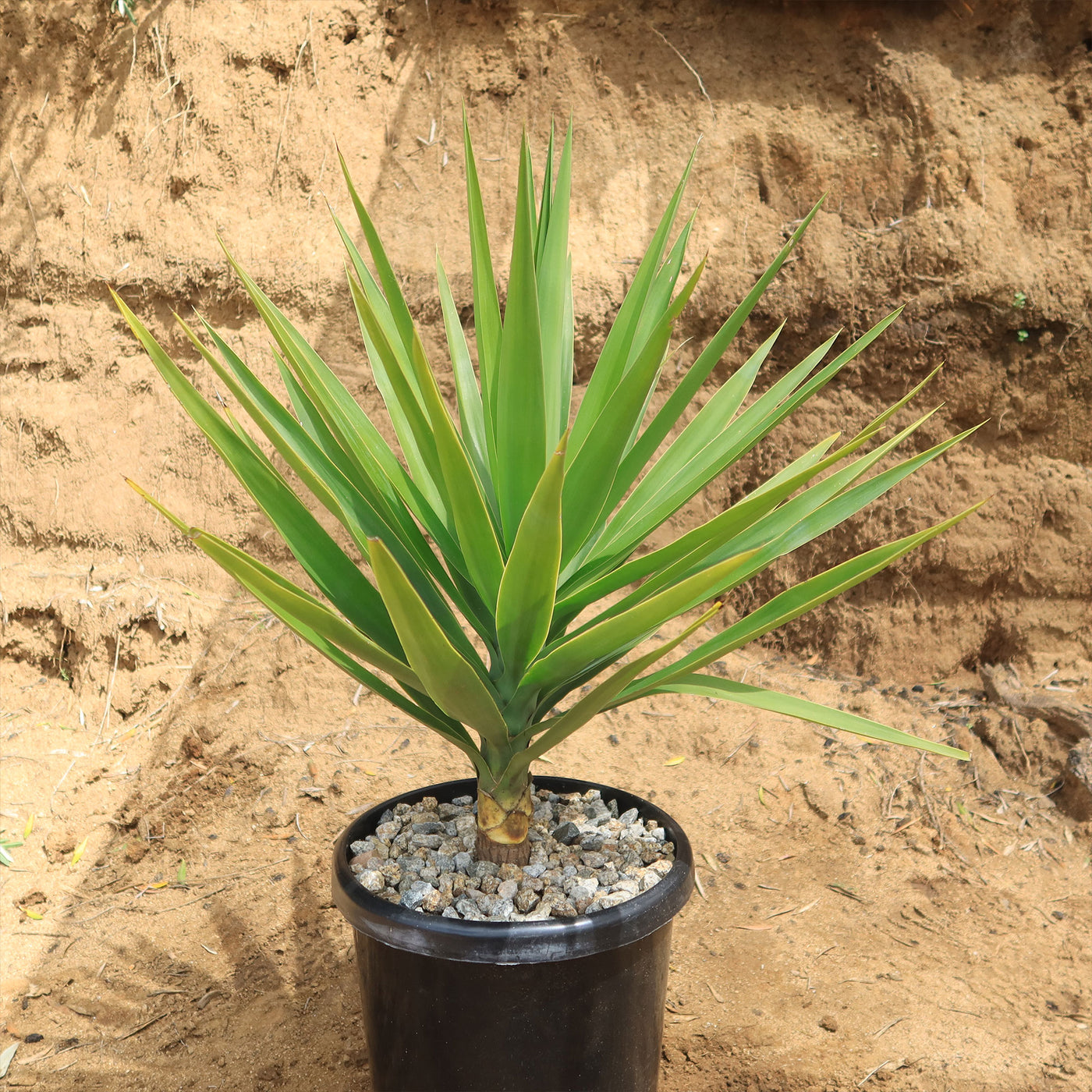
Introducing the Yucca elephantipes, known as Spineless Yucca, which is a popular indoor and outdoor Yucca plant known for its striking appearance and low-maintenance nature. Besides Yucca elephantipes, this plant is commonly referred to as the Giant Yucca, Soft-tip Yucca, Yucca gigantea, or Stick Yucca.
Native to Central America, the Yucca elephantipes gets its name from its resemblance to an elephant's foot. The thick, branched trunks of this air-purifying spineless yucca thicken over time, giving it that unique elephant-like appearance. As for the name "Spineless Yucca," it refers to the fact that, unlike other Yucca species, this particular plant doesn't have sharp spines on its leaves.
This resilient plant has gained popularity worldwide for its unique features and ability to thrive in various environments.
It is well-adapted to hot and dry climates, making it a suitable choice for xeriscaping and desert-themed gardens.
The Spineless Yucca is characterized by its thick, woody trunk and long, sword-shaped leaves.
These leathery blue-green leaves have smooth edges, lacking the sharp spines typically found on other Yucca plants.
The plant's architectural form and spiral rosettes of foliage make it an eye-catching addition to any space.
In ideal conditions, the slow-growing Spineless Yucca plants can reach impressive heights of up to 30 feet outdoors. However, when grown indoors as a houseplant, it usually stays more compact, reaching around 6 to 8 feet in height.
The flowers of Spineless Yucca elephantipes produce beautiful white or cream-colored blooms on tall stalks known as inflorescences. These white flowers are bell-shaped and appear in clusters during the summer months. The flowers are edible, high in calcium and potassium, and can be used in salads. While the plant can flower indoors, it is relatively rare and requires specific conditions, including ample sunlight and proper care.
The Spineless Yucca can be propagated through various methods, including stem cuttings and offsets. Stem cuttings can be taken from the main trunk or branches of mature plants, allowing the cut end to dry before planting it in well-draining soil. Offsets, or "pups," are small plantlets that grow at the base of the parent plant. These can be carefully separated and replanted to establish new plants.
Watering Needs
The Yucca elephantipes Spineless Yucca is a hardy and low-maintenance plant when it comes to watering. It has adapted to survive in arid environments, so it prefers drier soil. When watering your Spineless Yucca, it's important to strike a balance to prevent overwatering, which can lead to root rot.
In the spring and summer, during the growing season, you can water your Yucca elephantipes once every two weeks. Before watering, make sure the top inch or so of the soil is dry. When watering, give it a thorough soak, allowing the water to penetrate deep into the soil. Afterward, allow the soil to dry out completely before watering again. This helps mimic the plant's natural habitat and prevents the roots from sitting in soggy soil.
In the winter months, when the plant is in its dormant phase, you can reduce watering frequency. Water your Spineless Yucca only when the soil is completely dry, which may be once every four to six weeks. Remember, it's always better to underwater than to overwater this resilient plant.
Keep in mind that factors like temperature, humidity, and the type of pot and soil used can affect watering needs. Always monitor the moisture level of the soil and adjust your watering schedule accordingly. With a little attention and care, your Yucca elephantipes will thrive and bring a touch of natural beauty to your space!
Light Requirements
When growing indoors, the Spineless Yucca thrives in bright, indirect light. It enjoys being near a window where it can receive plenty of filtered sunlight throughout the day. However, it's important to avoid placing it in direct sunlight, as this can scorch the leaves. If you don't have a well-lit area, don't worry. The Spineless Yucca is also tolerant of lower light conditions and can still grow, although it may not be as lush.
When planted outdoors, the Spineless Yucca elephantipes prefer full sun or light shade. It can tolerate direct sunlight for 6-8 hours a day, but it also appreciates some shade during the hottest parts of the day, especially in hotter climates. If you live in an area with harsh, intense sunlight, providing some afternoon shade can help protect the plant from sunburn.
Remember, it's always a good idea to gradually acclimate your Yucca elephantipes to different light conditions if you're moving it from indoors to outdoors or vice versa. Sudden changes in light can shock the plant and lead to stress. So, take it slow and allow the plant to adjust gradually.
Optimal Soil & Fertilizer Needs
The Yucca elephantipes prefers sandy, well-drained sandy soil, as excess moisture can promote root and stem rot. Planet Desert specializes in succulents and has specialized succulent potting soil that includes an organic substrate with mycorrhizae to help with the growth of a healthy root system to help your succulents thrive. As an okay alternative, you can create your own potting mix by combining equal portions of perlite, coarse sand, and good natural potting soil.
The Spineless Yucca is a relatively low-maintenance plant when it comes to fertilizing. During the growing season, once a year in the spring, you can fertilize your Yucca elephantipes with a balanced (5-10-5), water-soluble NPK fertilizer. Dilute the fertilizer to half the recommended strength to avoid overfertilization. Apply the fertilizer to moist soil, as this helps prevent root burn.
In the winter months, when the plant is in its dormant phase, you can reduce or even stop fertilizing altogether. The Spineless Yucca doesn't require as much nutrient input during this time.
Remember, it's always a good idea to follow the instructions on the fertilizer packaging and adjust the frequency and strength of fertilization based on the specific needs of your plant. With the right soil and occasional fertilization, your Yucca elephantipes will thrive and bring a touch of natural beauty to your space!
Hardiness Zones & More
When growing indoors, your Spineless Yucca elephantipes is widely grown as a houseplant, making it well-suited for indoor environments. It can tolerate a wide range of temperatures, ideally between 60°F and 80°F. It's important to keep the plant away from drafts or sudden temperature fluctuations, as it prefers a stable indoor climate. As for humidity, the Spineless Yucca is quite adaptable and can tolerate average indoor humidity levels. If the air in your home is particularly dry, you can increase humidity by using a humidifier or placing this house plant on a tray filled with water and pebbles.
When grown outdoors, the Spineless Yucca is best suited for USDA hardiness zones 9 to 11. It can withstand temperatures as low as 25°F but may suffer damage or die back if exposed to prolonged freezing temperatures. In terms of temperature, the Spineless Yucca thrives in warm climates with temperatures ranging from 70°F to 90°F. It can tolerate higher temperatures as well, but providing some shade during the hottest parts of the day can help protect the plant.
As for humidity, these hardy plants are relatively drought-tolerant and can adapt to different humidity levels, including lower humidity in arid regions.
Remember, while the Spineless Yucca is adaptable to a range of conditions, it's important to provide it with optimal temperature and humidity levels to promote healthy growth and prevent stress. With the right care, your Yucca elephantipes will thrive, whether indoors or outdoors!
Final Thoughts
Overall, the Yucca elephantipes (Spineless Yucca) is a stunning plant with a thick trunk and long, sword-shaped leaves. Unlike other Yucca species, it lacks sharp spines, making it safer and easier to handle. This plant can grow up to 30 feet tall outdoors, but indoors it typically reaches around 6 to 8 feet in height. The Spineless Yucca produces beautiful white or cream-colored bell-shaped flowers during the summer. When it comes to Yucca elephantipes care, make sure it gets plenty of bright, indirect sunlight and waters it sparingly, allowing the soil to dry out between waterings. It thrives in well-draining soil and can tolerate a wide range of temperatures.
With its striking appearance and low-maintenance nature, the Spineless Yucca is a fantastic choice for both indoor and outdoor spaces.
Shipping Notes
- Free Standard Shipping on $100+ Orders to the USA.
- Except Preorder products are shipped in 48 hours.
- Delivery to the USA:
- Standard Shipping : 3-10 business days
- If time is of the essence, please consider selecting expedited delivery for faster service.
Exchange/Return Notes
- We offer a 30-day return/exchange service after receiving.
- Final sale items are not eligible for returns or exchanges.
- To process your return/exchange, please contact us at [email protected]
- Please click here for more details>>> Return & Exchange Policy