SKU: 21932074426
philodendron artificial light

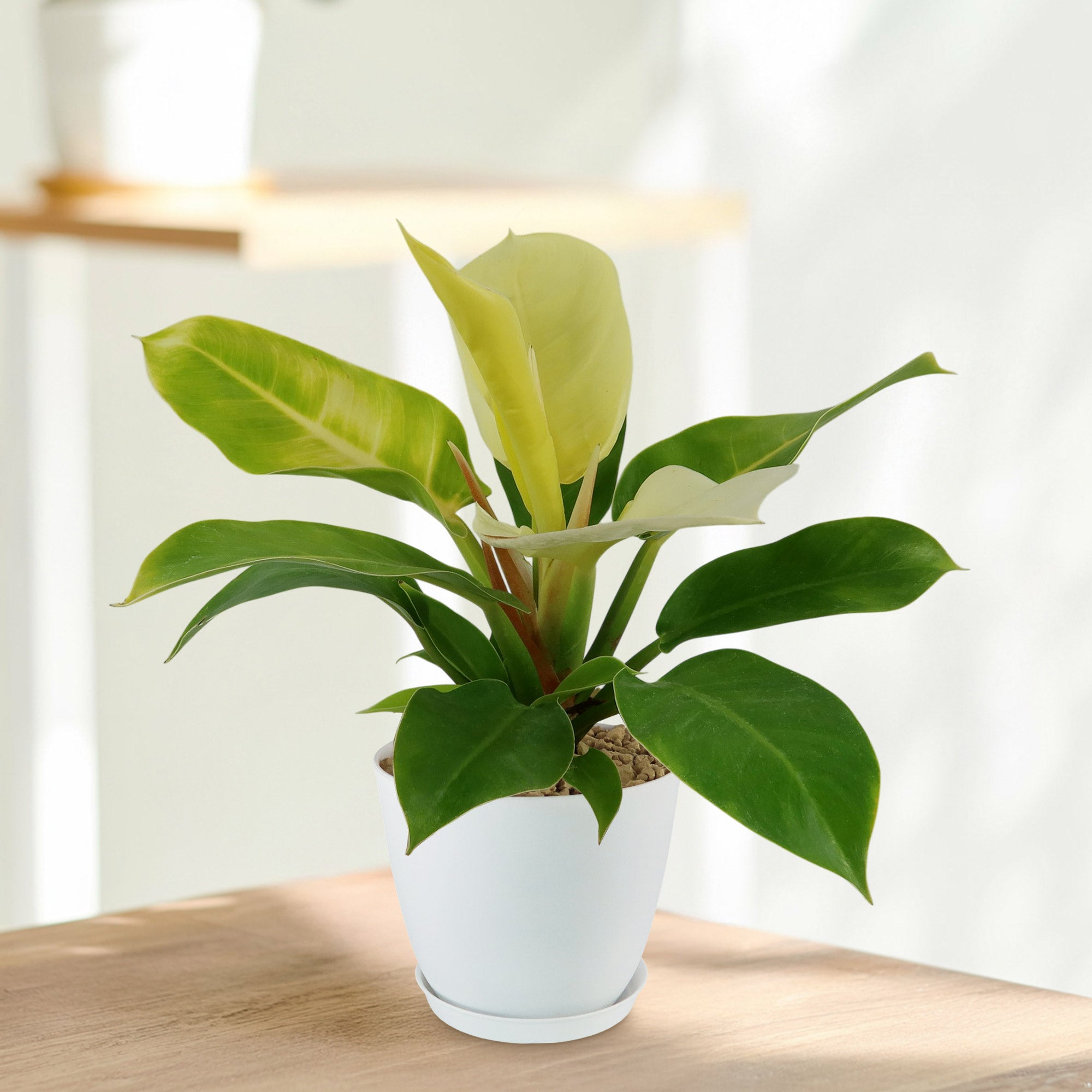
philodendron artificial light Moonlight Philodendron 8" Pot / Self Watering / With Pot

Sale price$25.71 Regular price$28.57
Save 10%

Pay in installments of $7.14 with ShopPay, AfterPay and Klarna

Shipping Estimate
USA
  • USA
  • CAN

Ships within 48 hours · Estimated delivery Sep 11 - Sep 16

Promo Codes Available:

For Your Every Summer RSVP, with Code: SUMMER15

Description

philodendron artificial light Moonlight Philodendron 8" Pot / Self Watering / With PotThe Moonlight Philodendron is a beautiful and popular houseplant that has fluorescent yellow leaves that add a pop of color to your home. It is a tropical hybrid characterized by glossy, color changing leaves that change from bright neon yellow to a brilliant green color. Native to South America, the name Moonlight was inspired by the plants stunning chartreuse to lime colored leaves, which reflect and catch light in a way that appears to glow, much

The Moonlight Philodendron is a beautiful and popular houseplant that has fluorescent yellow leaves that add a pop of color to your home. It is a tropical hybrid characterized by glossy, color-changing leaves that change from bright neon yellow to a brilliant green color. 

Native to South America, the name “Moonlight” was inspired by the plant’s stunning chartreuse-to-lime-colored leaves, which reflect and catch light in a way that appears to glow, much like moonlight itself.

This plant is sometimes simply referred to as the “Moonlight Philodendron” or “Lemon Philodendron” due to its lemony hue.

The Philodendron Moonlight is a clump-forming, self-heading plant, meaning it doesn’t climb but rather grows in a bushy form.

This unique growth pattern makes it compact and well-suited for indoor settings. It typically reaches a mature size of about 4 feet tall and wide, though in optimal outdoor conditions, it can grow larger. 

The leaves are broad, egg-shaped, and leathery in texture, giving the plant a lush and full look. New leaves emerge in bright yellow or lime green and gradually deepen to a medium green as they mature, providing a striking contrast on the plant itself. 

While the flowers of Philodendron Moonlight rarely bloom indoors, mature plants may develop white or light green spathes, which resemble the blooms of peace lilies. These flowers are subtle compared to the plant’s foliage, but they add a unique touch to the plant when they do appear. To encourage flowering, the plant must have ample warmth, humidity, and light.

One of the most notable benefits of the Philodendron Moonlight is its air-purifying qualities. It helps to remove common indoor air pollutants, including formaldehyde and benzene, by absorbing these toxins and converting them into oxygen. Having this plant indoors can improve air quality, contributing to a healthier living environment. Its low-maintenance care requirements and compact size also make it a practical choice for offices, bedrooms, and small apartments.

It’s often used as an accent plant in homes and offices, bringing a pop of color to minimalist decor or complementing other green foliage in plant arrangements. Whether as a standalone statement or as part of a collection, this philodendron makes a striking addition that suits various aesthetic styles.

When and How to Water Your Moonlight Philodendron 

The drought-tolerant Philodendron moonlight plant doesn't need a lot of water to thrive. This means you can let the soil dry out somewhat between waterings to prevent overwatering, which can lead to root rot. When watering your Philodendron Moonlight, make sure to water it thoroughly but allow the top inch or so of the soil to dry out before watering again.

In the spring and summer, during the growing season, your Philodendron moonlight may appreciate a bit more hydration typically every 1-2 weeks. You can increase the frequency of watering slightly during this period to support its growth. Water the plant when the top inch of soil feels dry to the touch, ensuring that excess water can drain out of the pot to prevent waterlogged soil.

During the fall and winter months when the plant is dormant, modify your watering schedule to correspond with its slower growth rate. During these cooler months, the Philodendron Moonlight will require less water typically once a month, so you can space out your watering sessions. Allow the soil to dry out a bit more between waterings, but still ensure the plant receives adequate hydration to maintain its health during the dormant period. By adjusting your watering routine based on the plant's growth stages, you can help your Philodendron Moonlight thrive throughout the year. 

Light Requirements – Where to Place Your Philodendron moonlight 

When grown indoors, the Philodendron moonlight plant enjoys bright, indirect light for at least 4-6 hours a day. It thrives in spaces with ample natural light but without direct sunlight, which can scorch its leaves. You can place your Philodendron Moonlight near a window where it can receive filtered sunlight or use sheer curtains to diffuse the light.

If your indoor space lacks natural light, you can supplement with artificial grow lights to meet the plant's light needs.

For outdoor cultivation, ensure it is in a location that offers bright, indirect light. Avoid exposing the plant to direct sunlight, especially during the intense midday sun, as this can cause sunburn on the leaves.

Providing a shaded spot with filtered sunlight or dappled shade can create an ideal outdoor environment for your Philodendron Moonlight to thrive.

Remember to monitor the plant's response to its new outdoor setting and adjust its placement if needed to optimize its light exposure.

Optimal Soil & Fertilizer Needs 

The Moonlight Philodendron prefers well-drained soil to avoid root rot. A good mix for this plant is a well-aerated, peat-based potting mix that retains some moisture but allows excess water to drain away. Make sure the pot has drainage holes to let excess water escape. Instead, make or buy a well-draining potting mix, or ideally use our specialized potting mix, opens in a new tab that contains 5 natural substrates and mycorrhizae to promote the development of a strong root system that helps your plant to thrive.

In terms of fertilizing your moonlight plant, during the growing season in spring, you can feed it with a balanced NPK fertilizer once a year. This will provide the plant with essential nutrients to support its growth and keep its foliage vibrant. However, during the fall and winter months when the plant is in its dormant phase, you can reduce or stop fertilizing altogether since the plant's growth slows down during this time. 

Remember not to over-fertilize your plant, as this can lead to mineral buildup in the soil, causing harm to the plant. Always follow the instructions on the fertilizer packaging and adjust the feeding schedule based on the plant's growth and the time of year.

Hardiness Zones & More 

When growing indoors, this Philodendron plant thrives in typical indoor temperatures ranging from 65°F to 80°F. It's essential to avoid exposing the plant to sudden temperature fluctuations, drafts, or cold air, as this can stress the plant and affect its growth. Keeping the indoor humidity levels around 40% to 60% can create an ideal environment for your Philodendron Moonlight, preventing issues like dry leaf tips or yellowing. 

For outdoor cultivation, it typically thrives in bright, indirect light in USDA zones 10 to 11, where temperatures are consistently warm. These zones generally experience mild winters and warm to hot summers, providing ideal conditions for tropical plants to flourish.

If you live in a region outside these zones but still want to grow this plant outdoors, consider using containers that can be moved indoors during colder months to protect the plant from frost or freezing temperatures. 

Wildlife Moonlight Plants Attracts the Following Friendly Pollinators

The Philodendron Moonlight plant can attract pollinators like bees, hummingbirds, butterflies, and insects with its beautiful foliage and sometimes flowers. These pollinators play a crucial role in the plant's reproduction process by transferring pollen from one flower to another, aiding in the production of seeds and fruits.  

Butterflies
Bees
Hummingbirds
Lady Bugs
Multi Pollinators
Other Birds

According to the ASPCA, the Moonlight Philodendron plant is considered mildly toxic to humans, cats, and dogs if ingested in large amounts. While touching the Moonlight Philodendron is safe, ingesting even a small bite can cause symptoms such as oral irritation, drooling, and mild discomfort. Eating larger amounts may lead to more severe symptoms, including vomiting and difficulty swallowing. Always wash your hands after handling the plant and keep it out of reach of pets and children. 

How to Propagate Your Philodendron Moonlight

To propagate your Philodendron moonlight plant, you can use stem cuttings. Select a healthy stem with a few leaves and make a clean cut just below a node. Remove the lower leaves to expose the node. Place the cutting in water or a well-draining soil mix, ensuring the node is submerged or covered. Keep the cutting in a warm, humid environment with indirect light. Roots should start to develop in a few weeks. Once the roots are established, you can transplant the cutting into a pot with a potting mix suitable for Philodendrons. Regularly water the new plant and provide it with indirect light to help it thrive and grow into a mature Moonlight Philodendron. 

Key Takeaways 

  1. Philodendron Moonlight is celebrated for its vibrant, neon green to yellow leaves that appear to glow, especially under bright, indirect light. This unique color has earned it the name “Moonlight,” as its leaves resemble a soft, illuminated effect.
  2. Unlike many philodendrons, which are known for climbing or trailing, Moonlight is a self-heading variety. This means it grows in a compact, bushy shape rather than vining, making it ideal for indoor spaces where vertical space is limited.
  3. It has air-purifying properties, helping to remove toxins like formaldehyde from indoor environments. This can improve air quality, making it a practical choice for homes and offices.
  4. It is relatively drought-tolerant once established, able to go without water for short periods. While it prefers consistently moist soil, it can handle occasional dry spells, making it a resilient choice for plant owners who may occasionally forget a watering.

The Bottom Line 

Overall, the Philodendron Moonlight is a visually striking and easy-care plant, perfect for adding vibrant color and life to any indoor space. With its glowing lime-green foliage and compact, self-heading growth habit, this philodendron is ideal for those looking to make a statement without needing extensive care. As a resilient, drought-tolerant plant, it thrives in bright, indirect light but can adapt to lower light conditions, making it suitable for various home or office settings. To keep it happy, provide well-draining soil and water when the top inch of soil feels dry, allowing it to dry out slightly between waterings. Additionally, its natural air-purifying abilities and relatively low maintenance needs make it an excellent choice for both new and experienced plant enthusiasts. With the Philodendron Moonlight, buyers can enjoy an attractive, low-maintenance plant that not only enhances their space but also contributes to a healthier indoor environment. 

Shipping Notes
  • Free Standard Shipping on $100+ Orders to the USA.
  • Except Preorder products are shipped in 48 hours.
  • Delivery to the USA:
  1. Standard Shipping : 3-10 business days
  • If time is of the essence, please consider selecting expedited delivery for faster service.
Exchange/Return Notes
  • We offer a 30-day return/exchange service after receiving.
  • Final sale items are not eligible for returns or exchanges.
  • To process your return/exchange, please contact us at [email protected]
  • Please click here for more details>>> Return & Exchange Policy
SKU: 21932074426

Discover Niche Categories That Outsell philodendron artificial light

Top-Converting Item to Boost Your Average Order

4.1 ★★★★★
Based on 27 reviews
Sort
Highest Rating
Newest First
Oldest First
Product Reviews
S
Verified Purchase
Scott
Port Orchard, US
★★★★★ 4
Printing is great, wifi is a problem (I figured out how to make it work!)
Color: White, Style: ET-2800-W, Pattern Name: Printer
I was on the fence about buying this printer because most of the 1 star reviews all said the same thing... "The Wifi would not work" So I followed the instructions, Turned on the print, downloaded the IOS app, connected to the printer via Bluetooth, installed the ink, initialized the printheads. While that was going on, the app asked me to setup the wifi. a List of SSID's came up and I selected the one I wanted. I put in the password and it connected and the icon on the printer turned blue. I have a Unifi setup and I could see that the printer connected to access point #3 @ 2.4ghz and got an ip address. I locked the IP address to the printer. (For my instructions to work for you, you need to make a reservation or lock the ipaddress that your DHCP server provided to the printer. ) If you don't do this, you will get a different address every time you turn the printer on and the computer and app will not be able to find the printer. When the initialization was complete, the app on my phone said it could not connect to the printer. I decided to try to connect to a computer and come back to the phone app. I downloaded the software package from Epson and ran it. When it went to connect to the printer it could not find it and brings up a list of troubleshooting steps that are not likely to do anything. There are videos about this problem and they are all useless. I am an IT professional with 26 years of experience. I am not going to unplug the printer and wait five minutes, I am not going to re-boot my router, I have a Unifi network environment with over 150 devices connected... (I have great wifi coverage, I am not moving my printer anywhere) My network works just fine, this printer is the issue! So at this point, I know that the printer IS connected to my wifi and it got an IP address. This is not a wifi problem as everyone seems to think it is. It is an issue with the Epson software. I decided to try to install it via the windows printer installer. I selected install via TCP/IP and put the ipaddress that my Unifi system provided to the printer. Windows found the printer and since the Epson app had already installed the drivers... just asked me what drivers I wanted to use. The ET-2800 showed up on the right hand side of the screen. I selected it, it installed and I was able to try a test print. It worked fine. I can print from my computer to the printer via the network. Next was the phone app. The phone app has the option to find the printer via the IP address. I put the IP address in and it found the printer. The phone app works now too. So, It took me some time to get this working, it should not have taken any time at all if the software worked correctly. The printer is really nice, it is a shame that the software is so bad when it comes to connecting to the printer. So if you decide to buy one of these printers, save yourself the headache and just install using the ip address, it is quick and easy that way and it just works. I would have just purchased an HP printer, but I did not want to deal with all the issues of their subscription ink service. I feel like the cost of ink makes this printer worth the hassle of getting it to work.
WAS THIS REVIEW HELPFUL?YesReportShare
Reviewed in the United States on December 2, 2024
H
Verified Purchase
Hawk R.
Lexington, US
★★★★★ 5
Handles Photo-Quality Prints, Versatile Connectivity
Color: Black, Style: ET-2800-B, Pattern Name: Printer, Color: Black, Style: ET-2800-B, Pattern Name: Printer
I've had this printer for a whole year now. I was on a severe budget, looking for a photo-quality printer that didn't require Wifi in this digital age- because I quite frankly can't afford my own Wifi connection. My rink-a-dink laptop had to be set up with the software at my library, and an extra cord purchased. All that said, I mostly print from my phone, because the software app is a bit easier to ensure that I get the highest quality setting. Laptop loves to be a snot about it. The blutooth feature, or "wifi direct", has a way about it, and as soon as you figure out what it wants, it gives minimal problems. It functions exactly as if a printer had wifi on it, believe it or not. What sold me on this model was the ability to do all of that, and adjust for different situations, seeing as other brands DEMAND constant wifi connectivity (lookin' at BROTHER, maybe Canon, too), and the long lasting ink tanks- I've printed hundreds of pages, and being a gothic/horror artist, at least a good part of the time, black is the only color even half gone. What horrified me the most about printer-shoping dropping a lot of money (hundred plus is a lot over here, man) and not getting the prints to look like my work. Well, fear not. The attached pictures are why I made this review, to hopefully ease the anxiety of others. I make digital paintings, and use high DPI for high quality, and also the cutest micro-stickers you've ever seen. Prints come out clear, even if they can sit in the tip of my finger. Yes, there are probably better printers. Maybe they're faster, and have even better connectivity, and have more bells and whistles. I specifically did not want to pay for those things, so, I'm very happy there's options. It's not perfect, no, because every now and then, I get what I call a "special edition", where my printer has decided to multi-color barf out the last third of the page. One time it randomly printed in black and white. Well, that's no big deal, my stuff tends to look great in monochrome. Every now and then I get a low quality print; things just look a bit fuzzy. I'm not happy about that, but, you clean the heads, and print something simple and toony, and it has never done it twice in a row. Alignment has been off only one time, and I put the printer away after every session. It occurs to me that people pay good amounts of money for printers that do that sort of thing anyway, so... Printers gonna printer, no matter where you try to hide. Overall, I'm happy and relieved. I hope it lasts me a good long time. (Streetratt on Kofi, by the way.🖤 )
WAS THIS REVIEW HELPFUL?YesReportShare
Reviewed in the United States on March 24, 2026
M
Verified Purchase
Micah
Boise, US
★★★★★ 5
Amazing value and performance — perfect everyday home printer!
Color: Black, Style: ET-2800-B, Pattern Name: Printer
After lots of research and comparing ink costs, I finally purchased the Epson EcoTank ET-2800 Wireless Color All-in-One Cartridge-Free Supertank with Scan and Copy and it has been one of the best tech investments I’ve made for my home setup. Whether I’m printing documents, photos, homework, or creative projects, this printer delivers consistently reliable results without the usual stress over ink costs. Right out of the box, setup was surprisingly easy. Epson’s app guided me through the wireless connection, and within minutes the printer was connected to my Wi-Fi and ready to go. The initial filling of the ink tanks took a few extra minutes, but the included bottles were clearly labeled and simple to use without mess. The print quality has exceeded my expectations for an all-in-one home printer: - Documents: Crisp, clean text — perfect for school assignments, work documents, letters, and recipes. - Photos: Bright, colorful prints with decent detail (especially when using good-quality paper). - Graphics & Crafts: I’ve printed worksheets, planner pages, labels, and even small art pieces — and everything looks sharp and vibrant. - The speed is solid for its class. It’s not a professional office machine, but it doesn’t feel slow for everyday use. Cartridge-Free Ink — Game Changer This is the real highlight: - Cartridge-free Supertank System: Instead of tiny cartridges that run out in no time, this printer uses large refillable ink tanks — which means massive savings on ink long-term. - Low Ink Cost: You really feel the savings after your first few refills. I used to go through cartridges quickly, but now I only refill every few months — and even then, it’s affordable. The included ink bottles provide a ton of pages, and you can easily track levels through the transparent tanks so you’re never caught off guard. The wireless setup works smoothly. I can print from: - My phone (via Epson app, AirPrint, or Google Cloud Print) - My laptop or tablet - Directly via Wi-Fi without cables No more plugging USB in every time — super convenient. The scanner is quick and easy to use: - Scan photos - Scan documents straight to email or phone - Make copies without touching a computer The scan quality is clear and accurate — ideal for digitizing receipts, forms, or school worksheets. Pros: - Huge savings on ink long-term - Excellent print quality for text and color graphics - Easy wireless setup and mobile printing - Transparent tanks — see ink levels at a glance - Scanner and copier work well for everyday tasks - Quiet operation compared to older printers Minor Notes - Initial setup takes a bit longer because of ink filling — but it’s worth it. - Photo prints are good for casual use, though super high-detail photography will still look better with dedicated photo printers or labs. - No automatic document feeder (ADF) — so multi-page scanning requires manual pages. The Epson EcoTank ET-2800 has transformed my printing experience. It’s affordable to run, produces great everyday prints, and the wireless features make it super convenient for the entire household. If you’re looking for a home printer that won’t drain your budget on ink, this one is absolutely worth it. Whether you’re printing school documents, work files, planners, photos, or craft projects, this printer does it all with ease — and saves you money over time. Highly recommended for home use — practical, efficient, and budget-friendly!
WAS THIS REVIEW HELPFUL?YesReportShare
Reviewed in the United States on February 5, 2026
P
Verified Purchase
pease4pod
Pawtucket, US
★★★★★ 5
Excellent Investment!
Color: Black, Style: ET-2800-B, Pattern Name: Printer
I have had this printer for two years now. I purchased it to do invitations and signs for my Daughter's baby shower. I designed an invitation, printed more than sixty copies with address labels, return address labels, numerous signs, games and raffles tickets. I used it again for the Baby's 1st Birthday same amount of items. I have not had to fill the colored ink in over 2 years. I have filled the black. My husband also uses it for work and I've printed several other projects including pictures. Everything has always exceeded my expectations. For the price you get excellent quality. I find the software easy to use and update.
WAS THIS REVIEW HELPFUL?YesReportShare
Reviewed in the United States on June 11, 2026
T
Verified Purchase
Tom B
Fort Morgan, US
★★★★★ 5
Inkjets have come a long way
Pattern Name: Printer, Style: ET-15000
Just a lot to like about this printer and nothing I don't like. Very capable for the price. I do mostly black and white printing, rarely print photos. (This will supposedly do a credible job of photo printing too but I haven't tried it). If you want professional caliber photo printing, you probably want the Epson 8550 which is similar to this, a bit more expensive, but does 6 color printing. If you are doing more like every day business printing the 15000 might be a better choice because it's built more for speed. The tank system means I can just replace the black because I use it a lot. The black ink tank is double size of the others and based on my experience so far, I think I'll easily get over a thousand pages on the standard-vivid setting which is very strong black but still relatively high speed printing. Given that the black ink bottles are under $30 I think the cost per page will be comparable to laser. The booklet/pamphlet printing can be complicated to work out with layers of PDF software and the Epson printer driver. But once you work it through, it's super capable. I've printed a lot of 12 x 18 double-sided for booklets and the paper handling has been flawless. (It can duplex automatically for 8 1/2 x 11 but for other sizes you have to manually duplex, which you can do by printing back/front or even/odd.) It's not as fast as a laser printer but it's pretty fast -- inkjets have improved so much.
WAS THIS REVIEW HELPFUL?YesReportShare
Reviewed in the United States on April 16, 2026

recommand products