SKU: 27454326440
philodendron glad hands vs pedatum

philodendron glad hands vs pedatum Philodendron Glad Hands

Sale price$20.15 Regular price$22.39
Save 10%

Pay in installments of $5.60 with ShopPay, AfterPay and Klarna

Shipping Estimate
USA
  • USA
  • CAN

Ships within 48 hours · Estimated delivery Oct 11 - Oct 16

Promo Codes Available:

For Your Every Summer RSVP, with Code: SUMMER15

Description

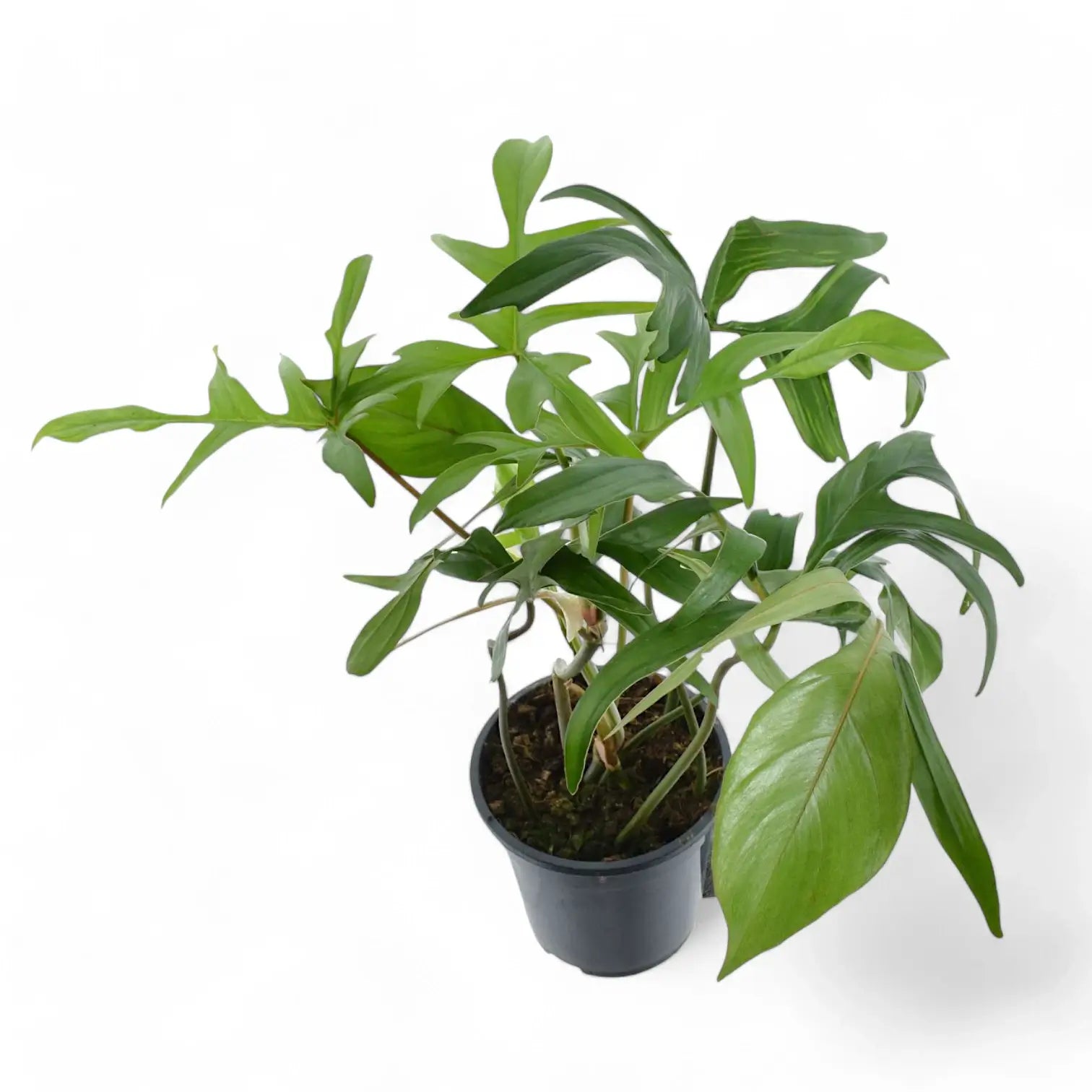
philodendron glad hands vs pedatum Philodendron Glad HandsPhilodendron 'Glad Hands' (quercifolium) Philodendron 'Glad Hands' is a narrow form of Philodendron pedatum, grown for deeply divided leaves with long, slim lobes that spread from the blade like fingers. The full leaf shape develops over time, so young plants can look slimmer and less divided before the stem gains size and support. This plant grows from a climbing stem with clear nodes and aerial roots. As the stem extends, each node can produce

Philodendron 'Glad Hands' (quercifolium)

Philodendron 'Glad Hands' is a narrow form of Philodendron pedatum, grown for deeply divided leaves with long, slim lobes that spread from the blade like fingers. The full leaf shape develops over time, so young plants can look slimmer and less divided before the stem gains size and support.

This plant grows from a climbing stem with clear nodes and aerial roots. As the stem extends, each node can produce another leaf and attach to support through new root points. A pole, plank, or trellis helps the plant anchor, keeps the stem upright, and gives divided leaves space to spread.

Narrow lobes and node-by-node growth

  • Growth habit: Climbing Philodendron with nodes, aerial roots, and a stem that responds well to vertical support.
  • Leaf shape: Long, narrow lobes give older leaves a hand-like outline.
  • Development: Leaf divisions become clearer as the plant gains size, support, and stronger root growth.
  • Petiole spread: Leaves are held away from the stem, so established plants need space around the support.
  • Root behaviour: Aerial roots help the climbing stem attach and support larger foliage over time.

Pedatum background and quercifolium name

Philodendron pedatum (Hook.) Kunth was published in Enumeratio Plantarum 3:49 in 1841. It is an accepted South American species that grows as a climber in wet tropical habitats. Philodendron quercifolium Engl., published in Botanische Jahrbücher für Systematik 26:546 in 1899, is now placed under Philodendron pedatum.

The quercifolium name refers to oak-like divided leaves and still appears around this plant in cultivation. This narrow form shows a slimmer, more finger-like expression of pedatum-style leaf division once the stem is rooted and climbing. Older leaves gain a more defined outline, not just a larger size.

Care for divided leaves

  • Light: Provide bright filtered light. Strong indirect light supports shorter internodes and more developed leaves, while harsh direct sun can scorch exposed lobes.
  • Watering: Water thoroughly once the upper substrate has dried slightly. Keep moisture steady during active growth, but do not leave the pot standing in water.
  • Substrate: Use a chunky aroid mix with bark or coco chips, perlite or pumice, and a moisture-holding base. The roots need both moisture and air around them.
  • Pot choice: Choose a pot with drainage holes and enough depth to hold the support firmly. Avoid oversized pots that keep the lower stem wet for too long.
  • Repotting: Repot when roots fill the pot or the support becomes unstable. Move up gradually so the root zone stays aerated.
  • Support: Add a pole, plank, or trellis early. Attach the stem loosely so aerial roots can reach the support without being crushed.
  • Humidity: Aim for moderate to high humidity. Around 50–70% helps the narrow lobes open without dry tips or tears.
  • Temperature: Keep at about 18–28°C. Cool, wet conditions slow root activity and can damage the lower stem.
  • Feeding: Feed lightly during active growth with a balanced fertiliser. Reduce feeding when light and leaf production slow down.
  • Growth rate: Expect moderate climbing growth once rooted and supported. Leaf shape improves gradually as the stem strengthens.
  • Pruning: Remove yellowing leaves and trim stretched stems above a node if the plant needs reshaping. Healthy cut sections can be used for propagation.
  • Placement: Give the plant room around its support so the lobed leaves can spread without rubbing against walls, shelves, or neighbouring plants.
  • Semi-hydroponics: This Philodendron can adapt to mineral or semi-hydro substrates if roots are transitioned gradually and the reservoir is kept clean.
  • Propagation: Take stem cuttings with at least one node and preferably an aerial-root nub. Keep cuttings warm and humid while roots form.

Juvenile leaves, torn lobes and stem stretch

  • Leaves staying juvenile: Check support, light, and root health. A divided leaf shape develops more reliably on a climbing, well-rooted stem.
  • Yellow lower leaves: Inspect the substrate and roots. Persistent wetness around the lower stem can cause older leaves to decline quickly.
  • Brown lobe tips: Look for dry roots, low humidity, fertiliser buildup, or hot sun through glass.
  • Long gaps between leaves: The stem may be reaching for light or growing away from its support. Move it into brighter filtered light and secure new growth.
  • Torn new leaves: New lobes can catch while unfurling. Keep watering stable and humidity moderate rather than forcing the leaf open.
  • Loose stem attachment: If the stem pulls away from the support, retie it gently at the nodes and guide new aerial roots toward the surface.
  • Pests: Check leaf undersides, petiole bases, and cataphylls for thrips, mites, scale, and mealybugs.

Pet safety and skin irritation

Philodendron 'Glad Hands' should be kept away from pets and children that may chew leaves or stems. Philodendron contains calcium oxalate crystals, which can irritate the mouth, throat, and digestive tract if ingested. Sap may irritate sensitive skin after pruning or propagation.

Name meaning and botanical background

Philodendron means “tree-loving”, a reference to the climbing habit common in the genus. The epithet pedatum means foot-like, matching the divided leaf outline of Philodendron pedatum. Quercifolium combines Latin roots for oak and leaf, referring to an oak-like leaf shape. The name 'Glad Hands' suits the hand-like spread of the leaf lobes.

Choose Philodendron 'Glad Hands' for a climbing Philodendron with slim, fingered leaves and a distinctive narrow-lobed outline.

Shipping Notes
  • Free Standard Shipping on $100+ Orders to the USA.
  • Except Preorder products are shipped in 48 hours.
  • Delivery to the USA:
  1. Standard Shipping : 3-10 business days
  • If time is of the essence, please consider selecting expedited delivery for faster service.
Exchange/Return Notes
  • We offer a 30-day return/exchange service after receiving.
  • Final sale items are not eligible for returns or exchanges.
  • To process your return/exchange, please contact us at [email protected]
  • Please click here for more details>>> Return & Exchange Policy
SKU: 27454326440

Discover Niche Categories That Outsell philodendron glad hands vs pedatum

Top-Converting Item to Boost Your Average Order

4.7 ★★★★★
Based on 7 reviews
Sort
Highest Rating
Newest First
Oldest First
Product Reviews
S
Verified Purchase
Sarah walker
Natrona Heights, US
★★★★★ 5
Great purchase and recommend!
Size: 15.6" 1080P, Size: 15.6" 1080P
What a great product! First I’ll start by saying it’s very lightweight which is what I needed to fit in my bag. I bought two of them because I need three screens and I couldn’t be happier. Set up, one cord!!! No power cord needed pulls power from the laptop so that’s a huge win in my book! I love the size I love the case is attached. Definitely recommend
WAS THIS REVIEW HELPFUL?YesReportShare
Reviewed in the United States on June 9, 2026
A
Verified Purchase
Amazon Customer
Alexandria, US
★★★★★ 4
Works as advertised, but included USB-C cable was defective.
Size: 15.6" 1080P
This monitor performs great! Picture quality, brightness, all work as expected. When powered by a phone, you may have to limit the brightness below 80% if you don't attach extra power. The good news is, I can attach a power bank for the extra power, and any extra power not needed by the monitor will pass through and charge my phone. I've tested this with my laptop, phone, and tablet, and it works great in all cases. One extra plus that I didn't expect, because it was not listed in the product description and also not mentioned in any reviews that I saw, is that this monitor has VESA compatible holes for a VESA mount hidden behind the magnetic cover on the back. Beautiful. If I ever decide to mount it to an arm I can do it. All the advertised functionality works as expected with ONE exception. The USB-C cable that came with this monitor was faulty. It had a short across a couple of wires which could have caused damage to my phone had my phone not recognized it and alerted me of foreign object or water in the port. That water and foreign object warning basically means something is causing wires to be connected that shouldn't be and assumes you have a good cable. In my case, it was the cable itself that was faulty, and I used a tester to make sure. While the description says "do not use other USB-C to USB-C cables", that is just to cover themselves, because many people will use a USB-C cable meant only for charging, or one that is not display compatible. I have cables of varying lengths that are Thunderbolt USB-C which all handle between 100-240W power, data up to 100Gbps, and displays up to 8K. I just used one of my cables and everything works just fine. If you're having trouble with your monitor, or intermittent connections with the monitor (I did before I got the warning) then you may have a bad cable. Get a quality cable and make sure it's rated for display port, high data throughput (ideally minimum 40Gbps), and decent power capacity. Some will work for data but not power. Some work with power but not data. Some work with power and data, but only one at a time. You have to flip the connector to go between modes. I don't know why they make those, and those that manufacture such garbage should be locked up, but that's another story for another day. Bottom line is this. It's a quality monitor. If it ever starts having issues, I'll update the review. The cables I'm not so sure of. The HDMI cable is sufficient enough for FHD display, but I wouldn't recommend swapping it over to a higher res monitor, as it probably can't handle it. The USB-C cable has quality control issues, as they sourced out inexpensive cables for this monitor to keep the costs down. No big deal for me, as I have an abundance of good cables, but keep that in mind that you may need to consider the cost of quality cables for this monitor. I'm glad I bought it. It's going to make me much more productive. While I was disappointed in the USB-C cable, it's not a deal breaker as I already had plenty. Minus one star for the bad cable.
WAS THIS REVIEW HELPFUL?YesReportShare
Reviewed in the United States on December 2, 2024
R
Verified Purchase
Rick Hinton
Phoenix, US
★★★★★ 5
Versatile, Great size, great value and bright. A little heavy, but well worth the cost.
Size: 15.6" 1080P
I own two of these monitors, I have been very happy with them. I carry them in my backpack/laptop case with all of my needed accessories, and it just simply works. I work from home and I was looking for something that I could take with me when I travel. My typical home setup involves a 43" LG monitor in the center, and then four additional 1080P monitors. When I am on the road, I need something smaller to have more "real estate" to work with. I usually use a hotel 4k TV or 4k tv at the air BNB we stay at so that I don't have to the 43" LG, but sometimes I just use these two portable screens. I have held meetings from a roadside park from the back of my Suburban with these while we were camping, from Panera while mixing audio, from a waiting room at an office while waiting on someone to complete their day, etc. All in all, the two that I have allow me to streamline my workflow when travelling. I have multiple windows up during the workday; I gather information from those screens and consolidate/copy/paste/ reference the data on my main laptop screen in the front and center. These monitors simply allow me to replicate what I have at home, but on a smaller and (somewhat) lighter scale. The good: I am not a gamer, so I cannot comment on how these would work in a gaming setup, I work on documents and reporting. With that said, these have great color at a great size. I can fit my Macbook Pro, and up to four of these screens in my bag, plus all my accessories, including Jabra Engage 75 headset, Plantronics headset (backup) , Apple keyboard and mouse, StreamDeck, USB-C Hub, and when needed, a universal Docking station that uses DisplayLink technology (Dell UD22) to get the extra screens. Without that, the Mac won't support more than 3 or 4 displays (Check specs for your PC/Mac). I like that these are USB-C *AND* HDMI. I can use them on pretty much any modern PC. To use the HDMI, however, You do need to power the monitor over USB-C with the provided cable. That's not a product issue, it's simply because that's the way HDMI works, there is no power over the cable. VESA capable, which is a big plus, I have magnetic VESA arms and I leave the plates on these monitors so I can use them anywhere. The bad: The rotator dial on the side has a tendency to get smashed in, but I don't use audio on either of the screens. I have a Bluetooth noise cancelling over the hear headphone set for that. A more solid design would have been with tactile push buttons instead of the rotator dial. I only have this problem with one of the screens. When I put them the backpack, I now put them in with the rotator dial pointed up to ensure a drop of the bag doesn't chance damaging the equipment. The ugly: The weight of the screens and associated covers adds about 2.5 lbs each, which is a lot. I have ordered two more, so that will be 10 lbs in the laptop backpack. May need to switch to a roller bag to cart this entourage around. Once I get the other two, I will revise this review. Right now I don't know if I will have to use the UD22 to utilize all of these screens simultaneously.
WAS THIS REVIEW HELPFUL?YesReportShare
Reviewed in the United States on June 6, 2025
T
Verified Purchase
Traveling Nurse
New York, US
★★★★★ 5
Great product for a great price
Size: 15.6" 1080P
I REALLY like this. I need 2 screens to do my job efficiently and have struggled lately when traveling. Splurged on this for myself and was really impressed. It’s nice and lightweight but feels sturdy. The image quality is good. The set up could not be easier. This is a game changer for me.
WAS THIS REVIEW HELPFUL?YesReportShare
Reviewed in the United States on May 23, 2026
A
Verified Purchase
AH
Lexington, US
★★★★★ 5
Works pretty well for a cheap monitor
Size: 15.6" 1080P
I work remote and travel, so I miss my multi monitor setup. Not anymore. I took this on a trip with me and it was great. The stand folded over to not take up too much desk space, the cables wear just long enough, another 6” would have been great but they worked. Quality of the screen is plenty good enough for office work, I have no gaming or artwork experience with it though. If you need an inexpensive 2nd monitor , this works great for on the go or even for a regular desk.
WAS THIS REVIEW HELPFUL?YesReportShare
Reviewed in the United States on May 3, 2026

recommand products