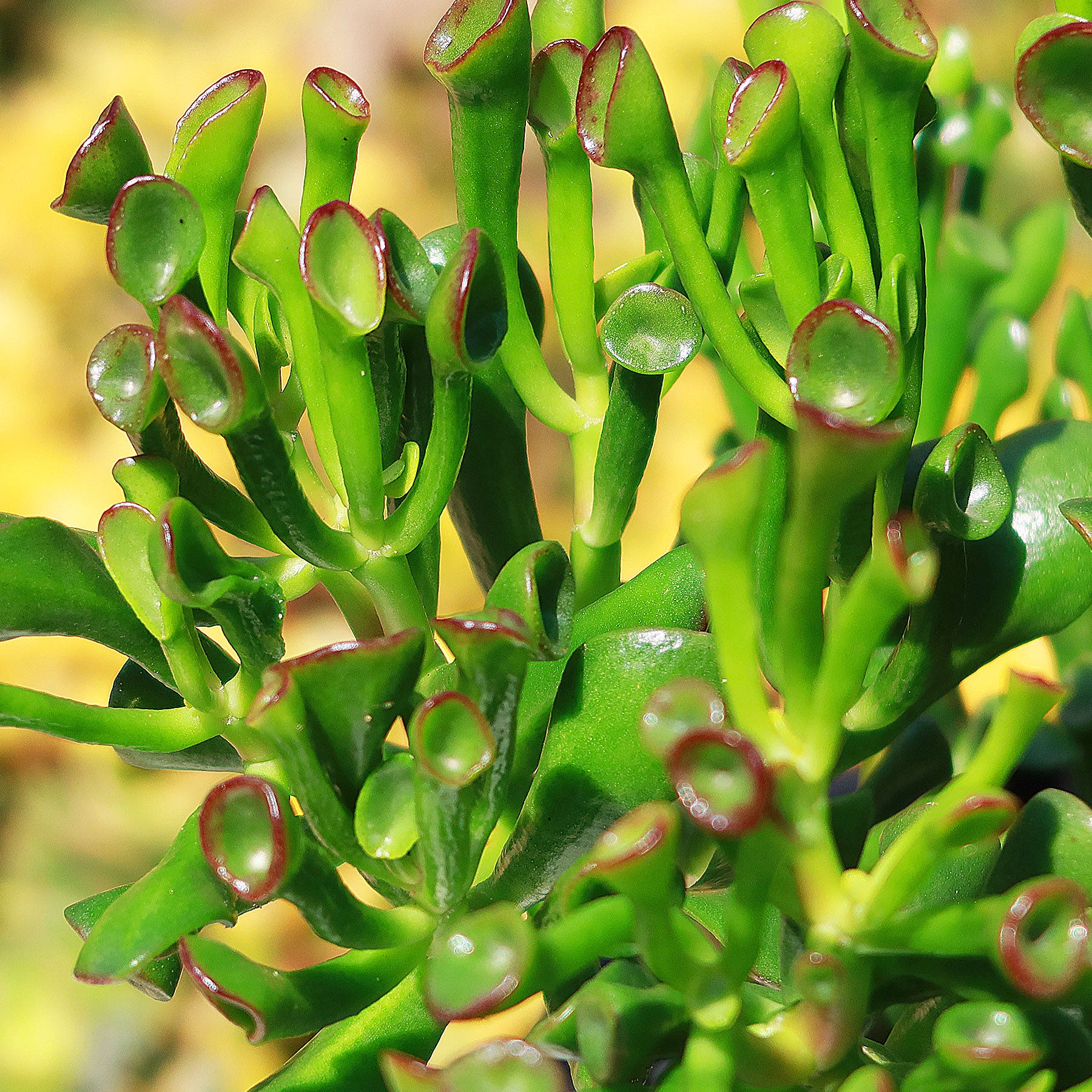
tubular succulent plant ET's Fingers-Shrek Ears 'Crassula ovata Gollum Jade' 4" Pot
SKU: 30658899586
tubular succulent plant

tubular succulent plant ET's Fingers-Shrek Ears 'Crassula ovata Gollum Jade' 4" Pot

Sale price$26.57 Regular price$29.52
Save 10%

Pay in installments of $7.38 with ShopPay, AfterPay and Klarna

Shipping Estimate
USA
  • USA
  • CAN

Ships within 48 hours · Estimated delivery Jun 29 - Jul 4

Promo Codes Available:

For Your Every Summer RSVP, with Code: SUMMER15

Description

tubular succulent plant ET's Fingers-Shrek Ears 'Crassula ovata Gollum Jade' 4" PotThe Gollum jade plant is also known as "ET's Fingers" because its fleshy leaves resemble the alien character's long, pointed fingers in the 1982 film "E. T. the Extra Terrestrial." The tips of the plants also look like the ears of the popular animated character Shrek, hence the other popular name, Shrek Ears. The plant's distinctive appearance has made it a favorite among kids who love the common names and like to look at it and touch it. This Gollum

The Gollum jade plant is also known as "ET's Fingers" because its fleshy leaves resemble the alien character's long, pointed fingers in the 1982 film "E.T. the Extra-Terrestrial." The tips of the plants also look like the ears of the popular animated character Shrek, hence the other popular name, Shrek Ears. 

The plant's distinctive appearance has made it a favorite among kids who love the common names and like to look at it and touch it.  This Gollum jade plant is also easy to care for, which may make it a good choice for families. 

Native to South Africa and Mozambique, these evergreen-flowering golumm jade plants can grow up to 3 feet tall and 2 feet wide and are sure to be the talk of your garden or indoor space.

When exposed to bright light, it produces green finger-like leaves with red circles at the tips. 

The flowers of your plant bloom during the late spring to early winter, with small, pinkish-white, star-shaped blooms. 

The Gollum jade or ET's fingers succulent plant is also considered a symbol of good luck in Chinese culture; that's why sometimes it is also referred to as the money plant.

Taking care of this plant doesn't require any lucky charms. In fact, it's super low-maintenance, easy to keep alive, and pretty.

Crassula ovata ‘Gollum Jade’ is often confused with Crassula ovata ‘Hobbit Jade'Go to jade hobbit plant crassula ovata hobbit due to their similarities and both being named after characters from JRR Tolkien’s stories.  

When and How to Water Your Gollum jade  

Gollum jade plants are extremly drought tolerant requiring minimal watering. It's important to only water them when the soil has dried out, as overwatering can cause root rot. Succulents, including these ET's fingers, are prone to rot if their roots are constantly submerged in moisture. 

The Gollum jade should be watered 10-14 days in growing season and reduce reduce watering to once every 3-4 weeks during the dormant season, with very light moisture.

During the growing season, control watering to allow the soil to dry out completely between waterings to prevent root rot. Good airflow and well-draining soil are also essential to keep the plant healthy and resilient throughout its active growth period.

During the dormant season, reduce watering since excess moisture can easily lead to root rot. Fertilizing is not necessary during this time, as the plant is not actively growing. It is best to keep it in a bright location with indirect sunlight and protect it from cold drafts or temperatures below 10°C, as the plant is sensitive to frost. Keeping conditions stable will help it rest properly and prepare for healthier growth in the next season.

Light Requirements - Where to Place Your Golumm Jade Plant

When growing indoors, providing enough light for these desert ET's fingers is one of the most important aspects of their care.

Place your jade plant directly in front of a west- or south-facing window where it can receive about 4 to 6 hours of direct sunlight daily.

Rotate the plant occasionally to help it grow evenly and keep its tubular leaves compact and well-shaped.

When growing outdoors, it thrives best in a location where it can receive about 4 to 6 hours of direct sunlight daily, with some protection from intense midday sun to prevent leaf burn.

A spot with partial shade during the hottest part of the day works well, especially in warmer climates.

If grown in pots, you can move it to a sheltered area during bad weather. With the right balance of sunlight, your Gollum jade can develop stronger stems and more vibrant leaf color.

Pro Tip

  1. If they don't receive enough light, their stems may grow leggy and become pale green or yellow, so make your succulents happy and give them plenty of light.
  2. If you notice the Gollum jade ET's fingers leaves are turning yellow or brown, it may be a sign that the plant is getting too much direct sunlight.

Optimal Soil & Fertilizer Needs 

The Gollum jade prefers a light, airy, and well-draining soil that is slightly acidic, with a pH between 5.6 and 6.5. Like most succulents, it does best in soil that dries out completely between waterings. A sandy, loose texture is ideal, similar to what you would find in desert conditions. Soil that stays wet for too long can harm the plant, leading to bacterial and fungal rot. 

You can also make your own mix by combining equal parts perlite, coarse sand, and a good-quality potting soil. This blend helps improve drainage while still providing enough nutrients. You can also use our specialized succulents potting mix that includes organic mycorrhizae – perfect for promoting healthy roots and happy plants.

Gollum jade is not a heavy feeder, but it can benefit from light fertilizing during its active growing season. A balanced fertilizer, such as a 5-10-5 NPK formula, works well. Apply it once during spring to support healthy growth. Avoid fertilizing during the dormant months in fall and winter, as the plant is resting and does not need extra nutrients. 

Hardiness Zones & More 

In the United States, this ET's fingers plant is mostly an indoor plant, but if you live in Southern Florida or Hawaii, then you can cultivate it outdoors in USDA zones 9-12.

They prefer constant temperatures above 70°F and can tolerate triple digits in the summer, so don't worry if your succulent gets too hot. 

They cannot handle frost, cold, or freezing temperatures, so make sure it doesn't get below 45°F in its environment. It can be grown as a houseplant in colder climates. ET's fingers prefers average to low humidity environments. These plants are adapted to arid conditions and have thick, fleshy leaves that store water.

So, you don't need to worry too much about providing extra humidity for them. Just make sure the air isn't excessively dry, especially during winter months when indoor heating can reduce humidity levels. 

How to Grow Indoors as a Houseplant 

Your ET's Fingers plant will do best when placed directly in front of a south or west facing window where it can receive around four to six hours of direct sunlight each day. Make sure to let the soil dry out completely before watering again, and avoid leaving the pot sitting in water since this can quickly lead to root rot.

Keep it in a room with average temperatures between 60°F and 75°F for healthy growth. Use a fast draining succulent mix to keep the roots dry and well aerated, and choose a pot with drainage holes so excess water can escape and the soil can dry faster.

Wildlife -  Golumm Jade Flowers Attract the Following Friendly Pollinators 

The Golumm Jade can attract friendly pollinators such as bees, butterflies, hummingbirds, and other beneficial insects. These pollinators play a crucial role in the ecosystem by aiding in the reproduction of plants and ensuring biodiversity.

Butterflies
Bees
Hummingbirds
Lady Bugs
Multi Pollinators
Other Birds

According to ASPCA, the Crassula ovata Gollum Jade is considered mildly toxic to humans or pets. It's always a good idea to practice caution and keep plants out of reach of curious pets or small children. 

How to Propagate Your Gollum Jade - ET's Fingers

You can propagate your Gollum jade (Et's Fingers) by stem cuttings. After cutting the stem, place it in a warm, shaded, and well ventilated area for about 2 to 5 days.

Once ready, plant the stem cuttings directly into a pot filled with a fast draining succulent or cactus mix. Keep the soil lightly moist but not soggy by misting or watering every few days until the cuttings begin to establish roots. Place the plant in bright, indirect light and avoid direct sunlight at this stage to prevent sunburn. 

Key Takeaways

  1. Golumm Jade is known for its tubular, finger like leaves with red tips that resemble ET’s fingers or Shrek’s ears, making it a fun and eye catching plant for any space.
  2. It is very low maintenance and easy to care for, making it a great choice for beginners or busy plant owners who want a plant that does not require constant attention to stay healthy.
  3. It needs minimal watering and can go for weeks without care, as it stores water in its leaves, making it ideal for those who sometimes forget to water their plants.
  4. Often called a money plant, it is believed to attract good fortune and positive energy, which makes it a meaningful gift for friends, family, or even as a lucky addition to your own home.
  5. It develops vibrant green leaves with red accents under bright light and can produce delicate pinkish-white flowers, adding extra visual appeal.

Final Thoughts

Overall, the ET's Fingers or Shrek ears (Crassula ovata 'Gollum' Jade) is a unique and fascinating succulent that captures attention with its unusual finger-like leaves. This plant is a cultivar of the popular Jade Plant, known for its resilience and easy care. The ET's Fingers variety features tubular, elongated leaves with a greenish hue and red tips, resembling the fingers of the iconic extraterrestrial character. It thrives in bright, indirect light and prefers well-draining soil. Like other succulents, it has low water requirements and should be watered sparingly to prevent overwatering. 

Be sure to add this unique plant with the tips of the tubular leaves that look like golumm jade to your home or garden and enjoy its low maintenance care while admiring its impressive display year after year. 

Shipping Notes
  • Free Standard Shipping on $100+ Orders to the USA.
  • Except Preorder products are shipped in 48 hours.
  • Delivery to the USA:
  1. Standard Shipping : 3-10 business days
  • If time is of the essence, please consider selecting expedited delivery for faster service.
Exchange/Return Notes
  • We offer a 30-day return/exchange service after receiving.
  • Final sale items are not eligible for returns or exchanges.
  • To process your return/exchange, please contact us at [email protected]
  • Please click here for more details>>> Return & Exchange Policy
SKU: 30658899586

Discover Niche Categories That Outsell tubular succulent plant

Top-Converting Item to Boost Your Average Order

4.7 ★★★★★
Based on 939 reviews
Sort
Highest Rating
Newest First
Oldest First
Product Reviews
J
Joan
Battle Creek, US
★★★★★ 5
Easy set-up, high quality prints, beautiful design!
This sleek and modern print/copy station has every feature you could ever need. With an easy set-up and user friendly interface and endless ink supply, this device exponentially enhances work-flow reduces technological headaches for good! Let's be real. My old printer had been a great work-horse for many years. Unfortunately as I upgraded my computer setup and phone, it was no longer syncing appropriately and had become a manual, troubleshooting headache! I was having to print the "even" pages on auto handling, then flip them by hand to print the "odd" pages with normal handling, then re-order appropriately. Not only this, but the cartridge price for my old device had risen to $30 per cartridge and I was constantly needing to replace and go through the pain of a slow, manual alignment process. Something needed to change. And that is when the HP OfficeJet Pro stepped in. The setup was an absolute dream. The provided QR code takes you directly to a setup slide-show that walks you through each step one at a time (I've posted a few screen-shots of the interface). Everything worked smoothly and as intended. I especially appreciated the speedy, automatic alignment. Once set-up was complete, I was able to effortlessly connect through all of my devices and print! The quality of the print was crisp, high quality and each page was ready lickety-split. The only con I could possibly note is that it isn't the most quiet printer I've ever used. If you need something whisper quiet, you may need to look at something else or move the printer to a more appropriate location. Once set up, I created an account and signed up for the subscription-based ink refills, which I think is a really ingenious idea. I actually chatted in with an HP representative regarding this (they were easy to get a hold of) to further clarify how it works. In a nutshell, you decide how many pages you anticipate printing in a month and you pay for that amount if ink. There is a sensor chip in the ink cartridge that lets HP know when youre about to run out of ink and they'll send you more...regardless if where you're at in your subscription. So, if I didnt quite use my 100 pages worth of ink, it wont bill my next month or send ink until I'm ready. This works out to be one heck of a deal. All told, 100 pages will only cost 7.99 rather than my usual 30 (or 60 if you count both ink and color). On top of functionality, this is also a beautiful piece of office equipment. I adore the soft white tone of the unit, which looks both uplifting and peaceful in my work area. Its the little things, I swear. Not only does it look peaceful, but it has taken extra stress off of my plate by being so easy to work with. Plus I don't have to add ink to my shopping list anymore! I think you'll find this unit to be well worth your while, and if its anything like my old HP printers, it's hopefully going to last a good handful of years!
WAS THIS REVIEW HELPFUL?YesReportShare
Reviewed in the United States on May 31, 2026
D
D.C
Birmingham, US
★★★★★ 5
Incredible image quality even when enlarged to full capacity
The quality and reliability of HP OfficeJet printers is unmatched, from my experience. I use this printer for regular everyday things like return labels and printing out documents but my favorite thing to use it for are art and design projects. I am able to copy an image and enlarge it up to 400%, or minimize its size to 25% which is an incredible range and perfect for design and art projects. As long as the ink cartridges are all at full capacity my images always come out flawless, even when I enlarge them huge. As long as I send an image in the right format or copy from a hard copy image it is always clear and crisp, not pixalized. Our craft room/office is in the basement and I am easily able to print from my kitchen or bedroom from my phone or laptop which is very convenient. The array of functions, the quality of the image, and the bright beautiful rich colors this printer is able to produce is really great if you plan to use it for design or art. I have never had a paper jam, which is very impressive considering I am always changing to photo paper as well as multiple different sized paper. I just received this printer but the HP printer I was using before still works like a charm and is close to 20 years old, if you are using this for your home I can't imagine having to replace it. My absolute favorite part is a 4 pack of extra large ink is $47.99 which is almost half of what my other printers ink cost. The wide format and large paper size I am able to print on has made our art projects really beautiful and uniform, rather than having to try to hide the seams of multiple pages taped together. Incredible product.
WAS THIS REVIEW HELPFUL?YesReportShare
Reviewed in the United States on May 22, 2026
K
Verified Purchase
Kevin L.
Belleville, US
★★★★★ 1
Pray you don't need HP Support to set up printer
HP Support is the absolute worst. If you have any setup issues with your HP printer, you're on your own. Their support is practically useless. I’ve been on a two-hour call trying to get wireless printing working. I’ve been transferred to three different people, and none of them knew how to help. Now I’m stuck on indefinite hold (over 30 minutes and counting) with no resolution in sight. I can print fine with a USB cable, but it simply will not print wirelessly no matter what we try. Extremely disappointed and frustrated with HP right now.
WAS THIS REVIEW HELPFUL?YesReportShare
Reviewed in the United States on May 27, 2026
G
Grant Harlow
Fort Morgan, US
★★★★★ 4
Very capable large format color inkjet printer
This thing is big. It’s replacing our Brother color laser, which didn’t get a lot of use (but is great for quick and cheap prints). The HP is longer in one dimension but less tall, so is roughly occupying the same space but with more wall visible (so looks less intrusive). Heavy. I could (and did) lift it on my own but all the packing and instructions say for 2 people to lift it. It’s manageable but I see why there’s that warning. Build quality is mostly plastic but sturdy enough for a static object. Scan lid opens easily, trays extend smoothly etc. Feels well build overall, no concerns. You can download installation instructions using a QR code and it’ll guide you to also install the HP app. The app ideally requires an account, mandatory if you plan to free trial the Instant Ink I think. I had an existing old HP account and used that. The setup was way enough but there’s a weird UI step in the app during pairing where the setup modal is blank grey with a greyed out “Next” button. Looks like it can’t find the printer. Wrong! Just hit Next to proceed. Weird and stupid and I wasted time figuring it out. Loses a star for that. Other than that, setup went fine and test print came out decent. WiFi connected ok and it also has Ethernet. The Brother only has WiFi but is flaky / goes to deep sleep too often. Testing with WiFi has been fine but I feel better knowing I can hardwire into my switch if there are issues! The HP shows on the network as an AirPrint target, and my Mac found it without issue / set up its own drivers. The fold out touch screen is nice, I wish it could be angled horizontally and not just vertically but it’s fine and responds predictably to touch. Colors and text are bright and crisp. Not quite laser crisp but pretty darn close to these old eyes. The colors are also better / truer in my opinion. Had issues with feeding vinyl sticker paper sheets, which repeatedly generated paper jam messages (at no point was the paper jammed) and wasted a lot of time. Willing to blame the paper / media (it’s slightly tacky) but our laser handled it ok. When it finally did print, I noticed some print quality issues / flaws repeatedly in the same places. Unsure of the cause and doesn’t impact subsequent printouts on other paper. Really like the ability to print larger (A3!) size. Note that scanning does not accommodate larger papers (up to Legal / same as the Brother). The supplied ink installed easily but they shipped me more as part of the Instant Ink trial. Subscribed to the lowest tier, which is affordable-ish (they just raised the lowest tier to $1.99 for 10 prints per month) but still costlier than laser. Not a huge fan of vendor lock-in / subs but did see in the fine print that HP allows third party inks to be used, which is reassuring if the subscription doesn’t make sense long term. While printing, the motion of the printer head caused my desk to shake. Worth bearing in mind if you plan on printing heavily while sharing a desk with it. Noise isn’t too bad, better than the laser printing noise we’re used to (lower frequency noise on the HP). I would not print during a zoom call though (noise + shaking). At time of review, $350 for a large format printer with built in scanning (and Ethernet) seems pretty decent. It’s not a bargain but it’s fair. Need to spend more time with other media and have ordered more paper types to test with. Will update if anything changes my rating but so far I feel like it’s a capable replacement for the color laser given our relatively modest print volume and need for higher quality color prints.
WAS THIS REVIEW HELPFUL?YesReportShare
Reviewed in the United States on June 7, 2026
A
Amazon_Customer
Lowell, US
★★★★★ 5
Reliable Wide-Format Office Printer – Versatile, Fast, and Feature-Rich
Reliable Wide-Format Office Printer – Versatile, Fast, and Feature-Rich ★★★★★ The HP OfficeJet Pro 9720 is a strong all-in-one wide-format printer designed for small offices or home office environments that need 11x17 printing capability. It handles printing, scanning, copying, and faxing in one unit, making it a very versatile productivity tool. Print quality is sharp and consistent, especially for documents, presentations, and color graphics. The wide-format support is a major advantage for users who need larger prints like spreadsheets, posters, or marketing materials. The automatic document feeder (ADF) and duplex printing features significantly improve efficiency, allowing for hands-free scanning and double-sided printing without constant manual input. Wireless connectivity is stable and easy to set up, with good support for mobile printing from phones and laptops. It integrates smoothly into typical office networks. Print speed is solid for an inkjet in this category, making it suitable for moderate to heavy office workloads. The included Instant Ink trial is a helpful bonus for managing ongoing supply costs. Overall, this is a dependable and well-rounded wide-format all-in-one printer that delivers strong performance, convenience features, and good print quality for office environments that require flexibility and larger document output.
WAS THIS REVIEW HELPFUL?YesReportShare
Reviewed in the United States on June 2, 2026

recommand products