Pay in installments of $7.21 with
 ,
,
 and
and

Shipping Estimate
USA
- USA
- CAN
- USA
- CAN
Ships within 48 hours · Estimated delivery Sep 16 - Sep 21
 Promo Codes Available:
For Your Every Summer RSVP, with Code: SUMMER15
Description
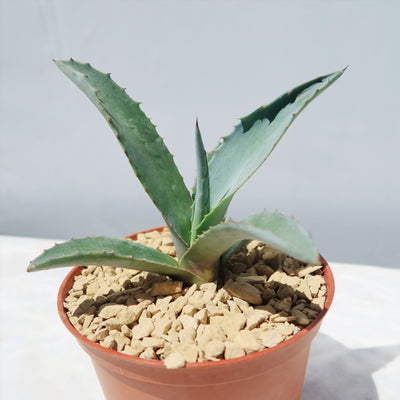
agave plant aloe vera Shop 'Century Plant - Agave Americana' Care and Growing GuideIntroducing the Century Plant, also known as Agave Americana, which is a stunning succulent that belongs to the family Asparagaceae. Native to Mexico and the Southwestern United States, the Agave americana has several other common names, including American aloe, maguey, flowering aloe, spiked aloe, blue agave, and Mexican soap plant. The image shows large, fleshy leaves forming a rosette shape, as well as a stunning blue green color. Century plant
Introducing the Century Plant, also known as Agave Americana, which is a stunning succulent that belongs to the family Asparagaceae. Native to Mexico and the Southwestern United States, the Agave americana has several other common names, including American aloe, maguey, flowering aloe, spiked aloe, blue agave, and Mexican soap plant.
Century plant agaves have large, thick, and fleshy leaves that form a rosette shape.
The leaves of these American agave plants are a beautiful blue-green color and have sharp, spiky edges, which can be quite formidable.
The Agave americana itself can grow to be quite large, with mature specimens reaching up to 6 feet tall and 8–12 feet wide.
Century plants, with their tall, spiky leaves, are a stunning addition to any rock garden or landscaping, creating a striking focal point.
When it comes to Century Plant blooming, it is truly a sight to behold. The Agave americana is a monocarpic plant, meaning it flowers only once in its lifetime, typically after 10 to 30 years. The century plant flower stalk can shoot up to an impressive height of 20–40 feet.
Interestingly, the Agave Americana is the only plant out of the family that is known to produce more than 20 gallons of nectar every week. This nectar is commonly used to make agave syrup, a natural sweetener that is a popular alternative to sugar.
The flowers themselves are yellow-green in color and are arranged in a dense cluster at the top of the stalk. This magnificent display of Agave americana blooming attracts pollinators like bees and hummingbirds.
When and How to Water Your Century Plant
The Century Plant is highly drought-tolerant, making it an ideal choice for arid gardens and xeriscaping. Its thick, fleshy leaves store water efficiently, allowing the plant to thrive with very little supplemental irrigation once established. Overwatering can quickly lead to root rot, so this agave performs best in well-draining soil and dry conditions. Your Agave americana prefers watering once every 3 to 4 weeks, and once every 6 to 8 weeks in the dormant season.
From spring through summer, during its growing season, the Century Plant benefits from deep soaking every 3 to 4 weeks in hot, dry climates. It is generally enough, as the plant prefers the soil to dry completely between waterings. This minimal but consistent watering supports healthy leaf growth while preventing stress from prolonged dryness during active growth.
From fall through winter, during its dormant season, watering should be reduced only once every 6 to 8 weeks. The plant requires little to no irrigation, especially if it receives natural rainfall. Allowing the soil to remain dry protects the agave from fungal problems and keeps it healthy during rest.
Light Requirements - Where to Place Your Century Plant
When growing the Century Plant indoors, it's crucial to provide it with bright, indirect light. Place your Agave Americana near a south-facing window or any spot that receives ample sunlight throughout the day. If direct sunlight is too intense, you can use sheer curtains or blinds to filter the light. The Agave americana should receive at least 6–8 hours of bright light daily to thrive indoors.
Agave americana is well-suited for outdoor cultivation, especially in warm and arid regions. It thrives in full sun exposure, so choose a location in your garden that receives direct sunlight for most of the day. This plant can tolerate high temperatures and intense sunlight, making it an excellent choice for xeriscaping or desert landscapes. Just ensure that the soil has good drainage to prevent waterlogging.
Optimal Soil & Fertilizer Needs
The Agave americana century plant prefers sandy, well-drained soil and should be fertilized once a year in spring. Planet Desert specializes in succulents and has specialized succulent potting soilGo to Soil cactus mix blend 1 gal 4 qt cacti succulent dirt compost growing media that includes an organic substrate with mycorrhizae to help with the growth of a healthy root system to help your Agave century plants thrive.
The Agave americana is a low-maintenance plant that doesn't require frequent fertilization. In fact, it can thrive in nutrient-poor soils. During the growing season in the spring, you can apply a balanced (5-10-5), slow-release NPK fertilizer once a year. While the Century Plant doesn't require rich soil, you can enhance its growth by incorporating some organic matter into the soil.
OTHER RELATED CENTURY PLANTS
Additionally, the Agave Americana variegataGo to Century plant variegated agave americana marginata or variegated century plant, and the White Stripe Century PlantGo to White stripe century plant agave (Agave Americana 'Mediopicta Alba') are popular other types of century plants with unique green and yellow/white leaves, making them attractive to gardeners and enthusiasts.
Hardiness Zone & More
When growing outdoors, this plant is suitable in USDA zones 8–11. It thrives in full sun and can tolerate a wide range of temperatures, from hot and dry summers to cooler winter temperatures.
In USDA Zone 8, it's important to protect your century plant from extreme cold temperatures by providing some winter protection, such as covering it with a frost cloth during freezing weather.
When it comes to humidity, the Century Plant is well-suited to arid and semi-arid climates. It can tolerate low humidity levels and is relatively drought-tolerant once established. However, it's important to note that excessive humidity can lead to fungal diseases, so it's best to provide good air circulation and avoid overwatering new plants.
How to Grow the Best Century Plant Indoors
When it comes to indoor growing, the Century Plant Agave Americana prefers a warm environment with temperatures between 65°F and 85°F. This century plant is quite adaptable and can tolerate slightly cooler temperatures during the winter months, but it's best to keep it away from drafts and cold windows.
As for humidity, the Century Plant can handle average indoor humidity levels, but it prefers drier conditions, similar to the arid regions in which it naturally grows. So, it's important not to overwater the plant and to ensure proper drainage to prevent root rot.
Wildlife - Century Plants Attract the Following Friendly Pollinators
Century plants are a favorite among pollinators such as bees, butterflies, and hummingbirds. These friendly creatures are drawn to the sweet nectar produced by the plant's flowers, making them important pollinators for the reproduction of century plants. Additionally, their vibrant colors and unique shapes make them a visually appealing addition to any garden or landscape.
According to ASPCA, the century plant is mildly toxic to cats, dogs, and horses. Ingesting any part of the plant can cause vomiting, diarrhea, lethargy, and even tremors or seizures in pets. However, it is safe to handle and plant in gardens as long as precautions are taken to prevent pets from ingesting it.
How to Propagate Your Century Plant
Agave americana can be propagated by using the offsets, or "pups," that grow around the base of the mature plant. These can be carefully separated and replanted to establish new agave-century plants. These American-century plants can be propagated through seeds, although this method requires more time and patience.
Key Takeaways
- Century Plant’s name is misleading – despite the name, it doesn’t live 100 years; it typically matures and flowers after 10 to 30 years.
- It dies after blooming – the plant produces a massive flower stalk up to 30 feet tall, then the mother plant dies, but it leaves behind many offsets (pups).
- It was historically used as a resource plant – Native peoples used its fibers for ropes and textiles, its sap for fermented drinks, and even its spines as natural needles.
- It creates striking landscapes – with its dramatic rosette of blue-green leaves tipped with sharp spines, it can serve as a centerpiece in xeriscaping and low-water gardens.
The Bottom Line
Overall, the Century Plant (Agave Americana) is a remarkable succulent that captivates with its striking features. With its large, fleshy leaves forming a rosette shape and its beautiful blue-green color, it's a true showstopper. The century plant can grow to impressive sizes and is often referred to by various common names, including American aloe and maguey. The Agave americana plant is known for its unique flowering habit, blooming only once in its lifetime with a towering flower stalk that attracts pollinators. It can be propagated through offsets or seeds, but caution should be exercised due to its toxic nature. Overall, Agave americana is a stunning plant that adds unique beauty and intrigue to any garden or landscape.
RELATED ARTICLE
All About Century Plants – Everything You Need to Know!
Shipping Notes
- Free Standard Shipping on $100+ Orders to the USA.
- Except Preorder products are shipped in 48 hours.
- Delivery to the USA:
- Standard Shipping : 3-10 business days
- If time is of the essence, please consider selecting expedited delivery for faster service.
Exchange/Return Notes
- We offer a 30-day return/exchange service after receiving.
- Final sale items are not eligible for returns or exchanges.
- To process your return/exchange, please contact us at [email protected]
- Please click here for more details>>> Return & Exchange Policy