SKU: 32867410666
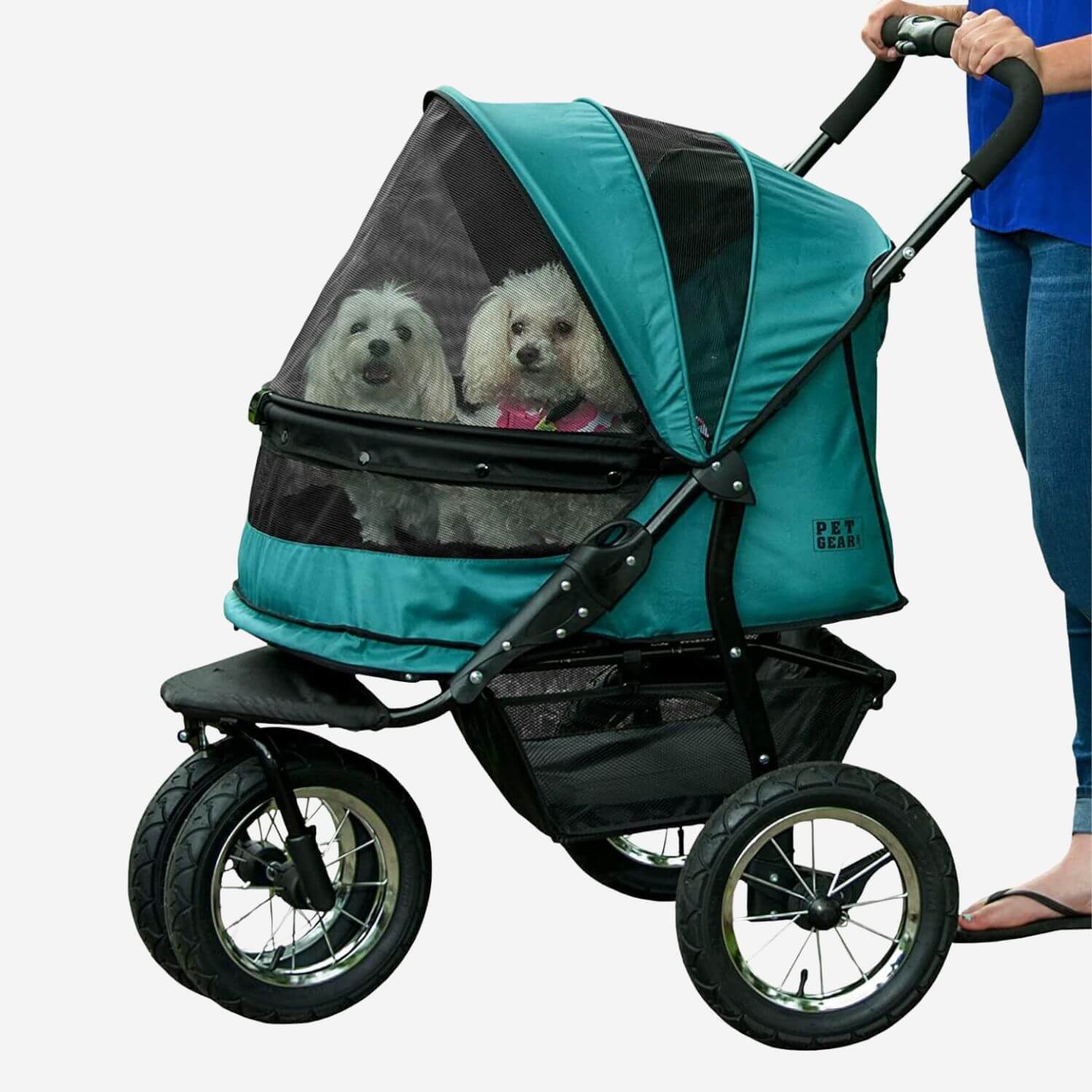
double pet stroller

double pet stroller No-Zip Double Pet Stroller

Sale price$20.77 Regular price$23.08
Save 10%

Pay in installments of $5.77 with ShopPay, AfterPay and Klarna

Shipping Estimate
USA
  • USA
  • CAN

Ships within 48 hours · Estimated delivery Jul 18 - Jul 23

Promo Codes Available:

For Your Every Summer RSVP, with Code: SUMMER15

Description

double pet stroller No-Zip Double Pet StrollerDescription The Pet Gear new NO ZIP Large Double Pet Stroller is truly one of a kind. The extra wide carriage design offers a spacious, comfortable ride for both single and multiple pets. No zippers mean no hassle when trying to open and close the stroller. Our new NO ZIP technology means that you can easily gain access to your dog without fumbling with difficult zippers! Quick release tires ensure the smoothest ride possible. Weve also included a

Description

The Pet Gear new NO-ZIP Large Double Pet Stroller is truly one of a kind. The extra-wide carriage design offers a spacious, comfortable ride for both single and multiple pets. No zippers mean no hassle when trying to open and close the stroller. Our new NO-ZIP technology means that you can easily gain access to your dog without fumbling with difficult zippers! Quick-release tires ensure the smoothest ride possible. We’ve also included a plush bolster pad and weather cover to create an extra-comfy environment for your beloved doggo, even in bad weather. The NO-ZIP Double Pet Stroller also features an elevated paw rest. Your furry best friend can easily look out of the stroller by using the front bar for support. The new panoramic view window allows your dog to remain safe inside of the stroller without missing any sights while you stroll! 
Precautions
When using this product always supervise your pet and don’t leave them unattended. Read the manufacture’s instruction manual before assembling and using your product.

Features & Benefits
  • Easy-Locking NO-ZIP entry
  • Elevated paw rest and panoramic view window
  • 12” Quick-release tires
  • 600 Denier water-resistant material
  • Cup holder, large storage basket, 2 interior safety tethers
  • Weather cover (included) provides protection from elements
  • One hand easy-fold mechanism
  • Quick-locking rear foot brake, ergonomic handle
Dimensions & Weight Capacity

Assembled Product

  • Interior Pet Cabin Size: 27" L x 20" W x 23" H (approx.)
  • Product Weight: 35 lbs.
  • Maximum Weight Capacity: Up to 90 lbs.
  • Tire Size Front/Back Wheel: 12"/12"

Shipping Dimensions

  • Box: 34.25"L x 24"W x 15"H
  • Shipping Weight: 41.5 lbs.

Instruction Manual

Pet Gear Double Pet Stroller No Zip Manual

Warranty
New Product
 
PET GEAR is the industry leader in pet products that are marketed under the PET GEAR brand and its authorized resellers (who display the appropriate sanctioned logo) only sell new products in original packaging. Product represented as used, refurbished, or as-is, or not in original packaging will not be covered by our warranty, or any consumer support.
 
We are committed to consumer satisfaction. To that end PET GEAR cautions consumers from purchasing any product other than product in its original packaging.
 
Proof of Purchase must be provided to our customer care center before a warranty claim can be honored.
Call: 802-438-2231
Fax: 802-438-5493
Mail:
Attn: Customer Care Center
PET GEAR INC.
192 Sheldon Avenue
West Rutland Vermont 05777
 
We thank you for interest in our products; please refer to our website for additional product information.
 
We are a participant in the Amazon Services LLC Associates Program, an affiliate advertising program designed to provide a means for us to earn fees by linking to Amazon.com and affiliated sites.
 
30 Day NON-TRANSFERABLE LIMITED WARRANTY
 
WHAT IS COVERED: Vermont Juvenile Furniture MFG, Inc. dba/ PET GEAR (hereinafter referred to as Pet Gear) warrants to the original retail consumer purchaser, and not any other purchaser or subsequent owner, that its Pet Gear products, when subject to normal and proper residential use, will be free from defects in material or workmanship for a period of 30 Days from the purchase date. An original retail consumer purchaser is a person or entity who originally purchases the product, or a gift recipient of a new product that is unopened and in its original packaging. The limited warranty is non-transferable and shall automatically terminate if the original retail consumer purchaser resells or transfers a Pet Gear product. In the event of defect, these are your exclusive remedies.
 
PROPER PRODUCT USE: This product is designed only for use with domesticated animals; do not use this product for any other purpose. However, the specific temperament of your animal may not work with this product. We recommend that you do not use this product if your animal is aggressive. If you are unsure whether this product is appropriate for your animal, please consult with your veterinarian or certified trainer before you use this product. Please see the instruction manual for additional important information.
 
WHAT IS NOT COVERED: This non-transferable limited warranty does not provide protection against, and Pet Gear will have no liability under this non-transferable limited warranty for any damage to or defects in the products caused by any animal, loss of product(s), failure, defect or damage caused by events and situations beyond normal residential exposure conditions, including, but not limited to: commercial use, misuse, abuse, neglect, improper use not in accordance with Pet Gear's instructions, use of non-Pet Gear accessories, impacts of foreign objects, acts of God, abnormal or improper use, improper storage, accident, alteration, defects in or failure of the surface the Pet Gear products are placed upon, discoloration or other damage caused by pollution, sunlight, other environmental conditions, mold, dirt, mildew, or exposure to harmful chemicals and any other cause not involving manufacturing defects in the Pet Gear product.
 
WARRANTY OF THE PRODUCT: A sales receipt shall be required to obtain any warranty coverage. Please keep this information in a safe place.
 
MAKING A WARRANTY CLAIM: To obtain warranty on a Pet Gear product, call the Pet Gear Customer Care Center. In the United States call (802-438-2231).
 
Pursuant to this non-transferable limited warranty, Pet Gear will replace the part. This non-transferable limited warranty will then apply to the new part for the remainder of the original non-transferable limited warranty period.
 
DISCLAIMERS: Replacement as provided under this non-transferable limited warranty is the exclusive remedy of the consumer.
 
This non-transferable limited warranty is in lieu of all other express warranties. Pet Gear expressly disclaims and excludes all other warranties, express or implied, including without limitation, the warranties of merchantability and fitness for a particular purpose. Pet Gear also disclaims and excludes all liability for incidental, consequential, punitive, direct, indirect, special or any other damages arising out of or connected with the purchase, use or misuse of this product or for the breach of any express or implied warranties or breach of contract or otherwise. Purchaser assumes all risks and liabilities from the use or misuse of this product. Pet Gear does not authorize any other person or agent to make any other express or implied warranties.
 
Furthermore, Pet Gear will not be liable for any loss, damage or injury resulting from delay in delivery of replacement parts due to circumstances beyond Pet Gear's control.
 
GOVERNING LAW: This non-transferable limited warranty shall be governed by the law of the State of Vermont , U.S.A., and by the laws of the United States of America, excluding their conflicts of laws principles. Furthermore, the United Nations Convention on Contracts for the International Sale of Goods is hereby excluded in its entirety from application to this nontransferable limited warranty. Jurisdiction and venue shall be exclusive to the courts of Rutland County, Vermont.
Shipping Notes
  • Free Standard Shipping on $100+ Orders to the USA.
  • Except Preorder products are shipped in 48 hours.
  • Delivery to the USA:
  1. Standard Shipping : 3-10 business days
  • If time is of the essence, please consider selecting expedited delivery for faster service.
Exchange/Return Notes
  • We offer a 30-day return/exchange service after receiving.
  • Final sale items are not eligible for returns or exchanges.
  • To process your return/exchange, please contact us at [email protected]
  • Please click here for more details>>> Return & Exchange Policy
SKU: 32867410666

Discover Niche Categories That Outsell double pet stroller

Top-Converting Item to Boost Your Average Order

4.6 ★★★★★
Based on 12 reviews
Sort
Highest Rating
Newest First
Oldest First
Product Reviews
N
Verified Purchase
Nick
Los Angeles, US
★★★★★ 4
Great for the price
Size: Medium, Color: Grey
Nice and light material. Looks good. Suitable for hot temperatures and casual attire. The only thing I've noticed so far that isn't so great, is that the buttons are rather cheap and the middle part broke out on a few of them.
WAS THIS REVIEW HELPFUL?YesReportShare
Reviewed in the United States on May 16, 2026
H
Verified Purchase
Hypercussion
Los Angeles, US
★★★★★ 5
Impressive solution for the price
Configuration: 3-pack, Style: without eero Plus
I'm a network engineer snob who won't hesitate a single second to give most of the home router and wifi junk sold today a terrible review when it's warranted. After having two router/wifi solutions made by that company that starts with Net and ends with Gear fail on me in less than 6 months, I was about ready to spend a few grand on a Ubiquiti solution and wire up my home for access points and cameras. Then a colleague and friend of mine suggested this eero mesh system as a lower cost/effort option. I'm not a fan of plug and play stuff and was skeptical but figured I could return it if not happy. I have to say I'm pretty impressed. The set up was almost too easy. Just download the eero app to your phone, plug a device in and connect the 2.5g port to your router and the app will walk you through it all. Most importantly, it worked really well when solutions like this from other vendors don't forcing you to connect a cable and manually set up. At first I didn't like that there isn't any ability to give the 2.4ghz and 5ghz networks different SSIDs (I had my previous router set up this way and changing this would have meant climbing up a ladder and reconfiguring several Ring cameras) but eero let's you change the name of the Guest Network to anything you want so this was an easy work around. As others have mentioned download the Wifiman app and shortcut and start scanning your house after you install the main router/wifi device. When you find spots that the signal drops below GOOD quality (-70dbm) drop another unit in between the first and where the signal dropped to poor quality. I bought the 3 pack thinking I'd need it to cover a 6,000 sq ft home. However one device was provided good coverage for most of my house and two provided either excellent or good signal strength everywhere inside and even outside on my patio and driveway. I only have one device on the first and second floors and both floors as well as the basement are all receiving good/excellent signal quality. I could have definitely saved $100 and gone with a two pack but I'm ok with having an extra device as a back up or if someone else in the family needs it (keep in mind any of these devices can act as a standalone router/wifi solution) or even to temporarily extend WiFi farther out into my yard in fair weather for outdoor gatherings etc.. Overall I'm impressed. The dashboard and tools/analytics included with the app are more than adequate for home users. You can even set up alerts for new devices connecting to your network. The GUI is modern and responsive and not like some of the traditional router vendors who still support an antiquated web login that takes forever to connect, lags between function and times out frequently. Time will tell if this is reliable but as mentioned a friend and colleague who owns his own network solution business told me he installs these in homes where the cost and wiring of a Ubiquiti or similar solution is prohibitive and he's never had an issue with their performance and reliability.
WAS THIS REVIEW HELPFUL?YesReportShare
Reviewed in the United States on March 2, 2026
D
Verified Purchase
D.S.
Port Orchard, US
★★★★★ 5
Bomb.com
Configuration: 3-pack, Style: without eero Plus
Not sure why this doesn’t have 5 stars from everyone! Got the three device set up and man this couldn’t have been easier to set up. This system is bomb, like I’m not sure how much easier of a setup people even want. Everything was basically plug-and-play, and the app walks you through it so smoothly it almost feels too easy. Performance-wise, it’s been amazing. The coverage is solid throughout the whole house, and the speeds are not just fast—they’re consistent everywhere on Wi-Fi, not just when you’re hardwired. I haven’t had any random drops or dead zones like I used to deal with. Compared to the Cox gateway, it’s not even close. They charge $15 a month to rent that thing and it doesn’t hold a candle to this setup—honestly kind of ridiculous. And the quality? Top tier. It honestly feels like an Apple product. From the packaging to the devices themselves, even the cords and the app—everything just feels super polished and premium. I’m actually glad Amazon acquired eero because you can see that level of refinement in the whole experience. My only complaint is the price tag. $400 is definitely not cheap. But when you break it down, Cox charges $15 a month to rent their gateway—that’s $180 a year. In just about two years, this system basically pays for itself, and you’re getting way better performance the whole time. Overall, 110% happy with this purchase.
WAS THIS REVIEW HELPFUL?YesReportShare
Reviewed in the United States on March 25, 2026
Verified Purchase
314
Chelsea, US
★★★★★ 5
Works very well. Very easy to set up.
Configuration: 1-pack, Style: without eero Plus
Previously just had the standard wifi router provided by ATT with fiber connection. It was fine really but some parts of the house lacked good signal. Purchased the 6 Pro E and put the ATT router in bridge mode, the Eero instructions on doing that were perfect and it worked. The 6 Pro E was up and running in minutes and did it's own software updated immediately. Was super easy to rename the network, set the password and permissions and every single device that was previously on the old router connected seamlessly on it's own without any intervention. I think possibly one 2.5GHz device may not have auto-connected but it connected just fine once I put it in pairing mode. We have a lot of devices, mixed 5ghz and 2.5ghz, and so far both networks broadcast fine and everything works. Also 5th Gen Echo Dots seamlessly boost the wifi signal and I already had those in nearly every room before getting the Eero 6 Pro E. Few things to note: I don't pay for Eero Plus subscription so I don't use any of the extra reporting features. New devices connect with what looks like a random code or with a manufacturers name, which usually does not help identify what it is. That can be a challenge when you're trying to figure out if it is something you just added or someone else who managed to get in passed the firewall. Googling the name that shows up does not always help figure out what it is. For some reason my iphone reconnects every few weeks as a "new device" with a name of "unknown device". This does not happen with my husband's iphone. This means that at any given time there is one active "unknown device" and several others that are inactive with that name. Looks like eventually they drop off the recently connected inactive list. Even if I rename it to something specific, after a few weeks it will reconnect as if it's brand new and I'll get an Eero notification that a new device has connected. It is frustrating to have to continually check the app to make sure it's just my own phone and not something intruding. The Eero devices have a Zigbee hub built-in but my recent purchase of motorized Alexa compatible shades with Zigbee motors had issues. They connected sort of, but were not functioning in the Alexa app even though both Eero and the shade manufacturer said they should work. Eventually I had to also buy 2 older 4th gen Echo's that also have a Zigbee hub built-in, only then would they be found by Alexa and then they started working in Alexa app with voice and scheduling. However, adding the old 4th gen echos created two more issues: While every single other device in my house on other floors away from the Eero 6 Pro can connect just fine because I have 5th Gen Echos in most rooms boosting the mesh coverage, for some reason, the 4th Gen Echo placed on the second floor could not connect to the 6 Pro E router on the first floor. I had to end up buying a second Eero 6 for the second floor to act as a booster up there as well. Only then did the second floor 4th Gen Echo connect to wifi and stay connected. That's very odd because everything else on the second floor and in the basement and detached garage had no issues connecting to either the wide array of 5th Gen Echos or to the main 6 Pro E on the first floor. The second new issue... the Eero devices are set to roam automatically which is the point of mesh coverage. However, the Zigbee shades hated that feature and would constantly bounce from the nearest 4th Gen Echo to the 6 Pro E and back. Each bounce made them "unresponsive" in the Alexa App. Eventually I had to turn off that roaming feature in the Eero app settings so that every device now connects to whichever Echo or Eero it sees first and then stays there. Defeats the purpose of having mesh but it was the only way to make the $2000 worth of "smart" shades actually work with the network and Alexa.
WAS THIS REVIEW HELPFUL?YesReportShare
Reviewed in the United States on July 22, 2025
P
Verified Purchase
Patrick Calder
Whiting, US
★★★★★ 4
Having trouble deciding if this is right for you? Read this.
Configuration: 3-pack, Style: without eero Plus
I'm only two days in to this, but I want to leave a review to help others who went through the same ordeal I have. This Eero Pro 6E has replaced an Orbi R750 system which I purchased in 2021 and used with two satellites. The Eero has some pros and cons over the Orbi. First, the reason for my replacement: while the Orbi still gives good coverage and speed, the stability of the wifi network has significantly decreased in the last year or so. I've done a lot of research on this and the only thing I can think of is that the Orbi 750 is rated for "40+" devices. I have "Smart Homed" my house and have 40-50 devices in total connected. Additionally, my wife owns a hair salon which operates out of our home so we have a guest wifi for that. So, I think that while theoretically the Orbi should still be fine, in practice it can't deal with more than 40 or so devices and starts "cycling through them" causing some devices to disconnect and reconnect repeatedly. I live in a rural area where cell signal is lousy, so you notice it very quickly when your device loses connectivity - especially if you are streaming. What good is my 65" OLED TV with wifi sound and my $300 a month cable and internet bill if I can't use the damn thing? So, on the Eero. I bought the three unit package since it was on sale (I'd actually initially bought the 2 unit package, and they went on sale the day afterwards so I returned it and ordered the 3 set. One complaint is that while I think you should get a "bulk deal" by ordering a 3 pack over a 2 pack over a single unit, but it's a huge difference. The 3 pack was $350 which equals $116 each. To buy just one if you misjudged how many you need, would be another $160.) Set up was quite simple, and was all done through the app. So it gets +1 for ease of use. As others have noted, there is no web log in and without the Eero plus subscription, there isn't much beyond set up and maintain the wifi. For the majority of users this is likely to not be a problem. Due to my recent wifi challenges, I wanted to use the analytics function of the app to see how the new coverage compared to the old. You can't do that without the plus subscription. So that's strike 1. However, you can set up the Guest network and basic things like that with the regular app access, so at least there's that. Likewise, adding each additional unit was pretty easy. What I recommend you do is download an app like WiFiman (which seems pretty legit) after you set up your first Eero and walk around with the shortcut function on in the WiFiman app which will tell you the signal strength as you move about. I would say right about the limit of where it stops being either "Excellent" or "Good" is where you need to place your next Eero unit. "Excellent" ensures the best quality, but if you have a lot of space to cover you'd need to stretch it to "Good". I will note here that unlike the Orbi, which has a router and two (or more) satellites, each Eero unit is functionally identical, so it doesn't matter which one you grab first, and which one are the satellites. It's easy to add the next Eero device from the app even if you didn't immediately select "Add another device" after the first one. Like I said, I recommend walking around and getting an idea of your coverage needs before adding the next ones anyway. So that's a +1, again for ease of use. However, I notice compared to the Orbi that its range and speed drops off much faster the further you get. So, you're not going to get the overall quality range. I noticed this while out doing yardwork this morning - my phone would stay on the Orbi wifi a hundred or so feet from the house. It loses the Eero wifi (or, the quality goes way down) at the same range. So this is another point that I guess I knew, but is important to remember: at range, the speed at which you transmit decreases despite what your internet connection actually is. So, for example, my service provider gives me 1000 mb/S service which is reasonably fast. Standing next to the Eero unit which is connected to my modem via the ethernet cable gives me close to that speed. But, get a dozen feet away with a wall in the way, and you are down to about 400 mb/s. As stated, the Orbi has better range and the speed keeps up better. But what good is range and speed if you are constantly getting booted off the Wifi? Supporting my max device theory, I'd often get booted off the Orbi wifi somewhat predictably at various times in the day. Last night, on the new Eero network, it didn't happen! I was able to stay connected the whole time. (As was my mother in law in the in-law apartment, so not having to deal with that is a major plus!). So stability is a +2 on the score scale. Finally, if you're like me and have several dozen Wifi devices you don't need to worry about the new Eero units and compatibility - as long as you name your new Wifi network the same and keep the same password, the devices don't know the difference. They connect to the new network the same way they'd go back to your old one as if it were nothing more than a power outage. So, ultimately the Eero 6E is a little slower and gives a little less coverage than the Orbi 750....but unlike the Orbi it says it will take "100+" devices...and it *works*. At least so far. That said, I'd definitely get it on sale. While functionality is always key, the fact is the features are much less than many competitors. It might not be worth the full price.
WAS THIS REVIEW HELPFUL?YesReportShare
Reviewed in the United States on June 20, 2025

recommand products