SKU: 33544304218
care for prickly pear cactus

care for prickly pear cactus Shop 'Winter Hardy Cactus – Opuntia 'Orange Chiffon' Care and Growing Guide

Sale price$23.66 Regular price$26.29
Save 10%

Pay in installments of $6.57 with ShopPay, AfterPay and Klarna

Shipping Estimate
USA
  • USA
  • CAN

Ships within 48 hours · Estimated delivery Jul 19 - Jul 24

Promo Codes Available:

For Your Every Summer RSVP, with Code: SUMMER15

Description

care for prickly pear cactus Shop 'Winter Hardy Cactus – Opuntia 'Orange Chiffon' Care and Growing GuideIntroducing the popular winter hardy cactus Opuntia Orange Chiffon, which is the low growing prickly pear cactus that belongs to the Opuntia genus. It is known for its vibrant flowers and unique texture. The Opuntia Orange Chiffon cactus has flat, paddle shaped stems known as pads or cladodes. These pads are covered in clusters of tiny, hair like glochids, which give the plant its soft, fuzzy appearance. The pads are bright green in color but turn

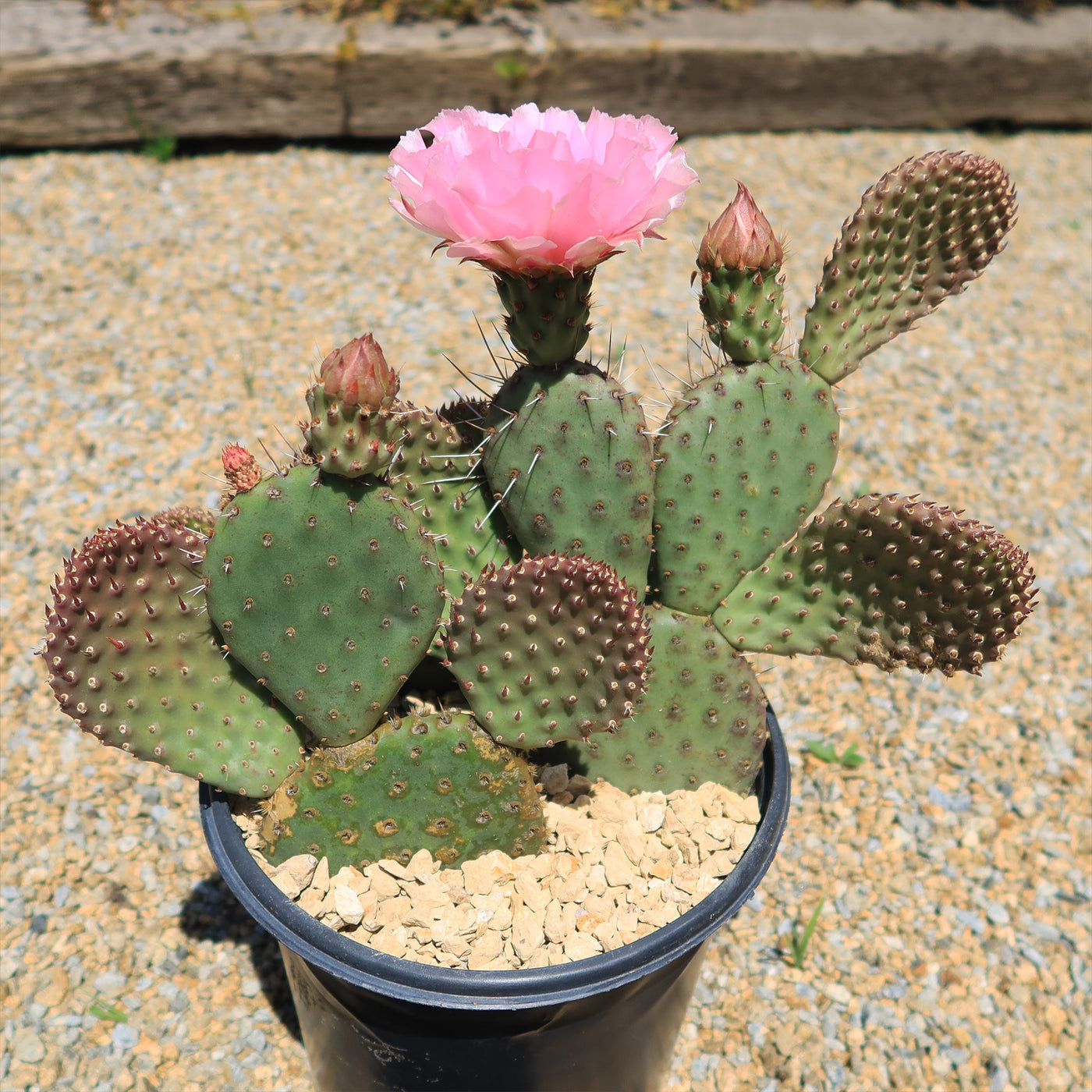
Introducing the popular winter hardy cactus Opuntia Orange Chiffon which is the low-growing prickly pear cactus that belongs to the Opuntia genus. It is known for its vibrant flowers and unique texture.  

The Opuntia Orange Chiffon cactus has flat, paddle-shaped stems known as pads or cladodes. These pads are covered in clusters of tiny, hair-like glochids, which give the plant its soft, fuzzy appearance. The pads are bright green in color but turn purple during cold.  


The Orange chiffon cold hardy cactus can grow up to 2 feet tall and 4 feet wide.

As the cactus matures, it forms a sprawling
or bushy habit.

The
flowers of Opuntia orange chiffon bloom during the spring and summer months, with striking orange-pink flowers.

These flowers are usually cup-shaped and can add a beautiful contrast to the vibrant green pads.

When it comes to care, the Opuntia Orange Chiffon cactus is a relatively low-maintenance plant. It thrives in full sunlight, so make sure to provide it with at least 6 hours of direct sunlight per day. As for watering, this cactus prefers a dry environment and should be watered sparingly once in 12 days. To avoid overwatering, allow the soil to completely dry between waterings. In terms of soil, a well-draining cactus mix, opens in a new tab is ideal. 

This cactus is known for its cold hardiness and can tolerate temperatures outdoors down to USDA Zone 5. However, it's important to protect it from prolonged exposure to freezing temperatures, especially during winter. If you live in a colder climate with consistent temperatures below 32 °F, it's best to bring the plant indoors or provide it with some form of insulation during the winter months. 

To propagate this Opuntia cactus, you can use stem cuttings or offsets. Simply let the cuttings dry for a few days before planting in well-drained soil. Make sure to place the cuttings in a warm, sunny location to encourage root growth. Water sparingly until roots are established to prevent rotting.  

Overall, the Opuntia orange chiffon is one of the cold hardy cacti that can survive winter. With the help of Opuntia orange chiffon, you'll start to spend less time maintaining your garden and more time taking in its beauty! 

Shipping Notes
  • Free Standard Shipping on $100+ Orders to the USA.
  • Except Preorder products are shipped in 48 hours.
  • Delivery to the USA:
  1. Standard Shipping : 3-10 business days
  • If time is of the essence, please consider selecting expedited delivery for faster service.
Exchange/Return Notes
  • We offer a 30-day return/exchange service after receiving.
  • Final sale items are not eligible for returns or exchanges.
  • To process your return/exchange, please contact us at [email protected]
  • Please click here for more details>>> Return & Exchange Policy
SKU: 33544304218

Discover Niche Categories That Outsell care for prickly pear cactus

Top-Converting Item to Boost Your Average Order

4.3 ★★★★★
Based on 17 reviews
Sort
Highest Rating
Newest First
Oldest First
Product Reviews
C
Verified Purchase
CoachDad
Draper, US
★★★★★ 4
Good value
Style: ET-5150, Set: ET PRO FAX/ADF/PRINT/COPY/SCAN
I think 3.5 would be about right. I had a Canon color laser printer that I loved! The problem was that after 6 years it started to need name brand toner at $45/each. I decided to co for something that would print cheaper, because it turns out I don't print as much as I used to, so having a commercial printer is no needed. I like the tanks a lot and they are super easy to fill. The first fill does not use a whole bottle, but then it settles and the next day you can top off the tanks with the rest of the bottle. The print quality is good. I have printed a few hundred pages and it is working as it should, and the tanks don't seem to have dropped but a touch. Much cheaper than toner for sure. The weird thing is that when you scan, it does not know that there is paper in the feeder, so you hear the flat bed scanner run first, and then the tray starts feeding. Also, it prints on both sides, but it does not scan both sides automatically with the feeder, you have to flip each sheet. This is a serious bummer for me as I do a lot of 2-sided scanner. So far so good. If things go south I will revise.
WAS THIS REVIEW HELPFUL?YesReportShare
Reviewed in the United States on August 22, 2025
K
Verified Purchase
Katie
Dallas, US
★★★★★ 5
18 months and going strong
Style: ET-5150, Set: ET PRO FAX/ADF/PRINT/COPY/SCAN, Style: ET-5150, Set: ET PRO FAX/ADF/PRINT/COPY/SCAN
Edit 1/18/26: 2 years in, and I just topped off the ink. I used the extra bottle of black that came with it, and bought a set of color ink for the first time. Love it. Original: I’ve had this printer for 18 months and love it. I haven’t even had to refill the ink yet! I print a fair amount, not constantly, but I homeschool and print things for church and scouts also. I’m able to connect easily from my Windows laptop, Mac desktop, and iPhone. Automatic double sided printing is great. Color printing is good quality. Printing on card stock can get jammed, but there’s a rear bypass for that. It’s annoying that you have to do a single sheet at a time, but oh well. Copying and scanning is handy.
WAS THIS REVIEW HELPFUL?YesReportShare
Reviewed in the United States on July 27, 2025
J
Verified Purchase
Jennifer
Boise, US
★★★★★ 5
The Perfect Printer
Style: ET-5150, Set: ET PRO FAX/ADF/PRINT/COPY/SCAN
This is the perfect printer! I love the paper loading tray that holds a ton of paper, and the sophisticated scanning hinge AND THE TOUCHSCREEN! Other printer's I have owned have had the weirdest buttons, but this is so clear and easy to use. We were replacing a broken black and white printer and upgraded to a color printer. We had an eco tank before (LOVE THEM!) so we knew we wanted an eco tank printer again. Honestly I cannot find a single downside of this printer. For Mac users, know that the CD that comes with it is unnecessary :) Just go online per the instructions to grab the Epson software and you'll be set! Full context: My husband and I are small business owners and we love having an in-home printer!
WAS THIS REVIEW HELPFUL?YesReportShare
Reviewed in the United States on September 19, 2025
C
Verified Purchase
Carrie
Waukegan, US
★★★★★ 5
Great Investment Printer
Style: ET-5850, Set: FAX/Print/Copy/Scan
This is a great overall printer, especially for a home office or small business setup. It prints quickly, handles everyday documents with ease, and the EcoTank system is very convenient and cost-effective over time. Honestly, it could even hold its own in a regular office environment because of how efficient and fast it is. It is also easy to connect to from a phone, laptop or computer. It was compatible with all the devices and computers in my household, even those with Windows 10. That said, if your main goal is printing high-quality photos, this wouldn’t be the best option Epson offers. Photo quality is decent, but not exceptional. If photo printing is important to you, I would recommend looking into the Epson 8550 instead. Overall, a solid, reliable printer for everyday use—just not the top choice for photo-focused needs.
WAS THIS REVIEW HELPFUL?YesReportShare
Reviewed in the United States on March 23, 2026
B
Verified Purchase
Brian
Belleville, US
★★★★★ 5
Excellent Epson, worth the investment!
Style: ET-5800, Set: FAX/Print/Copy/Scan
First, this is a big printer so double check the measurement specs before purchasing if space is an issue. First impressions: very well built, especially comparing to ET versions such as the ET-4800 ( see my review on that one for details). This is a sturdy printer, you can feel it when you lift the scanning bed, pull out the paper trays, etc. Printing quality: excellent right out of the box. I didn’t need to do an extensive alignment or cleaning during setup, everything printed perfectly and was photo quality. Setup was easy. Although it has a fax feature, I don’t use that so I didn’t need to set it up. Printing: using the rear paper trays, it prints on 100lb card stock very easily. I recommend only loading a few pages at a time to avoid any issues. I loaded 5 pages and made prints without any issues. 65 lb card stock was also easy to print on using the back paper feed tray and I loaded 8 sheets without an issue but know it could probably handle a few more. Just remember that the thicker the paper the more chance of having it jam with multiple sheets in the rear paper try. AND, only use the rear tray feed for cardstock or other thick paper. The actual paper tray drawers, there are two and you can set them up for different sizes and types of paper, very convenient. Now the cool detail: most printers have a flimsy plastic slide tray to catch the prints as they come out of the printer. Not this one. This has a really amazing tray catch that comes out of the printer automatically (it is motorized), and when you are done there is a little illuminated icon on the screen that looks like the printer, you press it and the tray retracts. Pretty cool detail. The screen: very easy to use and you can actually see it, unlike the postage stamp size screen they used in the ET-4800. All features are very easy to find and select and the icons are illuminated. Using this screen, setup was very easy. Ink: again a very good feature and very well thought out. The bottles are keyed so they fit in the receptacle. Simply unscrew the cap, tip them over (they won’t spill or leak) and place them in the correct color, the bottles automatically fill the tank. When done filling, remove the bottle and put the cap back on, again they won’t spill or leak because they have a mechanism that prevents it from doing so. Overall: excellent printer, expensive but over time the ink savings alone help ease the sticker price. It is heavy and sturdy, has wireless capability so you can put it anywhere and print with ease connected to your wireless network, has the ability to print from android and IPhone with an app, and it has amazing prints. This is one printer I highly recommend.
WAS THIS REVIEW HELPFUL?YesReportShare
Reviewed in the United States on June 2, 2026

recommand products