SKU: 35519035567
peg perego john deere gator battery charger

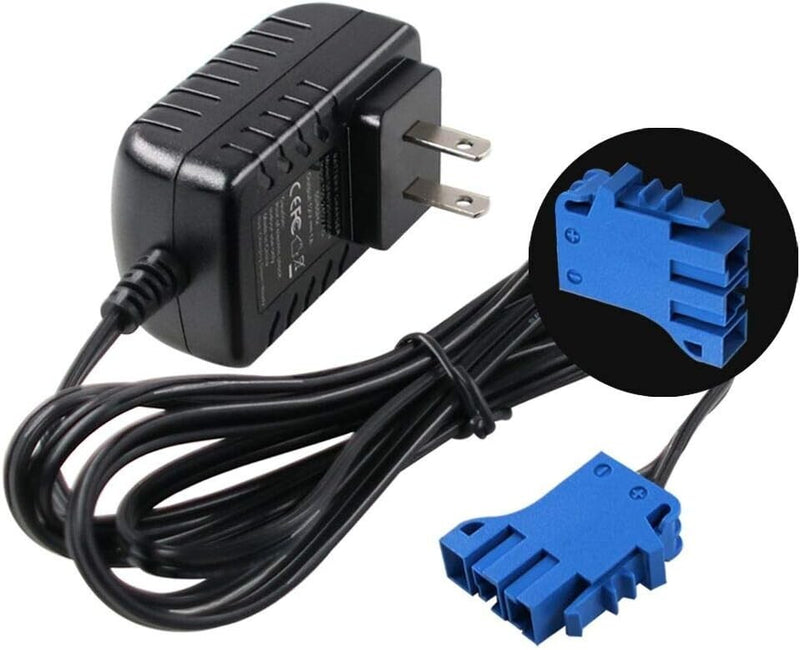
peg perego john deere gator battery charger 12V Battery Charger for Peg Perego, Ground Force Tractor John Deere Gator XUV .. Model 1

Sale price$21.73 Regular price$24.15
Save 10%

Pay in installments of $6.04 with ShopPay, AfterPay and Klarna

Shipping Estimate
USA
  • USA
  • CAN

Ships within 48 hours · Estimated delivery Sep 29 - Oct 4

Promo Codes Available:

For Your Every Summer RSVP, with Code: SUMMER15

Description

peg perego john deere gator battery charger 12V Battery Charger for Peg Perego, Ground Force Tractor John Deere Gator XUV .. Model 1Unleash endless fun and keep your child's favorite ride on truck or car powered up with these premium 12 Volt battery chargers, designed specifically for Peg Perego ride on vehicles. Whether your little adventurer cruises around in a Peg Perego car or takes on the trails in a ride on truck, these chargers ensure that the excitement never has to pause for long. Engineered with precision and built to exceed original manufacturer standards, each charger

Unleash endless fun and keep your child's favorite ride-on truck or car powered up with these premium 12-Volt battery chargers, designed specifically for Peg-Perego ride-on vehicles. Whether your little adventurer cruises around in a Peg-Perego car or takes on the trails in a ride-on truck, these chargers ensure that the excitement never has to pause for long. Engineered with precision and built to exceed original manufacturer standards, each charger offers a reliable and smart charging experience that every parent will appreciate.

Model 2 – The Ultimate Charger for Peg-Perego Ride-On Cars

Model 2 is a brand-new, top-of-the-line charger, crafted to perfectly fit all Peg-Perego 12-Volt ride-on cars that utilize the Blue Top 12-Volt Battery. This charger is CE, FCC, and RoHS certified, guaranteeing a high-quality product tested to meet and even exceed the original equipment manufacturer’s specifications. This means you can trust that your child's ride-on vehicle is receiving the safest and most effective power boost possible.

With an output of 12 volts at 1 amp, this charger revitalizes batteries efficiently, so your child can jump right back into their imaginative adventures. The built-in LED indicator gives you clear and instant feedback on the charging status — a red light means the battery is charging, while a green light tells you the battery is fully charged and ready to roll. No more guessing games or interruptions in playtime.

  • Compatible with all Peg-Perego 12-Volt ride-on cars using the Blue Top 12-Volt Battery
  • Output: 12V, 1A for optimal charging power
  • Easy-to-read LED display: red means charging, green means fully charged
  • Certified for safety and quality: CE, FCC, and RoHS certified

Model 1 – Versatile Power for Your Child’s Ride-On Truck or Car

Model 1 is a versatile and intelligent charger designed to keep your Peg-Perego 12-Volt vehicles and batteries fully powered and ready for action. Whether your child’s ride-on toy is the rugged John Deere Ground Force Tractor, the sporty John Deere Gator, or the thrilling Polaris RZR 900 powered ride-on car, this charger has you covered.

This charger accommodates a wide range of Peg-Perego 12-Volt Battery Chargers, including models CF12V12-T, IAKB0501, IAKB0502, DJW12-12HD, DMU 12-12, 2606FR, and NP12-12, as well as SafeAMP 12V batteries. This means you can use it across multiple ride-on vehicles, simplifying your gear and ensuring your child’s truck or car never runs out of juice during playtime.

  • Compatible with Peg-Perego 12-Volt vehicles and batteries
  • Works with a wide variety of Peg-Perego battery chargers and SafeAMP 12V batteries
  • Perfect for John Deere Ground Force Tractor, John Deere Gator, Polaris RZR 900 ride-on cars
  • Input: AC 100-240V, 50/60Hz; Output: DC 12V, 1A
  • 6.6-foot cable length for flexible charging options
  • Designed exclusively for 12-Volt batteries

Why Choose These Chargers for Your Child’s Ride-On Car or Truck?

Imagine the joy on your child's face as they hop into their ride-on car or truck, ready to embark on exciting journeys through the neighborhood or backyard. These chargers are the unsung heroes that keep those adventures going strong. Thanks to their smart IC chip technology, they not only charge the batteries but also protect them from overheating, over-current, over-voltage, and short circuits. This intelligent charging system automatically switches to power-saving mode once the battery is fully charged, preserving battery health and extending its lifespan.

The clear LED indicators simplify charging at a glance, so parents can easily monitor the process without second-guessing. The red light signals active charging, while the green light means your battery is fully juiced and ready to provide hours of fun. Plus, if the charger displays a green light but the battery doesn’t hold power during use, it’s a sign that the battery might need replacing—giving you a helpful heads-up to keep your ride-on vehicle performing at its best.

Benefits for Your Family

  • Quick and reliable charging: The 12V, 1A output recharges batteries efficiently so your child spends less time waiting and more time playing.
  • Safe and smart operation: Intelligent circuitry protects batteries, ensuring safe charging and peace of mind for parents.
  • Easy compatibility: Supports a wide range of Peg-Perego ride-on cars and trucks, including favorite models like John Deere and Polaris.
  • Clear charging indicators: LED lights make it simple to know when batteries are ready without needing to unplug prematurely.
  • Long cable reach: A generous 6.6-foot charging cable offers flexibility to plug in wherever is most convenient in your home or garage.

Package Contents

  • 1 × 12 Volt Charger for Peg-Perego Battery (Model 1 or Model 2 depending on selection)

Keep your child's ride-on car or truck powered and ready for adventure with these dependable, easy-to-use 12-Volt chargers. Whether it's a speedy car zooming around the driveway or a rugged truck tackling imaginary off-road terrains, these chargers provide the essential power your child's ride-on vehicle needs to keep the fun rolling. Choose the model that fits your ride-on battery and watch your child’s joy multiply with every charged adventure!

Shipping Notes
  • Free Standard Shipping on $100+ Orders to the USA.
  • Except Preorder products are shipped in 48 hours.
  • Delivery to the USA:
  1. Standard Shipping : 3-10 business days
  • If time is of the essence, please consider selecting expedited delivery for faster service.
Exchange/Return Notes
  • We offer a 30-day return/exchange service after receiving.
  • Final sale items are not eligible for returns or exchanges.
  • To process your return/exchange, please contact us at [email protected]
  • Please click here for more details>>> Return & Exchange Policy
SKU: 35519035567

Discover Niche Categories That Outsell peg perego john deere gator battery charger

Top-Converting Item to Boost Your Average Order

4.6 ★★★★★
Based on 16 reviews
Sort
Highest Rating
Newest First
Oldest First
Product Reviews
S
Verified Purchase
SandyLK
Carnegie, US
★★★★★ 5
Very comfortable to use
Color: Rose, Size: 1 Pack, Style: Combo
This is a nice keyboard/mouse for the money. I ordered it in pink because it will help me to keep it separate from others I have. I have a tendency to forget which mouse goes with which keyboard. The color makes all the difference. In addition this works well and has a light up indicator for the caps lock which my older one does not. That was annoying to look up and see that everything was in caps by mistake. Good product.
WAS THIS REVIEW HELPFUL?YesReportShare
Reviewed in the United States on May 1, 2026
Z
Verified Purchase
Zoey& Fabian
Bozeman, US
★★★★★ 5
Comfortable and responsive
Color: Black, Size: 1 Pack, Style: Combo
The Logitech MK270 Wireless Keyboard and Mouse Combo has been an amazing addition to my setup! The keyboard feels comfortable and responsive while typing, and the mouse works smoothly with no lag. I love how easy it was to connect — just plug in the USB receiver and it’s ready to go. The battery life is impressive, and the wireless range is great for keeping my workspace clean and organized. Perfect for work, school, or everyday use!
WAS THIS REVIEW HELPFUL?YesReportShare
Reviewed in the United States on May 13, 2026
J
Verified Purchase
Judi Fryer
San Leandro, US
★★★★★ 5
What's NOT to LOVE about this keyboard
Color: Black, Size: 1 Pack, Style: Keyboard
As a professional typist with decades of 12-14 hour days of doing nothing but just typing, I am very picky about keyboards. Keyboards that meet my standards are getting fewer and far between. Within a strict budget - this Logitech Wireless Keyboard more than meet my exceedingly stingent demands and I am currently a happy-typer. My finally gave out by way of a repeatedly sticking spacebar, which I tried to repair many times, but finally to no avail. After four years of faithful service, I finally had to put that wondeful keyboard to rest. Now a retiree with a tighter budget I had to seek something more in line with my pocketbook. The one new crteria was that my next purchase be a wireless keyboard. I spent days and days reading keyboard reviews and finally decided, with reservation, to order this Logitech Wireless Keyboard. My experience with Logitech consisted of trying a few of their wireless mourses. I would always go back to my of which I have two that I use daily and which I find the best mouse on the market. However, the description and reviews of the Logitech K270 seemed the most positive of all the keyboards and at $28.75 it was in my price range. I would have preferred to purchase it locally because I have a history of having to return keyboards because of being unhappy with the touch, sticking keys right out of the box, horrible configurations and key spacing, etc. However, no local business carries this keyboard in stock. I set aside an entire evening to set up my new keyboard, again based on previous history, and also because it was wireless, a new type of keyboard for me. I had a lot of extra time left for other endeavors that evening. Simply put; I opened the box, removed the keyboard and receiver from box, inserted the receiver in my computer tower, pulled out the paper tab from the battery door on the bottom of the keyboard, flipped out the feet on the bottom of the keyboard, turned the keyboard on, and started to type. I was amazed and pleased but I thought it was too early to review the product, I wanted to give it awhile to check out the actual fact of typing with this lightweight, well designed keyboard. The next morning I started with the new keyboard and wanted to test the touch and design of the keys placement on the board. Within 15 minutes I had forgotten that I was supposed to be trying out a keyboard; it simply became my keyboard. Now 24 days later I finally remembered I had never reviewed the product. That is because in that 24 days I have never actually given much thought at all to the fact that I am typing on a NEW keyboard. This was pretty much my first seamless keyboard replacement. I am of course aware that I don't have to keep adjusting the wire from the keyboard to the computer, that I don't have to adjust the sliding drawer where my keyboard rests because the wire is caught on something, that the wire isn't tangled in my feet because it is drooping to the floor, that the wire isn't keeping me from opening the sliding drawer far enough, and all those problems I have endured for years because I thought a wireless keyboard might not be responsive to my need for speed. In that regard, I have yet to notice anything, other than the lack of the physical wire, that tells me I am typing on a wireless keyboard. The touch of this keyboard just seems normal to me and hasn't caught my attention at all. This keyboard is designated as being Long-Range Wireless. My keyboard and computer tower are very close in proximity, so that was a feature I didn't need. However, I have tested this out and I can type on this keyboard down the hall from my office and into the dining room (next room over from office) and the response is fine. The second room over stretches the keyboards wireless limits and it starts to drop letters. I did not measure the distance. All in all this did not present a problem for me though. I never notice slowless or dropped letters or non-responsiveness where it matters, at my desk or in the next room either. The little feet on the bottom prop the keyboard at just the correct angle for me. I used to have to keep an additonal prop aid under my Saitek keyboard to get the cant just right. There is no wrist rest on this Logitech where there was on my Saitek. It took approximately 15 minutes for me not to miss it. My sliding drawer or keyboard tray is formica and like every keyboard I have had, the keyboard is a bit inclined to slide, but I long ago affixed rubbery-like shelf line with double-sided scotch tape to the surface of my keyboard slider. I placed new liner in honor of my new keyboard and voila, no slipping and sliding. The placement of the keys on this Logitech K270 keyboard are the nearest to the original placement of most of the keyboards I read reviews for. As a longtime typist the changing of major key placement and altering of the spacing between groups of keys always appears counter-productive to me. I don't understand the trend toward re-inventing the keyboard by every major keyboard manufacturer, but it continues to occur with even more frequency as the years roll by. This keyboard presented no problems for me whatsoever in that aspect. It sports a standard, full-size layout which I appreciate. I do however like the addition above the the F function keys, of several small short cut keys. I particularly enjoy the keys that takes me to my home page and to my e-mail (both with no set up required by me at all). There are also keys to increase, decrease, and mute the volume of videos, music, etc which I find helpful. There is also a key that brings up a calculator to the screen. I haven't had the keyboard long enough to encounter the need to replace the two AAA batteries required. The length of the battery power is estimated at 24 months or 2 million keystrokes per year. Now that I don't type all day everyday it might take me awhile to get to 2 million keystrokes in a year. There is an off/on switch on the keyboard to preserve battery power; however, I never turn mine off, nor do I turn off my wireless mouses. Just not a habit I ever developed. I would rather just change the batteries. I also have not utilized the feature available to allow just the one receiver for the keyboard and other compatible items such as your logitech mouse, but I have no reason to doubt that it wouldn't work perfectly as advertised. All in all this was easiest to set up computer keyboard I have encountered in years. The keyboard itself has everything required to make someone used to typing on a standard keyboard completely satisfied with the purchase. I recommend it highly.
WAS THIS REVIEW HELPFUL?YesReportShare
Reviewed in the United States on June 28, 2013
N
Verified Purchase
Nicole
Cuba, US
★★★★★ 4
Perfect, Budget‑Friendly Combo
Color: Black, Size: 1 Pack, Style: Combo
The Logitech MK270 Wireless Keyboard and Mouse Combo for Windows, 2.4 GHz Wireless is a great, cost‑effective set of everyday desktop accessories. It connects easily with a single USB‑A dongle, gives you a full‑size keyboard with a number pad and media keys, and includes a compact, comfortable mouse that works smoothly for typing and browsing. Battery life is excellent (keyboard and mouse both last many months), and the 2.4 GHz wireless connection stays stable without noticeable lag, so it’s reliable for office work, school, or casual home use. Overall, it’s a simple, plug‑and‑play wireless combo that delivers solid performance at a very reasonable price.
WAS THIS REVIEW HELPFUL?YesReportShare
Reviewed in the United States on April 12, 2026
C
Verified Purchase
CD_in_NM
Draper, US
★★★★★ 5
K270 keyboard info that might help you
Color: Black, Size: 1 Pack, Style: Keyboard
This review is a bit long, but has info that might help you. I posted it twice, once for the K270 keyboard and once for the M510 mouse. I have owned a K270 keyboard and M185 compact mouse for years. I bought them as the keyboard/mouse combo that Logitech sells. I have been happy with them. They are still working, but I decided that I would like to have a full size mouse. I settled on the M510 for the new mouse. The M510 mouse works with the unifying receiver. I did a fair amount of research before buying. I thought I could use the original K270 keyboard with the new mouse. I found that the older M185 mouse is not unifying. I thought that was odd because when you look at the seperate K270 Keyboard, it says that it is a unifying keyboard. Why would the combo set have a unifying keyboard but a non-unifying mouse? From what I have read online, when you buy the K270/M185 combo, it is NOT a unifying set. If you buy the K270 keyboard seperately, it IS a unifying keyboard. Since I wanted to get the M510 mouse, I had to buy a new seperate K270 keyboard since the one in the combo set is not unifying. I found this out ahead of time, so it was not an issue. I actually bought 2 each of the K270 & M510, for each of our 2 computers. Did not have any trouble getting them up and running. As a side benefit, the keyboard and mouse each come with a unifying receiver so I have a couple of spare receivers now. Registering them was an adventure. There are two methods to register, a serial number search or entering the info manually. The serial number search did not find any of them, so I did it manually. I did the keyboards first. After you enter the info for the unit you are registering, the registration software asks for the serial number. When you give it the serial number, I does a serial number search and verifies that the serial number matches that unit. This serial number search acutally worked (sort of). It found one of the keyboards correctly, but kept changing the other to a K295 instead of a K270. More on that in a bit. Next I registered the mice. When I got to the point where you select the correct model, the M510 was not in the list. I tried a few different things and finally found a trick that worked. When it asked for the model, I used M525 instead of M510. At the next step where it did the serial number search, it found the serial number was associated with the M510 and corrected the model entry from M525 to M510. Success with the mice. Back to the keyboard. I could not figure out a way around the registration error, so I contacted Logitech support and got a reply back from a support rep named Sharan. After a couple of email exchanges, Sharan was able to get the other keyboard registered correctly - Thank you again for your help, Sharan. I had noticed when I first started all of this that each unit has two serial numbers, one on the box and one on the unit. The two serial numbers did not match. Sharan told me that the number on the box is strictly for inventory use and the number on the unit is the one to use when registering. Anyway, both sets are now working and correctly registered. Happy with the purchase.
WAS THIS REVIEW HELPFUL?YesReportShare
Reviewed in the United States on January 30, 2024

recommand products