Pay in installments of $5.01 with
 ,
,
 and
and

Shipping Estimate
USA
- USA
- CAN
- USA
- CAN
Ships within 48 hours · Estimated delivery Oct 20 - Oct 25
 Promo Codes Available:
For Your Every Summer RSVP, with Code: SUMMER15
Description
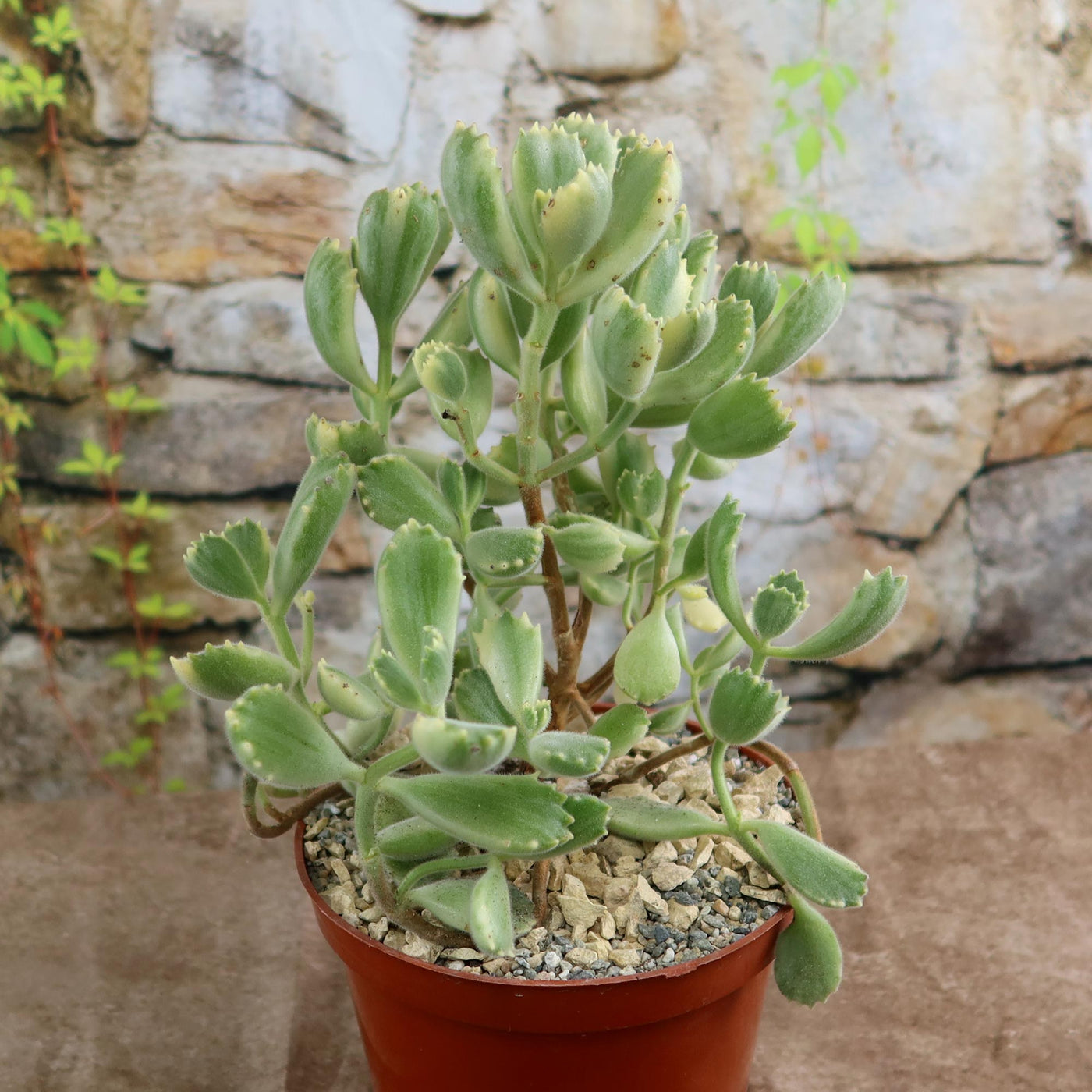
bear paw succulent indoors Variegated Bear Paw SucculentIntroducing the variegated bear paw or bear claw succulent, known as the Cotyledon ladismithiensis variegata, a vibrant member of the Cotyledon ladismithiensis family. The Bear paw succulent plant's leaves resemble bear paw pads, with a claw like shape and fuzzy texture. Variegation, a pattern of different colors on the fragile leaves, further enhances the paw like appearance. This rare evergreen variegated bears paw succulents, with its thick, fleshy
Introducing the variegated bear paw or bear claw succulent, known as the Cotyledon ladismithiensis variegata, a vibrant member of the Cotyledon ladismithiensis family. The Bear paw succulent plant's leaves resemble bear paw pads, with a claw-like shape and fuzzy texture. Variegation, a pattern of different colors on the fragile leaves, further enhances the paw-like appearance.
This rare evergreen variegated bears paw succulents, with its thick, fleshy leaves that are covered in soft, velvety hairs, gives it a cozy and cuddly appearance. The leaves are typically green with splashes of cream or yellow variegation and a red tooth-like formation on the edge, adding to its charm. Native to South Africa, this slow-growing dense mat-forming plant, can grow up to 12 inches tall.
The flowers of the variegated bear paw succulent are tubular and bell-shaped on long stalks, during the spring. The flowers can vary in color, ranging from shades of yellow to orange or even red.
You can propagate the Bear Paw succulent through stem cuttings or leaf cuttings. Simply take a healthy stem or leaf, allow it to callus for a few days, and then place it in well-draining soil. With proper care and the right conditions, these cuttings can grow healthy new plants.
Additionally, the Variegated Bear Paw is mildly toxic to humans and pets if ingested.
Watering Needs
Like other succulents, the Variegated Bear Paw is adapted to survive in arid conditions. When watering, make sure to give your Cotyledon succulents a thorough soak. Water until it starts to drain out from the bottom of the pot. This ensures that the roots are properly hydrated. Avoid overwatering by providing a moderate amount of water. The goal is to moisten the soil without leaving it soggy. Overwatering can cause root rot and other issues. To prevent this, let the soil dry completely between waterings, and if it feels dry, water accordingly.
In the spring and summer, during the growing season, the Bear's Paw succulent may require more frequent watering due to increased growth. While, in the fall and winter, during the dormant period, the plant's water needs decrease. Adjust your watering schedule accordingly.
Remember, it's always a good idea to observe your soft succulents and adjust your watering routine based on its specific needs. Factors like pot size, humidity, and temperature can influence watering frequency. With a little practice and attention, you'll find the right balance to keep your Variegated Bear Paw thriving.
Light Requirements
When growing indoors, this Bear Paw plant thrives in bright, indirect light. Place it near a window that receives bright, filtered sunlight for a good portion of the day. Avoid placing it in direct sunlight, especially during the hottest hours, as this can scorch the leaves. If you notice the leaves stretching or becoming leggy, it might be an indication that it needs more light. You can consider using a grow light to supplement the natural light if needed.
When grown outdoors, the Bear Paw succulent prefers bright, indirect light or partial shade for at least 4-6 hours a day. It can tolerate some direct morning or late afternoon sun, but it's best to protect it from intense midday sunlight, especially in hotter climates. If you live in a region with harsh, scorching summers, providing some shade during the hottest part of the day can help prevent leaf burn and stress.
Remember, it's essential to acclimate your Bear Paw succulents gradually to outdoor conditions if you plan to transition from indoors. Start by placing it in a shaded spot and gradually exposing it to more sunlight over a few weeks to avoid sunburn.
If the plant receives too little light, it may become leggy and lose its vibrant colors. On the other hand, excessive direct sunlight can cause leaf burn. Observing your plant's response and adjusting its placement accordingly will help ensure it thrives in bright light in its new home, whether indoors or outdoors.
Optimal Soil & Fertilizer Needs
The Bear Paw succulent prefers well-draining soil to prevent waterlogging, which can lead to root rot. Planting them in ordinary soil will result in compacted roots, stunted growth, and most likely root rot. Instead, make or buy a well-draining potting mix, or ideally use our specialized succulent potting mix that contains 5 natural substrates and mycorrhizae to promote the development of a strong root system that helps your succulent to thrive.
To keep your Bear Paw healthy and happy, it's a good idea to fertilize it regularly during the growing season in the spring. You can use a balanced (5-10-5), water-soluble NPK fertilizer diluted to half-strength. Apply the fertilizer once a year to provide the plant with essential nutrients.
However, it's important not to over-fertilize your variegated bear paw, as this can lead to fertilizer burn and damage to the plant. Always err on the side of caution and dilute the fertilizer more than recommended if you're unsure. During the dormant season in fall and winter, you can reduce or stop fertilizing altogether, as the plant's growth slows down.
Remember, it's always a good idea to monitor your plant's response to fertilization. If you notice any signs of nutrient deficiencies or excesses, such as yellowing or browning leaves, adjust your fertilization routine accordingly.
Hardiness Zone & More
When growing indoors, the bear Paw succulent is well-suited where it can thrive in normal room temperatures. Ideally, it prefers temperatures between 65°F to 80°F. It's important to keep the plant away from drafts or extreme temperature fluctuations, as they can stress the plant. So, find a cozy spot in your home where the temperature remains relatively stable.
When it comes to outdoor cultivation, the Variegated Bear Paw is generally hardy in USDA zones 9 to 11. If you live in one of these zones, you can consider growing them outdoors year-round. Just make sure to provide it with the right conditions and protection from frost, as it is not tolerant of freezing temperatures.
Additionally, it appreciates a moderate level of humidity, around 50% to 60%. If you live in a region with higher humidity, the plant will generally do well. However, if you're in a drier climate, you can increase humidity by misting the plant's leaves or placing a tray of water nearby.
Final Thoughts
Overall, the Variegated Bear Paw (Cotyledon ladismithiensis variegata) is a fascinating cotyledon succulent that captures attention with its bear paw-like leaves and beautiful variegation. It's a real standout in any succulent collection, adding a touch of whimsy and charm. With its fuzzy texture, unique leaf shape, and occasional bell-shaped flowers, this plant is truly a delight to behold. This bear paw succulent requires bright, indirect sunlight and well-draining soil to thrive. To avoid root rot, water sparingly and let the soil dry out entirely in between watering. Additionally, these plants benefit from occasional misting to increase humidity levels. Give it a try and enjoy the beauty and intrigue this unique variegated bear paw brings to your home or garden.
Shipping Notes
- Free Standard Shipping on $100+ Orders to the USA.
- Except Preorder products are shipped in 48 hours.
- Delivery to the USA:
- Standard Shipping : 3-10 business days
- If time is of the essence, please consider selecting expedited delivery for faster service.
Exchange/Return Notes
- We offer a 30-day return/exchange service after receiving.
- Final sale items are not eligible for returns or exchanges.
- To process your return/exchange, please contact us at [email protected]
- Please click here for more details>>> Return & Exchange Policy