Pay in installments of $5.00 with
 ,
,
 and
and

Shipping Estimate
USA
- USA
- CAN
- USA
- CAN
Ships within 48 hours · Estimated delivery Sep 8 - Sep 13
 Promo Codes Available:
For Your Every Summer RSVP, with Code: SUMMER15
Description
britax car seat cart instructions Britax Galaxy360 Slim Rotating Convertible Car Seat (Raven Black)Britax Galaxy360 Slim Rotating Convertible Car Seat If youre looking at the Britax Galaxy360, youre probably in love with the idea of getting a child in and out of the car seat without triggering backpain and or climbing into the backseat with your child. Britax designed the Galaxy360 Slim as a rotating convertible car seat that turns a full 360, starts rear facing for infants toddlers, and transitions to forward facing seat when your child is
Britax Galaxy360™ Slim Rotating Convertible Car Seat
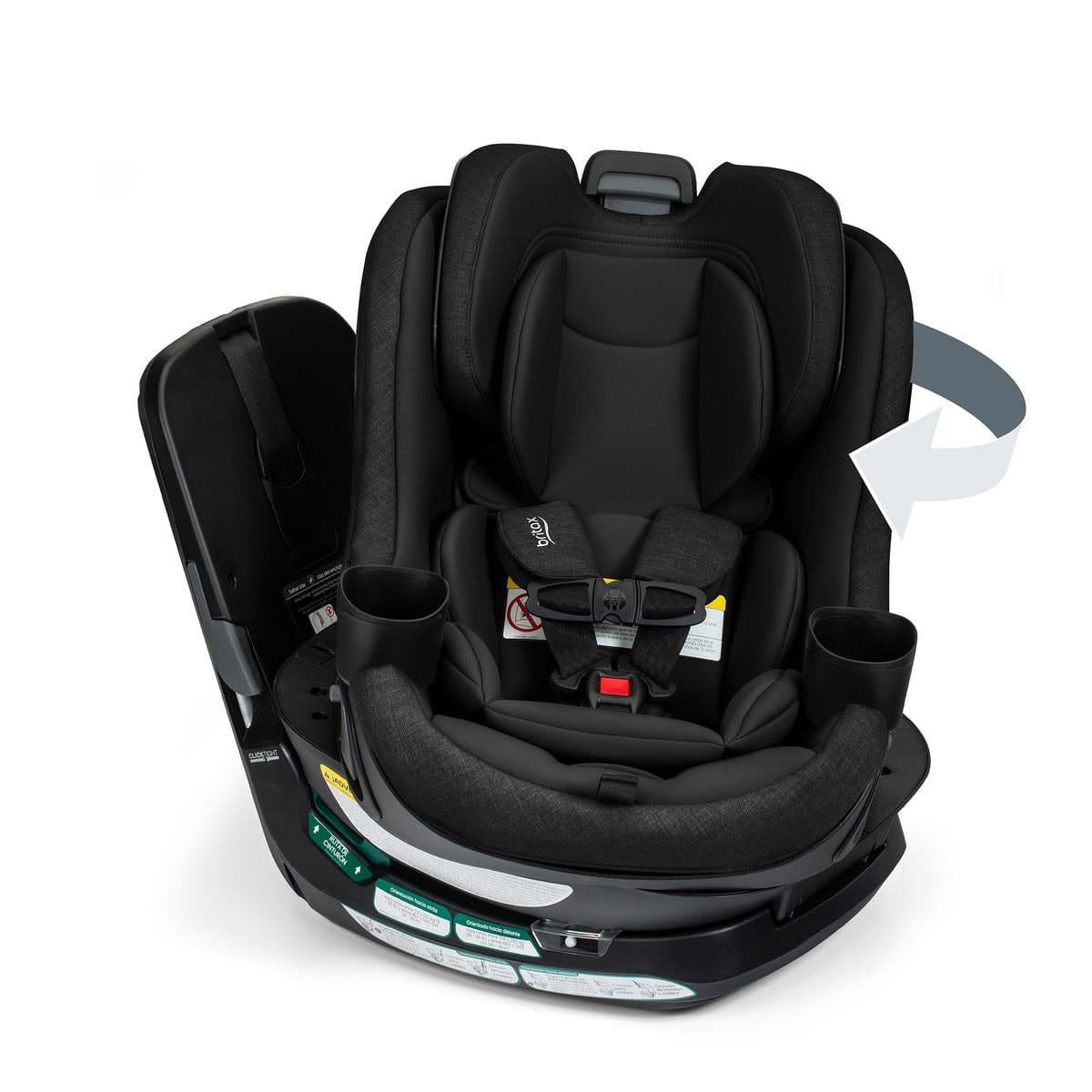
If you’re looking at the Britax Galaxy360, you’re probably in love with the idea of getting a child in and out of the car seat without triggering backpain and/or climbing into the backseat with your child. Britax designed the Galaxy360 Slim as a rotating convertible car seat that turns a full 360°, starts rear-facing for infants/toddlers, and transitions to forward-facing seat when your child is ready—without requiring a reinstall to switch directions. It’s built around three big ideas: one-hand rotation, an install process designed to be fast and intuitive (ClickTight + QuickStand), and a slim footprint (17” wide) intended to help you manage backseat space.
Size limits (manufacturer-listed): rear-facing 5–50 pounds, forward-facing 30–65 pounds, and rear- and forward-facing harnessed standing height less than 49”. The Galaxy360 also lists overall child weight as 5–65 pounds, with a published expiration of 10 years and a 1-year manufacturer limited warranty.
Space note: The Galaxy360 Slim comes in at 17” wide, with product dimensions 21.5” x 17” x 22”. That width number is the one many families look at first if they’re trying to plan a tight back seat or run multiple car seats at once.
Highlights & Features
- 360° rotation with one hand: The Galaxy360 is a rotating convertible car seat that turns a full 360 degrees and rotates with just one hand to simplify loading and buckling. (Read: turn the seat toward the door to buckle, then rotate it back to the travel position.)
- 2-in-1 convertible stages: Britax positions Galaxy360 as a rear-facing infant/toddler seat first (5–50 lbs.), then a forward-facing harness seat (30–65 lbs.) when your child is ready. Britax also states it strongly recommends children ride rear-facing up to the highest weight or height allowed by the seat.
- 2-in-1 convertible stages: The Galaxy360 covers two harnessed stages in one seat—rear-facing (5–50 lbs.) for infants and toddlers, then forward-facing (30–65 lbs.) when it’s time to turn. Keep your child rear-facing up to the maximum height or weight limit allowed.
- ClickTight® technology + QuickStand™ seat prop: The Galaxy360 uses an ultra-accessible seat belt path with a buckle-and-click-close install flow. A QuickStand™ seat prop holds the seat up and out of the way during installation, and ClickTight® technology tightens and locks the vehicle seat belt to help you get a fast, secure install.
- SwivelSmooth™ steel ring: The Galaxy360 uses a wheels-on-steel design with a SwivelSmooth™ steel ring to help the seat rotate smoothly, so turning it feels like a controlled glide.
- Secure one-piece design: The Galaxy360 is a one-piece seat + base system that stays connected as a single unit at all times, including during installation.
- Slim 17” SpaceSaver™ design: The Galaxy360 is a slim, 17” wide rotating seat designed to help you get a better fit in your vehicle and save backseat space without compromising safety or comfort.
- ReboundReduce™ stability panel (rear-facing): The Galaxy360 includes a ReboundReduce™ stability panel on the back of the base to help minimize movement in a crash when the seat is installed rear-facing.
- Energy management + reinforced base: The Galaxy360 has a high-strength steel–reinforced base and two layers of energy management—a protective seat shell plus a foam-lined headrest—designed to help absorb crash forces.
- Recline + adjustment: The Galaxy360 features a 6-position recline with an easy-read indicator, plus an 11-position no-rethread harness and headrest that adjust together for a proper fit as your child grows.
- Cleaning + materials: The Galaxy360 includes a SafeWash® cover that’s washer- and dryer-friendly, made with naturally flame-retardant fabrics with no added FR chemicals, plus a smooth, easy-to-wipe shell for everyday cleanup.
- Two cup holders: The Galaxy360 comes with two dishwasher-safe cup holders that slide out for cleaning and click back into place for a secure fit during rides.
- Testing & standards: The Galaxy360 is tested to FMVSS 213 frontal impact standards and side-impact tested according to FMVSS 213a. FMVSS 213a applies to harnessed children up to 40 lbs. and 43” and does not include side-impact standards for harnessed children above those limits.
Product Details
What “rotating convertible” means for today's parent
As part of the hottest trend of the 2020s, Britax built the Galaxy360 around the idea that a parent can rotate the seat toward the door opening to harness his or her child, then rotate it back to the locked travel position. Britax’s “one hand” emphasis matters because even if a seat rotates, it needs to be easy TO rotate in order for you to use it.
Rotation also tends to matter more in certain real-life setups like tighter parking spaces, cars with smaller rear door openings, higher SUVs where leaning in is a full-body move, and multi-kid situations where you’re buckling one child while keeping an eye on the rest.
Rear-facing stage (5–50 lbs., < 49 inches)
The American Academy of Pediatrics recommends that infants and toddlers ride rear-facing as long as possible, until they reach the highest weight or height allowed by their car seat manufacturer.
Britax sets the Galaxy360 rear-facing harnessed weight range at 5–50 lbs. and rear-facing harnessed standing height at less than 49 inches. For many families, the rear-facing stage is the longest stage, and it’s also the stage where loading can feel the most awkward because you’re leaning in and working at a lower angle (here comes the back pain).
Forward-facing harness stage (30–65 lbs., < 49” inches)
Once a child outgrows the forward-facing harness limits of any seat, families typically move to a booster seat category based on general child passenger safety guidance and the seat’s own instructions. Britax sets the Galaxy360 forward-facing harnessed weight range as 30–65 lbs. with a forward-facing height less than 49 inches. This is still a harnessed stage—Galaxy360 is described as a 2-in-1 convertible seat (rear- and forward-facing), not a booster, but these requirements are generous and should last a long time with most children.
Install once + switch directions without a reinstall
The Galaxy360 is designed so you can switch between rear-facing and forward-facing by rotating the seat—without uninstalling and reinstalling it just to change directions. That matters because reinstalling is usually where people second-guess everything: belt routing, tightness, recline angle, and whether the seat is truly locked in the way it should be.
This doesn’t eliminate the normal “use it correctly” steps. You still need to follow the user guide for the right recline setting, harness/headrest position, and any mode-specific indicators. The point is that the direction change happens through rotation, not by starting over on installation.
ClickTight® + QuickStand™
The Galaxy360 uses a ClickTight® install system built around an auto-opening seat and an ultra-accessible belt path. The intended flow is simple: open the seat, route the vehicle seat belt through the belt path, buckle, and click it closed. A built-in QuickStand™ seat prop holds the seat up and out of the way during installation, and ClickTight® is designed to tighten and lock the vehicle seat belt as you close it.
Fit and Space Planning
The Galaxy360 is built with a slim, 17” wide footprint—one of the first numbers families look at when they’re planning a tighter backseat layout or comparing seats side-by-side. For a more complete size check, the published dimensions are 21.5” x 17” x 22”, with buckle strap depths of 4”–7.25” and a seat area depth/width of 11” / 12.5”. If you are wondering about a 3-across selection of car seats (which means you can fit three seats across the bench in the backseat), these are the measurements you'll need.
Even with good dimensions, car seat fit can still vary by vehicle. Rear seat contouring, buckle stalk placement, door opening shape, and front-to-back room all change the real-world experience. The best approach is to use these measurements as your baseline, then confirm fit in your own vehicle and follow the user guide.
Recline + Indicators
The Galaxy360 has a 6-position recline with an easy-read indicator to help you find the right angle for your vehicle. It also includes proper-use indicators (including indicators for the tether, ClickTight, rotation, and recline) designed to give you a clear, repeatable way to confirm the setup—less guessing, more confidence that everything is locked in correctly.
Harness + headrest adjustment (11 positions, no rethread)
The Galaxy360 uses an 11-position no-rethread harness and headrest that adjust together, so you can change the fit without rethreading straps as your child gets taller. Harness fit is something you’ll revisit often, and correct strap positioning matters. For forward-facing use, NHTSA guidance emphasizes keeping harness straps flat (not twisted) and routing them through slots at or above the child’s shoulders, and it also recommends reading the car seat manual carefully since some seats have specific requirements for top slots in forward-facing mode.
Safety + energy management
The Galaxy360 is built with a safety-focused structure and impact-management features designed to keep the seat stable and help manage crash forces:
- Reinforced base: A high-strength steel–reinforced base helps keep the seat sturdy and stabilized.
- Rear-facing stability: An integrated anti-rebound panel plus the ReboundReduce™ stability panel are designed to help minimize movement in a crash when the seat is installed rear-facing.
- Energy management: A protective seat shell and foam-lined headrest are designed to help absorb impact energy.
Testing & standards: The Galaxy360 is side-impact tested according to FMVSS 213a and tested to FMVSS 213 frontal impact standards. FMVSS 213a sets side-impact standards for harnessed children up to 40 lbs. and 43” and does not include standards for testing harnessed children above those limits.
Cleaning and fabric approach
The Galaxy360 includes a SafeWash® cover that’s washer- and dryer-friendly, plus naturally flame-retardant fabrics with no added FR chemicals (available on select fashions). For best results, follow the care label and the user guide, remove crumbs and surface dirt first, and wash/dry according to the listed instructions.
For everyday messes, the Galaxy360 also has a smooth, easy-to-wipe shell, which makes quick cleanups simpler after snacks, spills, and the usual backseat chaos.
Specifications
- Seat type: The Galaxy360 Slim is a 2-in-1 rotating convertible car seat that supports rear-facing and forward-facing harnessed use.
- Rear-facing: 5–50 lbs.; standing height less than 49”.
-
Forward-facing: 30–65 lbs.; standing height less than 49”.
- Recline: 6-position recline with an easy-read indicator.
- Harness/headrest: 11-position no-rethread harness and headrest adjustment (adjust together).
- Cup holders: 2 dishwasher-safe cup holders.
- Fabric/cover: SafeWash® cover that’s machine washable and dryer-friendly, with naturally flame-retardant fabrics with no added FR chemicals (available on select fashions).
- Expiration: 10 years.
- Warranty: 1-year manufacturer limited warranty.
Dimensions
- Product dimensions: 21.5” x 17” x 22”
- Width: 17” (SpaceSaver™ design)
- Seat area depth/width: 11” / 12.5”
- Shoulder width: 12”
- Buckle strap depths: 4”–7.25”
- Harness slot heights (in): 9.75, 10.5, 11.25, 12, 12.75, 13.5, 14.25, 15, 15.75, 16.5, 17.25
What’s Included
The Galaxy360 Slim package includes the car seat, 2 cup holders, and an infant insert.
Britax Galaxy 360 FAQ
Shopping questions
Is the Galaxy360 a booster?
No. The Galaxy360 is a 2-in-1 rotating convertible car seat for rear-facing and forward-facing harnessed use. It does not convert to a booster.
What are the size limits?
- Rear-facing (harnessed): 5–50 lbs.
- Forward-facing (harnessed): 30–65 lbs.
- Standing height (rear + forward): less than 49”
How wide is it?
The Galaxy360 is 17” wide, with overall dimensions listed as 21.5” x 17” x 22”.
What comes in the box?
The Galaxy360 Slim package includes the car seat, 2 cup holders, and an infant insert.
What is Albee Baby’s return policy?
We accept returns of new, unused items within 60 days of receipt, with conditions (like original packaging/materials). Some special-order items may be non-returnable if clearly noted on the product page.
Do I earn rewards at Albee Baby?
Yes. Albee Baby’s rewards program describes earning up to 20% back in rewards on qualifying full-price gear (exclusions apply per the program terms).
General questions
How long should my child ride rear-facing?
Rear-facing is recommended as long as possible, until your child reaches the highest weight or height limit allowed by the seat (whichever comes first). The Galaxy360 supports rear-facing harnessed use up to 50 lbs. with standing height less than 49”.
What does “FMVSS 213a side-impact tested” mean?
FMVSS 213a is a U.S. federal safety standard for side-impact protection requirements. The standard applies to restraints intended for children up to about 40 lbs. or up to about 43” standing height with a 5-point harness, and it does not include side-impact standards for harnessed children above those limits.
Functionality questions
Does the seat rotate 360 degrees?
Yes. The Galaxy360 is designed to rotate a full 360°.
Can it switch from rear-facing to forward-facing without a reinstall?
Yes. The Galaxy360 is designed so you can switch directions with a simple turn, without reinstalling the seat just to change modes. As with any convertible seat, rear-facing is recommended up to the seat’s maximum height or weight limit.
How many recline positions does it have?
The Galaxy360 has a 6-position recline with an easy-read indicator.
How does the harness adjust?
The Galaxy360 has an 11-position no-rethread harness and headrest that adjust together.
Post-purchase & care questions
How do I know the installation is tight enough?
A properly installed seat shouldn’t move more than 1 inch side-to-side or front-to-back when pulled at the belt path.
Do I need to use the top tether forward-facing?
For forward-facing use, connect the top tether to the vehicle’s tether anchor and tighten it. This is an important step because it helps limit forward head movement in a crash. Always follow the user guide and your vehicle owner’s manual.
Can I machine wash the cover?
Yes. The Galaxy360 includes a SafeWash® cover that’s machine washable and dryer-friendly. Follow the care label and the user guide for your specific cover.
How long can I use the seat?
The Galaxy360 has a listed 10-year expiration. Confirm details on the seat label and follow the user guide.
What is the warranty?
The Galaxy360 has a listed 1-year manufacturer limited warranty.
Shop Britax Galaxy360 at Albee Baby
If Galaxy360 is on your shortlist, focus on what’s measurable: the rotating design (360° rotation with one hand), the size limits (rear-facing 5–50 lbs.; forward-facing 30–65 lbs.; less than 49” standing height), and the slim width (17”).
At Albee Baby, you're getting the industry's best rewards program; fast, free shipping over $99; and the promise of shopping with a retailer that's been in business since 1933. We have been helping parents for nearly 100 years, and we're glad that you're here today.
Shipping Notes
- Free Standard Shipping on $100+ Orders to the USA.
- Except Preorder products are shipped in 48 hours.
- Delivery to the USA:
- Standard Shipping : 3-10 business days
- If time is of the essence, please consider selecting expedited delivery for faster service.
Exchange/Return Notes
- We offer a 30-day return/exchange service after receiving.
- Final sale items are not eligible for returns or exchanges.
- To process your return/exchange, please contact us at [email protected]
- Please click here for more details>>> Return & Exchange Policy