SKU: 38454160604
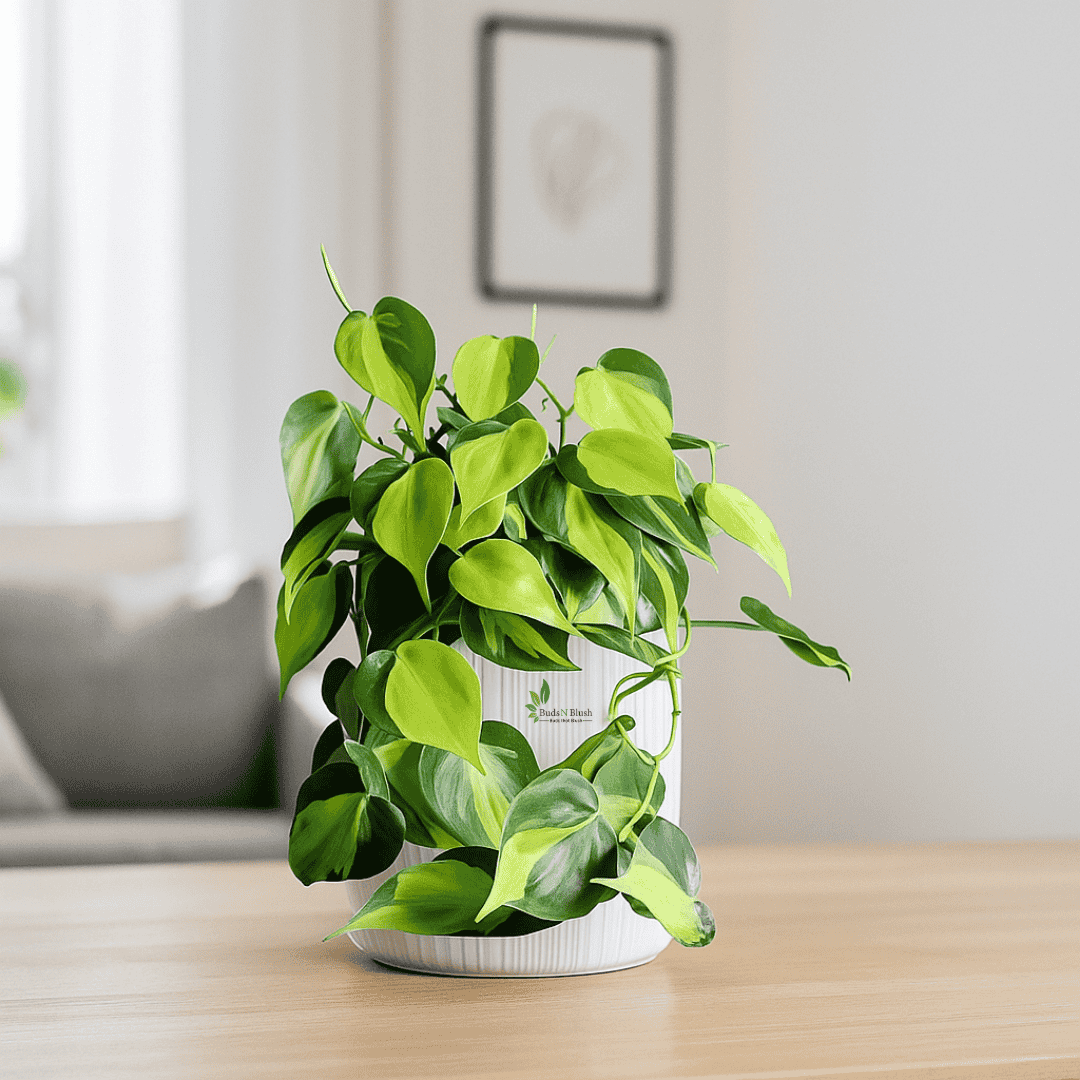
basil pothos plant

basil pothos plant Oxycodium Brasil Pothos

Sale price$22.87 Regular price$25.41
Save 10%

Pay in installments of $6.35 with ShopPay, AfterPay and Klarna

Shipping Estimate
USA
  • USA
  • CAN

Ships within 48 hours · Estimated delivery Sep 10 - Sep 15

Promo Codes Available:

For Your Every Summer RSVP, with Code: SUMMER15

Description

basil pothos plant Oxycodium Brasil PothosOxycardium Brasil Pothos Vibrant Variegation with Tropical Energy Oxycardium Brasil Pothos (Philodendron hederaceum var. oxycardium Brasil) is a stunning tropical vine recognized for its vivid green leaves streaked with golden yellow variegation. Its playful, heart shaped foliage and easy growing nature make it a perfect choice for brightening shelves, hanging baskets, or climbing displays. This plant combines the charm of classic pothos with a bold,

✅ Oxycardium Brasil Pothos – Vibrant Variegation with Tropical Energy

Oxycardium Brasil Pothos (Philodendron hederaceum var. oxycardium ‘Brasil’) is a stunning tropical vine recognized for its vivid green leaves streaked with golden-yellow variegation. Its playful, heart-shaped foliage and easy-growing nature make it a perfect choice for brightening shelves, hanging baskets, or climbing displays. This plant combines the charm of classic pothos with a bold, modern flair that stands out in any setting.

✅ Origin and Natural Habitat

  • Native to Central and South American rainforests

  • Grows as a climbing vine in shaded, humid environments

  • Uses aerial roots to cling to tree trunks for support

  • Adapted to thrive in warm, indirect light conditions

✅ Perfect Placement for a Stunning Home or Office Statement

  • In hanging baskets to showcase trailing variegated vines

  • On window sills with filtered sunlight for vibrant leaf color

  • Trained on moss poles for a tall, elegant display

  • As a centerpiece in plant groupings for contrast

  • On desks or shelves for a fresh, tropical touch

✅ Care Guide – From Nurturing to Flourishing

  • Prefers bright, indirect light to maintain strong variegation

  • Water when the top 1–2 inches of soil feel dry

  • Plant in a well-draining mix with added perlite or coco coir

  • Mist occasionally or keep in moderate humidity

  • Feed every 4–6 weeks during the growing season with a balanced liquid fertilizer

  • Prune regularly to encourage bushiness and control shape

✅ Benefits of Growing Oxycardium Brasil Pothos

  • Eye-catching variegated leaves brighten any room

  • Low maintenance and beginner-friendly

  • Improves indoor air quality naturally

  • Adaptable to various growing conditions

  • Easy to propagate for gifting or expanding your collection

✅ Common Problems and How to Prevent Them

  • Loss of variegation – move to a brighter spot without direct harsh sun

  • Yellow leaves – reduce watering frequency and improve drainage

  • Leggy growth – prune and provide more light

  • Pests like aphids or spider mites – treat quickly with neem oil or insecticidal soap

Shipping Notes
  • Free Standard Shipping on $100+ Orders to the USA.
  • Except Preorder products are shipped in 48 hours.
  • Delivery to the USA:
  1. Standard Shipping : 3-10 business days
  • If time is of the essence, please consider selecting expedited delivery for faster service.
Exchange/Return Notes
  • We offer a 30-day return/exchange service after receiving.
  • Final sale items are not eligible for returns or exchanges.
  • To process your return/exchange, please contact us at [email protected]
  • Please click here for more details>>> Return & Exchange Policy
SKU: 38454160604

Discover Niche Categories That Outsell basil pothos plant

Top-Converting Item to Boost Your Average Order

4.7 ★★★★★
Based on 28 reviews
Sort
Highest Rating
Newest First
Oldest First
Product Reviews
J
Verified Purchase
J. Chin
Battle Creek, US
★★★★★ 3
good on 16-inch MacBookPro and ThinkPad but not 13-inch MacBookPro; intermittent USB 3.2 connections
UPDATE 2025-NOV - lowering to 3-stars: Found that only the 2nd USB-C from the right is truly USB 3.2 compliant. Using the same SSD and same USB-C 3.2 cable, only the 2nd port from the right connects at 10Gbps speeds for RTL9210B-chipset enclosure SSDs (and I have tested with 4 different ones). The other 2 ports on this Anker adapter are intermittent, sometimes they connect the SSD as USB 3.0 and sometimes it connects as USB 2.0, for the same SSDs. The odd thing (as possible workaround) is that if we use a USB-C to USB-A female adapter and then use a USB-A to USB-C cable to the same SSD, it now connects at USB 3.0 speed on any of the ports, but transfers only at 5Gbps throughput. Another annoying thing is, this Anker adapter, even after the firmware upgrade, still intermittently "sleeps" or "goes offline" and disconnects from the laptop (does this on both my MacBook and ThinkPad). It does automatically reconnect after a few seconds, but very annoying, and can possibly corrupt drives that are connected when it happens. ORIGINAL REVIEW - 4 stars: USB-C hub is fast, able to transfer 5+ Gbps to SSD. Video display quality is OK for 1440p (when it works). DisplayPort video worked on ThinkPad and 16-inch MacBookPro, but not on 13-inch MacBookPro; connecting to a USB-C connected monitor (video worked without this Anker adapter). USB-C cable length to host computer is long enough. Worth the $30 price I paid ... yes; it served the purpose of having a USB-C hub while still being able to use the USB-C port for DisplayPort video; overall good design.
WAS THIS REVIEW HELPFUL?YesReportShare
Reviewed in the United States on September 10, 2025
S
Verified Purchase
Sam
Port Orchard, US
★★★★★ 4
Video output does not contain power — caveats and findings for Switch users to whom this may concern
The product works with some caveats, which I initially tried to resolve with an ultimately unsuccessful firmware upgrade. (Anker was responsive via email, much appreciated.) It turns out the product was working to the best of its abilities this whole time, which I will now expound upon. I expect that perhaps another 4-5 people in the world intended to use this in the ways that I did, namely with a Nintendo Switch as the source to various output devices. If you are one of these people who are interested in reading my experience connecting this hub with a Nintendo Switch, my findings are below (after a brief primer). A Brief Primer 1. As you know, the Nintendo Switch can be coaxed to output Dp-Alt video if you can satisify a 39W+ handshake (15V, 2.6A or higher) 2. There are other adapters that will do this and output the video (with ample power) over USB-C, which are useful for powering AR glasses, portable monitors, or desktop USB-C monitors. 3. The limitation of a USB-C Dp-Alt adapter is that it does not also provide USB data ports like the Switch Dock itself, while many USB-C to HDMI dongles include USB-A ports. (But we don't want HDMI out, of course, because using USB-C we can power AR glasses or a portable monitor and send the video signal with one cable.) 4. I surmised that, by chaining a USB-C Dp Alt Adapter to this one (Anker A8340), I could have video output and three USB-C ports. Why do I want USB-C data ports? Since you are like me, you already know it is so I can connect a UAC1 DAC to output USB Audio and power thirsty headphones via a 4.4mm Pentacon balanced headphone jack. I also don't need to convince you of the merits of this versus using the Switch's built in 3.5mm headphone jack. Or say, connecting a wired controller because I don't care for input latency if I can avoid it. My Findings 1. This hub can indeed be chained to a USB-C Dp-Alt adapter and pass through a video signal while also leaving three USB 3.2 data ports for wired devices (yes!) 2. However, as other reviews kindly mention, the video signal outputted by the A8340 does not contain power of any sort. So, if you are intending to plug this into a desktop USB-C monitor which already has/doesn't need power, then everything is awesome. 3. If you are trying to power AR glasses, this won't work unless you add a second USB-C DP-Alt adapter after it, and provide power that way. If you intend to convert the video signal to HDMI or DisplayPort via a USB-C to HDMI or DP cable, these won't work because there is no power for the inline conversion. 4. If you are using a USB-C travel monitor, this will work provided you directly power the monitor via its second USB-C power (if it has one). So in summation, it's possible to get what you want, though you may find the victory pyrrhic. The perfect adapter (which I had hope this was, and may yet exist at a higher price point) basically takes a USB-C Dp-Alt adapter, adds USB-C data ports, and outputs USB-C + power to power AR glasses or a travel monitor. This device nevertheless has its uses, such as the ability to connect multiple USB-C devices to the Switch in handheld mode and charge it, too.
WAS THIS REVIEW HELPFUL?YesReportShare
Reviewed in the United States on January 30, 2025
J
Verified Purchase
Johnny Decay
Houston, US
★★★★★ 5
Simple and reliable. No Flaws.
Flawless performance so far. I use this item with my iMac, and I'm able to run a 12 channel music interface through it with no noticeable lag.
WAS THIS REVIEW HELPFUL?YesReportShare
Reviewed in the United States on February 27, 2026
A
Verified Purchase
Amazon Customer
Houston, US
★★★★★ 5
Great Shoes
Size: 10, Color: Cognac
Love these shoes super comfortable and look great. Everyone asks me where I got them.
WAS THIS REVIEW HELPFUL?YesReportShare
Reviewed in the United States on May 20, 2026
A
Verified Purchase
Amazon Customer
New York, US
★★★★★ 5
Beautiful shoe but too narrow
Size: 10 Wide, Color: Navy Grainy Leather
Too narrow
WAS THIS REVIEW HELPFUL?YesReportShare
Reviewed in the United States on May 24, 2026

recommand products