SKU: 417806773
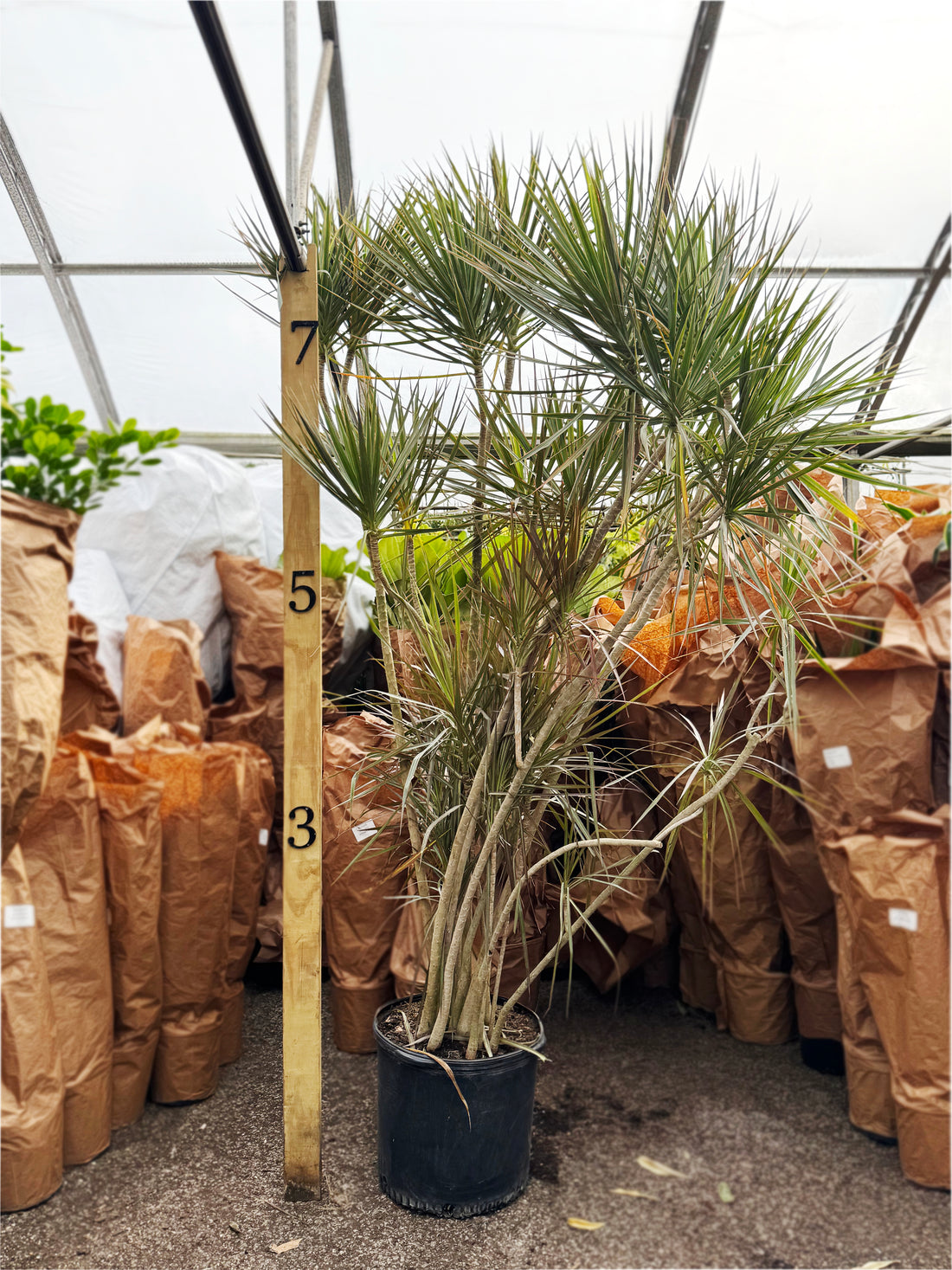
giant dracaena

giant dracaena Giant Dracaena 'Marginata' | Indoor Plants Delivered

Sale price$22.78 Regular price$25.31
Save 10%

Pay in installments of $6.33 with ShopPay, AfterPay and Klarna

Shipping Estimate
USA
  • USA
  • CAN

Ships within 48 hours · Estimated delivery Oct 20 - Oct 25

Promo Codes Available:

For Your Every Summer RSVP, with Code: SUMMER15

Description

giant dracaena Giant Dracaena 'Marginata' | Indoor Plants DeliveredIntroducing our Giant Dracaena Marginata The name Dragon Tree isn't just good branding. Those narrow, red edged leaves fanning out from bare, sculptural canes do look like something that belongs in a more dramatic story than your living room. Fortunately, she's happy to relocate. This Dracaena Marginata is already the version of herself that takes years to achieve tall, branched, with the kind of architectural presence that makes a room look

Introducing our Giant Dracaena Marginata

The name Dragon Tree isn't just good branding. Those narrow, red-edged leaves fanning out from bare, sculptural canes do look like something that belongs in a more dramatic story than your living room. Fortunately, she's happy to relocate.

This Dracaena Marginata is already the version of herself that takes years to achieve - tall, branched, with the kind of architectural presence that makes a room look deliberately designed. Native to Madagascar, she's one of the most distinctive Dracaena types available as a houseplant, and at this size, one of the most impressive. She's low-maintenance by nature, tolerant of imperfect conditions, and unbothered by the occasional missed watering.

She is not pet-friendly, so a spot out of reach of curious animals is worth planning for. But if your space works for her, she'll work hard for it.

One plant. One home.

There's one of her. Book a live video call to meet her before someone else does - you say hello, she ships exactly as you saw her.

How much light does a Dracaena Marginata need?

Dracaena Marginata thrives in medium to bright indirect light, where her red-edged leaves show their strongest color. She tolerates lower light conditions, though her canes may stretch and growth slows considerably in dim spots. Direct sun through glass can scorch her leaves, so filtered light or a position set back from a bright window suits her well.

How often should you water a Dracaena Marginata?

Dracaena Marginata should be watered when the top half of the soil has dried out, then watered thoroughly and allowed to drain completely. She's drought-tolerant and strongly dislikes sitting in wet soil - overwatering is the most common way to lose a Dragon Tree. In winter, let the soil dry even further between waterings. If your tap water is heavily fluoridated, filtered or rain water will help prevent brown leaf tips over time.

What fertilizer does a Dracaena Marginata need?

Dracaena Marginata does best with a balanced liquid fertilizer at half strength, applied every four to six weeks during spring and summer. She's a light feeder - too much fertilizer contributes to salt buildup and the leaf tip browning that Dracaena types are prone to. Feeding should stop completely in autumn and winter when her growth naturally slows.

What temperature does a Dracaena Marginata like?

Dracaena Marginata is most comfortable between 65-80°F (18-27°C) and handles typical indoor conditions well. Cold drafts and sudden temperature swings can cause leaf drop, so she's best kept away from exterior doors and air conditioning vents. She is not frost-tolerant and should always be kept indoors in cooler climates.

Does a Dracaena Marginata like humidity?

Dracaena Marginata tolerates average indoor humidity but performs better at moderate levels of around 50% or above. In dry air, brown leaf tips are her way of registering a complaint. A pebble tray or occasional misting helps in particularly dry rooms, especially during winter when indoor heating reduces humidity significantly.

How big does a Dracaena Marginata get indoors?

Indoors, Dracaena Marginata typically reaches 5-6 feet tall, with older specimens in good conditions growing taller over time. In her native Madagascar she develops into a small tree of up to 20 feet, but as a houseplant she stays well within manageable proportions. This particular Dragon Tree is already well into the upper range of that indoor height.

How fast does a Dracaena Marginata grow?

Dracaena Marginata is a slow to moderate grower indoors, gradually extending her canes and developing more branching over several years under good light. Growth slows further in lower light conditions, producing a more open, sparse appearance over time. A mature specimen like this one represents years of steady development that most buyers would otherwise be waiting for.

Is a Dracaena Marginata pet-friendly?

Dracaena Marginata is not pet-friendly and is listed as toxic to both cats and dogs by the ASPCA. In cats, ingestion can cause vomiting, drooling, dilated pupils, and lethargy. In dogs, symptoms include vomiting, diarrhea, drooling, and weakness. She's best placed in a room or on a surface that pets cannot access.

Is a Dracaena Marginata toxic to cats?

Dracaena Marginata is toxic to cats and is listed as such by the ASPCA. If a cat ingests any part of the plant, symptoms can include vomiting, drooling, dilated pupils, depression, and loss of appetite. Any suspected ingestion should be followed up with a call to your vet.

Is a Dracaena Marginata toxic to dogs?

Dracaena Marginata is toxic to dogs, with ingestion causing symptoms including vomiting (sometimes with blood), diarrhea, drooling, weakness, and loss of appetite. Dogs prone to chewing houseplants should be kept well away from her, and a vet should be contacted if ingestion occurs.


Shipping Notes
  • Free Standard Shipping on $100+ Orders to the USA.
  • Except Preorder products are shipped in 48 hours.
  • Delivery to the USA:
  1. Standard Shipping : 3-10 business days
  • If time is of the essence, please consider selecting expedited delivery for faster service.
Exchange/Return Notes
  • We offer a 30-day return/exchange service after receiving.
  • Final sale items are not eligible for returns or exchanges.
  • To process your return/exchange, please contact us at [email protected]
  • Please click here for more details>>> Return & Exchange Policy
SKU: 417806773

Discover Niche Categories That Outsell giant dracaena

Top-Converting Item to Boost Your Average Order

4.3 ★★★★★
Based on 26 reviews
Sort
Highest Rating
Newest First
Oldest First
Product Reviews
A
Verified Purchase
Ana Lucia Gonzalez
Dallas, US
★★★★★ 5
UGREEN
Very useful and compact USB-C hub. It easily expands connectivity with HDMI, USB ports, and fast charging support. The 4K HDMI output works well for presentations and streaming, and the 100W power delivery keeps devices charged without issues. Build quality feels solid, and it’s perfect for travel or daily use. Great value for the price.
WAS THIS REVIEW HELPFUL?YesReportShare
Reviewed in the United States on April 11, 2026
C
Verified Purchase
ChrisJE
Lexington, US
★★★★★ 5
Compact and useful.
It's small and light enough to fit in my bag easily. My computer uses a USB-c charger, and there's only one port, but I was able to use it for ethernet, and pass the charging through the same port. I've had issues with my computer not recognizing charging from some sources before, so this was great.
WAS THIS REVIEW HELPFUL?YesReportShare
Reviewed in the United States on May 28, 2026
Y
Verified Purchase
Yolando G.
New York, US
★★★★★ 5
Good choice
I like the design it looks sturdy. Te Number or ports is very useful
WAS THIS REVIEW HELPFUL?YesReportShare
Reviewed in the United States on June 11, 2026
A
Verified Purchase
Aaron
San Leandro, US
★★★★★ 5
Great 10gbps USB-C Hub, worked with Anker support through compat issues with PD4 iteration 1
Original Review (updates below): ----- The moment I noticed this thing on Amazon, I bought it and it literally just arrived. Finally, 4K60 over just USB-C with other ports (including making up to 10Gbps available to them) for a reasonable price. Unfortunately, the first two things I've done with it were both disappointing. I'll cut to the chase, the power delivery pass through isn't working with one of their own chargers. The first device I tried connecting this with is my Anker PD4 with one USB-C cable as the only thing plugged into it so I can test the truly up to 100W (-15 for its own power) claims. I've tried connecting it with Apple's 2m USB-C charge cable (100w capable) and an equivalent CableMatters cable that also supports 100W. When plugged directly into my laptop, both of these cables immediately start charging it and show up as 100W power sources. When this Anker hub is plugged in and either of them is connected to the power delivery port on the side of it, the laptop does not charge (laptop is a 16" Macbook Pro, I've tried multiple ports just for the heck of it). My second complaint is that when absolutely nothing is plugged into it, it becomes fairly warm to the touch. Why, when it's doing nothing, is it hot? I'm clearly not running data or even power through it so I have low hopes for it under load. The fact that it doesn't work in exactly the scenario they want it to most (a MacBook Pro with one of their own chargers) seems like a pretty big fail. I've got lots of USB-C things though so I thought I'd grab a couple and try those. Using an Apple 96W USB-C charger, the device does pass through power delivery properly. It shows up as providing 79W to the laptop (siphoning off 17W in this instance). I also have a 56W Aukey charger that splits power between a USB-A port and a USB-C port that can provide 45W of power delivery. When plugged into that charger it does appear to work as well and appears in macOS as a 30W power source. Maybe the problem is the Anker PD4? But it works fine providing power to the laptop directly. Would love to hear from Anker about these two products working together and what I should actually expect. Having it be unreliable for power delivery isn't great, but power and heat aside (it is getting a little bit warmer now that it's providing power from the Apple power adapter, but still definitely holdable), the hardware looks and feels good and the cable feels durable. Worth also noting that there's a white LED ring on the side of it that appears to be always on when it's plugged in. Don't know why it needs an LED. ----- Update, June 22, 2020: I've done some more testing and Anker has reached out to me to investigate what might be the issue. I can say that the hub works as I would expect from a quick test with my iPad Pro 11" with the above functioning chargers. It was able to pass through power with the 96W Apple Charger on the other end to both the iPad port as well as a Magic Keyboard port. The ethernet adapter showed up in iOS settings and an external drive was functional. When connected via the Magic Keyboard, which is a power only connection, as expected it provided only power. Still no power passthrough of any kind when connected to the PD4. ----- Update July 1, 2020: I've written back and forth with Anker and they've sent me a replacement hub. It also doesn't work with the PD4. I've tried multiple USB-C cables but they have also shipped a cable to test with it. For now I'm increasing the review from 2 to 3 stars because I am more and more suspicious about the PD4 and less about this hub. They claim that they have tested the setup I have separately without issue, and I've sent video showing the problems I've encountered, so the troubleshooting is ongoing. Have had a chance to use Ethernet on it without issue. Still need to try to test out its throughput when trying to use a 10Gbps USB-C enclosure and a 4K60 monitor at the same time (+ ethernet). More updates to come. ----- Update July 10, 2020: I've continued to talk with Anker support and they shipped me a replacement PD4. The one I had was labeled as "Iteration 1" on its barcode, the one I got back was labeled "Iteration 2". I tested it out and it works perfectly with this hub, passing through the correct amount of power to multiple Macbook Pros and fast charging an iPad Pro. Clearly the fault doesn't lie with this hub and is instead an issue with the first iteration PD4, so I'm updating my review accordingly. Working with Anker support was great. I've also been able to test USB-C throughput (without driving a display as well so far) and it properly utilizes 10Gbps. I've attached some extra images showing various devices connected to it (keyboard dongle, SD card, USB-C 10Gbps external SSD enclosure, USB sound card, ethernet).
WAS THIS REVIEW HELPFUL?YesReportShare
Reviewed in the United States on June 19, 2020
J
Verified Purchase
Juan Muratalla
Whiting, US
★★★★★ 5
Excellent Quality and Reliable Performance from Anker’s 8-in-1 USB-C Hub
I’m really impressed with this Anker USB-C Hub with Ethernet (8-in-1). The build quality feels premium, setup was completely plug-and-play, and all ports work flawlessly with my laptop. The Ethernet connection is stable and fast, which has been perfect for work calls and large file transfers. I also love how compact and portable it is while still offering plenty of connectivity options. HDMI output looks great, USB ports transfer quickly, and the SD card reader is very convenient for photo and video work. Anker continues to deliver reliable products, and this hub is no exception. Highly recommended if you need a dependable all-in-one USB-C hub for productivity or travel.
WAS THIS REVIEW HELPFUL?YesReportShare
Reviewed in the United States on May 20, 2026

recommand products