Pay in installments of $6.16 with
 ,
,
 and
and

Shipping Estimate
USA
- USA
- CAN
- USA
- CAN
Ships within 48 hours · Estimated delivery Oct 20 - Oct 25
 Promo Codes Available:
For Your Every Summer RSVP, with Code: SUMMER15
Description
mother of thousands succulents Mother of Thousands Plant 'Kalanchoe laetivirens' 4" PotIntroducing the mother of thousands plants, scientifically known as Kalanchoe laetivirens, is a fascinating succulent from the Kalanchoe genus that is native to Madagascar. It has several other common names, such as Alligator Plant, Mexican Hat Plant, and Devil's Backbone. However, the true Mother of Thousands is Kalanchoe daigremontiana, which can be identified by the distinctive purplish brown markings on the undersides of its leaves. The mother of
Introducing the mother of thousands plants, scientifically known as Kalanchoe laetivirens, is a fascinating succulent from the Kalanchoe genus that is native to Madagascar. It has several other common names, such as Alligator Plant, Mexican Hat Plant, and Devil's Backbone. However, the true Mother of Thousands is Kalanchoe daigremontiana, which can be identified by the distinctive purplish-brown markings on the undersides of its leaves.
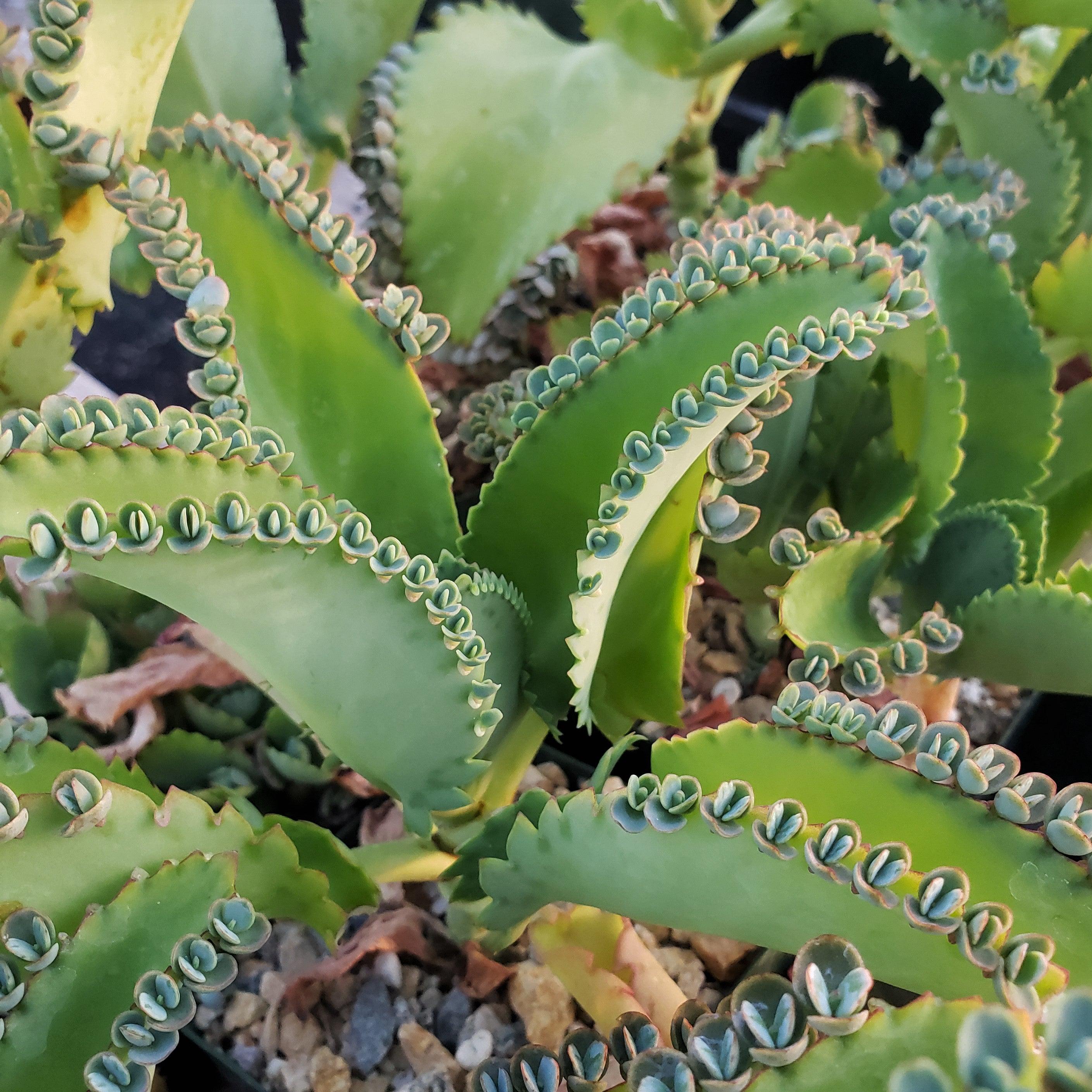
The mother of thousands gets its name from its unique ability to produce a lot of plantlets along the edges of its leaves. These plantlets, also known as "baby plantlets" or "pups," are miniature versions of the mother plant and can easily drop off and take root in the surrounding soil, giving rise to new plants.
Most people confuse the Kalanchoe plants because of their similarities, but the name "mother of thousands" (Kalanchoe laetivirens) refers to the tiny plantlets that develop along the edges of its leaves, whereas "mother of millions" (Kalanchoe delagoensis) produces plantlets on the tips of its leaves. There's even a hybrid called Kalanchoe houghtonii that combines the features of both plants. It's like a wonderful Kalanchoe family reunion!
The leaves of this monocarpic mother-of-thousand plant are thick and fleshy, with an attractive grayish-green color. They are often adorned with small, reddish-brown spots or markings, adding to the Kalanchoe plant's visual appeal. The mother-of-thousand succulent has an upright growth habit and can reach a height of up to 3 feet, making it a striking addition to any indoor or outdoor space.
The flowers of the mother of thousands plants are small, tubular, and bell-shaped. They are typically pinkish-grey in color and can appear in clusters on tall stalks. The flowering season for this mother-of-thousand plant is usually in late winter or early spring, and the flowers can last for several weeks. When grown indoors, it rarely blooms.
Mothers of thousands are considered to be mildly toxic to pets and humans if ingested. It contains compounds that can cause gastrointestinal discomfort. It's always best to keep it out of reach of curious pets and children.
You can propagate your alligator plant through its small plantlets. Pick two or three plantlets from the leaves and propagate them properly. The plant does not require any pruning other than the removal of dead stalks and dropped plantlets. It's like a little plant factory!
It's worth noting that while the Kalanchoe daigremontiana mother-of-thousand plant can be a delightful addition to your plant collection, it can also be considered invasive in some regions. The plantlets it produces can spread easily and take over if not properly managed. So, if you decide to grow this plant, it's important to be mindful of its potential to become invasive and take appropriate measures to control its growth.
When and How to Water Your Mother of Thousands Plant
Just like its closely related Kalanchoe plant, the mother of millions, this succulent is also adapted to arid conditions and is drought tolerant. Mother of thousands needs water at room temperature. Extreme cold or freezing temperatures or extremely hot water damages the roots of your Kalanchoe laetivirens.
To keep your mother of thousands happy, allow the soil to dry out completely between waterings. Stick your finger about an inch into the soil, and if it feels dry, then it's time to give it a good drink. Remember to use well-drained soil and a pot with good drainage and holes to prevent water from pooling and causing root rot.
During the cooler months or when the plant is in a dormant phase, you can reduce the frequency of watering even further. These succulents are built to store water in their leaves, so they can handle dry spells better than excessive moisture.
Light Requirements - Where to Place Your Mother of Thousands Plant
The mother of thousands loves bright, indirect sunlight. It thrives in a spot where it can soak up plenty of light throughout 4-6 hours of the day. Find a sunny east-facing window or a well-lit area in your home for your Kalanchoe mother-of-thousand succulent to bask in the sunshine.
However, be careful not to expose the mother of thousands to direct sunlight for extended periods, as it can scorch its leaves. So, a balance of bright, indirect light is ideal for this plant's growth and health.
Remember, finding the right lighting conditions will help your mother-of-thousand plant flourish and showcase its unique characteristics!
Optimal Soil & Fertilizers
When it comes to the soil and fertilizer needs of the mother-of-thousand plant, here's what you need to know!
For soil, the mother of thousands prefers well-draining potting soil that allows excess water to flow away. Instead of using the peat-moss-based soil, make or buy a well-draining potting mix, or ideally use our specialized succulent potting mix that contains 5 natural substrates and mycorrhizae to promote the development of a strong root system that helps your succulent to thrive.
As for fertilizing, the mother of thousands doesn't require frequent feeding. You can use a balanced, natural NPK fertilizer with an equal ratio of about (5-10-5) during the growing season, which is typically spring.
Remember, it's always best to under-fertilize rather than over-fertilize succulents like the mother of thousands. Too much fertilizer can cause salt buildup and harm the plant. So, a light feeding every few months should be sufficient to keep your plant happy and thriving!
Hardiness Zone & More
Typically grown in hot, arid desert regions, the Mother of Thousands plants thrive indoors in warm, dry surroundings. Only in hotter climates, such as Florida and Hawaii, can the slow-growing mother of thousands be grown outside.
If you live in USDA regions 9 to 11, you can also grow this particular plant outdoors year-round, but they are not frost-tolerant, so you should plant them indoors or put them in a pot and move them indoors during the winter if you live outside of these regions.
Keep your Kalanchoe laetivirens away from cold, drafty windows and air vents if you are growing it indoors in a cold climate.
As for humidity, this Kalanchoe mother-of-thousands succulent grows wherever it can tolerate a range of levels, but it's important to provide good air circulation.
While household humidity is generally good enough, these mother-of-thousand succulents will do even better with some extra moisture in the air. Set up a humidifier nearby or grow them in naturally humid rooms like your bathroom or kitchen.
The Bottom Line
Give it a try and enjoy the beauty and intrigue this unique Kalanchoe laetivirens mother of thousands brings to your home or garden! You can find out more information about the difference between the Mothers of Thousands and the Mothers of Millions right here on Planet Desert.
Shipping Notes
- Free Standard Shipping on $100+ Orders to the USA.
- Except Preorder products are shipped in 48 hours.
- Delivery to the USA:
- Standard Shipping : 3-10 business days
- If time is of the essence, please consider selecting expedited delivery for faster service.
Exchange/Return Notes
- We offer a 30-day return/exchange service after receiving.
- Final sale items are not eligible for returns or exchanges.
- To process your return/exchange, please contact us at [email protected]
- Please click here for more details>>> Return & Exchange Policy