SKU: 4432787350
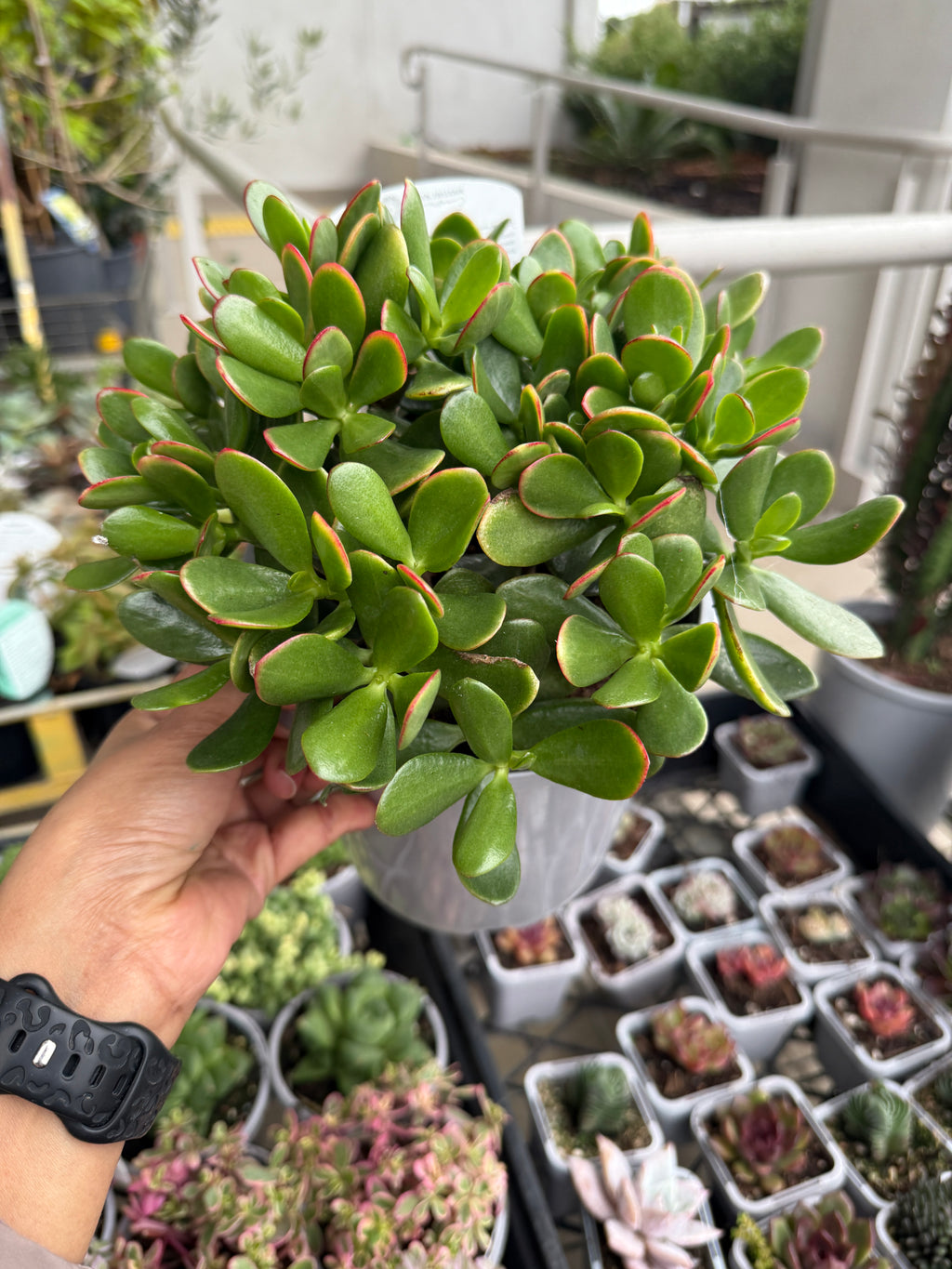
images of a jade plant

images of a jade plant Jade Plant (Crassula ovata) Care Guide

Sale price$20.50 Regular price$22.78
Save 10%

Pay in installments of $5.70 with ShopPay, AfterPay and Klarna

Shipping Estimate
USA
  • USA
  • CAN

Ships within 48 hours · Estimated delivery Sep 14 - Sep 19

Promo Codes Available:

For Your Every Summer RSVP, with Code: SUMMER15

Description

images of a jade plant Jade Plant (Crassula ovata) Care GuideCommon Name: Jade Plant, Money Plant, Lucky PlantOrigin: Native to South Africa and Mozambique Description: The Jade Plant is a classic succulent houseplant known for its thick, glossy, oval shaped leaves and strong, woody stems that give it a tree like appearance as it matures. Often considered a symbol of luck, prosperity, and friendship, it's a favourite in homes, offices, and gifts for new beginnings. Jade Plants are slow growers but incredibly

Common Name: Jade Plant, Money Plant, Lucky Plant
Origin: Native to South Africa and Mozambique

Description:

The Jade Plant is a classic succulent houseplant known for its thick, glossy, oval-shaped leaves and strong, woody stems that give it a tree-like appearance as it matures. Often considered a symbol of luck, prosperity, and friendship, it's a favourite in homes, offices, and gifts for new beginnings.

Jade Plants are slow growers but incredibly hardy, making them a perfect choice for beginners and seasoned plant parents alike. With the right care, they can live for decades — even becoming heirloom plants passed down through generations!

🌱 Care Tips:

Light:
Loves bright light! Place your Jade Plant near a sunny window — it thrives with at least 4–6 hours of direct or filtered sunlight daily. Outdoors, morning sun and afternoon shade work well.

Water:
Let the soil dry out completely between waterings. Water thoroughly, but make sure any excess drains out. Overwatering is the most common mistake — when in doubt, wait a few more days!

Humidity:
Jade Plants prefer dry air and are very tolerant of indoor conditions. No misting is needed.

Temperature:
Happy in average indoor temperatures between 18°C to 26°C (65°F to 80°F). Protect from frost and extreme heat.

Soil:
Use a well-draining succulent or cactus potting mix. A mix with sand or perlite is ideal to prevent root rot.

Fertiliser:
Feed once a month during the growing season (spring and summer) with a diluted succulent or general-purpose liquid fertiliser. No need to feed in winter.

Pet Friendly:
❌ No. Jade Plants are toxic if ingested by pets, so it's best to keep them out of reach of curious cats or dogs.

Shipping Notes
  • Free Standard Shipping on $100+ Orders to the USA.
  • Except Preorder products are shipped in 48 hours.
  • Delivery to the USA:
  1. Standard Shipping : 3-10 business days
  • If time is of the essence, please consider selecting expedited delivery for faster service.
Exchange/Return Notes
  • We offer a 30-day return/exchange service after receiving.
  • Final sale items are not eligible for returns or exchanges.
  • To process your return/exchange, please contact us at [email protected]
  • Please click here for more details>>> Return & Exchange Policy
SKU: 4432787350

Discover Niche Categories That Outsell images of a jade plant

Top-Converting Item to Boost Your Average Order

4.6 ★★★★★
Based on 12 reviews
Sort
Highest Rating
Newest First
Oldest First
Product Reviews
L
Liis
Belleville, US
★★★★★ 3
requirement: scan codes & down load proprietary app to set up & use all the functions of the unit
SPECS The printer weighs 39.19 pounds.  Overall it is 22.625 x 17.5 x 12.03125 inches.  The output tray extender sticks out 5.875 inches from the unit.  The usable power cord length is 59.5 inches. The unit can use legal [B00006GNXZ], letter [B0B57CKBCT], or ledger [B0017LR3M4] size paper. The control panel tilts up and is a color touch screen. The display is 2.125 x 1.625 inches.  The unit has two sided coping, scanning, and printing. There is a document feeder on the top.  The home screen has menu, copy, scan, trays, supplies, jobs, and help as the main functions.  Firmware updates can be set to automatic, notify, or disabled.  The printer does not come with a user manual.  OVERVIEW The unit comes wrapped in a plastic bag that has handles on each side. I was able to easily lift the printer up myself using the handles and took it to the desk.  The printer is missing some key features that do not make the printer cost effective. There is only one print tray. A fold out rear tray vertical tray is not even there.  Having to constantly change paper size is an extreme inconvenience. There is no USB port to be able to print from or scan documents to a USB hard drive or directly from a camera, which is a disadvantage.    In addition, to utilize all the features a code needs to be scanned and or the H P app needs to be used.  I did not like having to scan a code to set up and connect to wireless connection as well as using any of the scan features of email, network folder, computer, and share point, which makes the scan option useless. I had to download the HP app to set up the printer. When I was done I deleted the app. I do not want numerous apps on my devices.  I found not having a manual for the unit to be a disadvantage.  This is not a user friendly printer with all the code and app requirements.  Using the web address on my laptop and phone, just gave me a link to the play store to download the app again, which I did not want.  The size of the display screen is small. At times I had to touch the menu button more than one time to get it to continue to the next screen.   The unit functioned well printing and scanning. I was able to print from the computer via wireless connection without using the app. The copy function does not require the app or show a code to scan to be able to continue. The document feeder allows for quick copying and scanning, which is an advantage. The rollers did grab a one sheet copy job crooked and the copy was askew on the page which is a disadvantage.  On best, the copy did not come out any better than normal.  The copy images were a poor representation of the original. The copy images were more pix elated making them not as complete and crisp. In addition, the single color grey images were very pale and could barely be seen. I did not sign up for HP instant ink, compatibility. I also disabled firmware updates.
WAS THIS REVIEW HELPFUL?YesReportShare
Reviewed in the United States on May 25, 2026
M
Verified Purchase
Marc A. Diaz
Bozeman, US
★★★★★ 5
OEM INK
Style: Ink
OEM,, works Perfect
WAS THIS REVIEW HELPFUL?YesReportShare
Reviewed in the United States on May 4, 2026
M
Verified Purchase
Melissa Ann Butler
Whiting, US
★★★★★ 5
Ran out of Ink
Style: Ink
This product prints a lot of black & white, as well as color. Our business requires a lot of ink for our Epson.
WAS THIS REVIEW HELPFUL?YesReportShare
Reviewed in the United States on May 26, 2026
B
Verified Purchase
Bre
Louisville, US
★★★★★ 5
Reliable, Long-Lasting Ink for Crisp Prints!
Style: Ink
The Epson 812 XL ink works perfectly with my Epson WF-7840! The colors are vibrant, and the black is deep and sharp. Every print comes out crisp and professional looking. The XL size lasts a long time, which means fewer replacements and better value. Installation was quick and easy, and the printer recognized it immediately with no issues. I’ve been using it for documents, photos, and labels, and it performs consistently every time. A must have for anyone who wants high quality prints without frequent refills!
WAS THIS REVIEW HELPFUL?YesReportShare
Reviewed in the United States on October 15, 2025
A
Verified Purchase
Amazon Customer
Lowell, US
★★★★★ 5
Excelente producto
Style: Ink
Excelente producto y buen precio
WAS THIS REVIEW HELPFUL?YesReportShare
Reviewed in the United States on May 28, 2026

recommand products