SKU: 47988480017
mini succulent plants in bulk

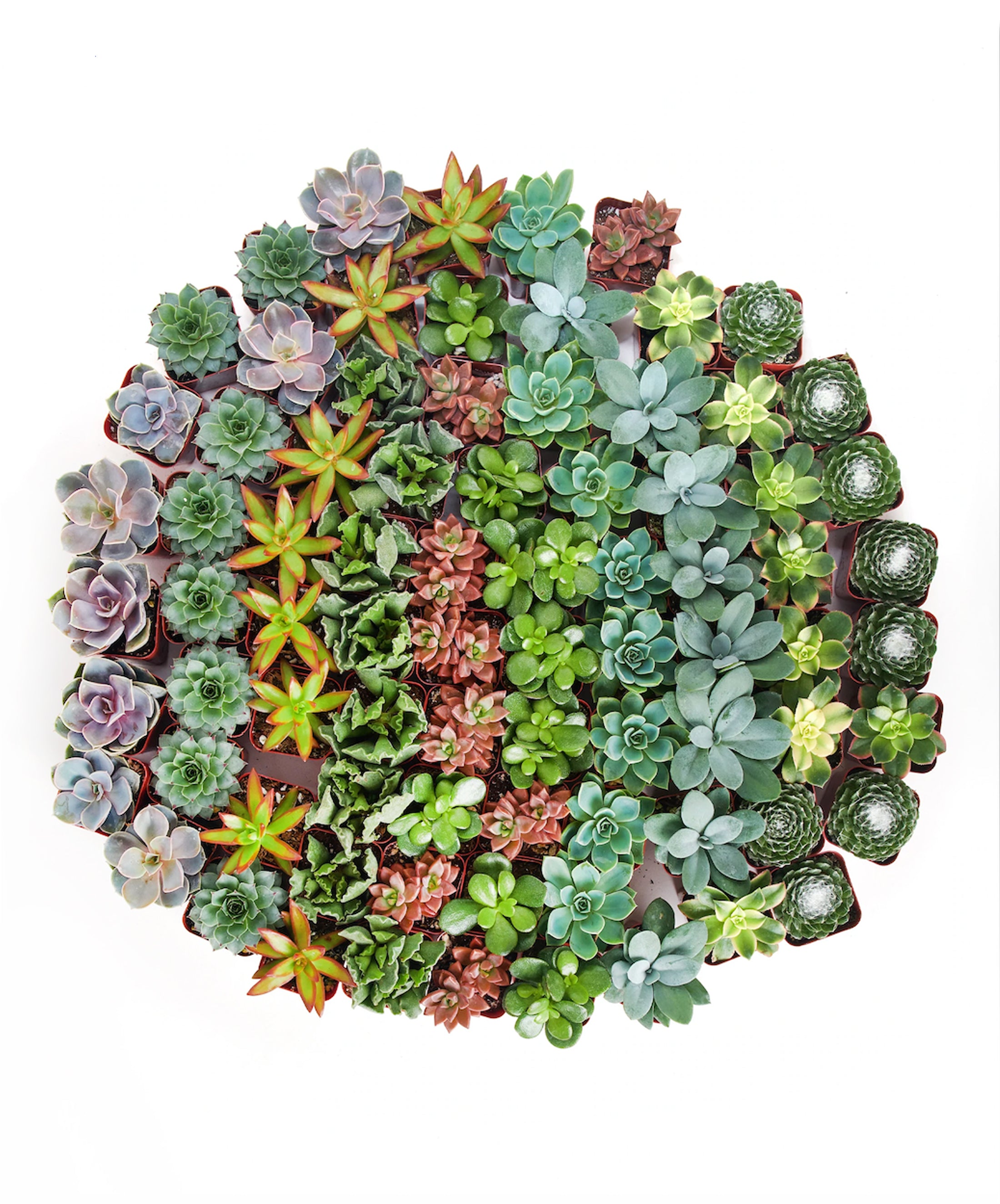
mini succulent plants in bulk 2 in. Assorted Succulent Collection (100-Pack)

Sale price$18.55 Regular price$20.61
Save 10%

Pay in installments of $5.15 with ShopPay, AfterPay and Klarna

Shipping Estimate
USA
  • USA
  • CAN

Ships within 48 hours · Estimated delivery Oct 20 - Oct 25

Promo Codes Available:

For Your Every Summer RSVP, with Code: SUMMER15

Description

mini succulent plants in bulk 2 in. Assorted Succulent Collection (100-Pack)Assorted Mini Succulents in Bulk The Assorted Collection features our mini succulent pack, a quality assortment of low maintenance mini succulent plants in perfectly sized 2 grow pots. These hardy plants bring natural elegance to any setting, whether youre using them for wedding favors, or simply adding greenery to your desk or windowsill. While the assorted collection includes some repeat species, we've designed it to offer a diverse range of

Assorted Mini Succulents in Bulk

The Assorted Collection features our mini succulent pack, a quality assortment of low-maintenance mini succulent plants in perfectly sized 2” grow pots. These hardy plants bring natural elegance to any setting, whether you’re using them for wedding favors, or simply adding greenery to your desk or windowsill. 

While the assorted collection includes some repeat species, we've designed it to offer a diverse range of succulent species with many shapes, textures, and colors. This collection provides both familiarity and excitement, making sure you have a well-rounded succulent assortment that is full of beauty.

Our nursery grows a wide variety of succulent species, carefully curated for their beauty and hardiness. Keep in mind that availability may vary from photos depending on the season, ensuring you always receive the freshest and most stunning selection.

Details

Type: Plastic Nursery Pot

Size: 2 Inch Diameter

Plant Care
Light: Succulents thrive in bright, indirect sunlight. Place them near a sunny window with filtered sunlight or in a spot with plenty of natural light. Some succulents can tolerate direct sunlight, but be cautious about intense afternoon sun, which can scorch the leaves.


Watering: Allow the soil to dry out completely between waterings. The frequency of watering depends on factors like the type of succulent, pot size, and environmental conditions. Typically, water once every 2-4 weeks, but adjust as needed. Water the soil directly and avoid getting water on the leaves, as this can lead to rot.


Soil: Use well-draining soil mix specifically formulated for succulents or cacti. You can also add perlite or coarse sand to regular potting soil to improve drainage. Ensure that the pot has drainage holes to prevent waterlogged roots.


Temperature: Succulents prefer a temperature range of 60-80°F (15-27°C). They can tolerate slightly cooler temperatures but should be protected from frost and extreme cold.


Fertilization: During the growing season (usually spring and summer), feed your succulents with a balanced, water-soluble fertilizer diluted to half strength. Fertilize sparingly, about once a month, as succulents do not require heavy feeding.


Pruning: Remove dead or damaged leaves and spent flower stalks to encourage healthy growth and appearance. Use clean, sharp scissors or pruning shears for this purpose.


Pests and Diseases: Keep an eye out for common succulent pests like mealybugs and aphids. Treat any infestations promptly with insecticidal soap or neem oil. Overwatering can lead to root rot, so ensure proper drainage to avoid this issue.


Repotting: Repot your succulents when they outgrow their containers or the soil becomes depleted of nutrients. Spring is usually the best time for repotting.
Shipping Notes
  • Free Standard Shipping on $100+ Orders to the USA.
  • Except Preorder products are shipped in 48 hours.
  • Delivery to the USA:
  1. Standard Shipping : 3-10 business days
  • If time is of the essence, please consider selecting expedited delivery for faster service.
Exchange/Return Notes
  • We offer a 30-day return/exchange service after receiving.
  • Final sale items are not eligible for returns or exchanges.
  • To process your return/exchange, please contact us at [email protected]
  • Please click here for more details>>> Return & Exchange Policy
SKU: 47988480017

Discover Niche Categories That Outsell mini succulent plants in bulk

Top-Converting Item to Boost Your Average Order

4.9 ★★★★★
Based on 21 reviews
Sort
Highest Rating
Newest First
Oldest First
Product Reviews
Y
Verified Purchase
YouNeedMorePeople
Boise, US
★★★★★ 3
Too compromised for the price
HDR: Windows 10/11 report 1015nits peak brightness which is its real peak luminance. Quantum HDR2000 is a fabricated specification unique to Samsung. In real content (games/movies) it is no where near capable of 2000nits and instead barely produces over 800nits peak brightness for 10% highlight. The 2000nit figure comes from best case scenario - 10% test slide used by calibrators and reviewers to measure luminance. The monitor detects such a scenario and temporarily boosts brightness so that they can publish impressive brightness figures. Yes this is essentially cheating and Samsung has been called out recently for the same "trick" on their TV's. Samsung could have opted to have the monitors HDR performance certified by VESA but chose not to in favor of their own marketing favorable terminology. In reality the monitor is some where between VESA DisplayHDR600 and DisplayHDR1000 due to a combination of Samsung severely limiting brightness for the sake of preventing blooming alongside possibly preventing the backlight from being overdriven to manage thermals. Scanlines: The monitor displays horizontal scanlines at its maximum 4K 240hz refresh rate. This is a limitation of the display driver or scaler and has been present on all 1440p+ 240hz Samsung monitors dating back to the original G7. This is not a software/firmware issue as the original G7 and Neo G9 still suffer from it to this day after over a dozen firmware updates between the two. Dropping down to 120hz rids you of scanlines but then you have to ask, why did I buy a 240hz display? A compromise is using a custom resolution/refresh rate of 165hz but then you have to ask yourself, why didn't I save $200 and purchase the Neo G7 instead? Anything above 165hz and the scanlines get very noticeable. Anti Reflective Coating: The Neo G8 uses a completely different AR coating compared to the Neo G7. Its extremely thick/hazy and has a sparkly sheen to it and as a result is a huge detriment to clarity. HDMI 2.1: As of right now the monitors HDMI 2.1 ports are either broken due to a firmware mishap or not full bandwidth HDMI 2.1 ports. 4K 120hz is the max possible refresh rate using an HDMI 2.1 capable GPU and even that can be finicky at times. DSC should make 4K 240hz possible just like the Displayport 1.4 port but its just not working correctly at the moment. Curve: The curve is non uniform and extremely aggressive at the center while flattening at the sides. It results in a very odd almost crease like presentation dead center and takes quite a bit of adjustment. I understand the 1000R curve is done to compensate for the VA panels poor viewing angles but its just too much for desktop/productivity and warps everything you're looking at. 1800R or 1500R max would be ideal although I wish Samsung would ditch this obsession with curves and just give us flat panels. Neo G7 vs Neo G8: So why buy the Neo G8? Well there really is no reason unless you enjoy horizontal scanlines at 240hz. The Neo G7 has the same HDR brightness (1015nits reported to Windows), gets you 165hz scanline free without having to fiddle with custom resolutions, uses a more traditional matte anti glare coating and as of writing this review appears to have the same HDMI 2.1 limitation.
WAS THIS REVIEW HELPFUL?YesReportShare
Reviewed in the United States on June 30, 2022
S
Verified Purchase
Steve B.
Dallas, US
★★★★★ 5
WHAT YOU NEED TO KNOW! And why people have issues with this Monitor, It's their fault.
Got mine today! Great packaging, no dead pixels! LOOKS AWESOME! This is what you need to know before buying this Monitor! Please read SO YOU KNOW! It will also help you with any other monitor, video card, or cables. This is a 4K 240Hz Monitor! There are 3 different versions of this Monitor in the user manual, and Samsung has never been great on literature to know what you need to push this monitor to its full potential. I read the 4-star reviews for this Monitor first. In there, I read about a guy who was getting tearing and replaced the DP (Display Port) cable to a 16K cable. I want to explain this to educate people and help. The base refresh rate for any resolution is 60Hz, so let's do the math backwards to fully understand. 16K at 60Hz = 8K at 120Hz = 4K at 240Hz = 2K at 480Hz Since not only Samsung, but every corporation tries to save money, the other 2 monitors in the user's guide doesn't require a 16K cable. Since I'm sure they all have the same packaging, there's no reason to believe the supplied DP (Display Port) cable is 16K. In Fact, I can see nothing on the cable that says so. However, I spent $6 for a 10' 16k cable delivered with the Monitor. This is the most important thing to know once you have your 16K DP (Display Port) cable. To push 16K your device (Video Card) has to have DP (Display Port) 2.1 AMD was on top of the ball on this and uses DP (Display Port) 2.1 for its RX 7000 series and up. I use a RX 7900XTX, so I'm covered. Nvidia used DP (Display Port) 1.4 on their RTX 4000 series cards to save money and charge you way too much! Nvidia implemented DP 2.1 on their RTX 5000 series cards. I don't know for INTEL cards; I would search the specs. I've read reviews from RTX 4000 people, and I can only assume that they don't understand that Nvidia DLSS has to be a factor, they aren't aware that their video cards can't push a true 4K at 240Hz. The last thing to add is the Dimensions that Samsung Provides! Yes, its 27" tall! But it's a telescopic stand, I only have 20.5" clearance, and it fits nice. I think it could go down to 19". Power Color Hellhound RX 7900 XTX AMD 9950 X3D Asus Rog Strix X870E-E Gaming Wi-Fi 32GB G.Skill Royal Neo at 8000Mhz Nothing else is important for this post
WAS THIS REVIEW HELPFUL?YesReportShare
Reviewed in the United States on July 15, 2025
A
Verified Purchase
Amazon Customer
Lexington, US
★★★★★ 5
Music and video editing. This thing works.
Size: 49-1, Size: 49-1
49" curved. It's a good monitor. Confirmed resolution is 5K. I had never heard of ZZA before but the reviews were good and the price was decent. Honestly, I did not expect too much. Well, this monitor is well packaged, easy to handle and use, built nicely. The screen has a matte low-reflection surface and looks smooth. Tested with Ableton, DaVinci, WOW, Zoom, and a few others. Instantly improved my workflow by displaying longer timelines in music and video. Games like WOW are very immersive, but it takes a few hours to get used to. Once you get into it, it might be had to go back to a normal flatscreen. Overall, it's worth the money. ZZA is evidently taking this very seriously with a decent design and a solid feel. Would recommend.
WAS THIS REVIEW HELPFUL?YesReportShare
Reviewed in the United States on February 2, 2026
T
Verified Purchase
Trisha Hagensick
Phoenix, US
★★★★★ 5
Great monitor
Was looking for an extra monitor to use for when working from home. The picture quality is perfect for just normal work use. The ports are easy to access for plugging in cords. Was easy to set up with the docking station as well. Worth the money.
WAS THIS REVIEW HELPFUL?YesReportShare
Reviewed in the United States on April 28, 2026
H
Verified Purchase
Hudson Rechsteiner
Bozeman, US
★★★★★ 5
Great Screen
Size: 27
For the price, you can not beat the picture quality. It is great for me and is a perfect size for warzone.
WAS THIS REVIEW HELPFUL?YesReportShare
Reviewed in the United States on May 24, 2026

recommand products