Pay in installments of $5.59 with
 ,
,
 and
and

Shipping Estimate
USA
- USA
- CAN
- USA
- CAN
Ships within 48 hours · Estimated delivery Oct 11 - Oct 16
 Promo Codes Available:
For Your Every Summer RSVP, with Code: SUMMER15
Description
companion plants for pineapple guava Pineapple Guava Phoenix, AZ | Feijoa sellowianaThe Best Edible Fruiting Shrub for Phoenix & Scottsdale Yards Pineapple Guava (Feijoa sellowiana) is the top dual purpose shrub for Arizona landscapes delivering both stunning ornamental beauty and delicious tropical tasting fruit. This evergreen grows 1015 feet tall with silvery green foliage, showy white and red flowers in spring, and egg sized green fruit with a pineapple mint flavor in fall. Hardy, drought adapted once established, and virtually
The Best Edible Fruiting Shrub for Phoenix & Scottsdale Yards
Pineapple Guava (Feijoa sellowiana) is the top dual-purpose shrub for Arizona landscapes — delivering both stunning ornamental beauty and delicious tropical-tasting fruit. This evergreen grows 10–15 feet tall with silvery-green foliage, showy white-and-red flowers in spring, and egg-sized green fruit with a pineapple-mint flavor in fall. Hardy, drought-adapted once established, and virtually pest-free. Whether you're planting a fruiting hedge in Scottsdale, a specimen tree in Chandler, or an edible screen along your Gilbert property line — Pineapple Guava gets the job done.
Pineapple Guava Plant Details
| Attribute | Detail |
|---|---|
| Scientific Name | Feijoa sellowiana (syn. Acca sellowiana) |
| Common Names | Pineapple Guava, Feijoa, Guavasteen |
| Mature Height | 10–15 feet |
| Mature Width | 10–15 feet |
| Growth Rate | Moderate — 1–2 feet per year in Phoenix |
| Sun | Full sun to partial shade. Produces best fruit in full sun. |
| Water | Low to moderate once established. Drought-adapted for a fruiting plant. |
| USDA Zones | 8–11 (Phoenix is Zone 9b–10a) |
| Soil | Well-draining. Adapts to Arizona caliche soils with light amendment. |
| Foliage | Evergreen — silvery-green oval leaves year-round |
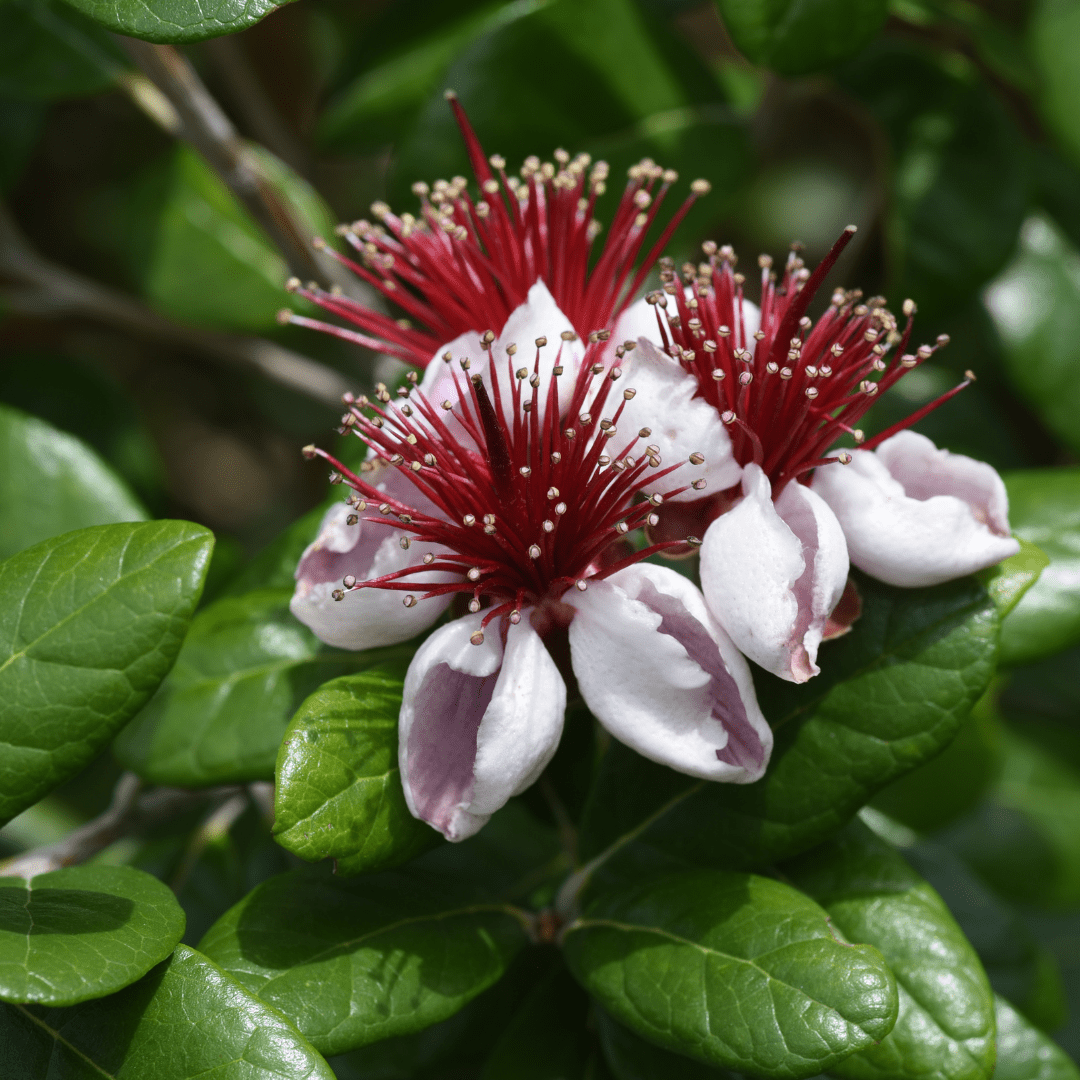
| Bloom/Fruit | White petals with red stamens (spring); green edible fruit (fall) |
Pineapple Guava Uses in Phoenix Landscapes
Edible Privacy Hedge
Pineapple Guava's dense evergreen canopy makes it one of the best edible hedge plants for Phoenix. Plant 6–8 feet apart for a continuous fruiting screen that reaches 10–15 feet. A 20-foot fence line needs 3 plants; a 40-foot run needs 5–6. The silvery foliage and showy spring blooms make this hedge beautiful even when not fruiting.
Specimen Fruit Tree
Planted as a standalone specimen, Pineapple Guava becomes a stunning small tree with a naturally rounded canopy. Its showy white-and-crimson flowers are edible themselves — sweet and crunchy, perfect for salads. The fall fruit tastes like a blend of pineapple, guava, and mint. Plant near a patio or kitchen garden for easy harvest.
Pool-Friendly Ornamental
The evergreen foliage, minimal leaf drop, and tidy growth habit make Pineapple Guava an excellent choice near pools. The silvery-green leaves catch the light beautifully, and the plant stays lush and full without excessive maintenance. Pairs well with Mediterranean Fan Palm and Pomegranate for a resort-style edible landscape.
Best Time to Plant Pineapple Guava in Phoenix
Fall (October–November) is the ideal planting window. Warm soil promotes root establishment while cooler air reduces transplant stress, giving the plant 6–8 months before summer heat. Spring (February–April) is the second-best option. Avoid summer planting — fruiting shrubs need extra care during establishment and are more vulnerable to heat stress.
How to Plant Pineapple Guava
- Dig wide, not deep — 2–3× the root ball width, same depth as the container.
- Check for caliche — break through any hardpan layer for drainage.
- Backfill with native soil mixed with 20% compost for a light nutrient boost.
- Spacing — 6–8 feet apart for hedge; 10–12 feet for standalone specimens.
- Water basin — build a 4–6 inch berm to hold water during deep soaks.
- Mulch — 3–4 inches of bark or wood chip mulch, keeping it 4 inches from the trunk.
Watering Pineapple Guava in Phoenix
First Year Watering Schedule
Weeks 1–2: Every 1–2 days, deep and slow (20–30 minutes). Month 1–2: Every 3–4 days. Month 3–6: Every 5–7 days (every 3–4 days in peak summer). After Year 1: Every 7–10 days in summer; every 2–3 weeks in winter.
Drip Irrigation
Use two 2-GPH emitters placed 12–18 inches from the trunk on opposite sides. Increase water slightly during fruit set (spring–summer) for larger, juicier fruit. Established plants are remarkably drought-adapted for a fruiting species.
How fast does Pineapple Guava grow in Phoenix? It is a moderate grower adding 1–2 feet per year. Expect fruit production within 2–3 years from a gallon-sized plant, sooner from larger specimens.
Do I need two plants for fruit? Most Pineapple Guava varieties are partially self-fertile, but planting two or more shrubs significantly increases fruit set and yield. For the best harvest, plant at least two.
Can Pineapple Guava handle full Phoenix sun? Yes, it thrives in full sun and handles reflected heat well. In extreme summer heat, afternoon shade can reduce fruit drop but is not required.
What does Pineapple Guava fruit taste like? The fruit has a unique tropical flavor combining pineapple, guava, and mint with a slightly gritty texture similar to pear. Eat it fresh, add to smoothies, or use in jams and baked goods.
You May Also Like
Pomegranate — Classic fruiting shrub with brilliant red blooms and sweet-tart fruit, thrives in Phoenix heat.
Mexican Lime — Compact citrus tree producing abundant limes year-round in Phoenix's warm climate.
Meyers Lemon — Prolific lemon tree with sweet, thin-skinned fruit perfect for Phoenix backyard orchards.
Navel Orange — The classic Arizona citrus tree delivering sweet, seedless oranges every winter.
How Many Pineapple Guava Do I Need?
For an edible privacy hedge, space Pineapple Guava about 7 feet apart on center so the canopies knit into a solid 10 to 15 foot screen. For standalone specimens, give each plant 10 to 12 feet. Use this as a starting guide at 7 foot hedge spacing:
| Hedge / fence length | Plants needed (7 ft spacing) |
|---|---|
| 20 ft | 3 plants |
| 40 ft | 6 plants |
| 60 ft | 9 plants |
For fruit, plant at least two: the shrubs are only partly self-fertile, and a second plant nearby dramatically improves fruit set.
Pineapple Guava Season-by-Season in Phoenix
- Spring (Feb–Apr): Showy white-and-crimson flowers open (the petals are edible) along with a flush of silver new growth. A strong second window to plant.
- Summer (May–Sep): Fruit sizes up through the heat. The shrub tolerates reflected heat off walls, though a little afternoon shade reduces fruit drop in the worst of it. Bump up water slightly during fruit set; monsoon rains (Jul–Sep) are welcome.
- Fall (Oct–Nov): Harvest season: the egg-sized green fruit ripens and drops when ready, tasting of pineapple, guava, and mint. Also the prime planting window in the Valley.
- Winter (Dec–Jan): Holds its silvery evergreen foliage all winter. Hardy to about 15°F, so no frost protection is needed in Phoenix.
At a Glance
✔ Edible ✔ Evergreen ✔ Heat-Loving (Reflected-Heat Tolerant) ✔ Drought-Tolerant ✔ Pool-Friendly (Low-Litter) ✔ Pollinator-Friendly ✔ Low-Maintenance ✔ Cold-Hardy to 15°F
Plant It With
- Pomegranate: a heat-loving fruiting companion with red blooms and sweet-tart fruit for an edible hedge.
- Improved Meyer Lemon: Phoenix's favorite backyard citrus rounds out a kitchen-garden planting.
- Fig Tree: one of the easiest, most productive desert fruit trees to grow alongside Feijoa.
- Red Grapefruit: a classic Arizona citrus that extends the harvest into winter.
Is Pineapple Guava Right for Your Yard?
It is an excellent fit when you want one plant to do two jobs: an evergreen screen or specimen plus an edible harvest, in full sun with reasonably draining soil. Plant two for the best fruit set and give it room to reach 10 to 15 feet. It is not the right pick for a tight, deeply shaded spot or a low-water bed where you never plan to irrigate, since fruiting quality drops off without occasional deep watering through fruit set.
Shipping Notes
- Free Standard Shipping on $100+ Orders to the USA.
- Except Preorder products are shipped in 48 hours.
- Delivery to the USA:
- Standard Shipping : 3-10 business days
- If time is of the essence, please consider selecting expedited delivery for faster service.
Exchange/Return Notes
- We offer a 30-day return/exchange service after receiving.
- Final sale items are not eligible for returns or exchanges.
- To process your return/exchange, please contact us at [email protected]
- Please click here for more details>>> Return & Exchange Policy