Pay in installments of $5.80 with
 ,
,
 and
and

Shipping Estimate
USA
- USA
- CAN
- USA
- CAN
Ships within 48 hours · Estimated delivery Jul 27 - Aug 1
 Promo Codes Available:
For Your Every Summer RSVP, with Code: SUMMER15
Description
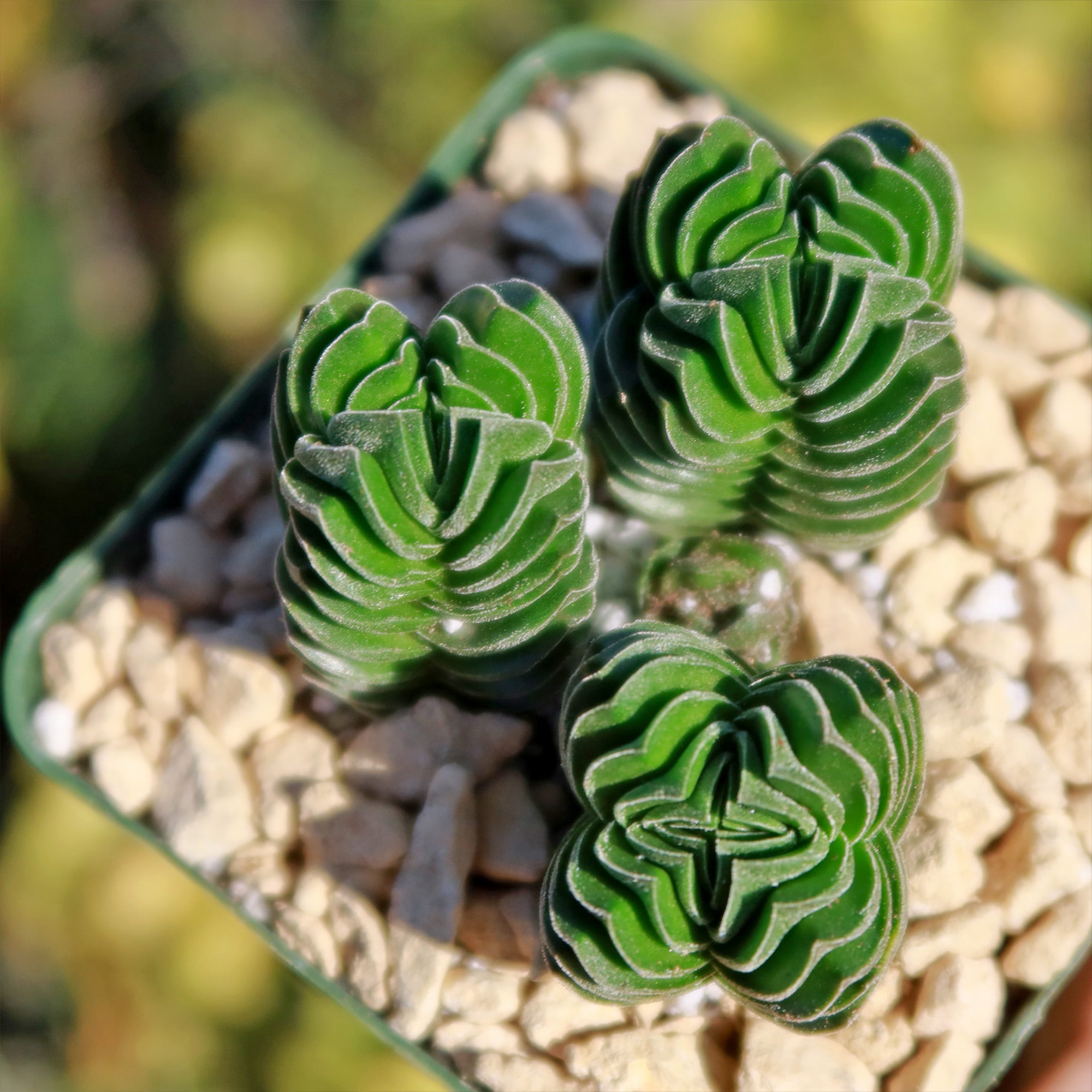
green pagoda succulent Crassula Buddha's Temple 2" PotThe stunning Crassula Buddha's Temple, also known as Crassula pyramidalis Buddhas Temple, is a unique and eye catching hybrid succulent. The name "Buddha's Temple" is inspired by its distinctive shape, which resembles the tiers of a temple or pagoda. This succulent is believed to have originated from South Africa, where it thrives in arid and rocky environments. The Crassula Buddha's Temple is a hybrid cross between Crassula falcata and Crassula
The stunning Crassula Buddha's Temple, also known as Crassula pyramidalis Buddha’s Temple, is a unique and eye-catching hybrid succulent. The name "Buddha's Temple" is inspired by its distinctive shape, which resembles the tiers of a temple or pagoda. This succulent is believed to have originated from South Africa, where it thrives in arid and rocky environments.
The Crassula Buddha's Temple is a hybrid cross between Crassula falcata and Crassula pyramidalis. This combination has resulted in a plant with intriguing architectural features.
The leaves of this Crassula grow in stacked tiers, forming a pyramid-like structure folded up at the red edges.
Its leaves are heart-shaped, thick, and fleshy, with a powdery, glossy green colour. This square-shaped column grows up to 12 inches tall and 1.6 inches wide, producing branches from the sides.
The flowers of the Buddha's Temple Crassula are small and star-shaped, with a pale pink or white colour.
They bloom in clusters atop tall stems, creating a lovely contrast against the green foliage. The flowering period typically occurs during the spring and summer months.
When it comes to propagation, the Crassula Buddha's Temple can be propagated through stem cuttings or leaf cuttings. Simply take a healthy stem or leaf cutting, allow it to callus for a few days, and then plant it in well-draining soil. With proper care and attention, the cuttings will develop roots and grow into new Buddha plants.
Additionally, the Buddha's Temple Crassula is considered friendly to both humans and pets. However, it's always good practice to keep any plant out of reach of curious pets or small children, as ingestion can still cause mild stomach discomfort.
When and How to Water Your Crassula Buddha's Temple
Crassula Buddha’s Temple is highly drought-tolerant, thanks to its thick, stacked leaves that store moisture efficiently. This architectural succulent prefers infrequent but deep watering, as its roots are sensitive to excess moisture. Always let the soil dry out completely before watering again; overly damp conditions can quickly lead to root rot. The Crassula Buddha's temple prefers watering once every 1-2 weeks, and once every 3-4 weeks in the dormant season.
In spring and summer, during the growing season, your Buddha’s Temple will actively produce new stacked leaves, so it appreciates a bit more moisture. Water once every 1–2 weeks, depending on how quickly the soil dries in your climate. Give a deep soak and then allow the soil to fully dry out before the next watering. Avoid getting water on the leaves, as moisture trapped between the tight leaf layers can lead to rot.
In fall and winter, during the dormant season, the plant’s growth slows, and its water needs drop significantly. Reduce watering to once every 3–4 weeks, or even slightly less if your home stays cool. The goal is to give just enough moisture to prevent shrivelling while keeping the soil mostly dry. If the stacked leaves turn yellow or feel mushy, that’s a sign of overwatering; cut back immediately.
Light Requirements - Where to Place Your Crassula Buddha's Temple
When growing indoors, the Crassula Buddha's Temple thrives in bright, indirect light. Place your Buddha's temple succulent plant near a window that receives plenty of sunlight, but make sure to avoid direct sunlight, especially during the hottest parts of the day. If your Crassula Buddha's temple isn't getting enough light, you may notice it is stretching or leaning toward the light source, which is a sign that it needs more light. In that case, you can consider using artificial grow lights to supplement the natural light.
For outdoor growing Crassula Buddha's Temple, it's important to find a spot that offers partial shade. This means providing your succulent with 4-6 hours of direct sunlight in the morning or late afternoon while protecting it from the intense midday sun. Too much direct sunlight can scorch the leaves of the Buddha's temple plant, so finding a balance between sun and shade is key.
Optimal Soil & Fertilizer Needs
When it comes to the soil, this lovely Buddha's temple succulent prefers well-draining soil that allows excess water to flow out easily. A mix of regular potting soil and perlite or pumice works well to create a light and airy texture. This type of soil helps prevent water from sitting around the roots, which can lead to root rot. Instead, make or buy a well-draining potting mix, or ideally, use our specialized succulent potting mix that contains 5 natural substrates and mycorrhizae to promote the development of a strong root system that helps your Buddha's temple succulent to thrive.
As for fertilizer, the Crassula Buddha's Temple plant doesn't require frequent feeding. During the growing season, which is typically spring, you can fertilize your Buddha's temple crassula once a year using a balanced (5-10-5), water-soluble NPK fertilizer diluted to half strength. This will provide the necessary nutrients without overwhelming your Crassula Buddha's Temple plant. In the dormant winter months, you can skip fertilizing altogether, as it is not actively growing during this time.
Remember, it's important not to over-fertilize your Buddha's Temple Crassula, as succulents are generally low maintenance when it comes to feeding. Too much fertilizer can lead to excessive growth, weak stems, and other issues. Always follow the instructions and err on the side of caution when it comes to feeding your Buddha's Temple Crassula plant.
Hardiness Zone & More
When growing the Crassula Buddha's Temple indoors, it can adapt well to a variety of temperature ranges. It prefers temperatures between 60°F and 75°F, which is pretty comfortable for most indoor environments. It's important to avoid extreme temperature fluctuations and drafts, as they can stress your Buddha's temple succulent. As for humidity, the Crassula Buddha's temple is quite adaptable and can tolerate average indoor humidity levels. You don't need to worry too much about adjusting the humidity specifically for this Buddha's temple, Crassula.
If you are living in USDA zone 9-11, you can grow your Buddha's Temple Crassula outdoors year-round. However, if you live in a colder zone, you can still enjoy this stunning Crassula succulent outdoors during the warmer months. Just make sure to bring it indoors or provide protection when temperatures drop below its preferred range.
The Crassula Buddha's Temple can tolerate temperatures as low as 25 -50°F but prefers temperatures between 60°F and 75°F for optimal growth. As for humidity, it can handle a range of humidity levels, but it generally prefers moderate humidity. It's important to note that excessive humidity, especially in combination with low temperatures, can increase the risk of fungal diseases, so good air circulation is essential.
Final Thoughts
Overall, the Crassula Buddha's Temple is a captivating hybrid succulent with tiered, pyramid-like foliage, reminiscent of a temple or pagoda. Its triangular leaves are thick, fleshy, and glossy green, with striking red edges. This unique plant produces delicate, star-shaped flowers in pale pink or white, adding to its charm. Buddha's temple crassula propagation can be done by stem or leaf cuttings. The Crassula Buddha's Temple is non-toxic to humans and pets, but it's always wise to keep it out of reach. Overall, it's a visually stunning succulent that brings a touch of architectural beauty to any plant collection.
Shipping Notes
- Free Standard Shipping on $100+ Orders to the USA.
- Except Preorder products are shipped in 48 hours.
- Delivery to the USA:
- Standard Shipping : 3-10 business days
- If time is of the essence, please consider selecting expedited delivery for faster service.
Exchange/Return Notes
- We offer a 30-day return/exchange service after receiving.
- Final sale items are not eligible for returns or exchanges.
- To process your return/exchange, please contact us at [email protected]
- Please click here for more details>>> Return & Exchange Policy