Pay in installments of $5.36 with
 ,
,
 and
and

Shipping Estimate
USA
- USA
- CAN
- USA
- CAN
Ships within 48 hours · Estimated delivery Sep 11 - Sep 16
 Promo Codes Available:
For Your Every Summer RSVP, with Code: SUMMER15
Description
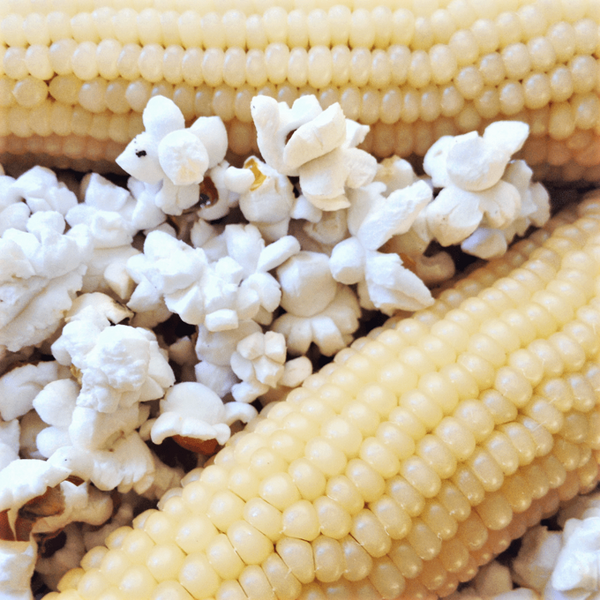
white popcorn seeds for planting Japanese White Hulless Popcorn Ornamental CornJapanese Hulless Popcorn produces white popping kernels on dwarf 4 inch cobs grown on 4 5 foot tall stalks! This old favorite produces popcorn kernels that are delicious, unusually tender, sweet, and all white when popped! Its fast growth and adaptability make Japanese Hulless Popcorn an easy and rewarding crop for gardeners, thriving in full sun and well drained soil. The stalks grow to a manageable height, making them suitable for smaller gardens or
Japanese Hulless Popcorn produces white popping kernels on dwarf 4-inch cobs grown on 4-5 foot tall stalks! This old favorite produces popcorn kernels that are delicious, unusually tender, sweet, and all-white when popped! Its fast growth and adaptability make Japanese Hulless Popcorn an easy and rewarding crop for gardeners, thriving in full sun and well-drained soil. The stalks grow to a manageable height, making them suitable for smaller gardens or container planting, while still producing abundant ears. Not only is it a healthier snack option, packed with fiber and low in calories, but the satisfaction of growing and popping your own popcorn at home adds a fun, wholesome activity for the entire family. This variety also boasts excellent storage capabilities, allowing you to save the dried kernels for popping well after the harvest season.Corn is one of the plants grown in the traditional Native American vegetable technique called the Three Sisters. The other two plants in the Three Sisters are beans and squash, and each has its role in the companion planting tradition. Corn serves as a support for the vining beans. Squash served as a ground cover, preventing weeds from growing. Beans provided natural fertilizer for all.
Also Known As: Tom Thumb, Australian Hulless, Dwarf Baby Rice, Popping Corn, Native American Corn, Flint Corn, Indian Corn, Pole Corn, Maize, Maise, Calico Corn, Baby Popcorn, Ornamental Corn, Decorative Corn.
| Plant Name: | Ornamental Corn, Japanese Hulless Popcorn |
| Latin Name: | Zea mays |
| Days to Germinate: | 10-14 |
| Days to Harvest: | 80-110 |
| Plant Height: | 6 - 8 Feet |
| Spread: | 2 - 3 Feet |
| Growth Habit: | Upright |
| USDA Zones: | 2-11 |
| Lifespan: | Annual |
| Brand: | TomorrowSeeds |
| Sunlight: | Full Sun, Partial Shade |
| Pollination: | Heirloom, Open-Pollinated |
| GMO: | No |
| Fungicide-Treated Seeds*: | No |
| Seeds Packed For**: | 2026 |
**Seeds are freshly packed for the growing season of the year listed. Seeds are still viable beyond pack date. Store in a cool and dry location such as the refrigerator or basement to best preserve germination rates.
Planting Instructions:
Soil Preparation:
Choose an area with heavy, well-draining soil that receives at least 6 hours of sunlight each day. Remove weeds, large rocks, and litter from the planting area. Leave small weeds and dead grass, they will enrich the soil when turned under. Spade or till the soil 8-12 inches deep. Loosening the soil will help the plant establish strong roots.
Corn grow best in soil with lots of organic matter. You may optionally add fertilizer or organic material such as compost, leaves, or rotted hay to mix into the soil at this point. For small gardens, scatter 2-3 tablespoons of fertilizer evenly and work into the top 2-3 inches of soil for each hill or 2 foot by 2 foot planting area. For larger gardens, scatter 2-3 pounds of a complete fertilizer for each 100 square feet of planting area. Work fertilizer or organic material into the soil and leave the surface smooth.
Form rows of soil beds 4-6 inches high and at least 15 inches apart. This formation of ridges will help with drainage.
For small gardens, corn is best planted in square blocks instead of long rows to improve cross-pollination between corn stalks.
Planting:
Ornamental Corn are best direct-sown because they often don’t transplant well. Plant corn outdoors in spring when soil temperatures warm to at least 65F. To plant, make holes 2 inches deep and spaced 8 inches apart down the rows of raised beds. Plant 1 seed per hole. Plant 2-3 seeds if choosing to thin to the strongest plant. When thinning, determine the strongest and healthiest plant, then remove all other plants, narrowing to a single plant per hole. Cover seeds thinly with soil and water after planting.| Planting Depth: | 2 inch |
| Within-Row Spacing: | 8 inches |
| Between-Row Spacing: | 15 inches |
Care During the Season:
Watering: Keep corn plants watered, soaking the soil to a depth of 6-8 inches, once a week. If there is no rainfall, water 2 times a week. Sandy soils may need to be watered more often than heavy clay soils.
A good rule of thumb is to water when the top inch of soil feels dry.
Weeding: Keeping plants weed-free improves production. If plowing or hoeing, do not dig deeper than 1 inch to prevent from cutting the feeder roots.
Fertilizing: Once corn plants reach 4-6 inches tall, you may optionally apply a nitrogen-rich fertilizer, without letting the fertilizer touch the plants. A second round of nitrogen-rich fertilizer can be applied to plants when they reach 12-18 inches tall. Then a final round of nitrogen-rich fertilizer can be applied during the tasseling stage, just before ears silks emerge. Read and follow fertilizer instructions for best application. Water plants after fertilizing.
Insecticides: Insecticides may be used to protect plants. Bt-based insecticides and sulfur are organic options that can be used for prevention. Sulfur also has fungicidal properties and helps in controlling many diseases. Before using a pesticide, read the label and follow cautions, warnings and directions.
Diseases: If spots or mold appear, treat plants with an approved fungicide. Neem oil, sulfur, and other fungicides may be used. When using fungicides always follow label directions.
Harvesting:
Harvest ornamental corn when the kernels are fully mature, around 100 to 120 days after planting. The husks should be dry and the kernels should feel firm when pressed. Harvest ornamental corn after the first frost, as the cool temperatures help intensify the colors of the kernels. To harvest, use pruners or a sharp knife to cut the ears from the stalk, leaving a few inches of the cob intact. After harvesting, you can hang the corn in a cool, dry place to finish drying for a couple of weeks if needed, ensuring the kernels are fully set for storage or decorative use. You may optionally coat Indian corn with lacquer to give a shiny appearance to use for decoration. If harvesting for popcorn, strip corn and save kernels for popping.
Shipping Notes
- Free Standard Shipping on $100+ Orders to the USA.
- Except Preorder products are shipped in 48 hours.
- Delivery to the USA:
- Standard Shipping : 3-10 business days
- If time is of the essence, please consider selecting expedited delivery for faster service.
Exchange/Return Notes
- We offer a 30-day return/exchange service after receiving.
- Final sale items are not eligible for returns or exchanges.
- To process your return/exchange, please contact us at [email protected]
- Please click here for more details>>> Return & Exchange Policy