Pay in installments of $7.14 with
 ,
,
 and
and

Shipping Estimate
USA
- USA
- CAN
- USA
- CAN
Ships within 48 hours · Estimated delivery Sep 8 - Sep 13
 Promo Codes Available:
For Your Every Summer RSVP, with Code: SUMMER15
Description
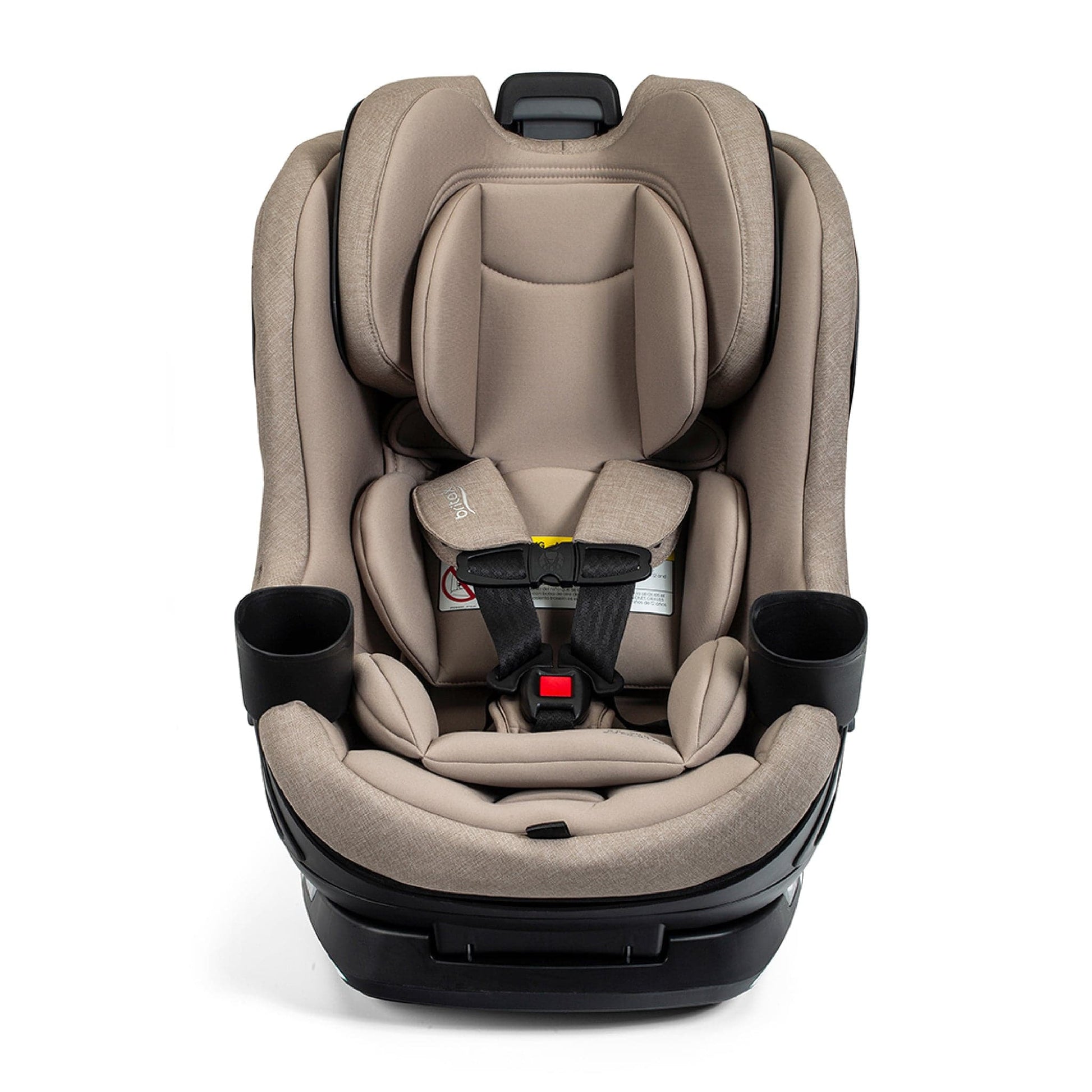
britax airplane seat Britax Galaxy 360 Slim Rotating Convertible Car Seat TeakBritax Galaxy360 Slim Rotating Convertible Car Seat Parents considering the Britax Galaxy360 are usually drawn to the convenience of loading and unloading their little one without straining their back or awkwardly climbing into the car. The Galaxy360 Slim is engineered as a fully rotating (360) convertible car seat. It begins as a rear facing seat for babies and toddlers, seamlessly switching to a forward facing configuration when the time comesall
Britax Galaxy360™ Slim Rotating Convertible Car Seat
Parents considering the Britax Galaxy360 are usually drawn to the convenience of loading and unloading their little one without straining their back or awkwardly climbing into the car. The Galaxy360 Slim is engineered as a fully rotating (360°) convertible car seat. It begins as a rear-facing seat for babies and toddlers, seamlessly switching to a forward-facing configuration when the time comes—all without the need to reinstall the base. The design centers on three core benefits: single-handed rotation, a quick and straightforward installation (via ClickTight + QuickStand), and a narrow 17-inch profile to maximize room in your back seat.
- Manufacturer size limits: 5–50 lbs. for rear-facing, 30–65 lbs. for forward-facing, with a maximum standing height of under 49” for both modes. The seat accommodates an overall weight range of 5–65 lbs., features a 10-year expiration lifespan, and includes a 1-year limited manufacturer warranty.
- Space footprint: The Galaxy360 Slim measures precisely 17” across, with overall dimensions of 21.5” x 17” x 22”. That 17-inch width is often the deciding factor for families configuring a cramped back seat or installing multiple car seats side-by-side.
Highlights & Features
- One-handed 360° rotation: This convertible seat spins a complete 360 degrees using just one hand, making buckling and loading effortless. Simply swivel the seat to face the open door, secure your child, and smoothly rotate it back into a locked travel position.
- Two harnessed convertible stages: The Galaxy360 accommodates two primary growth phases: rear-facing for infants and toddlers (5–50 lbs.), followed by forward-facing (30–65 lbs.) when they are big enough to turn around. (Note: Britax strongly advises keeping children rear-facing until they reach the maximum weight or height limit specified for the seat).
- ClickTight® installation & QuickStand™ prop: Featuring an easily accessible belt path and a simple buckle-and-click setup, installing this seat is a breeze. The built-in QuickStand™ prop keeps the seat elevated and out of your way as you work, while ClickTight® technology automatically tensions and locks the vehicle's seat belt for a fast, secure fit.
- SwivelSmooth™ steel ring: Utilizing a wheels-on-steel mechanism, the SwivelSmooth™ ring ensures the seat rotates with a fluid, controlled, and stable glide.
- Integrated one-piece design: The car seat and its base are constructed as a single, continuous unit that remains securely attached to one another at all times, including during the installation process.
- 17” SpaceSaver™ profile: The seat's narrow 17-inch width is purposefully crafted to save valuable space in your back seat and fit more easily into various vehicles, all without sacrificing child comfort or safety.
- ReboundReduce™ stability panel: When used in rear-facing mode, the base features a ReboundReduce™ panel designed to limit excessive movement during a crash.
- Reinforced base & impact absorption: Constructed with a high-strength steel-reinforced base, the seat also boasts dual layers of energy management: a durable outer shell and a foam-lined headrest to help absorb crash forces.
- Adjustability and recline: The seat offers a 6-position recline equipped with a simple-to-read indicator. It also includes an 11-position, no-rethread harness and headrest system that move together to easily adjust as your child grows.
- Fabrics and cleaning: Everyday spills are easy to manage thanks to a smooth, wipeable outer shell and a SafeWash® cover that is completely washer and dryer safe. Select fashions also feature naturally flame-retardant materials crafted without added FR chemicals.
- Dual cup holders: Includes two dishwasher-safe cup holders that securely click into place for travel and slide right out when it's time to wash them.
- Testing & safety standards: The Galaxy360 meets FMVSS 213 standards for frontal impacts and is side-impact tested to FMVSS 213a guidelines. (Please note that FMVSS 213a side-impact standards apply strictly to harnessed children up to 43” and 40 lbs., and do not cover testing for kids exceeding those metrics).
Product Details
The appeal of the "rotating convertible"
Recognized as one of the most popular baby gear trends of the 2020s, the rotating car seat concept allows parents to pivot the seat toward the car door for easy harnessing, then lock it back into a safe travel position. Britax highlights "one-hand" operation specifically because a rotating seat is only useful if the turning mechanism is actually effortless to use.
This rotation feature is a game-changer for real-world scenarios: squeezing into tight parking spots, navigating small car doors, lifting a child into a tall SUV, or managing multiple kids simultaneously while trying to buckle one in.
Rear-facing stage (5–50 lbs., under 49”)
The American Academy of Pediatrics advises keeping toddlers and infants rear-facing for as long as possible, up to the maximum height or weight limits of their specific car seat.
Britax designates the Galaxy360’s rear-facing harnessed limits at 5–50 lbs. and a standing height under 49 inches. This is often the most extended phase of a car seat's lifespan, and historically the most physically demanding for parents loading kids at a low, awkward angle.
Forward-facing harness stage (30–65 lbs., under 49”)
Once a child exceeds the rear-facing parameters, caregivers generally transition them to a forward-facing setup, adhering to general passenger safety guidelines and the manual. Britax allows forward-facing harnessed use for kids weighing 30–65 lbs. and measuring under 49 inches tall. Since this is a 2-in-1 convertible (not a booster), the child remains in a 5-point harness during this stage, and these generous limits ensure it will accommodate most kids for several years.
Switch directions without reinstalling A major perk of the Galaxy360 is that transitioning from rear-facing to forward-facing only requires rotating the seat—you do not have to completely uninstall and reinstall the base. This is crucial because reinstallations are often when parents worry about getting the belt routing, tension, and lock-offs perfectly right again.
You still must follow standard instructions for mode-specific indicators, recline settings, and headrest positions. However, the actual directional shift is handled purely via the swivel mechanism.
ClickTight® + QuickStand™ Installation
The ClickTight® system centers on an accessible belt path inside an auto-opening seat. The process is remarkably straightforward: open the compartment, thread the seat belt through, buckle it, and snap the seat closed. A handy QuickStand™ prop keeps the seat out of your way while you work, and the ClickTight® mechanism actively tensions and locks the belt as you press it shut.
Space and Fit Planning
At just 17 inches wide, the Galaxy360 features a highly sought-after slim footprint—a critical metric for families attempting to maximize space or fit three car seats across a single row. For complete spatial planning, the official dimensions are 21.5” x 17” x 22”, alongside an 11” x 12.5” seat area (depth/width) and buckle strap depths ranging from 4” to 7.25”.
Keep in mind that while these measurements are a great baseline, actual fit varies depending on your specific vehicle. Door shapes, back seat contours, and front-to-back clearance all impact the final installation. Always verify the fit in your car and consult the manual.
Recline and Proper-Use Indicators
To help you achieve the perfect angle for your car's back seat, the Galaxy360 includes a 6-position recline with a clear indicator. It also features visual proper-use indicators for the recline, rotation, ClickTight system, and tether, removing the guesswork and providing visual confirmation that the seat is correctly locked in.
11-Position No-Rethread Harness
As your little one grows, the Galaxy360’s headrest and harness easily adjust together across 11 different positions without the hassle of rethreading the straps. Proper harness height is a frequent adjustment, so this convenience is key. For forward-facing riders, NHTSA guidelines remind parents to keep straps untwisted and flat, routing them at or slightly above the shoulders (be sure to check the seat’s manual for any specific forward-facing top-slot rules).
Safety and Energy Management
The Galaxy360 is engineered with targeted impact-management technology to maintain stability and absorb crash forces:
- Reinforced foundation: A high-strength steel-reinforced base ensures structural integrity.
- Rear-facing stability: The built-in anti-rebound panel, combined with the ReboundReduce™ stability panel, is crafted to reduce seat motion during a collision in rear-facing mode.
- Energy absorption: A foam-lined headrest and protective outer shell work together to dissipate impact energy.
- Testing criteria: The seat is tested against FMVSS 213 frontal impact regulations, as well as FMVSS 213a side-impact standards (note: the 213a side-impact standard applies exclusively to harnessed children up to 43” and 40 lbs).
Fabric Care and Cleaning
The included SafeWash® cover is completely washer and dryer safe, and select Galaxy360 fashions feature naturally flame-retardant fabrics with no added FR chemicals. For the best longevity, always brush off loose crumbs before washing and follow the specific care label instructions. For quick, on-the-go maintenance, the seat's shell is smooth and easy to wipe down after inevitable backseat spills.
Specifications
- Seat type: 2-in-1 rotating convertible car seat (rear-facing and forward-facing harnessed).
- Rear-facing: 5–50 lbs.; standing height under 49”.
- Forward-facing: 30–65 lbs.; standing height under 49”.
- Recline: 6 positions with an easy-read angle indicator.
- Harness/headrest: 11-position no-rethread system (both adjust simultaneously).
- Cup holders: 2 removable, dishwasher-safe cup holders.
- Fabric/cover: Machine washable and dryer-friendly SafeWash® cover. Select fashions offer naturally flame-retardant fabric without added FR chemicals.
- Lifespan: 10-year expiration.
- Warranty: 1-year limited manufacturer warranty.
Dimensions
- Product dimensions: 21.5” x 17” x 22”
- Width: 17” (SpaceSaver™ profile)
- Seat area (depth/width): 11” / 12.5”
- Shoulder width: 12”
- Buckle strap depths: 4”–7.25”
- Harness slot heights (in): 9.75, 10.5, 11.25, 12, 12.75, 13.5, 14.25, 15, 15.75, 16.5, 17.25
What’s Included
The Britax Galaxy360 Slim box contains the car seat itself, an infant insert, and two cup holders.
Britax Galaxy360 FAQ
Shopping Questions
Is the Galaxy360 a booster?
No. It is a 2-in-1 rotating convertible seat designed for harnessed use in both forward- and rear-facing modes. It does not transition into a belt-positioning booster.
What are the size limits?
Rear-facing (harnessed): 5–50 lbs. Forward-facing (harnessed): 30–65 lbs. Standing height limit (both modes): under 49”
How wide is it?
The seat measures 17” across, with total dimensions of 21.5” x 17” x 22”.
What comes in the box?
You will receive the car seat, an infant insert, and two cup holders.
What is Albee Baby’s return policy?
We accept returns of unused, new merchandise within 60 days of delivery, provided they meet conditions such as having the original packaging. Certain special-order products are non-returnable, which will be explicitly noted on the item page.
Do I earn rewards at Albee Baby?
Absolutely. Through the Albee Baby rewards program, you can earn up to 20% back on eligible full-price gear (subject to program terms and exclusions).
General Questions
How long should my child ride rear-facing?
Experts recommend keeping your child rear-facing for as long as possible—until they max out the height or weight constraints of their seat. The Galaxy360 accommodates rear-facing riders up to 49” tall or 50 lbs.
What does “FMVSS 213a side-impact tested” mean?
FMVSS 213a is the federal safety benchmark for side-impact protection in the US. This specific standard applies to 5-point harness restraints used for children up to 43” tall or approximately 40 lbs.; it does not currently dictate side-impact testing for kids exceeding those limits.
Functionality Questions
Does the seat rotate 360 degrees?
Yes, the Galaxy360 is engineered to spin a complete 360°.
Can it switch from rear-facing to forward-facing without a reinstall?
Yes. You can transition between the two modes simply by rotating the seat, eliminating the need to completely reinstall the base. (Remember, rear-facing is highly recommended until your child hits the seat's maximum rear-facing size limits).
How many recline positions does it have?
It features 6 unique recline positions, complete with an easy-to-read indicator.
How does the harness adjust?
It utilizes a no-rethread system that allows you to adjust the headrest and harness together across 11 different height positions.
Post-Purchase & Care Questions
How do I know the installation is tight enough?
When properly installed, the car seat should not shift more than 1 inch from front-to-back or side-to-side when tested at the belt path.
Do I need to use the top tether forward-facing?
Yes, when forward-facing, you must connect and tighten the top tether to your vehicle's designated anchor. This critical step minimizes forward head excursion during a collision. Always cross-reference your vehicle's manual and the car seat user guide.
Can I machine wash the cover?
Yes. The SafeWash® cover is completely safe for both your washing machine and dryer. Be sure to check your specific cover's care label and the manual for precise washing instructions.
How long can I use the seat?
The Galaxy360 carries a 10-year expiration date. Always verify this on your specific seat's label and consult the manual.
What is the warranty?
Britax provides a 1-year limited manufacturer warranty for this model.
Shop the Britax Galaxy360 at Albee Baby
If the Galaxy360 is a top contender for you, the key metrics to remember are its single-handed 360° rotation, its narrow 17-inch width, and its robust size limits (rear-facing up to 50 lbs., forward-facing up to 65 lbs., and up to 49” tall).
When you shop with Albee Baby, you benefit from the best rewards program in the business, fast and free shipping on orders over $99, and the confidence of buying from a family retailer that has been serving parents since 1933. We’ve dedicated nearly a century to helping families, and we are so glad you are here with us today.
Shipping Notes
- Free Standard Shipping on $100+ Orders to the USA.
- Except Preorder products are shipped in 48 hours.
- Delivery to the USA:
- Standard Shipping : 3-10 business days
- If time is of the essence, please consider selecting expedited delivery for faster service.
Exchange/Return Notes
- We offer a 30-day return/exchange service after receiving.
- Final sale items are not eligible for returns or exchanges.
- To process your return/exchange, please contact us at [email protected]
- Please click here for more details>>> Return & Exchange Policy