SKU: 58293306423
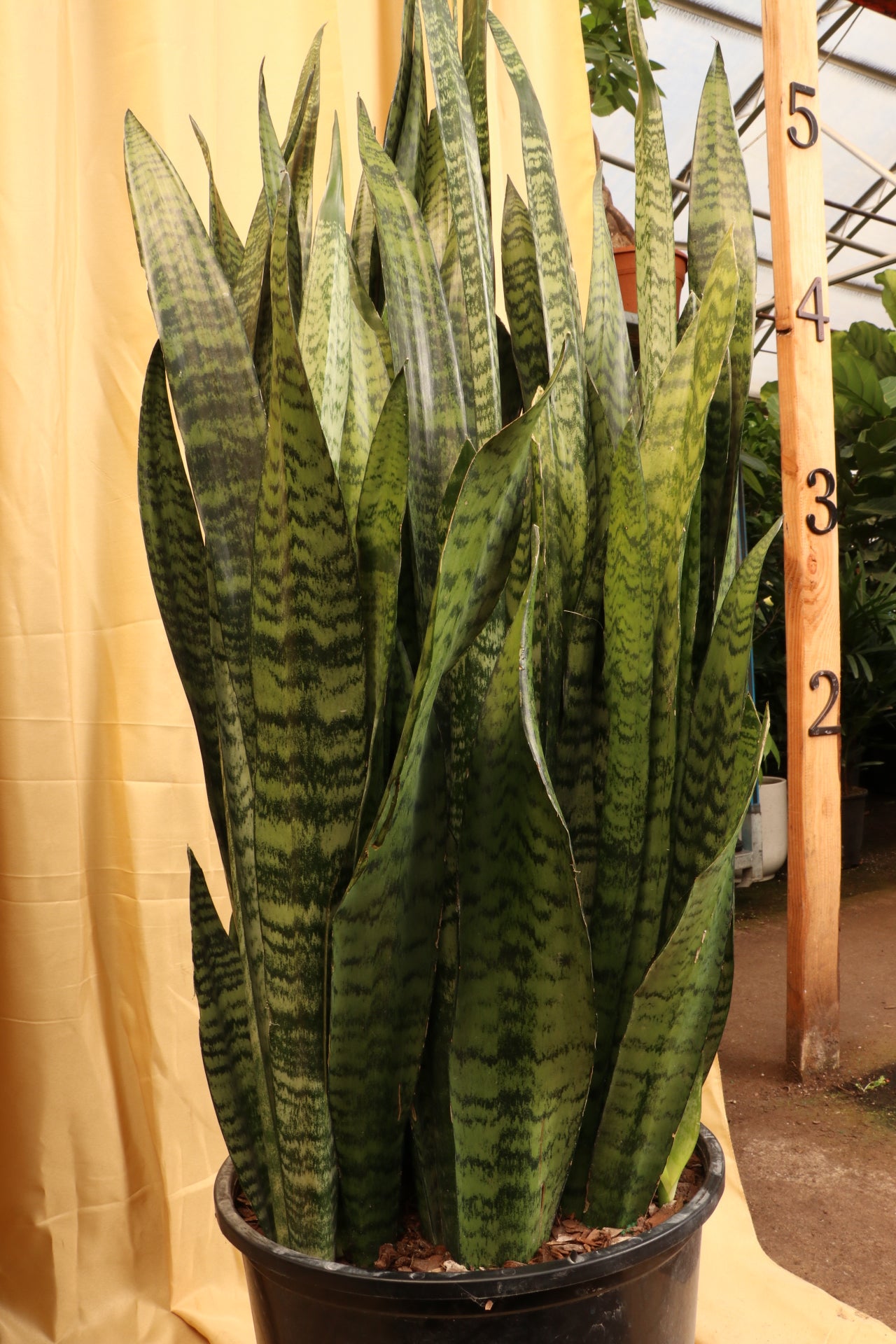
huge snake plant

huge snake plant Full Size Green Snake Plant (Zeylanica)

Sale price$19.67 Regular price$21.86
Save 10%

Pay in installments of $5.46 with ShopPay, AfterPay and Klarna

Shipping Estimate
USA
  • USA
  • CAN

Ships within 48 hours · Estimated delivery Jul 16 - Jul 21

Promo Codes Available:

For Your Every Summer RSVP, with Code: SUMMER15

Description

huge snake plant Full Size Green Snake Plant (Zeylanica)Description The snake plant is a type of succulent thats extremely resilient and easy to maintain. Seriously, its hard to kill. It doesnt need to be watered often, and it can tolerate any lightingfrom full shade to full sun. He barely demands anything from you, but he actively offers you something. The Snake plant, aka Sansevieria trifasciata, can purify the air in your house! (NASA said so!) The plant really catches the eye with its vibrant hues and

Description


The snake plant is a type of succulent that’s extremely resilient and easy to maintain. Seriously, it’s hard to kill. It doesn’t need to be watered often, and it can tolerate any lighting—from full shade to full sun. He barely demands anything from you, but he actively offers you something. The Snake plant, aka Sansevieria trifasciata, can purify the air in your house! (NASA said so!)


The plant really catches the eye with its vibrant hues and unique leaves that look like blades. Blades of grass? Medieval swords? That’s up to you. With hunter greens, emerald splashes, and lime highlights, the Trifasciata is an eye-catcher that will spice up any space.


Snake plant wins the “low maintenance” award, permanently

 One time, a customer reached out to us after Covid. He was hoping to replace his plants that had died over the year when no one was in office. He said, "I want all snake plants!" I asked why.


He said, "Over the year and a half we weren't in office, no one was there to take care of the plants. Not surprisingly, ALL the plants in there died… EXCEPT for the few snake plants. They were chillin' like Bob Dylan. No light, no water, no care, no problem."


Snake plant benefits

Mr. Snake is resilient. It can tolerate drought, too much shade, too much light, or lack of fertilizer. This plant is great for beginners, no matter what color your thumb is! The Snake Plant also filters the air indoors.


By inhaling CO2 and converting it into oxygen, even overnight, the Snake plant helps encourage air flow. Snake plants remove allergens and toxins from the surrounding environment—like benzene, formaldehyde, and xylene, among others.


Order a snake plant today

Now that you're an expert in Snake Plantery (that’s the official terminology), order a big Snake plant by 7pm ET to get this plant out of our greenhouse in New Jersey tomorrow. Dahing delivers locally in the NJ/NYC area and ships as far as Chicago and Miami.


Hop on a video call to pick your EXACT big snake plant, and it will arrive just the way it looks in our greenhouse. (If you are wondering about the arrival time, check with the zip-code validator on top of the Add To Cart button.) Our plant shipping solution is truly protective and innovative to ensure your plants arrive safe and intact!


Hop on a video call to explore our greenhouse, and we WILL send out the EXACT plant that you pick out. Just like choosing a plant at a local nursery or garden center, except we have more and fresher plants to choose from—and you can't find our Pafe fine ceramic planter options anywhere else other than our website. :)


For any other questions or concerns, please don't hesitate to reach out to us at [email protected] or call/text (609)-968-7063!


Care


Are Snake plants hard to keep alive?

Snake plants are the easiest plant to keep alive. They’re totally ok in literally any lighting, from full sun to full shade. Put them anywhere you want. Water them occasionally, but it’s ok if you forget. They love to live.


What kind of lighting do snake plants need?

Snake plants are insanely flexible about lighting. Full shade? Bright indirect light? Full sun? It’s all good. It’s a master photosynthesiser who knows how to make do with very little sun and how to protect itself from lots of sun.


How often do you water a snake plant?

Snake plants are VERY drought tolerant. Do anything you want to it except water it. Ok, that was an exaggeration: You should not gift it to your cat and you should water the plant once every month or so.


If you are a regular reader, you're probably familiar with us being reluctant to give a schedule for watering. that's because we don't want to underquote it nor overquote it, and a bajillion factors go into the exact timing. (You don’t have to calculate those factors, just check the soil’s moisture level.)


But this is the only plant we can confidently give a schedule for, because we'll just under-quote it, because they're so drought tolerant. Water around once every month or so and you'll be fine.


If you want to go the scientific way, rather than the calendar method, then monitor the first 2-3 inches of the soil and only water when the first 2-3 inches are dry across a few spots of the soil.


Do Snake plants like bathrooms?

Snake plants love the bathroom! A Snake plant is happy in low lighting and comfortable in temperatures up to 90 degrees. It also purifies the air, and well, we’d bet you could use some air purification in that specific room.


Why are Snake plants so popular?

Snake plants are popular for two main reasons. First of all, they look epic. Zig-zaggy green swords, basically. Second, they’re unbelievably easy to keep alive, regardless of the color of your thumb. If you buy one, you’re kinda stuck forever.


How do I make my Snake plant happy?

Snake plants are inherently happy, like that girl in high school who got straight A’s, made the cheer team, and had supportive parents. Water when the soil’s dry. Put it wherever you want. Sing a lullaby at bedtime. That’s it.


Do Snake plants like their leaves misted?

Don’t mist your Snake plant! It comes from a dry climate, so it doesn’t need misting. In fact, misting can actively hurt your Snake plant. If the water drips down and collects near the roots, it can cause root rot.


Should a Snake plant be by a window?

A Snake plant is happy by a window—but it’s happy just about anywhere, including away from a window. It’s even happy in a dim room with little natural light. Basically, put your Snake plant wherever your heart desires.


Not pet-friendly


Are Snake plants toxic to dogs, cats, or kids?

Sadly, Snake plants are indeed toxic to dogs, cats, and babies—they contain saponins, which can cause nausea, vomiting, diarrhea. For cats, eating a Snake leaf could even hurt their red blood cells through a process called hemolysis.


Factoids


How tall is the snake plant?

Average Snake plants grow 2 feet tall and ½ foot wide—but our full-size snake plants are around 4 feet tall. If they were actual snakes, they’d be reticulated pythons (we looked it up, that’s the longest snake).


That height was measured when we wrote this—better to check with us over a live virtual shopping call. They might be even bigger!


What did NASA say about Snake plants?

The NASA Clean Air Study, led by NASA in association with the Associated Landscape Contractors of America, found that Snake plants are particularly good air purifiers. The study investigated which plants could keep a space habitat healthy. Snake plants could!


Is it good to sleep next to a Snake plant in the bedroom?

It’s beneficial to sleep next to a snake plant. First of all, it purifies the air and breathes out oxygen, helping you sleep peacefully. Second, it’ll make you smile when you wake up next to it in the morning.


Does the Snake plant make oxygen at night?

Most plants don’t release oxygen at night, but the Snake plant does. Most plants need light to photosynthesize—the process that takes in carbon dioxide and releases oxygen—but the Snake plant barely needs light, even during the day.


Can I touch my Snake plant, or is it poisonous to the touch?

The Snake plant’s sap can cause an itchy skin rash. We recommend wearing gloves when handling the Snake plant, unless of course you are in the market for an itchy rash. That would be strange, but you do you.


Do Snake plants smell good?

When a Snake plant flowers, it smells like vanilla. Some even say jasmine or banana. Unless you hate jasmine or banana (we refuse to believe anyone hates vanilla), it’s delightful. When it’s not flowering, it has a mild planty smell.


Does a Snake plant flower indoors?

A Snake plant can bloom inside, but it’s rare. It’s also not a good thing. Snake plants tend to flower when they’re afraid they’re dying, so they can send their progeny off into the world before they meet their fate.


If you’ve neglected your Snake plant so much that it freaks out and tries to make babies, you win a special medal for Plant Neglect. Snake plants hardly ever die, so they hardly ever flower. It does, however, smell really good. Win some, lose some.


Rumors


Why is the Snake plant called “mother-in-law’s tongue”?

The Snake plant is called “mother-in-law’s tongue” because the leaves look like sharp tongues, and . . . Well, there’s a certain stereotype. If you had a sharp-tongued MIL, you probably wouldn’t need to ask. Maybe ask your partner.


Do Snake plants ward off evil?

In African culture, Snake plants ward off evil spirits. In some Asian countries, they block negative Chi, and in China especially, they have positive feng shui. Plus, in all cultures, it demolishes carbon dioxide and other toxins in the air.


Does a Snake plant attract snakes? Or do snakes hate snake plants?

Snakes hate Snake plants! The sharp-edged leaves can slice up their scaly skin. So if you hate snakes as much as snakes hate Snake plants, get some Snake plants to keep the snakes away. (Say that five times fast.)


What’s the best room in the house for a Snake plant?

Put the Snake plant wherever you want! Snakey doesn’t care whether he sits by the north window or the south. In feng shui principles, you should put him near your front door, to protect your home from bad energy.


What are the magical uses of a Snake plant?

The Snake plant’s first magical power is air purification. In feng shui, it also symbolizes good fortune, good energy, and prosperity. It protects the home and offers mental clarity. If you don’t need any of that, buy a begonia.


Are Snake plants bad feng shui?

Thoughts are mixed on the Snake plant’s role in feng shui. Many believe that its sharp leaves represent protection and vitality. Others, however, believe you should avoid sharp plants, especially in your home’s relationship area. It could make you sharp-tongued.


Shipping Notes
  • Free Standard Shipping on $100+ Orders to the USA.
  • Except Preorder products are shipped in 48 hours.
  • Delivery to the USA:
  1. Standard Shipping : 3-10 business days
  • If time is of the essence, please consider selecting expedited delivery for faster service.
Exchange/Return Notes
  • We offer a 30-day return/exchange service after receiving.
  • Final sale items are not eligible for returns or exchanges.
  • To process your return/exchange, please contact us at [email protected]
  • Please click here for more details>>> Return & Exchange Policy
SKU: 58293306423

Discover Niche Categories That Outsell huge snake plant

Top-Converting Item to Boost Your Average Order

4.0 ★★★★★
Based on 17 reviews
Sort
Highest Rating
Newest First
Oldest First
Product Reviews
C
Verified Purchase
Chris
Grantham, US
★★★★★ 5
Gorgeous, responsive display.
I'm only a few days in, but so far this monitor is everything I hoped it would be. The unit shipped to me so far appears to be flawless, no dead pixels or other issues. The blacks are so dark that one could legitimately mistake this for an OLED monitor. (It does make my cheaper secondary monitor's blacks look awful by comparison, but that's the fault of my secondary monitor, not this one.) The resolution and frame rate of the G8 are exquisite. This is my first curved monitor. I've read that some people need time to get used to it. I was used to it almost immediately. I haven't tested the included stand. I immediately attached this monitor to a dual arm monitor stand using the included 100mm VESA mount adapter. The VESA adapter works, and attaching it was easy... however there were no screws included to attach the adapter to the monitor. This is my biggest complaint about this monitor, but it's not enough to deduct a star. Luckily I had the correct screws already, otherwise I would have had to order some. My monitor stand is only rated to 20 lbs, but has no problem handling this monitor. Maybe it goes without saying, but if you're thinking about spending the money for this monitor, make sure your PC/GPU is equipped to take advantage of it. Even in 2025 only the best GPUs are able to push 240fps at true 4K. I'm running a 7900xtx (AMD's most powerful GPU until the new ones come out this year) and so far I'm glad I spent the extra money on this monitor to unleash my GPU's potential.
WAS THIS REVIEW HELPFUL?YesReportShare
Reviewed in the United States on January 10, 2025
M
Verified Purchase
Mauricio G. Orozco
San Leandro, US
★★★★★ 1
Highly recommended if you get a good copy !!
INITIAL REVIEW after 5 days : First of all, this is my rig : - AMD 7900 XTX video card - i9-12900k CPU - Z790-e mono - 32 Gb or RAM / 2TB SSD When I was checking the net about this monitor, I could not find anybody using this monitor with an AMD video card and among those who bought this monitor and hooked it up to a NVIDIA video card ( 40 series ), almost all of them coincided in two flaws about this monitor : Scan lines and flickering ( some of them reported dead pixels as well ). My initial report is that I do not have any of those issues : no scan lines in my desktop ( nor in my games ), no flickering and zero dead pixels ... however ... last Saturday December 9 when I turned on my PC ( and I would like to say something about this first : I always turn on my monitor, wait for the signal to appear in the screen - logo - and after that, I turn on my PC ... when I finish doing my gaming, I turn my PC off and then my monitor and this process is SUPER essential to keep your monitor working properly good ), I got a divided screen ( a vertical line dividing the screen in two screens ) and ugly and very pronounced scan lines in the whole screen. I freaked out and I thought in that very moment, to return it forever and replace it for a different monitor. I decided to turn not my PC, I waited 5 minutes and turned the monitor back on ... this time, I waited for the DISPLAY PORT pop up small window to show on the top left of the screen ( previously I did not wait for that logo ) and as soon as I saw that my monitor was displaying that the display port was connected, I turned my PC on and it did work as intended. Again, I do not know at this point why I got a divided screen and ugly, big and pronounced scan lines before ... I spoke to my PC tech and he suggested to me that most likely it was a cable issue. The display port cable I was using was the iVANKY 8K cable, a cable that I have for some time and was hooked up to my previous monitor and I never had any problem with it. I think that the problem probably was, that as soon as I turned on my monitor, I turned on my PC, so I did not wait for the monitor to properly wake up, give me the signal that the display port was connected and probably, that was the problem. Again, I have no technical proof about what I am saying, but the correct process should be : - Turn the monitor on and wait for a light in the screen ( energy is waking up your monitor ) and the signal that your display port is connected ... - ... and then turn on your PC ... - revert the process and this is important : once you turn off your PC and it is OFF, click on the center joystick button of your monitor, click on the 'south button' and turn the monitor off. Do not leave it on. Since that issue that happened last Saturday, I am following that process by the letter and I have not had any issue at all, however, to be sure that this does not happens again, I decided to buy a different cable in Amazon, the : BIFALE vesa certified 6.6 feet 16K DP 2.1 cable. I started to use this cable today as soon as it arrived. So far, so good. So, except for that issue that happened last Saturday and it did happen only one time, this monitor, so far, is working like a charm. Now, let's talk about some details : - The curvature : I do not know what all the fuss is about this, cause for me, is beautiful ... however, I am coming from the Samsung G7 1440p 240 Hz monitor which also is curved, so for me, that is not an issue at all, but I remember that when I got my G7, it took me a couple of days to get use to and I fell in love with curved screens. - Matte screen : I love this monitor in that regard. The screen has not reflections at all, is pure black, no light reflections and no bleeding lights at all. - The power brick is not too big as some people described it. - The bezel is thin and I like it better than my G7. - If you turn on the fancy light in the front and back, I can tell you that the lights in front are not that bright and they do not bother me as other monitors did in the past. MY OWN SETTINGS : - Refresh Rate : 240Hz ( with my GPU AMD 7900 XTX I can play Cyberpunk - no ray tracing cause I do not like it anyway - in Ultra and get 140 FPS. I do not care if it does not get to 240, cause we do not have any video card in the world that can get 240 hz in 4k anyway and beside, I do not see why people are so concerned about a lot of hertz when 60 is sufficient and if you get more than a 100 fps is more than enough. Anyway, to each his own, but for me, there is not difference between 120 or 180 FPS so I am good with what I got ... however, I got plenty of room still so when I upgrade my video ( in 2024 ) card with the newest AMD, I will probably get around 180 fps. Again, this is not something I am crazy about but it is good to have extra than not. - Free Sync : ON - Black Equalizer : 13 - Brightness : 50 - Contrast : 73 - Contrast Enhancer : OFF - Gamma : Mode 3 - Saturation : 50 - Local Dimming : AUTO - VRR Control : ON - Color Tone : CUSTOM - Red = 50 / Blue = 50 and Green = 50 - I have not used this monitor with HDR. I do have Windows 11 and I am not planning to use HDR till this feature has been enhanced by Microsoft. I do not believe it is polished enough yet so I do not know how this monitor will perform using HDR ... however, I will give it a try with new upcoming games with great graphics ( perhaps via Unreal Engine 5 ) and see how well it does perform with HDR. I will update this information once I do it next year ( 2024 ), assuming that this monitor does not break before. QUALITY OF THE SCREEN / IMAGE : - The colors are really PUNCHY ... very saturated out of the box and kind of 'warm' image, fantastic, something that you have never seen before. The only changes I made as soon as I connected it to my PC were : Refresh Rate ( default was 120Hz, Freesync = on, Black Equalizer= 13 and Gamma = mode 3. I think that the VRR was on already and Local dimming in auto as well. So out of the box this monitor is superb. I have had IPS monitors as well and nothing matched the punchy and burn colors of this monitor. I do not think that it needed to be calibrated at all. - No Scan lines - No flickering - No Dead Pixels .... I am happy so far with this monitor but I am crossing my fingers here. Someone reported in the net that he did not have any issue during 2 months and then the scan lines started to show up. We will see if that happens and if it does happen before my refund window, I will return it immediately and replace it with a different monitor but I will never go back to this one again. FLAWS : - It could be sturdy but it does wobble a bit. The base is not that strong to hold the monitor really steady. - The joystick in the bottom center of the screen to control your settings, have 5 very tiny buttons, one in the center and 4 : north, south, east and west .... those 4 are so small that in the beginning, when I try to access my monitor settings, I could not figure it out by the touch, I spent about a couple of minutes before I could sense with the tip of my finger, that there were another 4 buttons beside the middle one. In this regard, they could have done better but once you figure it out, it is easy to handle. CONCLUSION : I cannot find anything else bad in this monitor to be honest. I am not using the Display Port cable that came with it. I am using my own display port cable. I cannot advise anything related about how good this monitor is with a NVIDIA video card. All my life I used NVIDIA since I started to use PC : 1080ti and 2080ti ... I wanted to jump to the 3080 or 4080 but hey, those prices back then were too high. I will stay with AMD, which is cheaper and I have no complains at all about this awesome video card ( 7900 XTX ). My monitor is on my very nice desk ( real wood desk and heavy ) and beside me, on my right, there is the windows that give me access to my balcony. If I open it, still this monitor does not reflect light in the screen but most of time, that window stays close. I have a living room lamp on my left and a small desk lamp on the right of my desk and those lights does not reflect in my screen as well, so the matte coated Samsung used on this screen is something else. The firmware version is : 1000.8 which is the last one available according to Samsung website, so I do not need to update it at all. Well folks, for those who have an AMD card ( series 6 or 7 ), most likely, you will not have any issues with this monitor. I am saying this because I know that Samsung said that it was Nvidia fault about the scan lines and flickering in this monitor. Even though I am rating this monitor with 5 stars in Gaming, Picture Quality and Brightness, I cannot give it an overall 5 stars cause I have not used it long enough to find out if those issues that everybody have reported ( scan lines and flickering ) will show up one of these days. I hope not and if it does not happen, then I will increase my own rating to 5 overall. I will update this review in 2 weeks and a couple of days before my refund window close. Honestly, I am looking forward to continue using this monitor for a very long time. It does has the potential to still be very good in the future and has nothing to envy to any monitor out there, even an OLED monitor which are much better in the contrast department but still, this Samsung Neo G8 32" 4k 240Hz is excellent in that regard as well, and the OLED technology is not yet solid enough to completely defeat this monitor. UPDATE ( 12/24/2023 ) : Up to this point, this monitor continuos performing flawless. No scan-lines, no flickering and no dead pixels at all. I am very happy with it and will update this review in about 2 weeks. UPDATE ( 12/30/2023 ) : The image shows what this monitor has done twice since I bought it. I have tried 2 very good cables. If that happens again, I will return it. LAST UPDATE and RETURNED ( 01/03/2024 ) : Unfortunately, the ugly scan lines + divided screen ( as you can see in the image ) were present again. I had to return it today January 4th, 2024 for a full refund ( Amazon did not offer me to replace it ... ) to my credit card. It is a shame, a waste of time when you buy an expensive monitor like this one, and you end up returning the unit due to some faulty function that could not be fixed by Samsung. Yes, the monitor size is excellent, the curvature is awesome, the colors are punchy and it is a 4k screen with super detailed image but .... the scan lines ( as shown in the image ) completely ruined my experience and my desire to buy a replacement. I used 3 different cables to filter the issue, believing that the culprit was probably a bad cable but it was not. I am not an Electronic Enigineer but I think that the problem is I think, related to the display port not able to output the right frequency or something like that. Whatever you see in that picture happened 3 times in less than a month. When it happened, I had to turn my PC off and restart it back up. Anytime I did that, the monitor worked as expected, but as I said before, it did happen 3 times and that is unacceptable. I cannot keep a monitor that is doing that with the potential to completely break down to the point that I would not be able to use it anymore or ending up in sending the unit to Samsung. Why should I waste my time and why should I deal with Samsung in the first place ? If Samsung would have ensured that these units were working as expected, this would be the monitor to buy and never look back. There is no other better option than these monitors out there if you have an excellent copy. I cannot recommend to anyone to buy it cause there is a great chance that you will end up returning the unit and that is a waste of time that customers should not face at all. Now I need to wait for my full refund and will probably buy a different unit. I have time to do my research and I am very sure that I will get something better. I have changed my overall rating from 4 to 1. Good luck if you get a perfect unit.
WAS THIS REVIEW HELPFUL?YesReportShare
Reviewed in the United States on December 12, 2023
S
Verified Purchase
SoxKeepYouWarm
Grantham, US
★★★★★ 5
Great high contrast gaming monitor
Great high contrast gaming monitor. I think they oversell some of the features and try to push the monitor beyond what it's really capable of but after some tweaking it's still a very good monitor I don't plan on returning. pros: - great contrast with MiniLed, almost as good as Oled* - very low latency with no noticeable overdrive - hdr looks excellent with miniled setting set to "high" - great brightness if you switch the base display profile to "fps", the default is pretty dim cons: - mine has a dead pixel in the very corner, it's so close to the edge of the screen it's barely detectable even when I'm looking for it so I decided not to return - scan lines when viewing at 240hz, it's not noticeable in games but when you look at blocky solid colors (more yellows and blues) it really stands out. Hard not to notice that all the Amazon yellow buttons have horizontal lines through them. I've left mine at 120hz, don't really notice a huge difference between the two rates anyway, completely resolves the issue. - the miniled implementation likes to avoid blooming, but comes at the cost of reducing the brightness of highlights. IE: if you have a black screen you'll notice your mouse appears slightly dimmer, but the blacks are still near-black. If you switch the miniled setting to "high" you get a normal brightness mouse but some bloom. - default settings cause a good amount of black crush (black and near-blacks get pushed to no-brightness). I had to reduce the black equalizer setting down to 8 to fix this. The default setting looks more dramatic in movies but the loss of detail in dark scenes was pretty bad.
WAS THIS REVIEW HELPFUL?YesReportShare
Reviewed in the United States on August 21, 2022
K
Verified Purchase
Koby
Chelsea, US
★★★★★ 4
Nice monitor
I have had this for a little over 2 years. The only problem that has occurred a few times is that the PC display screen goes blank. I don't know the origin of this problem but it seems to be in the monitor. If I use the monitor controls, I can view the monitor settings and eventually the PC display resumes. It has happened only a few times over the 2 years. Also, the screen control buttons are a little difficult use because they are underneath the screen and cannot be seen. Just have to go by feel. Otherwise a very nice monitor.
WAS THIS REVIEW HELPFUL?YesReportShare
Reviewed in the United States on March 5, 2026
C
Verified Purchase
caleb me
Fort Morgan, US
★★★★★ 5
Worth the hefty price tag
After considering OLED for a while and waiting for the price to drop, I finally decided to try this when on sale. I had very high expectations and was fully prepared to refund at the first sign of trouble. Lets start with the cons in my experience. 1. After setting up the monitor and looking through the settings, trying to turn the RGB LEDs on worked... for the most part. The lights on the back worked fine, on the front there are two zones that are supposed to light up also, but only one of them worked. After doing some searching apparently a simple firmware update or downgrade can fix this, so it is not a hardware issue but a software one. I do not need LEDs on a monitor anyway, especially an OLED that has those nice true blacks, so I don't want anything on to distract my eye. I turned the LEDs off completely and never card to change firmware just to be able to turn them on again. 2. The first day I setup the monitor, tested it a bit, then went to bed. The following day I turned on the monitor and after a few hours of using it I closed all my programs and went to desktop (which is a true black single color background). To my surprise the LEDs were still on, the screen looked no different from my other non OLED screens. After digging through various settings and power cycling the monitor a few times I decided to contact support. I explained my issue and got transfer once or twice through Samsung support chat before finally getting through to help. The first thing that I was asked to do was unplug the power cord that runs from the adapter box to the monitor, not from the wall to the adapter box, and not power cycling using the button on the monitor. After waiting about a minute and plugging it back in the black were true black again and I felt like an idiot. The important takeaway here is that the box will run some power to the screen even if the screen is of, so if you need to power cycle make sure you unplug the screen. After doing the reset once my pixels have remained true black where they should and have not been an issue since. Before we get to the pros is want to mention settings. There are quite a few settings of which most are helpful, just about anything you would want to change you can. The only problem is that with so many settings it can be hard to find what you're looking for sometimes. So far this is one of my only monitors to not change settings ever after setup, I have had ASUS and ACER monitors before that both will occasionally change a setting if a certain game launches or if the hdmi/vda/dp gets unplugged. Finally we have the pros. 1. OLED monitor at a PC desktop form factor. This thing looks great, it is great to watch movies and videos on, and colorful and cinematic games look amazing, I have never seen a non OLED come anywhere close it is not even the same ballgame. I have had TN VA and IPS displays before and IMO all three of those look far more similar to each other than to this. 2. Responsiveness and Refresh rate. 240hz is incredibly solid for modern gaming, not as bug of jump from 60 to 144 or even 120, but still noticeable. Due to the OLED tech the overall screen response time is insane, it isn't as simple as the 1ms, 0.5ms or 0.1ms that you see advertised on these monitor pages, if you look into it in depth, this monitor has a response time that is about 2x faster then the next best non OLED gaming monitor, and that monitor is even 360hz! What does this meant though? Blur essentially does not exist on this monitor, comparing to 144hz, 165, and 60hz, when setting this monitors refresh rate to match, it is significantly clearer and less blurry. At 240hz even taking a still image with a high fps camera it is hard to detect or extremely minimal, where my VA 165hz displays at least 5 clearly visible ghosted images at once just with my phone camera. To summarize, this monitor I expected to be good but not worth the price tag, but after quite some use it has completely blown me away and I am definitely keeping it. The only monitor jump that has been as noticeable as jumping from non OLED to OLED is the jump from 60-144hz.
WAS THIS REVIEW HELPFUL?YesReportShare
Reviewed in the United States on October 5, 2023

recommand products