SKU: 6159488738
best san pedro cactus

best san pedro cactus Buy San Pedro Cactus Phoenix, AZ | Echinopsis pachanoi

Sale price$22.06 Regular price$24.51
Save 10%

Pay in installments of $6.13 with ShopPay, AfterPay and Klarna

Shipping Estimate
USA
  • USA
  • CAN

Ships within 48 hours · Estimated delivery Jul 20 - Jul 25

Promo Codes Available:

For Your Every Summer RSVP, with Code: SUMMER15

Description

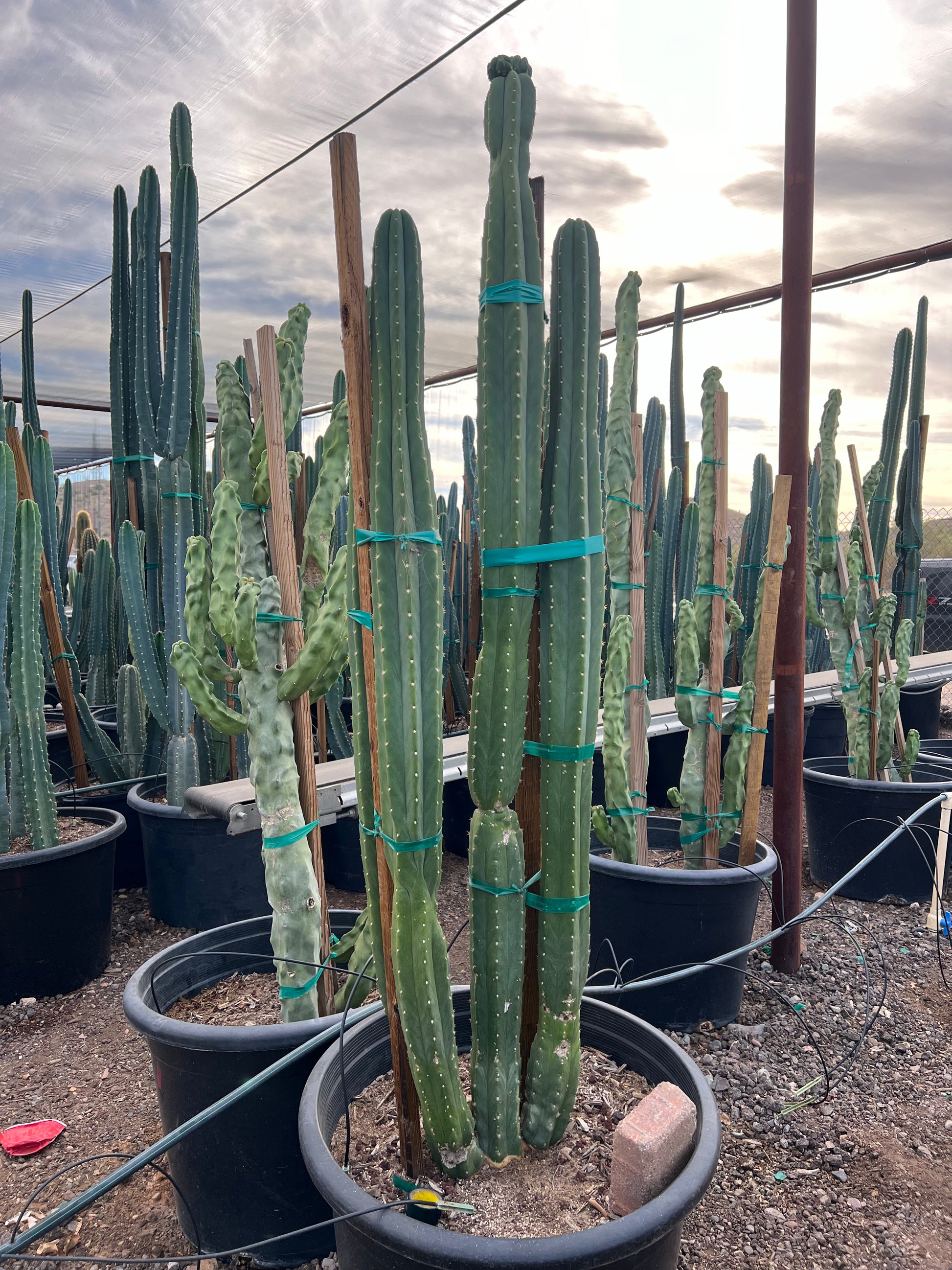
best san pedro cactus Buy San Pedro Cactus Phoenix, AZ | Echinopsis pachanoiA Towering Columnar Cactus for Phoenix Desert Gardens San Pedro The San Pedro Cactus (Echinopsis pachanoi) is one of the fastest growing columnar cacti available for Phoenix landscapes. Native to the Andes Mountains, this striking blue green cactus grows tall, ribbed columns that branch with age into dramatic multi stemmed specimens. San Pedro can reach 1020 feet tall in the Phoenix Valley, adding bold vertical structure to xeriscape gardens,

A Towering Columnar Cactus for Phoenix Desert Gardens — San Pedro

The San Pedro Cactus (Echinopsis pachanoi) is one of the fastest-growing columnar cacti available for Phoenix landscapes. Native to the Andes Mountains, this striking blue-green cactus grows tall, ribbed columns that branch with age into dramatic multi-stemmed specimens. San Pedro can reach 10–20 feet tall in the Phoenix Valley, adding bold vertical structure to xeriscape gardens, courtyard plantings, and modern desert designs. It produces spectacular large white flowers that bloom at night during summer — a rare treat for any garden. Whether you’re creating a sculptural cactus garden in Scottsdale, anchoring a Chandler desert border, or adding architectural drama to a Mesa backyard — San Pedro delivers fast growth and jaw-dropping form.

San Pedro Cactus Plant Details

Attribute Detail
Scientific Name Echinopsis pachanoi (syn. Trichocereus pachanoi)
Common Names San Pedro Cactus, Saint Peter Cactus
Mature Height 10–20 feet
Mature Width 4–6 feet (multi-branched clump)
Growth Rate Fast for a cactus — 1–2 feet per year in Phoenix
Sun Full sun to light shade. Handles reflected heat well.
Water Low once established. Drought-tolerant but appreciates occasional deep watering.
USDA Zones 9–11 (Phoenix is Zone 9b–10a)
Soil Well-draining required. Thrives in sandy, rocky Arizona soils and handles caliche with drainage.
Foliage Evergreen — blue-green ribbed columns year-round
Bloom Large white nocturnal flowers in summer — fragrant and spectacular

San Pedro Cactus Uses in Phoenix Landscapes

Sculptural Focal Point & Cactus Gardens

San Pedro’s tall, ribbed columns create dramatic vertical architecture in any desert garden. Plant a single specimen as a living sculpture in a Scottsdale courtyard, or group 3–5 for a columnar cactus grove effect. Pair with Golden Barrel, Totem Pole Cactus, and Mexican Fencepost for an all-columnar desert statement garden.

Modern Desert Borders & Property Screens

Because San Pedro branches and fills in with age, it makes an effective living screen or border plant. Space 3–4 feet apart along a Chandler property line or Gilbert fence to create a striking green wall. The columns grow fast enough to provide meaningful screening within 3–5 years.

Pool-Friendly & Low-Litter Plantings

San Pedro is an excellent pool-adjacent plant — it produces virtually no leaf litter, requires minimal trimming, and its smooth columns and minimal spines make it safer than many cacti. Plant along Tempe and Mesa pool perimeters for a clean, architectural look with zero maintenance debris.

Best Time to Plant San Pedro Cactus in Phoenix

Spring (March–May) is the ideal planting window. Warm soil and rising temperatures promote fast root establishment and active growth. Fall (October–November) is the second-best option. Avoid planting in winter — San Pedro is slightly frost-sensitive and roots best in warm soil.

How to Plant San Pedro Cactus

  1. Dig wide, not deep — excavate 2x the root ball width at the same depth. Cacti have shallow root systems.
  2. Ensure excellent drainage — break through any caliche layer. San Pedro will rot in standing water.
  3. Backfill with native soil — no amendments needed. Sandy, rocky Arizona soil is ideal.
  4. Spacing — 3–4 feet apart for a border or screen; 5+ feet for standalone specimens.
  5. Let the cut callus — if transplanting a cutting, let the cut end dry and callus for 1–2 weeks before planting.
  6. Gravel mulch — 2–3 inches of decomposed granite or gravel. Never use organic mulch that retains moisture.

Watering San Pedro Cactus in Phoenix

First Year Watering Schedule

  • Weeks 1–2: Every 5–7 days, light watering to settle soil
  • Months 1–2: Every 7–10 days
  • Months 3–6: Every 10–14 days
  • After Year 1: Every 2–3 weeks in summer; monthly or less in winter

Drip Irrigation

Place 1 emitter (1–2 GPH) 12–18 inches from the base. San Pedro appreciates more water than most columnar cacti, which helps it maintain its fast growth rate. However, always let the soil dry completely between waterings. Overwatering causes root rot.

How fast does San Pedro grow in Phoenix?
San Pedro is one of the fastest-growing columnar cacti, adding 1–2 feet per year in Phoenix with regular summer watering. A 5-gallon plant can reach 6–8 feet within 3–4 years.

Is San Pedro frost-hardy in Phoenix?
San Pedro handles most Phoenix winters well, tolerating temps down to about 25°F. During rare hard freezes, drape frost cloth over the plant. Established specimens are more cold-hardy than young ones.

Does San Pedro bloom?
Yes — mature San Pedro cacti produce large, spectacular white flowers that open at night during summer. The blooms are fragrant and typically last one night, attracting moths and bats. Plants usually begin blooming once they reach 4–6 feet tall.

How does San Pedro compare to Totem Pole Cactus?
Both are tall columnar cacti, but San Pedro has visible ribs and small spines, while Totem Pole (Pachycereus schottii ‘Monstrosus’) is smooth and spineless with a knobby texture. San Pedro grows faster and produces showy flowers. Both are excellent choices for Phoenix desert gardens.

You May Also Like

  • Totem Pole Cactus — a smooth, spineless columnar cactus with a unique sculptural form.
  • Mexican Fence Post — a tall, columnar cactus often used as a living fence in desert landscapes.
  • Golden Barrel Cactus — a round, golden-spined cactus that contrasts beautifully with tall columnar species.
  • Ocotillo — a spindly desert native with fiery red spring blooms, perfect for adding movement to cactus gardens.

How Many San Pedro Cactus Do I Need?

San Pedro works two ways: as a single sculptural specimen, or branched together into a fast-growing columnar screen. For a focal point, plant one and give it 5 to 6 feet of clear space so the multi-stemmed form can spread. For a living screen along a wall or property line, space the columns 3 to 4 feet apart:

Run length Plants at 3.5 ft spacing
10 ft 3 plants
20 ft 6 plants
30 ft 9 plants
40 ft 11 plants

For a grove effect, group 3 to 5 columns in odd numbers, each 3 to 4 feet apart, so the ribbed stems read as one bold cluster.

San Pedro Cactus Season-by-Season in Phoenix

  • Spring (Feb-Apr): Prime planting window. Warm soil drives fast root establishment and the first flush of new column growth.
  • Summer (May-Sep): Peak growth season, adding 1 to 2 feet with regular deep watering. Large fragrant white flowers open at night and draw moths and bats. Handles full reflected heat off walls and pavement.
  • Fall (Oct-Nov): Second-best planting window and continued growth before cooling. Taper watering as temperatures drop.
  • Winter (Dec-Jan): Evergreen blue-green structure holds all winter. Hardy to about 25°F: during a hard freeze, drape frost cloth over the columns, especially on young plants.

At a Glance

✔ Heat-Loving (Reflected-Heat Tolerant)   ✔ Drought-Tolerant   ✔ Pollinator-Friendly   ✔ Pool-Friendly (Low-Litter)   ✔ Evergreen   ✔ Low-Maintenance   ✔ Deer & Rabbit-Resistant   ✔ Cold-Hardy to 25°F

Plant It With

Is San Pedro Cactus Right for Your Yard?

San Pedro thrives in full sun to light shade with fast-draining soil, and it tolerates reflected heat off walls and pavement better than most columnar cacti. Give it room to branch and break through any caliche layer so water never pools at the roots. It is not a fit if your spot stays wet or shaded, or if you cannot cover it during a rare hard freeze while it is young.

Shipping Notes
  • Free Standard Shipping on $100+ Orders to the USA.
  • Except Preorder products are shipped in 48 hours.
  • Delivery to the USA:
  1. Standard Shipping : 3-10 business days
  • If time is of the essence, please consider selecting expedited delivery for faster service.
Exchange/Return Notes
  • We offer a 30-day return/exchange service after receiving.
  • Final sale items are not eligible for returns or exchanges.
  • To process your return/exchange, please contact us at [email protected]
  • Please click here for more details>>> Return & Exchange Policy
SKU: 6159488738

Discover Niche Categories That Outsell best san pedro cactus

Top-Converting Item to Boost Your Average Order

4.5 ★★★★★
Based on 18 reviews
Sort
Highest Rating
Newest First
Oldest First
Product Reviews
P
Verified Purchase
pease4pod
Omaha, US
★★★★★ 5
Excellent Investment!
Color: Black, Style: ET-2800-B, Pattern Name: Printer
I have had this printer for two years now. I purchased it to do invitations and signs for my Daughter's baby shower. I designed an invitation, printed more than sixty copies with address labels, return address labels, numerous signs, games and raffles tickets. I used it again for the Baby's 1st Birthday same amount of items. I have not had to fill the colored ink in over 2 years. I have filled the black. My husband also uses it for work and I've printed several other projects including pictures. Everything has always exceeded my expectations. For the price you get excellent quality. I find the software easy to use and update.
WAS THIS REVIEW HELPFUL?YesReportShare
Reviewed in the United States on June 11, 2026
J
Joan
San Leandro, US
★★★★★ 5
Easy set-up, high quality prints, beautiful design!
This sleek and modern print/copy station has every feature you could ever need. With an easy set-up and user friendly interface and endless ink supply, this device exponentially enhances work-flow reduces technological headaches for good! Let's be real. My old printer had been a great work-horse for many years. Unfortunately as I upgraded my computer setup and phone, it was no longer syncing appropriately and had become a manual, troubleshooting headache! I was having to print the "even" pages on auto handling, then flip them by hand to print the "odd" pages with normal handling, then re-order appropriately. Not only this, but the cartridge price for my old device had risen to $30 per cartridge and I was constantly needing to replace and go through the pain of a slow, manual alignment process. Something needed to change. And that is when the HP OfficeJet Pro stepped in. The setup was an absolute dream. The provided QR code takes you directly to a setup slide-show that walks you through each step one at a time (I've posted a few screen-shots of the interface). Everything worked smoothly and as intended. I especially appreciated the speedy, automatic alignment. Once set-up was complete, I was able to effortlessly connect through all of my devices and print! The quality of the print was crisp, high quality and each page was ready lickety-split. The only con I could possibly note is that it isn't the most quiet printer I've ever used. If you need something whisper quiet, you may need to look at something else or move the printer to a more appropriate location. Once set up, I created an account and signed up for the subscription-based ink refills, which I think is a really ingenious idea. I actually chatted in with an HP representative regarding this (they were easy to get a hold of) to further clarify how it works. In a nutshell, you decide how many pages you anticipate printing in a month and you pay for that amount if ink. There is a sensor chip in the ink cartridge that lets HP know when youre about to run out of ink and they'll send you more...regardless if where you're at in your subscription. So, if I didnt quite use my 100 pages worth of ink, it wont bill my next month or send ink until I'm ready. This works out to be one heck of a deal. All told, 100 pages will only cost 7.99 rather than my usual 30 (or 60 if you count both ink and color). On top of functionality, this is also a beautiful piece of office equipment. I adore the soft white tone of the unit, which looks both uplifting and peaceful in my work area. Its the little things, I swear. Not only does it look peaceful, but it has taken extra stress off of my plate by being so easy to work with. Plus I don't have to add ink to my shopping list anymore! I think you'll find this unit to be well worth your while, and if its anything like my old HP printers, it's hopefully going to last a good handful of years!
WAS THIS REVIEW HELPFUL?YesReportShare
Reviewed in the United States on May 31, 2026
D
D.C
Grantham, US
★★★★★ 5
Incredible image quality even when enlarged to full capacity
The quality and reliability of HP OfficeJet printers is unmatched, from my experience. I use this printer for regular everyday things like return labels and printing out documents but my favorite thing to use it for are art and design projects. I am able to copy an image and enlarge it up to 400%, or minimize its size to 25% which is an incredible range and perfect for design and art projects. As long as the ink cartridges are all at full capacity my images always come out flawless, even when I enlarge them huge. As long as I send an image in the right format or copy from a hard copy image it is always clear and crisp, not pixalized. Our craft room/office is in the basement and I am easily able to print from my kitchen or bedroom from my phone or laptop which is very convenient. The array of functions, the quality of the image, and the bright beautiful rich colors this printer is able to produce is really great if you plan to use it for design or art. I have never had a paper jam, which is very impressive considering I am always changing to photo paper as well as multiple different sized paper. I just received this printer but the HP printer I was using before still works like a charm and is close to 20 years old, if you are using this for your home I can't imagine having to replace it. My absolute favorite part is a 4 pack of extra large ink is $47.99 which is almost half of what my other printers ink cost. The wide format and large paper size I am able to print on has made our art projects really beautiful and uniform, rather than having to try to hide the seams of multiple pages taped together. Incredible product.
WAS THIS REVIEW HELPFUL?YesReportShare
Reviewed in the United States on May 22, 2026
K
Verified Purchase
Kevin L.
Cuba, US
★★★★★ 1
Pray you don't need HP Support to set up printer
HP Support is the absolute worst. If you have any setup issues with your HP printer, you're on your own. Their support is practically useless. I’ve been on a two-hour call trying to get wireless printing working. I’ve been transferred to three different people, and none of them knew how to help. Now I’m stuck on indefinite hold (over 30 minutes and counting) with no resolution in sight. I can print fine with a USB cable, but it simply will not print wirelessly no matter what we try. Extremely disappointed and frustrated with HP right now.
WAS THIS REVIEW HELPFUL?YesReportShare
Reviewed in the United States on May 27, 2026
G
Grant Harlow
Omaha, US
★★★★★ 4
Very capable large format color inkjet printer
This thing is big. It’s replacing our Brother color laser, which didn’t get a lot of use (but is great for quick and cheap prints). The HP is longer in one dimension but less tall, so is roughly occupying the same space but with more wall visible (so looks less intrusive). Heavy. I could (and did) lift it on my own but all the packing and instructions say for 2 people to lift it. It’s manageable but I see why there’s that warning. Build quality is mostly plastic but sturdy enough for a static object. Scan lid opens easily, trays extend smoothly etc. Feels well build overall, no concerns. You can download installation instructions using a QR code and it’ll guide you to also install the HP app. The app ideally requires an account, mandatory if you plan to free trial the Instant Ink I think. I had an existing old HP account and used that. The setup was way enough but there’s a weird UI step in the app during pairing where the setup modal is blank grey with a greyed out “Next” button. Looks like it can’t find the printer. Wrong! Just hit Next to proceed. Weird and stupid and I wasted time figuring it out. Loses a star for that. Other than that, setup went fine and test print came out decent. WiFi connected ok and it also has Ethernet. The Brother only has WiFi but is flaky / goes to deep sleep too often. Testing with WiFi has been fine but I feel better knowing I can hardwire into my switch if there are issues! The HP shows on the network as an AirPrint target, and my Mac found it without issue / set up its own drivers. The fold out touch screen is nice, I wish it could be angled horizontally and not just vertically but it’s fine and responds predictably to touch. Colors and text are bright and crisp. Not quite laser crisp but pretty darn close to these old eyes. The colors are also better / truer in my opinion. Had issues with feeding vinyl sticker paper sheets, which repeatedly generated paper jam messages (at no point was the paper jammed) and wasted a lot of time. Willing to blame the paper / media (it’s slightly tacky) but our laser handled it ok. When it finally did print, I noticed some print quality issues / flaws repeatedly in the same places. Unsure of the cause and doesn’t impact subsequent printouts on other paper. Really like the ability to print larger (A3!) size. Note that scanning does not accommodate larger papers (up to Legal / same as the Brother). The supplied ink installed easily but they shipped me more as part of the Instant Ink trial. Subscribed to the lowest tier, which is affordable-ish (they just raised the lowest tier to $1.99 for 10 prints per month) but still costlier than laser. Not a huge fan of vendor lock-in / subs but did see in the fine print that HP allows third party inks to be used, which is reassuring if the subscription doesn’t make sense long term. While printing, the motion of the printer head caused my desk to shake. Worth bearing in mind if you plan on printing heavily while sharing a desk with it. Noise isn’t too bad, better than the laser printing noise we’re used to (lower frequency noise on the HP). I would not print during a zoom call though (noise + shaking). At time of review, $350 for a large format printer with built in scanning (and Ethernet) seems pretty decent. It’s not a bargain but it’s fair. Need to spend more time with other media and have ordered more paper types to test with. Will update if anything changes my rating but so far I feel like it’s a capable replacement for the color laser given our relatively modest print volume and need for higher quality color prints.
WAS THIS REVIEW HELPFUL?YesReportShare
Reviewed in the United States on June 7, 2026

recommand products