SKU: 64884819098
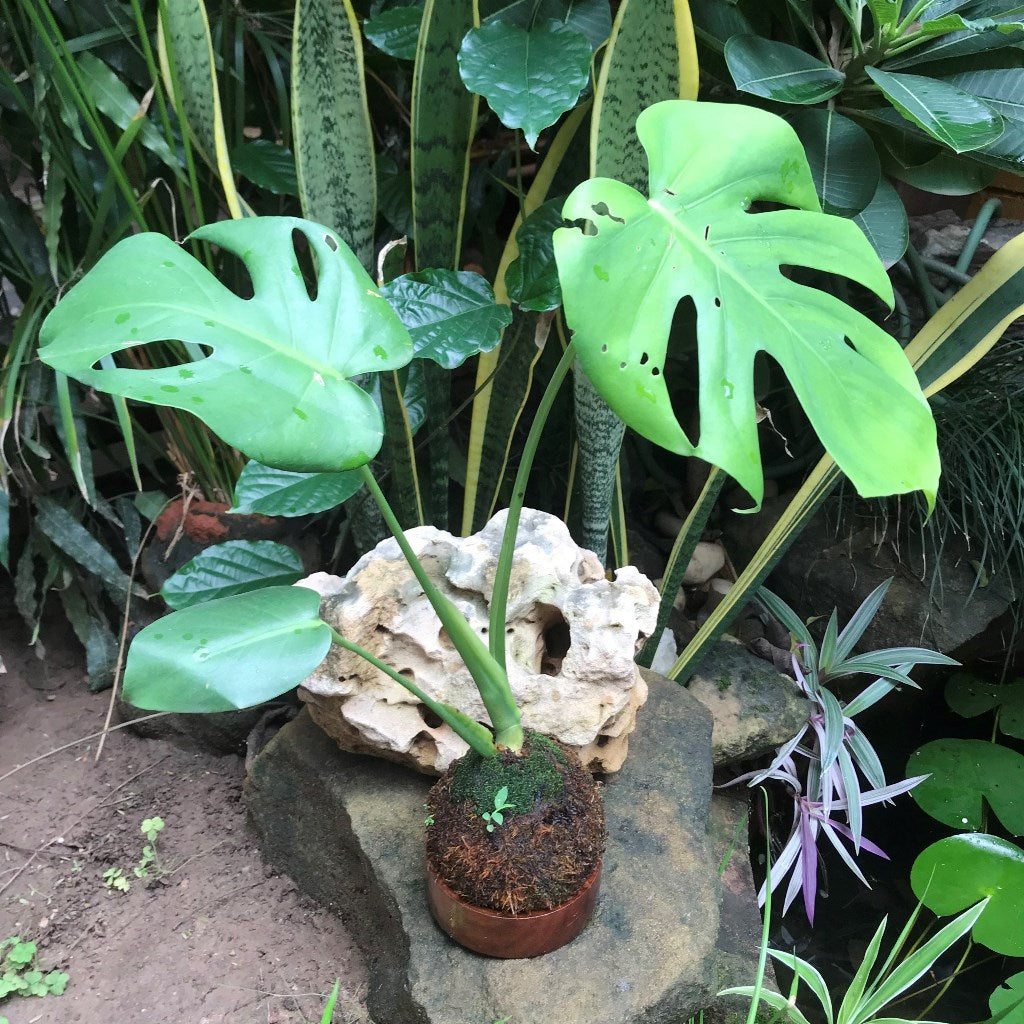
monstera deliciosa kokedama

monstera deliciosa kokedama Kokedama Moss Ball Monstera Deliciosa Plant

Sale price$24.98 Regular price$27.75
Save 10%

Pay in installments of $6.94 with ShopPay, AfterPay and Klarna

Shipping Estimate
USA
  • USA
  • CAN

Ships within 48 hours · Estimated delivery Oct 14 - Oct 19

Promo Codes Available:

For Your Every Summer RSVP, with Code: SUMMER15

Description

monstera deliciosa kokedama Kokedama Moss Ball Monstera Deliciosa PlantKokedama Balls Description Kokedama is a traditional bonsai discipline in which the roots of a plant are bound into a spherical form with moss and clay. The Japanese word, Kokedama, translates to "moss ball," and the practice originated in Japan during the Edo Era, c. 1600. Sometimes called string gardens, each piece can sit in a shallow dish or hang with the attached fishing line loop, making them lovely additions to any window or tabletop. The

Kokedama Balls

Description

Kokedama is a traditional bonsai discipline in which the roots of a plant are bound into a spherical form with moss and clay. The Japanese word, Kokedama, translates to "moss ball," and the practice originated in Japan during the Edo Era, c.1600. Sometimes called string gardens, each piece can sit in a shallow dish or hang with the attached fishing line loop, making them lovely additions to any window or tabletop.

The Kokedama collection celebrates simplicity and the integrity of natural materials and processes. Its clever design means that layers of soil, moss and thread not only create a self contained vessel for the plant to grow but a living sculptural object.

Please note: plant species vary based upon availability, and the photos are intended to show species frequently available. If you'd like to request a particular species, just add a note to your order on the cart page, and we'll do our best to accommodate.

Every Kokedama was 100% handcrafted

Environment

Light: Medium to bright indirect light - avoid direct sun

Water: Water when moss feels near dry . Feel moss /soil at base of plant and check overall weight of kokedama to assess if it s time to water.

Soak entire moss ball in room temperature water for 20-30 minutes, until fully saturated. For best results, research the needs of your particular species. Reduce watering during winter. It s normal for moss to brown over time. Spray the trellis once a day to help pothos grow better.

Location: It's best to keep most plants out of direct sun and away from drafts, so be sure to hang them slightly away from windows. You can also set your kokedama in a shallow bowl or dish and place it at your desk, on a shelf, or on the windowsill.


Shipping Notes
  • Free Standard Shipping on $100+ Orders to the USA.
  • Except Preorder products are shipped in 48 hours.
  • Delivery to the USA:
  1. Standard Shipping : 3-10 business days
  • If time is of the essence, please consider selecting expedited delivery for faster service.
Exchange/Return Notes
  • We offer a 30-day return/exchange service after receiving.
  • Final sale items are not eligible for returns or exchanges.
  • To process your return/exchange, please contact us at [email protected]
  • Please click here for more details>>> Return & Exchange Policy
SKU: 64884819098

Discover Niche Categories That Outsell monstera deliciosa kokedama

Top-Converting Item to Boost Your Average Order

4.4 ★★★★★
Based on 14 reviews
Sort
Highest Rating
Newest First
Oldest First
Product Reviews
Z
Verified Purchase
Zane
Waukegan, US
★★★★★ 5
Helped transfer data from Samsung Galaxy S21 with broken screen.
Color: Black
Helped me transfer data from a Samsung Galaxy S21 with broken screen. Simple put USB C end into phone , grab HDMI cable and plug into hub , then plug HDMI end into a monitor. Then grab a wireless keyboard & mouse and plug dongle into hub. Your phone will output to monitor and you can transfer data via Smart Switch using keyboard & mouse. Will only work if phone is unlocked I found on S21.
WAS THIS REVIEW HELPFUL?YesReportShare
Reviewed in the United States on May 22, 2026
A
Verified Purchase
Alien Nomad
Carnegie, US
★★★★★ 5
Anker 332 USB-C Hub (5-in-1): The Swiss Army Knife of Connectivity
Color: Black
Ever felt like your laptop was playing a cruel joke on you with its lack of ports? Enter the Anker 332 USB-C Hub (5-in-1)—the tech equivalent of a superhero swooping in to save the day (and your productivity). Port Party This hub is like the ultimate party host: it’s got a little something for everyone. Need to connect an external monitor? Boom, there’s a 4K HDMI port. Want to transfer files faster than a cheetah on a caffeine rush? It’s got two 5 Gbps USB-A ports and a 5 Gbps USB-C data port ready to go. Oh, and don’t worry about keeping your laptop charged while you’re multitasking like a boss—there’s a 100W PD-IN port to keep the power flowing. 4K HDMI: Because Why Settle for Less? Let’s talk about that HDMI port, shall we? We’re talking 4K at 30Hz, which means your Netflix binge or work presentation will look crisp, clean, and oh-so-satisfying. It’s like upgrading from VHS to Blu-ray—you won’t believe you ever survived without it. File Transfers in a Flash Remember the days when transferring files felt like waiting for dial-up internet to connect? Yeah, those days are over. With up to 5 Gbps transfer speeds, you can move files so fast that you’ll barely have time to grab your coffee before it’s done. Just think of all the time you’ll save—and how much more you can procrastinate as a result! Pass-Through Charging: Power Up, Don’t Power Down One of the worst feelings in the tech world is watching your battery icon turn red while you’re in the middle of something important. But fear not—this hub’s got you covered with up to 85W pass-through charging. So, go ahead and keep doing whatever it is you’re doing, whether it’s crushing deadlines or browsing cat memes (no judgment here). Compact and Reliable The Anker 332 USB-C Hub is compact enough to slip into your laptop bag without a second thought. And with an 18-month worry-free warranty, it’s clear that Anker has your back—just in case you get a little too enthusiastic with all those ports. Final Thought In a world where laptops keep losing ports faster than you lose socks in the laundry, the Anker 332 USB-C Hub is the perfect solution. It’s reliable, versatile, and just what you need to bring your laptop back to life. So go ahead—plug in, power up, and let the good times (and files) roll!
WAS THIS REVIEW HELPFUL?YesReportShare
Reviewed in the United States on August 20, 2024
P
Verified Purchase
Pratik @ Toronto, CA
Massapequa, US
★★★★★ 5
Excellent Product - USB C - power and data transfer!
Color: Black
It works great. I used this to connect two USB-C devices: one from the POS printer and another for charging, both connected to my tablet into one USB-C. It solved the biggest issue that I was facing.
WAS THIS REVIEW HELPFUL?YesReportShare
Reviewed in the United States on April 21, 2026
J
Verified Purchase
John3.16
Dallas, US
★★★★★ 5
Great choicd
Color: Black
Work great, size is compact and out of the way.
WAS THIS REVIEW HELPFUL?YesReportShare
Reviewed in the United States on June 11, 2026
M
Verified Purchase
Magpie
Massapequa, US
★★★★★ 5
Great replacement screen for an old Chromebook
Size: 15.6" 1080P
Needed a new Screen for an older touch-screen Samsung Chromebook that bit the dust. Repairing it wasn't an option since it's no longer available. Enter this gem of a portable monitor. It works great. Not a replacement touch screen, but works fine with the chromebook touch pad or mouse and dongle. Easy to hook up, a bit testy on first several attempted to bluetooth connect, but works fine now. The speakers leave a bit to be desired, but I just use Bluetooth speakers anyway. Overall, very pleased with the screen clarity and responsiveness of this portable monitor. 15" screen. Great value! I'd buy it again.
WAS THIS REVIEW HELPFUL?YesReportShare
Reviewed in the United States on June 4, 2026

recommand products