SKU: 65445138430
best organic fertilizer for flowering plants

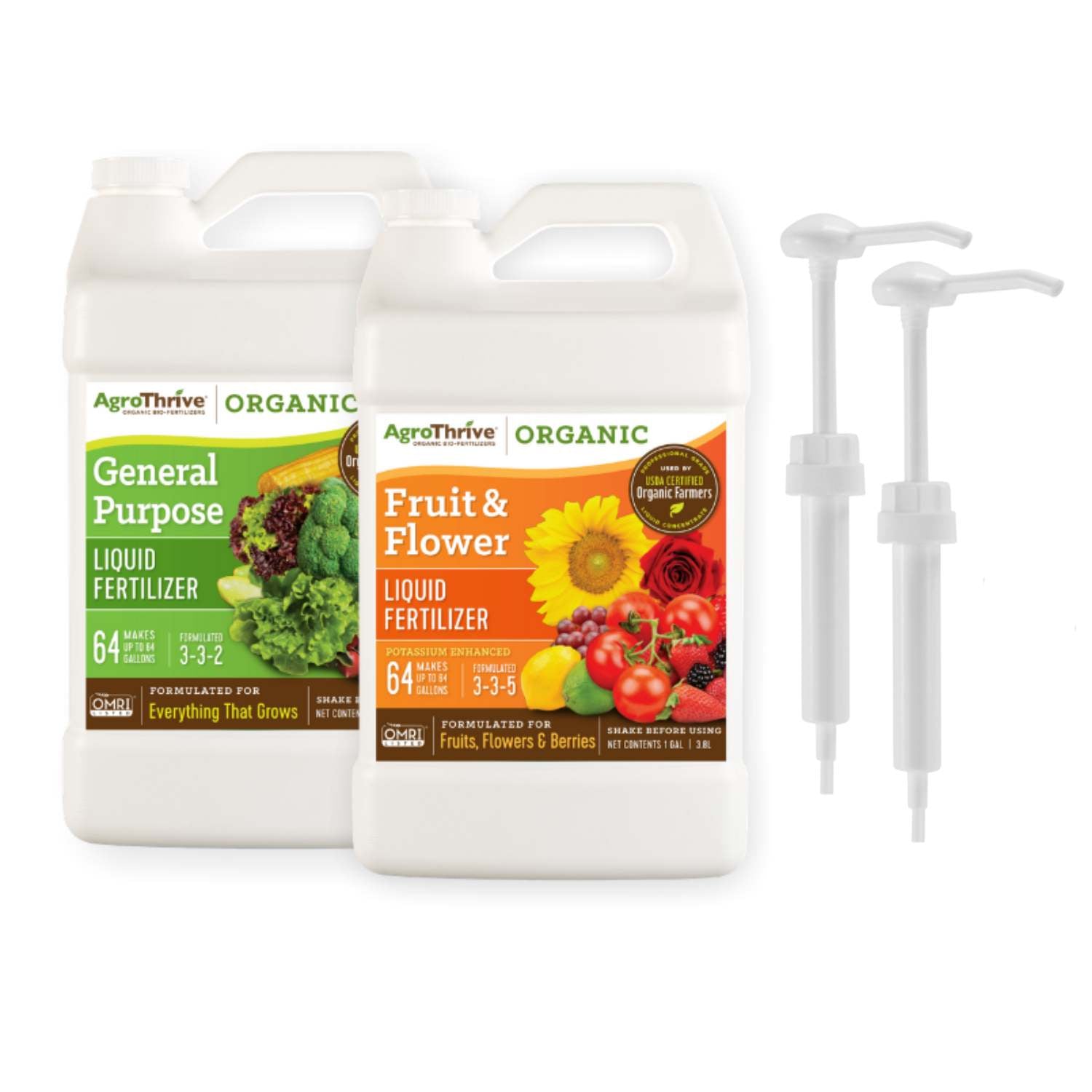
best organic fertilizer for flowering plants AgroThrive Organic Liquid Fertilizer for Fruits and Flowers | Fast Acting Fertilizer for Plants | 100% Organic

Sale price$21.63 Regular price$24.03
Save 10%

Pay in installments of $6.01 with ShopPay, AfterPay and Klarna

Shipping Estimate
USA
  • USA
  • CAN

Ships within 48 hours · Estimated delivery Oct 19 - Oct 24

Promo Codes Available:

For Your Every Summer RSVP, with Code: SUMMER15

Description

best organic fertilizer for flowering plants AgroThrive Organic Liquid Fertilizer for Fruits and Flowers | Fast Acting Fertilizer for Plants | 100% OrganicProduct Details What's The Difference? Suitable for organic production (OMRI, CDFA, and WSDA listed) Organic liquid fertilizer formulated for vegetables, fruits, flower bearing plants, and everything else that grows; derived from corn steep liquor, fermented fish by products, and sulfate of potash Activates indigenous micro flora in soil and helps nutrient release; 70% fast release, 30% slow release Faster growth, root stimulation, plant protection,

Product Details


What's The Difference?

✔ Suitable for organic production (OMRI, CDFA, and WSDA listed)

✔ Organic liquid fertilizer formulated for vegetables, fruits, flower-bearing plants, and everything else that grows; derived from corn steep liquor, fermented fish by-products, and sulfate of potash

✔ Activates indigenous micro-flora in soil and helps nutrient release; 70% fast-release, 30% slow-release

✔ Faster growth, root stimulation, plant protection, higher yields, and more flavorful fruit and vegetables

✔ Convenient liquid concentrate. Just mix with water and apply

    Directions For Use

    Shake well before diluting with water.

    Starter Plants: Mix 2oz of fertilizer concentrate with 1 gallon of water and apply to soil every week.

    Mature Plants: Mix 4oz of fertilizer concentrate with 1 gallon of water and apply to soil every 1-2 weeks.

    Can Be Used For: Soil drench, foliar feeding, hydroponics, and other fertilizing systems.

    After diluting, apply to soil before watering. Use all the diluted portion. Store unused concentrate capped.

    Download the Application Guide Here

    Watering Can Application Video:

    Hose End Sprayer Application Video:

    Pump Sprayer Application Video:

    Delivery & Refunds

    Please allow 5-7 days for your order to arrive. We appreciate your patience!

    Something wrong with your order? No problem! Simply contact us. We'll get you a replacement or refund immediately!

    Why AgroThrive?

    Pre-Digested Means Fast Acting

    Traditional organic fertilizers are simply blends of organic nutrients. When applied to soil, the plants rely on soil microbes to break down those nutrients to a simple form that the plants can eventually absorb.

    This digestion process usually takes anywhere from 2-6 weeks in soil, which can make growing organically quite a challenge.

    AgroThrive is the only organic fertilizer that has already gone through this digestion process before going into the soil, which is why users can see results in less than a week!

    Learn More


    Environmentally Friendly
    Industrial food waste has been a burden for every sector involved: concentrated animal feeding operations, food processors, local waste collectors, and above all – our environment. Traditional disposal methods all have their own environmental risks as highlighted in this video.

    The Progressive Digestion Process (PDP) is an environmentally responsible technology that bridges the gap between industrial food waste and nutritious organic fertilizers in just 21 days. PDP harnesses the natural microbial and enzymatic digestion of organic inputs to break down raw materials while creating biological heat, eliminating harmful pathogens in the process. This digestion is achieved without adding any outside inoculum or external heat to kill pathogens.

    PDP is the most energy-efficient technology available today that can handle every part of the animal and convert it into something beneficial for our planet.

    This process is done in a fully solar-powered facility in the heart of Salinas Valley, California.

    Organic
    Before any organic fertilizer can be used by certified organic farms, they must be listed by OMRI, CDFA, and/or WSDA as compliant with the USDA NOP rule for certified organic farming.

    This is a confirmation to the consumers that these products have been scrutinized, inspected, and are vetted annually for compliance with NOP organic rule.

    Therefore, our customers can rest assured that they are buying absolutely the best products for their lawns, gardens, and indoor/outdoor plants.

    Farmer Trusted
    In 2006, our inspiration was to develop an environmentally friendly and sustainable alternative to chemical fertilizers by harnessing the power of natural digestion of organic wastes. We have since become trusted by many of the largest USDA-certified organic farms across the nation. These certified organic farmers have depended on our products for over a decade to provide our local grocery markets with the safest, tasty organic produce on a regular basis.

    Pet, Home & Garden Safe

    At AgroThrive we believe that food safety starts with fertilizer. The fertilizer we use inevitably comes into contact with the food that we eat, which is why it is critical that growers use a fertilizer that is completely pathogen-free and safe for home use.

    AgroThrive, Inc. is the only organic bio-fertilizer manufacturer that uses HACCP, a food safety technology reserved for production of food for human consumption. Our Progressive Digestion Process kills pathogens several times that of traditional composting processes.

    In addition, our QA program includes complete pathogen and nutrient analyses of every lot with a hold and release program and a computerized traceback system in place to ensure the highest food safety standards in the industry.

    Shipping Notes
    • Free Standard Shipping on $100+ Orders to the USA.
    • Except Preorder products are shipped in 48 hours.
    • Delivery to the USA:
    1. Standard Shipping : 3-10 business days
    • If time is of the essence, please consider selecting expedited delivery for faster service.
    Exchange/Return Notes
    • We offer a 30-day return/exchange service after receiving.
    • Final sale items are not eligible for returns or exchanges.
    • To process your return/exchange, please contact us at [email protected]
    • Please click here for more details>>> Return & Exchange Policy
    SKU: 65445138430

    Discover Niche Categories That Outsell best organic fertilizer for flowering plants

    Top-Converting Item to Boost Your Average Order

    4.5 ★★★★★
    Based on 26 reviews
    Sort
    Highest Rating
    Newest First
    Oldest First
    Product Reviews
    J
    Verified Purchase
    Juan Muratalla
    Los Angeles, US
    ★★★★★ 5
    Excellent Quality and Reliable Performance from Anker’s 8-in-1 USB-C Hub
    I’m really impressed with this Anker USB-C Hub with Ethernet (8-in-1). The build quality feels premium, setup was completely plug-and-play, and all ports work flawlessly with my laptop. The Ethernet connection is stable and fast, which has been perfect for work calls and large file transfers. I also love how compact and portable it is while still offering plenty of connectivity options. HDMI output looks great, USB ports transfer quickly, and the SD card reader is very convenient for photo and video work. Anker continues to deliver reliable products, and this hub is no exception. Highly recommended if you need a dependable all-in-one USB-C hub for productivity or travel.
    WAS THIS REVIEW HELPFUL?YesReportShare
    Reviewed in the United States on May 20, 2026
    T
    Verified Purchase
    Tommy
    Alexandria, US
    ★★★★★ 5
    Works great (quick test)
    Just got this and tested and works great I attached to my MacBook with Ethernet and had a solid connection I tested my steam deck by plugging in Ethernet then adding HDMI then adding power and everything worked as it was plugged in I tested my Nintendo switch even though it clearly states it's not supported and it did not work at all. Even the power pass through did nothing. This is not even remotely a problem since it was advertised as such but I figured it was with a try and worth noting
    WAS THIS REVIEW HELPFUL?YesReportShare
    Reviewed in the United States on May 31, 2026
    K
    Verified Purchase
    kunoh
    Chelsea, US
    ★★★★★ 4
    Despite some caveats; this is a versatile hub
    The Anker 555 8-in-1 USB-C Hub is a good buy if you’re looking for a hub from a reputable brand. I use it with an M1 Macbook Air, and it has been reliable so far. This hub has the following ports: 1 USB-C data port, 1 USB-C Power Delivery Port, 2 USB-A data ports, 1 HDMI port, an Ethernet port, and a microSD/SD card reader. Charging, PD (Power Delivery): To keep my Macbook charging, I connect a PD (Power Delivery) capable cable to the USB-C port meant for PD. (The other USB-C Port on this hub is meant only for data.) Once connected, the hub will eventually become warm to the touch, but this hasn’t caused any problems so far. Video Performance - no problems in 1440p I can connect my 1440p 144hz monitor to this hub’s HDMI port and my Macbook Air has no problem outputting a refresh speed of 144hz, as well the lower refresh rates of 120hz and 60hz. (I do not have a 4k monitor, so I could not test that.) USB-A Ports - works flawlessly I’ve tried keyboards, USB Drives, and even gaming Mice. All of these devices work as expected when connected to the USB-A Ports. Ethernet - Excellent speed I've connect this hub using an Ethernet cable to Gigabit speed Internet. The speed is just as fast as other computers on the network, and there is no slowdown at all, even with most of the ports on the hub being used. Gaming Keyboards with USB-C connectors - some issues. Some peripherals such as keyboards with USB-C connectors may not work on the USB-C ports on this hub. I tried using a Glorious GMMK Mechanical Keyboard and it did not work with this hub’s USB-C ports. (Of course you could try to simply use a USB-C to USB-A adaptor and then connect via the other USB ports on the hub instead.) Extension Cable - Use a Thunderbolt 4 cable Although this is totally optional, I like to use a small, 6-inch USB-C Extension cable to allow this hub to have more slack away from my laptop when connected. To allow this to work, I had to use a Thunderbolt 4 extension cable. I've tried other cables such as a Thunderbolt 3 extension cable. However, some of the attached devices on the hub were not recognized. Only the the Thunderbolt 4 extension cable allowed all my attached devices to be recognized. Other devices I have successfully connected an external SSD via the USB-C data port on this hub. I also regularly use an external DAC using the USB-A ports connecting to an IFI HIP DAC. Both of these devices work perfectly with this hub. Data transfer speed is rated at 10Gbs, though I haven't actually confirmed that. It works well enough for my purposes of transferring text documents and the occasional batch of vacation photos to my external SSD. Conclusion This hub from Anker is rated at 10Gbs which is plenty for me. But if you regularly transfer large amounts of data (like for video editing), I would instead recommend a powered docking station such as those from CalDigit. But for me, this portable hub does everything I need, and for much less money.
    WAS THIS REVIEW HELPFUL?YesReportShare
    Reviewed in the United States on January 28, 2023
    S
    Verified Purchase
    SamCat
    Dallas, US
    ★★★★★ 5
    Almost perfect, could use one more USB-C Gen 2 port and a metal case instead of plastic.
    Never really had any problems with Anker gear, I've come to trust the brand name. This little hub is almost perfect for use with my 2019 MacBook Pro, but where Anker really dropped the ball is by not adding one more USB-C port. I mean, there's two, but if one is dedicated to power devices only that doesn't really leave much room for expansion by only giving you one extra, I mean they were thoughtful enough to give you two USB-A ports. I do like that the USB-C and two USB-A ports are version 3.2 Gen 2 rated for up to 10Gbps transfer speeds versus Gen 1 at 5Gbps. The plastic casing does get hot, not sure if aluminum metal would be any better, but it would feel nicer, plastic just feels cheap. Also, a dark case with dark letter printing doesn't work because you can't see the writing, should have used lighter letter coloring. Otherwise, solid performer. I'll keep it along with my other one because having two hubs with a laptop is convenient so I don't have to always haul a hub around from place to place. PROS: • 1 USB-C port version 3.2 Gen 2 rated up to 10Gbps. • 2 USB-A ports version 3.2 Gen 2 rated up to 10Gbps. • Also includes, HDMI, Ethernet, SD and micro SD card ports. CONS: • Plastic casing, gets hot. • Should have one more USB-C port. • Port description lettering is too dark, gets lost against dark case color, should have used white or silver lettering instead. • No audio port.
    WAS THIS REVIEW HELPFUL?YesReportShare
    Reviewed in the United States on May 7, 2024
    M
    Verified Purchase
    Mares by the Bay
    Louisville, US
    ★★★★★ 5
    It WORKS! I'm Back at Work. Thx to Apple for support and Amazon for fast delivery
    I am thrilled to report that the Anker USB C Hub with Ethernet fixed a dire problem that nailed me when I switched from my maybe-20 year old dying wired Apple Extended Keyboard to the Macally keyboard comparable (with USB-C connection). I have a 2023 MacBook Pro 14", a lovely workhorse, with 3 USB-C/Thunderbolt ports, a MagSafe power port and an HDMI port (with, it turned out, limited ability to handle UHD displays, so useless for my desk setup). It turned out my old Dockteck hub with ethernet didn't have thunderbolt capable USB-C ports, so my new MacAlly keyboard connected to that hub stopped working. On top of that, as I swapped with my Logi webcam, it also required a trickle of power the Dockteck hub didn't provide. As soon as I figured out what the issue was, I read up on several multiport adapters with ethernet, and it seemed that either I would be stuck purchasing WAY more than I needed, adding another bulky (annoying!) device on my desk surface and costing me close to $200. This seemed crazy, so I called Apple Store support. The only Apple Store multiport adapter was useless to me (and also $80) because, of all weird things, it had only ONE USB-C/Thunderbolt compatible port among 8--most ports were legacy. (Ugly too, just saying folks don't HAVE to make devices ugly!) The Apple Store rep, in one of those brilliant customer rep incidents, understood quickly the challenge, said Apple Store didn't have anything that would work for me, but SHE KNEW SOMEONE (ta-da! better than AI!) who would know and could recommend. Three minutes later she said this Anker device would work. I had it in hand by 6pm same day. So this is not just a rave for a solution that WORKS, but also a thank you to the great support from Apple to get me back to work fast. And Amazon for getting the item to me fast too!
    WAS THIS REVIEW HELPFUL?YesReportShare
    Reviewed in the United States on April 20, 2026

    recommand products