SKU: 68306099136
lowe's succulent pots

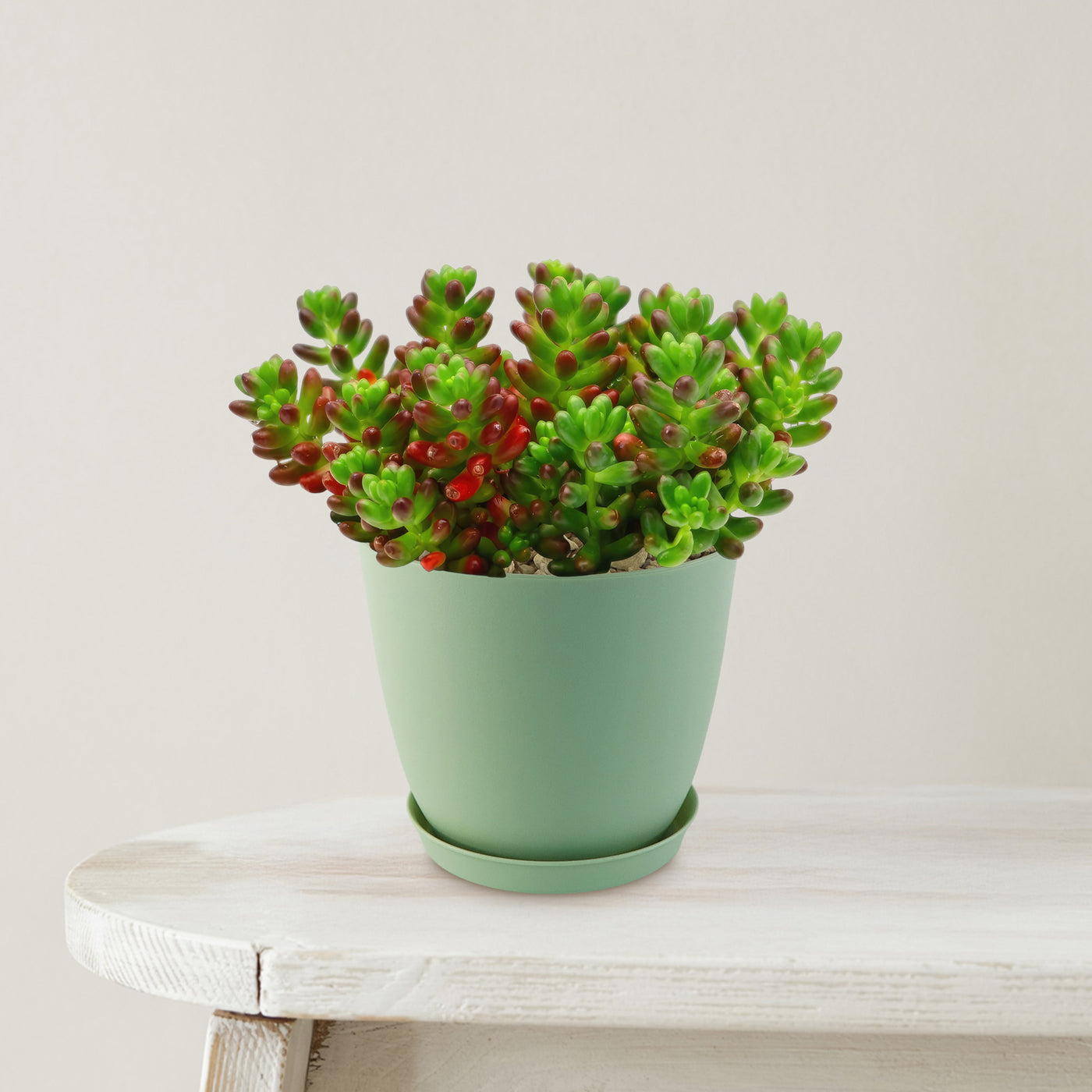
lowe's succulent pots Jelly Bean Succulent 'Sedum rubrotinctum' 6" Pot / Light Green / With Pot

Sale price$18.49 Regular price$20.54
Save 10%

Pay in installments of $5.13 with ShopPay, AfterPay and Klarna

Shipping Estimate
USA
  • USA
  • CAN

Ships within 48 hours · Estimated delivery Oct 17 - Oct 22

Promo Codes Available:

For Your Every Summer RSVP, with Code: SUMMER15

Description

lowe's succulent pots Jelly Bean Succulent 'Sedum rubrotinctum' 6" Pot / Light Green / With PotIntroducing the Jelly Bean Plant, botanically known as Sedum rubrotinctum, is a charming, low growing succulent admired for its colorful, bead like foliage. Its cascading stems make it an excellent choice for hanging baskets, window boxes, and container arrangements, where its colorful foliage can spill over the edges beautifully. Native to Mexico, this evergreen perennial is commonly called pork and beans or banana cactus due to its plump, jelly bean

Introducing the Jelly Bean Plant, botanically known as Sedum rubrotinctum, is a charming, low-growing succulent admired for its colorful, bead-like foliage. Its cascading stems make it an excellent choice for hanging baskets, window boxes, and container arrangements, where its colorful foliage can spill over the edges beautifully.

Native to Mexico, this evergreen perennial is commonly called pork and beans or banana cactus due to its plump, jelly bean-shaped leaves that give it a playful and unique appearance.

This hybrid jelly bean succulent has small, fleshy leaves that start out green but develop vibrant shades of red, orange, or bronze when exposed to bright sunlight, making it a standout in any succulent collection.

It is often used as a ground cover in rock gardens or featured in decorative containers and dish gardens.

As the plant matures, Sedum rubrotinctum typically reaches about 8 inches tall and up to 24 inches wide, forming a spreading, trailing habit.

Jelly bean succulent flowers are yellow, small, and star-shaped, blooming in clusters at the tips of their stems.

While the blooms are subtle, they provide a delicate contrast to the bold foliage and usually appear in spring to early summer.

Related Product

What truly makes the jelly bean succulent so popular is its combination of low-maintenance care and vibrant color transformation. It is drought-tolerant, easy to grow, and adapts well to both indoor and outdoor environments with proper light. Its ability to change color with sunlight adds dynamic beauty throughout the year.

When and How to Water Your Sedum rubrotinctum Plant

This jelly bean succulent is highly drought-tolerant and prefers drying out between waterings, making it more resilient to underwatering than overwatering.

The Sedum rubrotinctum should be watered once every 1-2 weeks during the growing season, with light soaking and minimal watering once every 3-4 weeks during the dormant season, with very light moisture.

During the active growing season, allow the soil to dry out completely between waterings. This helps prevent overwatering, which can cause the Sedum rubrotinctum roots to rot.

During the dormant season, your jelly bean requires even less water. It's important to remember that succulents like the jelly bean plant are more tolerant of underwatering than overwatering.

Light Requirements - Where to Place Your Jelly Bean Succulent

When growing indoors, you can grow it in the areas where it can receive atleast at least 6 hours of bright, direct light to maintain their vibrant red coloring and compact, healthy growth. 

Place it near a window that receives plenty of sunlight, but make sure to protect your jelly bean plants from direct exposure to intense sunlight, especially during the hottest parts of the day.

A south or west facing window works best, but protect it from harsh midday sun. If natural light is limited, you can use grow lights. 

When growing outdoors, it loves basking in the full sun, so find a location in your garden or patio that receives at least 6 hours of direct sunlight each day. 

When grown in direct sunlight, the color ranges from bright green leaves to red-tipped leaves, with the brightest hues.  However, it's important to note that the jelly bean plant can also tolerate partially shaded areas, especially in regions with intense summer heat. 

Newly purchased jelly bean succulent may burn if placed in full sun right away, so increase exposure gradually.

  1. If the leaves stretch or turn pale, it needs more light.
  2. If they become scorched or develop brown spots, it is getting too much sun.

Optimal Soil & Fertilizer Needs 

The Sedum rubrotinctum favors very airy, sandy soil that drains well, and NPK fertilizers once a year in spring. Planting your Sedum rubrotinctum in ordinary wet soil will result in compacted roots, stunted growth, and, most likely, root rot. Instead, make or buy a well-draining potting mix, or ideally, use our Go to Soil cactus mix blend 1 gal 4 qt cacti succulent dirt compost growing media that contains organic mycorrhizae to promote the development of a strong root system that helps your jelly bean plants and other succulents to thrive. 

A balanced, low-strength fertilizer works best for your Jelly bean succulent plant, ideally with an NPK ratio around 5-10-5, where phosphorus is slightly higher than nitrogen to support healthy growth. Apply fertilizer once in spring at the start of the growing season to give it a gentle boost to support stronger roots and better nutrient absorption. 

Hardiness Zones & More 

In the United States, this jelly bean succulent is mostly an indoor plant, but if you live in southern Florida or Hawaii, then you can cultivate it outdoors in USDA zones 9-11.

If you live in a colder climate, it's best to bring the jelly bean plant indoors or provide some protection during the winter months.

As for humidity, the jelly bean plant can handle a range of humidity levels, from drier to more humid environments. Just ensure that the soil has good drainage to prevent waterlogged conditions. 

How to Grow as a Houseplant 

Your jelly bean succulent grows best indoors in temperatures between 60°F and 75°F. It can tolerate slightly cooler temperatures during the winter months, but it's best to keep it away from drafts or extreme temperature fluctuations. As for humidity, the Sedum rubrotinctum jelly bean plant can handle average indoor humidity levels, so you don't need to worry too much about providing extra humidity. Just make sure the air isn't too dry, especially during the winter when indoor heating can cause dryness. 

Wildlife - Jelly Bean Succulent Flowers Attract the Following Friendly Pollinators 

Jelly Bean Succulent 'Sedum rubrotinctum' can attract friendly pollinators such as bees, butterflies, hummingbirds, and other beneficial insects. These pollinators play a crucial role in the ecosystem by aiding in the reproduction of plants and ensuring biodiversity.

Butterflies
Bees
Hummingbirds
Lady Bugs
Multi Pollinators
Other Birds

According to ASPCA, the Sedum rubrotinctum is mildly toxic to humans or pets if ingested in large amounts. However, it is safe to touch and handle, making it a popular choice for indoor gardens or landscaping due to its vibrant colors and low maintenance requirements.

How to Propagate Your Sedum rubrotinctum Plant 

To propagate your jelly bean plants, stem or leaf cuttings can be used. Both are simple and have a high success rate. Keep the cutting in a spot with bright, indirect light instead of direct sunlight, and give it some time until you begin to see new growth. 

Key Takeaways

  1. Jelly bean succulents are low-maintenance and drought-tolerant. They prefer infrequent watering and can handle dry conditions better than excess moisture, making them beginner-friendly plants.
  2. 'Sedum rubrotinctum' is known as pork and beans succulent or banana cactus, because of their jelly bean-shaped leaves.
  3. These succulents thrive in airy, sandy soil, and keeping roots from sitting in moisture is key to maintaining plant health.
  4. Jelly bean succulents' leaves shift from green to vibrant red or bronze, in bright sunlight.

Final Thoughts

Overall, the jelly bean succulents (Sedum rubrotinctumm) are captivating succulents with their bean-shaped leaves and trailing growth habit. With their vibrant green foliage and occasional bursts of colorful flowers, they add a touch of whimsy to any space. A succulent tends to live for many years and grows slowly. Plant them in the spring after the weather warms up. Propagating these succulents is relatively easy, whether through stem cuttings or fallen leaves. Jelly bean succulents are a delightful addition to any succulent collection, bringing charm and beauty to both indoor and outdoor settings. If you're looking for a unique and low-maintenance plant, the jelly bean succulent is definitely worth considering!

Don't miss out on this opportunity to add something truly exceptional to your garden. Order your very own jelly bean Sedum rubrotinctum today!
Shipping Notes
  • Free Standard Shipping on $100+ Orders to the USA.
  • Except Preorder products are shipped in 48 hours.
  • Delivery to the USA:
  1. Standard Shipping : 3-10 business days
  • If time is of the essence, please consider selecting expedited delivery for faster service.
Exchange/Return Notes
  • We offer a 30-day return/exchange service after receiving.
  • Final sale items are not eligible for returns or exchanges.
  • To process your return/exchange, please contact us at [email protected]
  • Please click here for more details>>> Return & Exchange Policy
SKU: 68306099136

Discover Niche Categories That Outsell lowe's succulent pots

Top-Converting Item to Boost Your Average Order

4.5 ★★★★★
Based on 13 reviews
Sort
Highest Rating
Newest First
Oldest First
Product Reviews
R
Verified Purchase
Robert O. Forsyth Jr.
Natrona Heights, US
★★★★★ 1
JUNK, Cheaply built, Feed Scanner fails and falls apart in less than 5 months and only 4 uses.
Style: ET-4800, Color: White, Set: FAX/ADF/Print/Copy/Scan, Style: ET-4800, Color: White, Set: FAX/ADF/Print/Copy/Scan
Absolute piece of Junk! Built cheaply. Feed Scanner has never worked properly from my first scan (only did 4) and now falls apart completely, in the roller section. It falls out after it jammed for the 7th time today, this time with a SINGLE piece of paper. If you have a piece of paper that has a fold in it, forget about it. That will never feed through. I had 6 sheets I had to get out today, I had to do manually via the flat bed, both sides. It took 23 minutes to get done. Should not have taken 2. The last time I used it same issues but less sheets. The paper is SO TIGHT in the feed section it is hitting BOTH walls. You could not slip a piece of paper in there if you wanted too, most likely one of the reasons it does not feed correctly. While on the phone with support (I am right now, 4th call today and 3 emails of pictures they wanted later, the hoops they put you through is ridiculous!) Of course overseas support and has little to no knowledge of being Tech support, I asked for supervisors only to have my first call disconnect at 1 hour and 20 seconds. Then the next call was 24 minutes, then another 32 minutes and now this one still ongoing (56 minutes and still going). Now after 3 hours and 5 minutes, they are "holding" my credit card for 179.99 + tax to get a REFURB unit! So much for a 5 year Warranty. Oh they acted like it was out of date on Warranty, it has NOT been in EXISTENCE for 5 years , it came out in 2022. Did I fail to mention you WILL be dealing with Overseas people who have you repeat the same thing over and over and over and over again. They wonder why I was getting upset...hmmmm . As they pass you along the ranks you have to repeat EVERYTHING all over again. As I was on the phone and they were asking me to open WRONG doors to find the serial #, I lifted once again the Jam area and guess what, the parts fell out. Just PLOP! Other issues while I am at it, the Picture quality is "OK" nothing special. I bought it to save ink as HP gouges you to death and destroys your print head if you use a knockoff. The Ink has been "OK", but I haven't really had it long enough to tell as most everything has been Black and White, so all are still full except the Black (3.4's). Its a rear feed, I miss the HP draw on that, the print speed again is not fast, just OK. Though never really in a rush with it. I cant say it enough, this is cheaply built, and my experience with Tech Support was a HORRIFIC. I never like dealing with Over seas support as it is, but what they wanted pictures of as proof was mind blowing (pictures of the tubes that go to the ink wells? What does that have to do with the issue at hand.) The panel function is anything but user friendly. Firmware Updates, if not done, will prevent usage until done. You have to download and install ALMOST 30 different files, from drivers to firmware updates the list is endless. Never have I had to do that many of ALL printers I have had combined. Simple ZIP file and let it run on an executable file (EXE)like everyone else. That will take you over 2 hours to get all loaded. The ink wasn't bad seeing it needs to be primed first to work, I am not sure what will happen when the REFURB comes, will I get ink or just have to re-prime from the cartridges. The software for scanning is easy to use, though unnecessary, should just scan and auto save, or am I just spoiled by HP? But to send me a "REFURB" as a replacement on a 5 month old unit with a 5 year warranty is really being low. They did EVERYTHING they could to get me to NOT follow through in this return, you have ONLY 30 days on Amazon. You have been warned, I would look elsewhere, the tank issue is a great Idea, but if it doesn't work, what good does it do.
WAS THIS REVIEW HELPFUL?YesReportShare
Reviewed in the United States on December 8, 2025
M
Verified Purchase
Michael A. Adkins
Charlottesville, US
★★★★★ 5
First Impressions - Complete Review
Style: ET-4800, Color: White, Set: FAX/ADF/Print/Copy/Scan, Style: ET-4800, Color: White, Set: FAX/ADF/Print/Copy/Scan
Printer Review from an Artist. Printer cost with a 3-year extended warranty - $199.00. Came with four full bottles of Ink. Each bottle was huge, and enough to completely fill up the tanks. In my old Epson printer that used Epson 127 Ink Cartridges a cartridge held 8ml of ink. The cost per cartridge for the XL Black was $31.00 on Amazon. In comparison, a bottle of ink for the tank printer costs $15.00 and holds 65ml. The Epson 127 Ink Cartridge is rated at 175 pages for the XL cartridge and the Tank Printer is rated at 4500 pages per bottle of ink. So, the difference in cost is striking. Unboxing the printer was simple enough. The printer weighs about half the weight of my old Epson printer. The new printer does not have printer drawers but, back feed only. This actually worked out well for me since I was constantly taking the paper in out and out of the drawers when changing paper size. Also, with this direct paper feed, I figure it will handle my heavier weight card stock paper that I use for my art and greeting cards. To my great surprise, the printer offers two-sided printing. This is really handy when printing my Zines. The printer setup was extremely easy as they recommend a phone app, that walks you through each step with pictures. And it communicated perfectly with the phone for the setup. It takes about 15 minutes to completely set up the printer. I have learned to not rush setup. Take your time, and follow the instructions step by step, Which include filling the tanks. Features, * The printer dues Dual-Sided Print - Great for zines. * It has fax capability, but we do not have a landline, so that will not be used. * It does copying, with a document feeder or you can lift the feeder and place the document on the glass. * I mostly use my Epson Precision San copier but it is nice if you wish to make a quick copy of a document. * Some reviews complained about the very small LED display but I find that by using the app or computer I can control all that I need to do. Print Alignment. I did this test but the printer heads did not require any alignment. During the setup process, the program installs the printer driver on my computer. However I found it to be the very basic driver, and I went to the Epson Website and downloaded and installed the latest driver which is very robust and has all the settings that I needed. The printer's footprint is smaller than my old printer. And my old printer had two paper drawers, though I never used the second drawer. Negatives. The output tray is flimsy and seems like it would easily break if bumped when I walked past the printer, so I have to be careful about this. So far I do not see a way of checking the ink levels from the computer. And they said in the instructions to be sure to check your ink levels. You can see on the front of the printer, where you can see the ink levels. When you purchase more ink, you can attach the bottle and it will not overfill the tanks, and you can then use more ink from the bottle later. So I will purchase a complete set of ink and keep it and as it runs low with about 1/4 left in the tank, I will just fill it up. So far I am very happy with the investment and now printing and ink cost is not a major factor. And I figure I will do a lot of printing with this printer when the holiday season rolls around for my greeting cards. As for print quality, I will need to report on this later, though there were no negative reviews of print quality. A test print on regular paper and the colors seemed to be spot on. One note, I still will continue to use my Canon Pro-300 Wide Printer for my Fine Art Prints, but the new Tank Printer will be my studio workhorse.
WAS THIS REVIEW HELPFUL?YesReportShare
Reviewed in the United States on August 11, 2024
E
Verified Purchase
Edisson Salazar
Fort Morgan, US
★★★★★ 4
Frustrating to set up and unreliable
Style: ET-4800, Color: White, Set: FAX/ADF/Print/Copy/Scan
I bought the Epson EcoTank ET-4800 hoping for an easy, low-cost printing solution, but it has been nothing but trouble. The wireless setup is overly complicated, and the printer often loses connection to the network, forcing me to restart it or reinstall the software. Printing is slow, even for simple documents, and the paper feeder sometimes pulls multiple sheets at once. While the EcoTank system is supposed to save money on ink, the print quality is inconsistent — colors can be dull, and black text occasionally appears streaky. Scanning and copying are also sluggish. For the price, I expected something much more reliable.
WAS THIS REVIEW HELPFUL?YesReportShare
Reviewed in the United States on August 9, 2025
I
Verified Purchase
Irving M. Lamansky
Fort Morgan, US
★★★★★ 5
ET-4800 EZ PZ set up and start up. Prints and scans just fine
Style: ET-4800, Color: White, Set: FAX/ADF/Print/Copy/Scan, Style: ET-4800, Color: White, Set: FAX/ADF/Print/Copy/Scan
An excellent home printer. And why did I purchase such? I had an Epson WF-520 for nearly ten years. But neglect and lack of use caused the printer head to get gunked up. I cleaned the print heads using a solution of 95% Etoh and glass cleaner (about fifty/fifty), a syringe with a plastic tube attached and LOTS of paper towel strips. It was moderately successful but I was never able to get it back to like new printing. I looked over several new printers and wanted to stay with Epson because of ease of use (copy, scanning, printing). Seems as tank printers are the way to go these days. So I ordered the ET-4800. Got here in only a couple of days. Setup was pretty easy, just follow the instructions either via the documentation included or online version. I have pinted and scanned a color test page. I used the built in SmartScan feature without having to think about it much. I am quite satisfied with the results. By the way, there is no automatic two side printing. You actually have to get off your b---, take out the first printing, turn it over and refeed the stack. I was used to doing that with the old WF-520 and never had a problem. I will now set up a once a week, automatic scheduled printing task. I will just have to make sure there is paper on hand. Lack of use is the killer of these inkjet machines regardless of manufacturer.
WAS THIS REVIEW HELPFUL?YesReportShare
Reviewed in the United States on February 16, 2026
T
Verified Purchase
Thomas Weaver
Fort Morgan, US
★★★★★ 5
The intensity of the higher DPI and other settings makes this a marvelous Printer.
Style: ET-4800, Color: White, Set: FAX/ADF/Print/Copy/Scan
I am a former Canon product user for years. I became disappointed two printers ago. Support is horrible. So, I ordered this Epson. Initially, because of the differences I was somewhat confused on the set-up; however, once completed, I can completely endorse this product. The printing is absolutely tops. The ink system is fantastic. AND, it has fax capabilities which I tested and works great. Can not say enough good things about it. I specialize in historical photo and documentation restoration - and this printer works GREAT.
WAS THIS REVIEW HELPFUL?YesReportShare
Reviewed in the United States on April 29, 2026

recommand products