Pay in installments of $5.27 with
 ,
,
 and
and

Shipping Estimate
USA
- USA
- CAN
- USA
- CAN
Ships within 48 hours · Estimated delivery Sep 12 - Sep 17
 Promo Codes Available:
For Your Every Summer RSVP, with Code: SUMMER15
Description
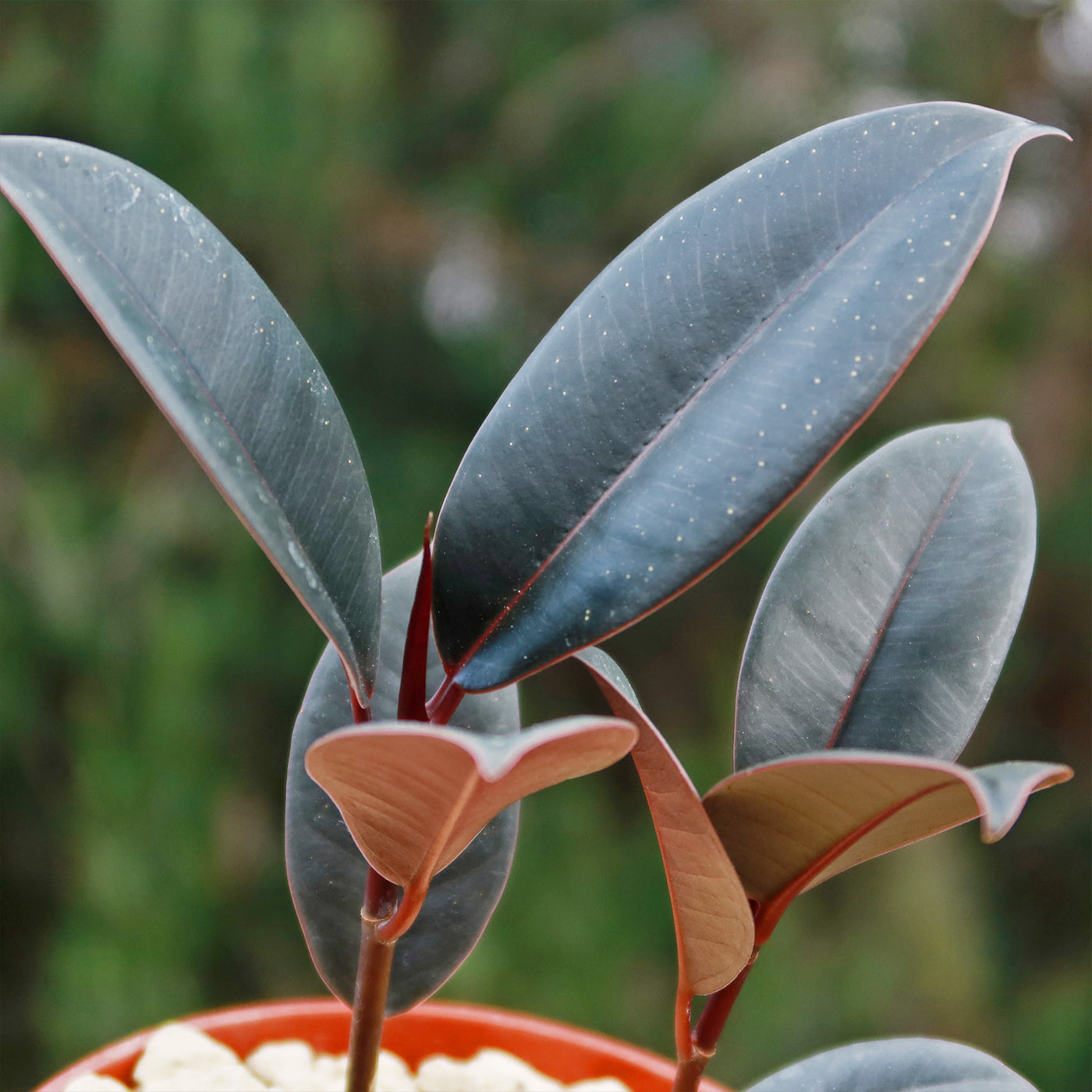
rubber tree plant red leaves Rubber Fig 'Ficus Burgundy' For saleAttention Gardeners, are you looking for Ficus plants that will make your garden stand out? Look no further than rubber fig, also known as Ficus Elastica burgundy! With its stunning, burgundy colored leaves, it has several other names such as Indian rubber fig, Indian rubber tree plant, burgundy rubber plant, burgundy rubber tree, and Abidjan black prince. It belongs to the Ficus family and is native to Southeast Asia. Ficus burgundy is a popular
Attention Gardeners, are you looking for Ficus plants that will make your garden stand out? Look no further than rubber fig, also known as Ficus Elastica burgundy! With its stunning, burgundy-colored leaves, it has several other names such as Indian rubber fig, Indian rubber tree plant, burgundy rubber plant, burgundy rubber tree, and Abidjan black prince. It belongs to the Ficus family and is native to Southeast Asia.
Ficus burgundy is a popular perennial plant with dark green leaves, deep reddish variegation, and a glossy sheen. It features a large green trunk resembling an elephant's foot or tusk and is also known as the fiddle leaf fig. This dramatic and vigorous plant is perfect for any home or office room. This burgundy Ficus rubber plant is a fast-growing tropical plant, that can grow up to 10 feet indoors with glossy, oval-shaped leaves measuring 4 inches in width.
The flowers of the Ficus burgundy are small and insignificant and bloom during spring and summer. However, it is primarily grown for its attractive, burgundy-colored leaves rather than its flowers.
To propagate the Ficus burgundy, you can use stem cuttings. Simply take a healthy stem cutting with a few leaves and place it in a glass of water. After a few weeks, roots will start to develop, and you can transfer the cutting to a pot with well-draining soil. Another method is to propagate using air layering, where you encourage roots to grow on a section of the stem while it is still attached to the parent plant.
Additionally, the Ficus plant's stems and leaves can be toxic to humans or pets if consumed in large amounts, causing nausea, vomiting, diarrhea, and paralysis, so it's crucial to prevent children and pets.
Watering Needs
When it comes to Ficus burgundy care, it has moderate watering needs. The soil must remain consistently moist without becoming soggy. Overwatering can lead to root rot, so it's best to let the top inch of soil dry out before watering again. You can test the soil's moisture content by inserting your finger into it. If it feels dry, it's time to water your rubber fig tree.
When watering, be sure to completely saturate the soil and let it drain out of the pot. This helps to flush out any accumulated salts and ensures that the roots receive sufficient hydration. However, avoid leaving your Ficus burgundy rubber fig sitting in standing water, as this can also lead to root problems.
During the winter months, when your Ficus plant is in its dormant phase, you can reduce the frequency of watering. Allow the soil to dry out a bit more between waterings, but still ensure that it doesn't completely dry out.
Remember, each environment is unique, so it's important to observe your burgundy ficus and adjust your watering routine accordingly. If the leaves start to droop or turn yellow, it could be a sign of overwatering or underwatering. Finding the right balance will help keep your Ficus Burgundy happy and healthy!
Light Requirements
The Ficus Burgundy thrives in bright, indirect light to maintain its dark foliage. It enjoys being near a window where it can receive plenty of filtered sunlight throughout the day. However, it's important to avoid placing it in direct sunlight as the intense rays can scorch the leaves.
If you don't have a well-lit area in your home, don't worry! The Ficus Burgundy can tolerate lower light conditions but may grow more slowly, and its leaves might not develop their full burgundy color. You can also supplement its light requirements with artificial grow lights to ensure it gets the necessary light for healthy growth.
Remember to rotate your rubber plant every few weeks to ensure even light exposure on all sides. This will help prevent your rubber fig from leaning towards the light source and promote balanced growth.
Optimal Soil & Fertilizer Needs
Use a well-drained soil that is designed specifically for your succulent. These specialty soil mixes have been precisely developed to imitate well-draining desert soils. Commercial succulent soil is affordable and available online or at Home Depot. We believe the best option is to use our specialty succulent potting mix that contains 5 natural substrates and organic mycorrhizae to promote the development of a strong root system that helps your burgundy ficus rubber plant to thrive. If you don't mind getting a bit of dirt on your hands and are okay with a basic soil for your succulents, then you can save some money and make your own mix by simply combining healthy natural garden soil with equal parts of sand or perlite.
When it comes to fertilizing, the Ficus Burgundy benefits from a balanced, water-soluble NPK fertilizer. You can apply it once a year during the growing season (spring). During the winter months, when your ficus plant is in its dormant phase, you can reduce or completely stop fertilizing. This allows your ficus rubber plant to rest and prepare for new growth in the following season.
Remember to always water your ficus indoor plant before applying fertilizer to avoid burning the roots. And don't forget to wipe off any excess fertilizer from the leaves to prevent damage.
Hardiness Zones & More
The Ficus Burgundy is typically suited for USDA hardiness zones 9 to 11, which means it can tolerate temperatures as low as 35°F. However, it's important to note that this Ficus plant prefers warmer temperatures and may suffer damage if exposed to prolonged cold or frost.
In terms of temperature, the Ficus Burgundy thrives in average room temperatures between 60°F and 75°F. It can tolerate slightly higher or lower temperatures, but extreme fluctuations or prolonged exposure to very high or low temperatures can negatively impact its growth.
When it comes to humidity, the Ficus Burgundy prefers moderate to high humidity levels. It can tolerate average household humidity, but it will appreciate some extra humidity, especially during dry winter months. You can increase humidity by placing a tray of water near the rubber fig plant or using a humidifier.
Remember to avoid placing the plant near drafts or vents, as sudden temperature changes and dry air can stress the Ficus Burgundy. With the right temperature and humidity conditions, your plant will thrive and maintain its beautiful foliage.
Shipping Notes
- Free Standard Shipping on $100+ Orders to the USA.
- Except Preorder products are shipped in 48 hours.
- Delivery to the USA:
- Standard Shipping : 3-10 business days
- If time is of the essence, please consider selecting expedited delivery for faster service.
Exchange/Return Notes
- We offer a 30-day return/exchange service after receiving.
- Final sale items are not eligible for returns or exchanges.
- To process your return/exchange, please contact us at [email protected]
- Please click here for more details>>> Return & Exchange Policy