SKU: 73202854903
indoor plants aquarium

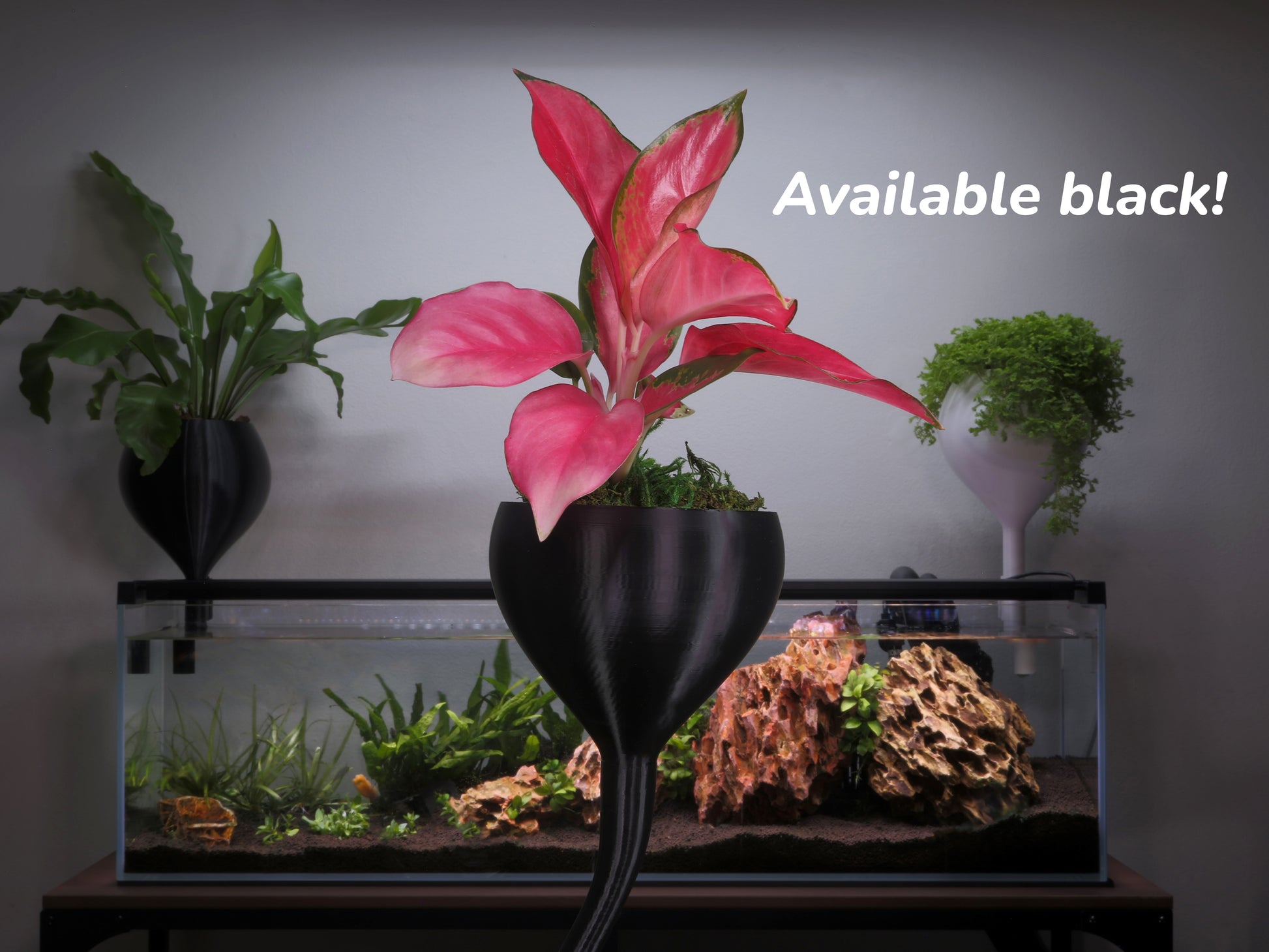
indoor plants aquarium Small Aquarium Wicking Pot – Compact Fish Tank Planter

Sale price$22.21 Regular price$24.68
Save 10%

Pay in installments of $6.17 with ShopPay, AfterPay and Klarna

Shipping Estimate
USA
  • USA
  • CAN

Ships within 48 hours · Estimated delivery Jul 29 - Aug 3

Promo Codes Available:

For Your Every Summer RSVP, with Code: SUMMER15

Description

indoor plants aquarium Small Aquarium Wicking Pot – Compact Fish Tank PlanterSmall Aquarium Mounted Wicking Pot Compact Self Watering Planter Product Specifications Fits rimmed and rimless aquariums Compact planting chamber Designed for continuous moisture environments Compatible with Mossari extensions Ships in 12 business days Add tropical greenery to your aquarium without taking over the tank. The Mossari Small Aquarium Mounted Wicking Pot is a compact self watering planter designed to fit both rimmed and rimless aquariums.

Small Aquarium-Mounted Wicking Pot – Compact Self-Watering Planter

Product Specifications

Fits rimmed and rimless aquariums
• Compact planting chamber
• Designed for continuous moisture environments
• Compatible with Mossari extensions
• Ships in 1–2 business days

Add tropical greenery to your aquarium without taking over the tank.

The Mossari Small Aquarium-Mounted Wicking Pot is a compact self-watering planter designed to fit both rimmed and rimless aquariums. Built from aquarium-safe materials, it mounts securely to your tank and uses passive capillary action to draw water upward into the root zone.

No pumps. No plumbing. No daily watering.

This smaller format is ideal for nano tanks, tighter setups, or hobbyists who want to experiment with above-tank plant growth without committing to a larger planter.

How the Aquarium Wicking System Works

A wick extends from the planter into your aquarium water. As the plant uses moisture, water is continuously drawn upward and distributed evenly throughout the substrate.

This creates a stable, consistently moist root zone that supports steady growth without the harsh wet-dry cycle of traditional watering.

The Small Wicking Pot works especially well for compact tropical plants that prefer consistent moisture, including small trailing vines, creeping species, ferns, and lightweight foliage plants.

Substrate Options – Choose Your Growing Strategy

Customize your planter with one of two wicking substrate blends depending on how you want your aquarium system to perform.

Enriched Wicking Substrate – Added Nutrient Support

Designed for growers who want stronger establishment and added nutrient buffering in the root zone.

Includes:
• Coco coir, perlite
• Worm castings
• Kelp meal
• Neem meal
• Gypsum

Why upgrade to Enriched?

Worm castings provide gentle plant-available nutrients and beneficial microbial activity that support root health.

Kelp meal supplies trace minerals and natural growth compounds that encourage fuller foliage and stronger development.

Neem meal contributes organic matter and supports a balanced root-zone environment.

Gypsum provides calcium for structural plant support and helps maintain substrate structure.

This option is particularly helpful for lightly stocked aquariums, new tanks, or smaller systems where nutrient levels may be lower.

When used properly in a Mossari wicking system, amendments remain primarily concentrated in the root zone rather than freely washing into the aquarium.

Inert Wicking Substrate – Full Feeding Control

Designed for fully aquarium-driven nutrient systems.

Includes:
• Coco coir
• Coco chips
• Perlite

No added fertilizers or amendments.

Plants rely entirely on nutrients drawn from aquarium water. Ideal for established tanks with steady nitrate production or growers who prefer complete nutrient control.

How Much Does 6 Cups Fill?

One 6-cup bag fills:

Designed for Plant and Fish Health

The wicking system separates the plant root zone from direct water flow. Water moves upward through capillary action rather than pouring through the substrate.

This helps:

• Maintain stable root moisture
• Avoid heavy nutrient dumping into the aquarium
• Allow plants to assist in nutrient uptake from tank water

Why Choose Mossari

Mossari planters are engineered specifically for aquarium integration. They are not modified pots or generic clip-on containers. Each design is built around wicking performance, structural stability, and long-term durability in humid environments.

The Small Wicking Pot gives you flexibility to test new plants, expand vertically, or add greenery without overwhelming your aquarium footprint.

Create a Living System

Add compact tropical plants above your tank. Reduce manual watering. Turn unused vertical space into a functional plant-aquarium display.

Shipping Notes
  • Free Standard Shipping on $100+ Orders to the USA.
  • Except Preorder products are shipped in 48 hours.
  • Delivery to the USA:
  1. Standard Shipping : 3-10 business days
  • If time is of the essence, please consider selecting expedited delivery for faster service.
Exchange/Return Notes
  • We offer a 30-day return/exchange service after receiving.
  • Final sale items are not eligible for returns or exchanges.
  • To process your return/exchange, please contact us at [email protected]
  • Please click here for more details>>> Return & Exchange Policy
SKU: 73202854903

Discover Niche Categories That Outsell indoor plants aquarium

Top-Converting Item to Boost Your Average Order

4.7 ★★★★★
Based on 16 reviews
Sort
Highest Rating
Newest First
Oldest First
Product Reviews
C
Verified Purchase
Customer in Oregon
Chelsea, US
★★★★★ 5
FULL POINTS!!!
Configuration: 2-pack, Style: without eero Plus
After repeated, torturous attempts with other routers to replace the wifi network provided by our beloved Apple Time Capsule, we are relieved and thrilled to have landed on the 2-unit eero Pro 6E router. Hallellujah! Among other things, the eero routers (and their mesh) were trivial to set up, the support was great (and barely needed), and a great surprise, the eero routers automatically connect to our wifi-aware HP LaserJet M401dw printer (via a feature in the eero routers called Universal Plug and Play, or uPnP), so that I don't have to choose the printer's wifi before printing. And oh yeah, the eero routers' mesh covers our 1,600-sq ft house nicely, with great signal speed and strength, and automatically chooses my Mac's fastest wifi speed. TIP (old news to most of you, I presume): To provide additional ethernet ports from the routers, I bought and installed the inexpensive, high quality "NETGEAR 5-Port Gigabit Ethernet Unmanaged Switch (GS105NA)", which required no setup at all, except that the switch must be connected to either of the eero routers after the eero router is connected to your cable modem, so that your ethernet service can recognize the additional ports provided by the switch. My only complaint is that setting up the eero routers requires a cell phone, and as I love macOS for its legacy self-evident user interface, I hate cell phones! But that said, set up with the cell phone was trivial. So... FULL POINTS!!! PS. Despite searching hard, I never found a router that supported Time Machine backups via wifi, which was possible with the Apple Time Capsule. Instead, I have adopted Apple's present guidance to make Time Machine backups to an SSD (removable flash drive). I use two, keeping one in the house and one in the car and swapping them with every backup. Works fine, but I miss Steve Jobs!
WAS THIS REVIEW HELPFUL?YesReportShare
Reviewed in the United States on January 9, 2026
P
Verified Purchase
Peaty
Draper, US
★★★★★ 5
Very easy set up, plays nice with smart devices.
Configuration: 3-pack, Style: without eero Plus, Configuration: 3-pack, Style: without eero Plus
I've been using the system for a number of months now. I had an aging Netgear Orbi system that was working well enough but due to the way the system works, it was difficult to get it to work with the smart devices in my house. I have a number of smart locks, security cams and outlets that had issues hooking up. I decided to change to the eero system. I have a main unit and three satellites. The main router is on the top floor of my two story house and I have one in the basement. I have quick speeds throughout the house no problem. I'm pretty good with tec stuff but was worried that I'd have to go through setting up each device again on my system when I switched over. I got each of the eero devices up and running with the latest firmware. Set them up with the same SSID and PW's of my previous system. I unplugged my old system and restarted the eero's and everything just, worked. All my devices connected. I was expecting to have to manually add one of my security cameras or maybe a smart outlet. I'm using a few smart systems like Netvue, VeSync, U home and Gosund. They all work without issues. I was little shocked frankly. I was expecting some sort of issue I'd have to start googling but no. I wish there was a web base app but it's not a big issue everything is through a phone app. I pay My ISP for a 1GB Download and am seeing just about that wired and wireless 650+ MBps so it's plenty fast. I have a MoCa device to my Nvidia Shield streaming device and that's also seeing 950+MBps. It's been very stable, I haven't noticed any drops or speed reductions. Not that it matters too much to me but each of the stations are pretty small and look pretty good compared to my old ones. All in all a worthwhile upgrade for me.
WAS THIS REVIEW HELPFUL?YesReportShare
Reviewed in the United States on January 31, 2025
N
Verified Purchase
nmd
Draper, US
★★★★★ 5
Great Product
Size: 1 Camera
Great camera for outdoor security. The features on the app have been updated and work better than the Ring Doorbell. The camera has a great live picture, and the sound is very clear.
WAS THIS REVIEW HELPFUL?YesReportShare
Reviewed in the United States on April 23, 2026
D
Verified Purchase
Dexter
Lexington, US
★★★★★ 5
Quality Cameras
Size: 2 Cameras
Love these Cameras. Great clear quality and super easy to set up! If you are looking to add a camera or camera system, you can't beat the price and quality of these
WAS THIS REVIEW HELPFUL?YesReportShare
Reviewed in the United States on May 18, 2026
G
Verified Purchase
GuitarRebel
Port Orchard, US
★★★★★ 5
Read this if you're having connection or audio/video/notification difficulties ***UPDATED at end***
Before I start my revised review, let me state that there's been a lot of news lately about people hacking into Ring cameras, but this only happens when someone installs a new camera and doesn't update the default username and password (or has an extremely weak password which is easy for a hacker to guess). This is like leaving your front door open while on vacation. Your camera is sending and receiving signals over a wireless network. Anyone within range of the signal can potentially be a threat if you don't have good encryption (username and good password) set up on your camera. There's no logical reason for a Ring owner to not do this. Ring even stresses changing the default settings during the initial setup process. Bottom line, don't blame the car manufacturer if you leave the keys in your car and it gets stolen. ---------------------------------------------------------------------------------------------------------------------------------------- Recently, I wrote a rather scathing 1 star review about the problems I was having with my new Ring Stick Up Wireless Battery Cam. I'm no stranger to wireless cams, having 10 hooked up and running seamlessly on another network as I write this, but I was totally frustrated with the connection reliability, not only with my two upper end cellphones, but also on my Galaxy Tab and Amazon Show. More times than not, the software wouldn't connect with the camera but when it did, the video was choppy. Notifications were also hit and miss. I have a great wireless mesh router system throughout the house, so after doing all the troubleshooting I could think of, I assumed it was due to faulty hardware or software. I gave up and started the return process through Amazon. It was a new product after all and new products sometimes are really buggy. Plus, I read other negative reviews which seemed to justify my thoughts and actions. Then I got an email from a gentleman from Ring saying he read my review and asked if I'd be willing to let him help troubleshoot my issues with me. Although I had already started the return process, I was willing. It was refreshing to know Ring Customer Service was genuinely interested in troubleshooting possible defects in their newest product. Together, we isolated the issue within about 20 minutes. It turned out it wasn't the camera or software after all. Anyone having connection issues should do what he advised me to do. Open up the Ring app and click on the 3 little dots to the upper right of the camera screenshot, then select settings. From there go to Device Health and check the signal strength. Although I had a good mesh hub (inside) within 10 feet of my camera (mounted outside), my signal strength was RSSI -64. He stated that the signal was so weak it was on the cusp of what is needed for the camera to even minimally operate. This prompted me to reboot my wireless mesh system and reset/reconnect the camera. When it came back online, my signal strength went to -39, a vast improvement. A quick check of all of my devices showed the camera and software working flawlessly. Hat's off to Ring. Anyone who may be having connection or audio/video/notification difficulties, check your signal strength to the camera via the Ring software, even if your router is close by. You just might be surprised. ***UPDATE*** Camera (and software) is still working flawlessly on all devices. Ring has now updated their Windows 10 desktop app (which previously didn't work with the new wireless battery cams) and it works flawlessly as well. Observations. Notifications on my phone, Tab and Amazon devices (Show, Echo, Dot) are almost instantaneous. Alexa says "Someone is at your front door." Very cool. I bought an extra battery, but it looks like it'll be at least a few months before I need to swap it out, even with the intensive testing I've done on the Stick Up Cam. Battery life seems excellent. I have one zone blocked out and that seems to work fine as well. I also have it mounted a couple of feet above and to the left of my front door, tilting downward at an angle. Even though residential traffic is visible in the field of view, I've not gotten one trigger due to street activity. The motion sensor is triggered by anything coming into the bottom half of it's field of view. From the time someone triggers the motion sensor until the time I'm aware of it is 1-2 seconds. That's about as close to real time as you can get. It's not given me a false alarm even once. Telling my Amazon Show to "(Alexa), show front door cam" takes about 5 seconds to complete. I can also watch triggered video clips and get a live feed while away from home without any extra setup to my network. It's totally automatic. Because of the customer service I received from Ring and the fact the product is much better than I originally thought, I will be expanding my Ring family soon.
WAS THIS REVIEW HELPFUL?YesReportShare
Reviewed in the United States on October 29, 2019

recommand products