SKU: 74843392579
plant for money in home

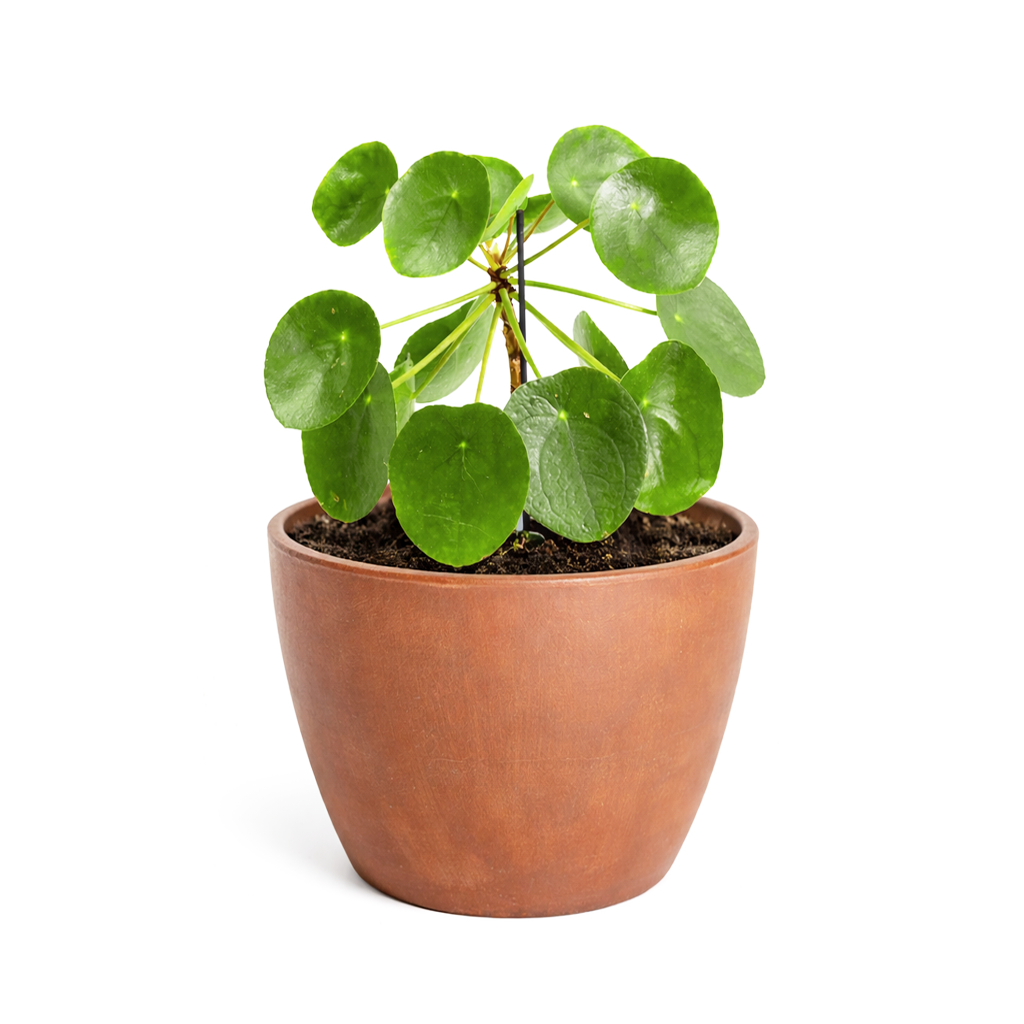
plant for money in home Pilea Peperomioides 'Chinese Money', Feng Shui Houseplant for Your Home

Sale price$22.77 Regular price$25.30
Save 10%

Shipping Estimate
USA
  • USA
  • CAN

Ships within 48 hours · Estimated delivery Jul 14 - Jul 19

Promo Codes Available:

For Your Every Summer RSVP, with Code: SUMMER15

Description

plant for money in home Pilea Peperomioides 'Chinese Money', Feng Shui Houseplant for Your HomeDescription Light Soil Water Hardiness Pilea Peperomioides, or Chinese Money Plant, is a rare houseplant with coin shaped green leaves. Its round leaves resemble coins, symbolizing wealth and prosperity. Placing this plant in your home or office is believed to attract financial abundance and good luck. The leaves have long, thin leaf stems growing around the trunk of the plant. This unique foliage makes Pilea Peperomioides a bold and precious addition

  • Pilea Peperomioides, or Chinese Money Plant, is a rare houseplant with coin-shaped green leaves. Its round leaves resemble coins, symbolizing wealth and prosperity. Placing this plant in your home or office is believed to attract financial abundance and good luck. The leaves have long, thin leaf stems growing around the trunk of the plant. This unique foliage makes Pilea Peperomioides a bold and precious addition to your houseplant collection. 

    Pilea Peperomioides is an Asiatic perennial herb native to Yunnan Province in Southern China, growing at the foot of the Himalayas mountains. It is believed that this plant was brought to Scandinavia in the 1940s, and became popular throughout the Nordic countries before spreading to other parts of the world.

    Pilea Peperomioides is a fast grower and can reach about 12" in both height and width.

    A mature Pilea Peperomioides may produce clusters of small white flowers on pink-tinged stems.
  • Pilea Peperomioide needs bright, indirect sunlight. It does not tolerate low light conditions. Too little light can slow down its growth and makes this plant leggy. Avoid harsh direct sun to prevent scorching leaves.

    Pilea Peperomioides needs watering about once per week or whenever the first 2" of the soil is dry. Always check the soil before watering and drain well to avoid root rot.

    Pilea Peperomioides does not like waterlogged soil, and the best soil for this plant is well-drained, porous potting soil that can promote healthy root development.

    This plant grows best in normal room temperatures (between 65°F-85°F). This plant is not frost-tolerant and it does not grow well when the temperature drops below 50°F. Pilea Peperomioides thrives in average indoor humidity, and it is recommended that you mist your plant and use a humidifier when the environment is too dry (humidity level falls below 50%). Low humidity can cause brown patches on the leaves.

    This plant should be fertilized once per month during the growing season (spring/summer) with diluted houseplant fertilizer.

  • USDA Zone 9-11

    USDA Zone 9b: to -3.8 °C (25 °F)

    USDA Zone 10a: to -1.1 °C (30 °F)

    USDA Zone 10b: to 1.7 °C (35 °F)

    USDA Zone 11: above 4.5 °C (40 °F)

Shipping Notes
  • Free Standard Shipping on $100+ Orders to the USA.
  • Except Preorder products are shipped in 48 hours.
  • Delivery to the USA:
  1. Standard Shipping : 3-10 business days
  • If time is of the essence, please consider selecting expedited delivery for faster service.
Exchange/Return Notes
  • We offer a 30-day return/exchange service after receiving.
  • Final sale items are not eligible for returns or exchanges.
  • To process your return/exchange, please contact us at [email protected]
  • Please click here for more details>>> Return & Exchange Policy
SKU: 74843392579

Discover Niche Categories That Outsell plant for money in home

Top-Converting Item to Boost Your Average Order

4.8 ★★★★★
Based on 583 reviews
Sort
Highest Rating
Newest First
Oldest First
Product Reviews
M
Verified Purchase
Marylou
Boise, US
★★★★★ 5
Windows OS only, Software Sketchy but works. Use with precautions and do a security scan afterwards.
Ok, I was really annoyed when I found out this waste ink pad causes the printer to be "end of life." I currently have the ET2800, and after 15,500 pages, I got this message. I own a small stationery business, which is why I print a lot. However, I used to work on large multi-function printers that had user-replaceable waste ink cartridges. I called Epson in hopes that they would just send me the part and be done with it. BUT NOPE, they wanted me to send in pictures, then I had to either send the printer in or get a certified technician to work on it. I looked online and found this, along with several videos on how a regular user can replace it themselves. It was easy, with no issues. You do need to physically plug the printer into your computer. OH, and the SOFTWARE is only compatible ON WINDOWS; it does not work on MAC OS and GOOGLE OS. Just FYI. The only problem I had was that the software, which is usually offered by third-party products from Amazon, has a sketchy website attached to it. BUT this was the best one to use because you DO NOT NEED A KEY to reset the waste ink counter. You simply use their application, and that's it. One tip I suggest is to uninstall or delete the application and its folder after you have finished resetting. Also, empty your recycle bin. Then run a quick Windows security scan.
WAS THIS REVIEW HELPFUL?YesReportShare
Reviewed in the United States on November 25, 2025
C
Verified Purchase
Carole T.
Phoenix, US
★★★★★ 5
Reset Software for Ecotank ET-4800
Excellent. Worked like a charm!
WAS THIS REVIEW HELPFUL?YesReportShare
Reviewed in the United States on May 6, 2026
K
Verified Purchase
Kay
Natrona Heights, US
★★★★★ 5
Great Product - highly recommend
Worked great fixed problem….wonderful instructions easy to follow
WAS THIS REVIEW HELPFUL?YesReportShare
Reviewed in the United States on April 28, 2026
A
Verified Purchase
Amazon Customer
Lowell, US
★★★★★ 5
Might Need to Turn Off Security Measures in Order to Download
I'm a 1st grade teacher and use my ET-2800 religiously. We own 4 of them, between home, my husband's and my classroom, and one for sublimation. I've printed over 15,000 copies on my school printer in the last few years and had no idea about the ink pad replacement until the error message popped up and wouldn't work anymore. I originally purchased a different set and couldn't get it to work. I was in panic mode so I ordered this set, which also originally didn't work. After really paying attention to the alerts that were popping up, I finally had to Google how to turn off my McAfee and Windows Security programs. They were blocking it from running. Once I did that, it was able to install and it is back up and running again. It did make me very nervous to turn them off but as soon as I got it installed, I turned them right back on and ran scans. So far I haven't had any issues in the last few days. The installation is extremely easy, it came with gloves, a screw driver, etc. Mine wasn't messy, so I didn't need the gloves or anything. It's also a 3-pack, so I left myself reminders for next time on how turn off the security. If you are having installation problems, turn off all of your malware security and that will probably help. Just make sure you turn it back on and run scans, the whole process with all of these websites seems shady and scary at first, but this one appears to be legit. I did read that Windows 10 and 11 tend to block sites that are deemed safe.
WAS THIS REVIEW HELPFUL?YesReportShare
Reviewed in the United States on December 13, 2025
J
Verified Purchase
JamesJordan
Cuba, US
★★★★★ 5
works great for great price
they are getting a great deal for three
WAS THIS REVIEW HELPFUL?YesReportShare
Reviewed in the United States on June 1, 2026

recommand products