Pay in installments of $5.70 with
 ,
,
 and
and

Shipping Estimate
USA
- USA
- CAN
- USA
- CAN
Ships within 48 hours · Estimated delivery Oct 18 - Oct 23
 Promo Codes Available:
For Your Every Summer RSVP, with Code: SUMMER15
Description
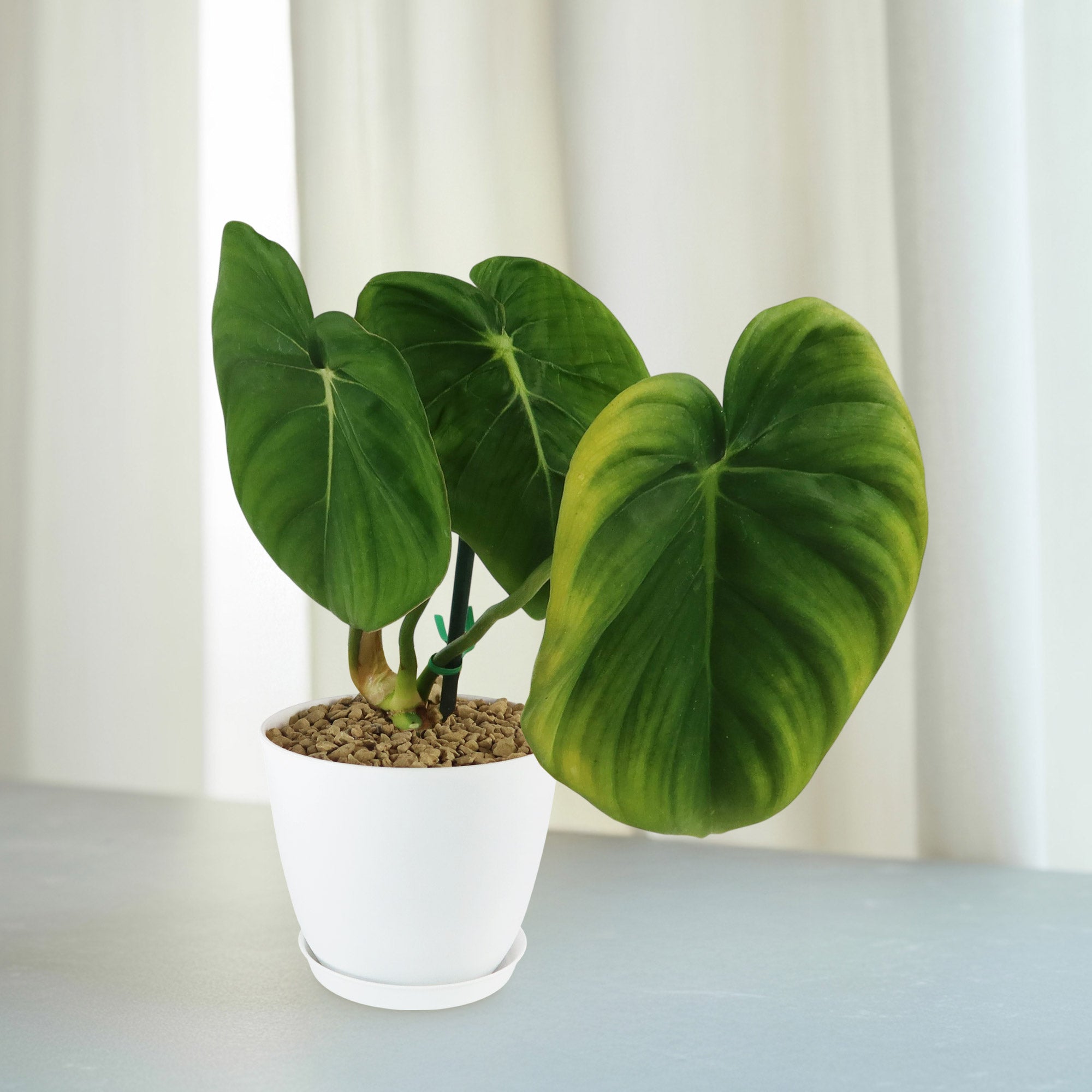
dark leaved philodendron Shop 'Philodendron Mcdowell' Care & Growing GuideThe Philodendron Mcdowell is a crawling, drought tolerant plant that has lush, heart shaped leaves and a velvet like texture. This tropical plant is well known among collectors and indoor plant enthusiasts, and it is the ideal combination of easy care and captivating beauty. This crawling hybrid is a cross between Philodendron gloriosum and Philodendron pastazanum. This unique origin gives McDowell its natural adaptability to warm and humid
The Philodendron ‘Mcdowell’ is a crawling, drought-tolerant plant that has lush, heart-shaped leaves and a velvet-like texture. This tropical plant is well-known among collectors and indoor plant enthusiasts, and it is the ideal combination of easy care and captivating beauty.
This crawling hybrid is a cross between Philodendron gloriosum and Philodendron pastazanum. This unique origin gives ‘McDowell’ its natural adaptability to warm and humid environments, as well as being tolerant to low light; which mimics the shaded conditions of tropical forest floors.
The standout feature of the Mcdowell Philodendron plant is undoubtedly its massive, heart-shaped leaves, which can reach up to 2 feet in length when grown in ideal conditions.
These leaves have a deep green hue with prominent, white-veined patterns, and their texture resembles a velvety fabric, giving the plant an exceptionally tactile allure.
It is a terrestrial grower, which means it typically crawls along the soil rather than climbing, making it ideal for low, wide pots.
Though it rarely blooms indoors, the Philodendron 'Mcdowell' plant can produce tiny, spathe-like flowers. These blooms are not as showy as the plant's foliage and often go unnoticed, but they do emit a subtle fragrance. Flowering may occur if the plant is grown outdoors in a tropical climate or in a greenhouse that replicates its native conditions.
As an indoor plant, Philodendron ‘Mcdowell’ not only enhances the aesthetic of a space with its dramatic foliage, but it also helps purify the air by absorbing pollutants. Like other philodendrons, it plays a role in removing toxins, making it an excellent choice for improving indoor air quality. Its lush, tropical appearance adds a sense of tranquility and vibrant greenery to any interior setting.
When and How to Water Philodendron ‘Mcdowell’
Like other drought-tolerant plants, the Philodendron McDowell can handle some neglect when it comes to watering. It is important to allow the soil to dry out between waterings to prevent root rot. Overwatering can be more harmful than underwatering for this plant.
In the spring and summer, during the growing season, you want to keep the soil slightly moist but not waterlogged. A good rule of thumb is to water it when the top inch of the soil feels dry to the touch. You can water it thoroughly typically for 1-2 weeks, allowing excess water to drain out of the pot to prevent root rot.
In the fall and winter, during the dormant season, the McDowell Philodendron plant doesn't need as much water. You should reduce the frequency of watering to once a week. It's essential to adjust your watering schedule based on the plant's needs and the environmental conditions. Overwatering can be more harmful than underwatering for this plant, so it's better to err on the side of slightly underwatering than overdoing it. Just keep an eye on the moisture and adjust accordingly to keep your Philodendron happy and healthy!
Light Requirements – Where to Place Your Philodendron Plant
When grown indoors, it does well in bright, indirect light for at least 4-6 hours a day. You can place it near a window where it can get filtered sunlight or even a few feet away from a window with bright, indirect light.
Just avoid placing it in direct sunlight as that can scorch its leaves. If you notice the leaves turning yellow or brown, it might be getting too much light.
For outdoor cultivation, Philodendron McDowell can still do well in bright, indirect light. It's best to place it in a spot where it gets filtered sunlight or dappled shade.
If you're in a region with intense sunlight, make sure to protect it from direct sun exposure, especially during the hottest parts of the day.
Remember, the key is to provide it with the right balance of light – not too dim and not too bright.
Optimal Soil & Fertilizer Needs
When it comes to soil for your Philodendron McDowell, it thrives in a well-draining potting mix. This type of soil allows excess water to drain away, preventing waterlogging, which can lead to root rot. You can also consider adding some orchid bark or charcoal to the mix to enhance aeration and drainage, promoting healthy root growth. Planet Desert specialized potting soil, opens in a new tabGo to soil cactus mix blend 1 gal 4 qt cacti succulent dirt compost growing media that includes an organic substrate with mycorrhizae to help with the growth of a healthy root system to help your succulents thrive.
Your Philodendron McDowell doesn't require a lot of feeding. During the growing season in spring, you can fertilize it with a balanced NPK fertilizer diluted to half strength. Feed the plant once a year to provide it with the necessary nutrients for healthy growth. During the dormant season in fall and winter, you can reduce or stop fertilizing altogether since the plant's growth slows down during this time. Always remember to follow the instructions on the fertilizer package to avoid overfeeding, which can harm the plant. With the right soil mix and proper fertilization, your Philodendron plant will continue to thrive and grace your space with its lush green foliage.
Hardiness Zones & More
When grown indoors, with bright, indirect light keep the temperature between 65-80°F during the day and no lower than 60°F at night. Avoid placing it near drafty windows or doors as sudden temperature drops can stress the plant. Maintaining a stable temperature will help your Philodendron thrive and remain healthy indoors.
For outdoor planting, the Philodendron McDowell is suitable for USDA hardiness zones 10-11. These zones typically have milder winters with temperatures above 30°F.
If you live in a colder climate, you can still grow it outdoors during the warmer months and bring it inside before the temperatures drop. This plant thrives in temperatures above 50°F and doesn't tolerate frost well.
The Philodendron plants enjoy moderate to high humidity levels. Indoors, you can increase humidity by misting the plant regularly, using a humidifier, or placing a tray of water near the plant. Outdoors in humid regions, the plant will naturally benefit from the ambient moisture in the air.
Wildlife – Philodendron Mcdowell Attracts the Following Friendly Pollinators
The Philodendron McDowell is known to attract pollinators such as bees, hummingbirds, and butterflies with its unique flowers. These pollinators are drawn to the plant's nectar and can help facilitate the pollination process, leading to the production of seeds. By attracting these pollinators, the Philodendron McDowell contributes to the ecosystem's biodiversity and promotes plant reproduction.
Philodendron McDowell is mildly toxic to pets and humans, causing symptoms such as irritation and swelling if ingested. It is safe to touch and handle without any adverse effects. However, it is recommended to keep this plant out of reach of pets and children to prevent accidental ingestion.
How to Propagate Your Philodendron ‘Mcdowell’
The Philodendron McDowell can be propagate through stem cuttings. To propagate your plant, you can take a cutting with at least one node (where leaves are attached) and place it in water or directly into a well-draining potting mix. Keep the cutting in a warm and humid environment, and roots should start to develop within a few weeks. Once the roots are established, you can transplant the cutting into a larger pot with soil and continue to care for it as you would a mature plant. This method of propagation is relatively straightforward and can help you expand your Philodendron collection.
Key Takeaways
- This Philodendron is a hybrid created by John Banta, a cross between Philodendron gloriosum and Philodendron pastazanum. It inherits the striking heart-shaped leaves and velvety texture from its parent plants.
- The Philodendron 'Mcdowell' is a crawler rather than a climber, unlike vining Philodendrons, which grow upward with support.
- The extremely large, heart-shaped leaves are velvety with prominent white veins, making it a popular choice among collectors. Young leaves often emerge with a pinkish hue before maturing into a deep green.
- As a crawler rather than a climber, Mcdowell grows horizontally across the soil, requiring a wide pot or ground space to thrive.
- This Philodendron plant is known for its air-purifying qualities, making it a popular choice for indoor spaces.
The Bottom Line
Overall, the Philodendron ‘Mcdowell’ is a stunning hybrid known for its large, heart-shaped, velvety leaves with distinct white veins that give it a bold, tropical appearance. As a crawling variety, it grows horizontally, spreading across the soil, which makes it ideal for wide containers or as a ground cover in tropical gardens. This plant thrives in bright, indirect light and requires consistently moist but well-drained soil. It’s essential to let the top inch dry out between waterings to prevent root rot. High humidity (around 60-80%) and warm temperatures between 65-80°F are ideal for its growth, making it a great indoor plant, especially when a humidifier is available in drier environments. With proper care and attention, Philodendron ‘Mcdowell’ brings lush, green beauty to any space and rewards growers with its impressive, luxurious foliage. Order your very own Philodendron ‘Mcdowell’ for sale today!
Shipping Notes
- Free Standard Shipping on $100+ Orders to the USA.
- Except Preorder products are shipped in 48 hours.
- Delivery to the USA:
- Standard Shipping : 3-10 business days
- If time is of the essence, please consider selecting expedited delivery for faster service.
Exchange/Return Notes
- We offer a 30-day return/exchange service after receiving.
- Final sale items are not eligible for returns or exchanges.
- To process your return/exchange, please contact us at [email protected]
- Please click here for more details>>> Return & Exchange Policy