SKU: 77347360805
indoor plants self watering pots

indoor plants self watering pots Grey / US DI-Smart Automatic Watering System

Sale price$25.53 Regular price$28.37
Save 10%

Pay in installments of $7.09 with ShopPay, AfterPay and Klarna

Shipping Estimate
USA
  • USA
  • CAN

Ships within 48 hours · Estimated delivery Sep 3 - Sep 8

Promo Codes Available:

For Your Every Summer RSVP, with Code: SUMMER15

Description

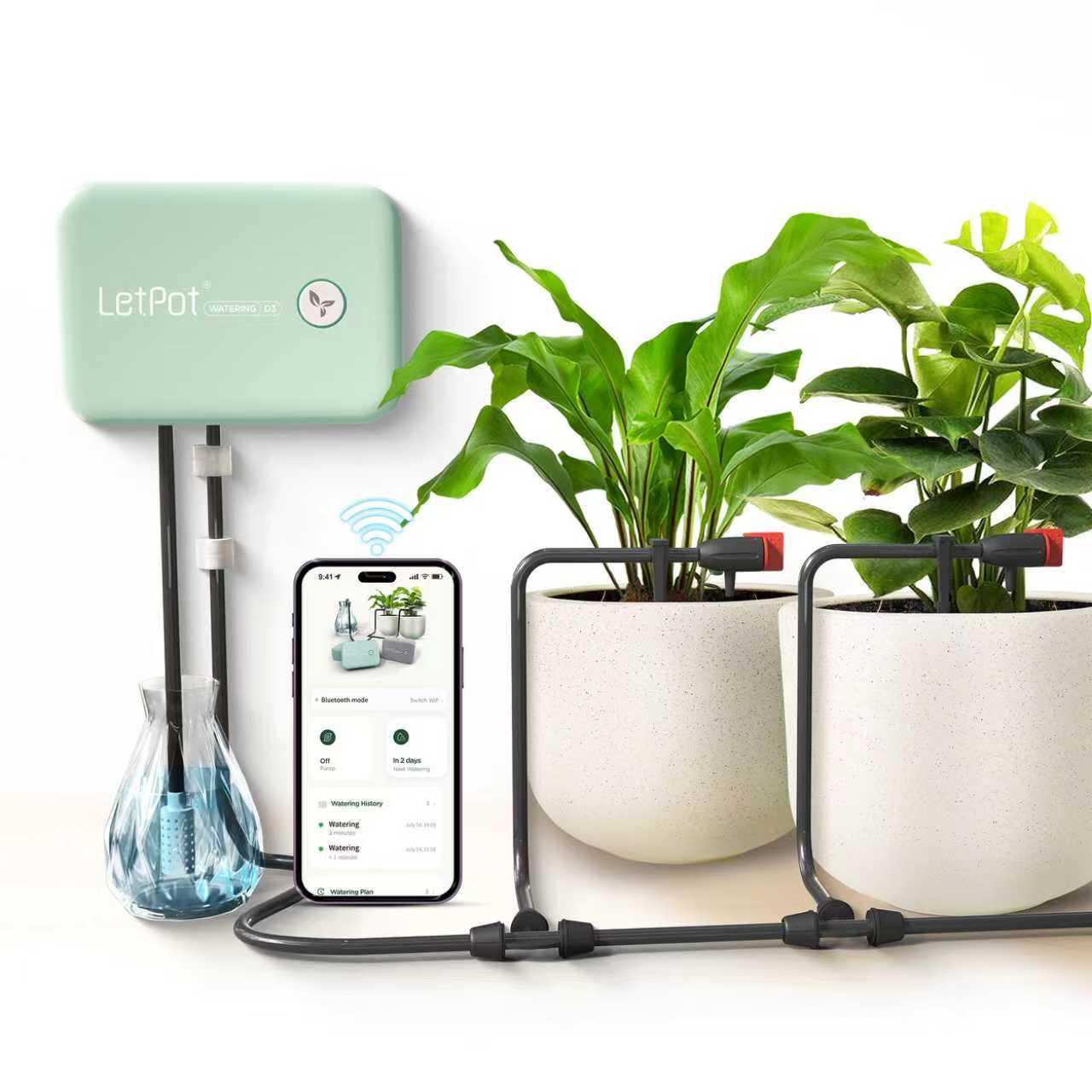
indoor plants self watering pots Grey / US DI-Smart Automatic Watering SystemAbout LetPot Smart Drip Irrigation Kit The LetPot automatic plant watering system takes the effort out of daily plant careindoors or out. This irrigation system is thoughtfully designed for home convenience, letting you manage your plants from an app via WIFI or Bluetooth. It works as a reliable auto watering system for plants, irrigating up to 20 pots at once. Thanks to built in soundproofing, the device stays quiet in any room. Frequent travelers

About LetPot Smart Drip Irrigation Kit

The LetPot automatic plant watering system takes the effort out of daily plant care—indoors or out. This irrigation system is thoughtfully designed for home convenience, letting you manage your plants from an app via WIFI or Bluetooth. It works as a reliable auto watering system for plants, irrigating up to 20 pots at once.
Thanks to built-in soundproofing, the device stays quiet in any room. Frequent travelers and anyone who wants consistent care will love how it delivers hydration right when plants need it.

LetPot DIY Drip Irrigation Kit

Product Features

  • Dual connectivity using WIFI and Bluetooth for flexible control.
  • Smart water-flow detection and instant low-water alerts via the app.
  • Schedules set directly from the app or by pressing the button.
  • Durable, waterproof IPX66 build keeps the unit safe from leaks and splashes.
  • Adjustable drippers on bamboo-inspired pipes let you control flow for each plant.
  • Mineral filter reduces blockages and ensures a steady, reliable flow.
  1. Comes with all parts needed to hydrate up to 10 pots efficiently.
  2. No clips or glue required—hang or mount easily to start right away.
  3. Extremely quiet pump delivers near-silent operation for peaceful spaces.

What`s in the box

  • Power Adaptor x1
  • Filter ×1
  • Adjustable Dripper x10
  • Tee Connector x10
  • Water Pipe Bracket x10
  • Water Pipe 10m
  • LetPot Drip Irrigation Controller x1

APP Water Shortage Detection

LetPot's irrigation system features low-water detection sensors. When the tank drops, your phone is alerted instantly. Notifications help you avoid losing plants to neglect or dehydration.

Adjustable Drip Head

Each head is adjusted for the perfect flow. Water every pot exactly the way it needs. The result is healthy hydration with less waste.

IP66 Waterproof

IP66 protection keeps everything working safely inside or outside. Rain and splashes cannot harm the durable LetPot drip solution in any setting.

Silent Water Pump

The included pump distributes water quietly, keeping any living area peaceful and undisturbed.

Version V2.3.6 arrived on January 12, 2023, increasing network power and improving phone alerts. LetPot's app is updated every two weeks for better operation and smoother performance.

Why Choose the LetPot Automatic Plant Watering System?

Whether you need a dependable self watering system for pots or a complete auto watering systems setup for your balcony garden, LetPot delivers. Its drip irrigation keeps water delivery efficient—no drop goes to waste. Your plants receive steady hydration for healthier growth every day.
Bamboo-look drip pipes organize water delivery to many pots smoothly. Each dripper can be fine-tuned for precise needs. A built-in filter guards against clogging, preserving the device day after day.

How the Automatic Plant Waterer Improves Your Routine

With this automatic plant waterer, enjoy less stress and more free time. Set everything up through the app and manage care even when away from home. Waterproof construction ensures reliable function indoors or outdoors. Operation is ultra-quiet, making it suitable for any room. LetPot is the smarter way to keep your green space healthy—without daily effort.
Shipping Notes
  • Free Standard Shipping on $100+ Orders to the USA.
  • Except Preorder products are shipped in 48 hours.
  • Delivery to the USA:
  1. Standard Shipping : 3-10 business days
  • If time is of the essence, please consider selecting expedited delivery for faster service.
Exchange/Return Notes
  • We offer a 30-day return/exchange service after receiving.
  • Final sale items are not eligible for returns or exchanges.
  • To process your return/exchange, please contact us at [email protected]
  • Please click here for more details>>> Return & Exchange Policy
SKU: 77347360805

Discover Niche Categories That Outsell indoor plants self watering pots

Top-Converting Item to Boost Your Average Order

4.8 ★★★★★
Based on 27 reviews
Sort
Highest Rating
Newest First
Oldest First
Product Reviews
L
Verified Purchase
Little Rick
Dallas, US
★★★★★ 5
Exactly what you need
Color: Black
This is a perfect and conformist up. Excellent spacing between keys and the number section is comfortable to use because it is large enough to make it a comfortable set up No instamtions issues and no communication issues with it and my Lenovo Think Pad
WAS THIS REVIEW HELPFUL?YesReportShare
Reviewed in the United States on May 20, 2026
J
Verified Purchase
Janice Estrada
Alexandria, US
★★★★★ 5
Great value
Color: Black
No problems. Very good keyboard mouse combo
WAS THIS REVIEW HELPFUL?YesReportShare
Reviewed in the United States on May 17, 2026
F
Verified Purchase
Frank
Lake Worth, US
★★★★★ 5
Just what I needed!!
Color: Black
The wireless keyboard & mouse is being used with an aging laptop - the laptop's keyboard & touchpad were almost unusable, but the laptop itself (with a few minor upgrades) performed well considering its age. The keyboard uses one (1) AAA battery, is full size, and operates smoothly with no 'hiccups' or annoyances; the mouse uses one (1) AA battery, has auto-sleep built-in that kick in after approx 5 minutes of non-use, that takes a bit of getting use to bc you have to left or right click to wake it before it will respond to any motion - that's not really a 'con' bc that function could potentially extend battery life. It's an inexpensive way to get a new & functional input interface for your computer.
WAS THIS REVIEW HELPFUL?YesReportShare
Reviewed in the United States on October 27, 2025
C
Verified Purchase
Chris S.
Port Orchard, US
★★★★★ 5
Excellent Monitor Once Your Eyes Get Used to the Curve
I upgraded from the 4K LG 27GN950-B UltraGear Gaming Monitor 27” UHD to this 4K Neo G8 curved monitor because of the 240Hz refresh rate and the numerous superlatives doled out to it by tech magazines and websites. I also wanted to maximize my Nvidia RTX 4090 card with one of the best rated monitors out there. So, let's get the worrisome part out of the way first: if you aren't used to curved monitors (I wasn't) then, as many reviewers noted, it will take your eyes some time to get used to the curvature and how the images actually move on screen. For me, that time period lasted about two weeks, and I was really on the fence about this monitor during that timeframe. Once acclimated though, I finally got used to the tunneling effect where the image forces your eyes to focus on the center of the screen (kind of like when you are driving at night), and processes peripheral images still very distinctly but similar to your own vision with a slight wrapping effect at the edges. The second issue I think many new users confront is actually adjusting the image settings to get the quality you prefer rather than one that's set as the default. For me, that means my video card can easily handle the 240Hz refresh rate (other cards may not) without screen flashing, tearing, or image ghosting, but the colors are far too saturated and actually are overwhelming on any of the presets. I had to adjust the color settings to the old sRGB standard rather than one of the presets (e.g., FPS, RPG, Cinema, etc.). The color tone is simply warmer and more natural with that sRGB setting and with the Contrast Enhancer On and the Brightness dimmed about 10%. As a first step, I recommend you adjust your own settings to your preferences and also factor an image that reduces strain on the eyes. On that note of eye strain, I would also recommend some decent blue light glasses for extended play or viewing sessions. Just like with my aforementioned comparison with night driving, your eyes really do lock in a bit more for an immersive experience and you need to ensure you don't overdo it, especially initially if you aren't used to this type of monitor. Some users may notice initial motion sickness for specific games like FPSs or first-person RPGs, but I found that goes away with the right settings, some judicious gaming time limits (or blue light glasses for extended use), and the natural adjustment by your eyes to the curved display. But, once you hit that sweet spot for settings, this monitor is excellent for picture quality and overall viewing. My old LG pales in comparison, though it still remains a good monitor. For anyone on the fence about the curved display, go to your local brick and mortar store that sells these and check them out in-person first. If you think you can adapt and you have the video card to power this monitor at the 240Hz refresh rate, then it's an easy recommendation. If not, the Neo G7 has a flat monitor option at 144Hz that would likely be an upgrade from the LG as well. With whatever monitor you settle on, always adjust the settings to your preferences as a first step, rather than force your eyes to adjust to a default setting or otherwise unnatural image quality in terms of light intensity. warmth, or color oversaturation.
WAS THIS REVIEW HELPFUL?YesReportShare
Reviewed in the United States on December 29, 2023
C
Verified Purchase
Chris
Belleville, US
★★★★★ 5
Gorgeous, responsive display.
I'm only a few days in, but so far this monitor is everything I hoped it would be. The unit shipped to me so far appears to be flawless, no dead pixels or other issues. The blacks are so dark that one could legitimately mistake this for an OLED monitor. (It does make my cheaper secondary monitor's blacks look awful by comparison, but that's the fault of my secondary monitor, not this one.) The resolution and frame rate of the G8 are exquisite. This is my first curved monitor. I've read that some people need time to get used to it. I was used to it almost immediately. I haven't tested the included stand. I immediately attached this monitor to a dual arm monitor stand using the included 100mm VESA mount adapter. The VESA adapter works, and attaching it was easy... however there were no screws included to attach the adapter to the monitor. This is my biggest complaint about this monitor, but it's not enough to deduct a star. Luckily I had the correct screws already, otherwise I would have had to order some. My monitor stand is only rated to 20 lbs, but has no problem handling this monitor. Maybe it goes without saying, but if you're thinking about spending the money for this monitor, make sure your PC/GPU is equipped to take advantage of it. Even in 2025 only the best GPUs are able to push 240fps at true 4K. I'm running a 7900xtx (AMD's most powerful GPU until the new ones come out this year) and so far I'm glad I spent the extra money on this monitor to unleash my GPU's potential.
WAS THIS REVIEW HELPFUL?YesReportShare
Reviewed in the United States on January 10, 2025

recommand products