Pay in installments of $5.08 with
 ,
,
 and
and

Shipping Estimate
USA
- USA
- CAN
- USA
- CAN
Ships within 48 hours · Estimated delivery Sep 10 - Sep 15
 Promo Codes Available:
For Your Every Summer RSVP, with Code: SUMMER15
Description
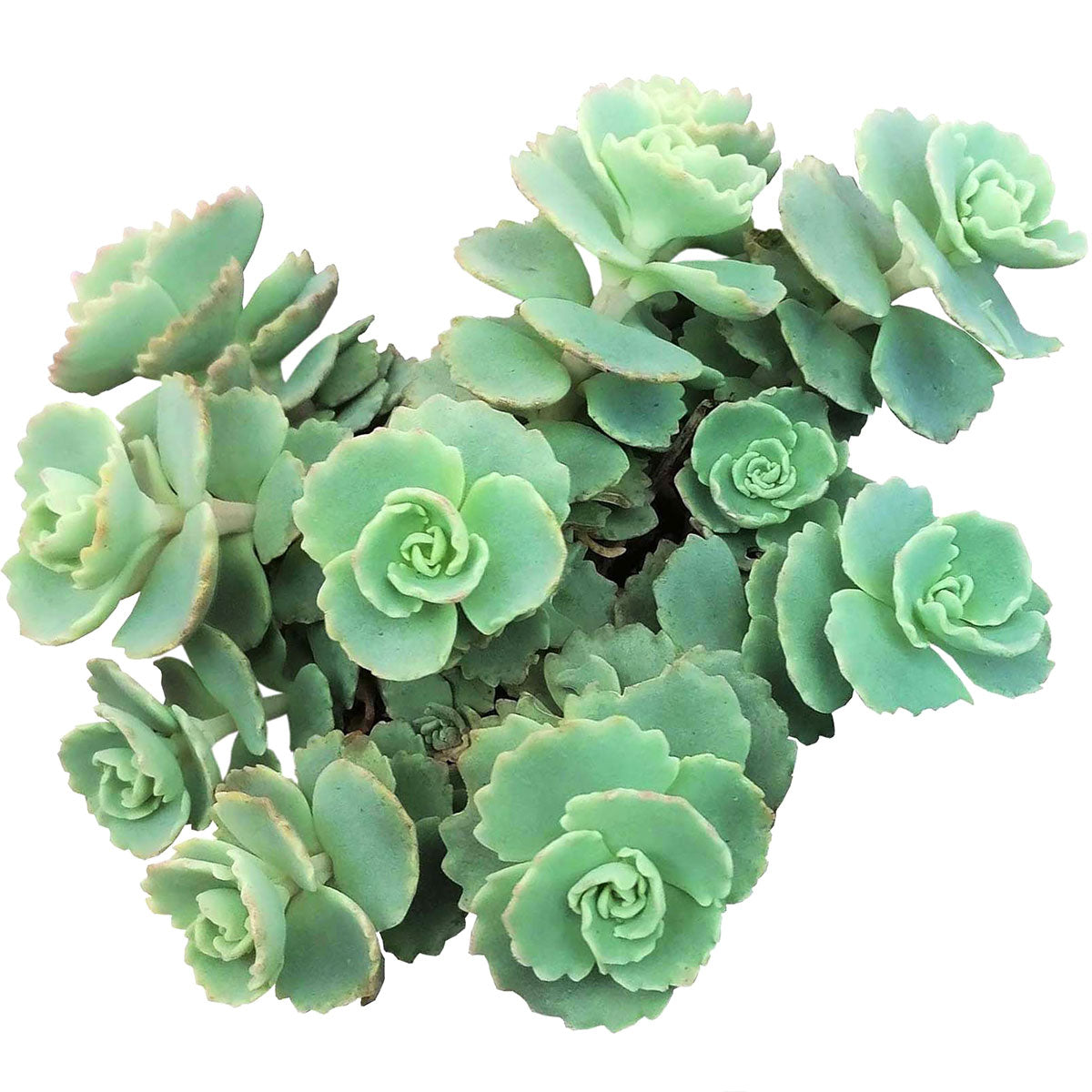
daphne succulent Sedum Sieboldii October Daphne Succulent | Care InstructionDescription Light Soil Water Hardiness Sedum Sieboldii, also known as October Daphne, is a mould like species that spreads out horizontal branches from the center. Its leaves are more than half an inch round and have blue green hue with pink margins. During the hot summer months, the color of these margins intensifies into deep pink. Its bright purple pink, star shaped flowers appear in early fall. In the right conditions, its fall foliage turns
-
Sedum Sieboldii, also known as October Daphne, is a mould-like species that spreads out horizontal branches from the center. Its leaves are more than half an inch round and have blue-green hue with pink margins. During the hot summer months, the color of these margins intensifies into deep pink.
Its bright purple-pink, star-shaped flowers appear in early fall. In the right conditions, its fall foliage turns beautiful shades of pink, red, yellow, and orange. Frosty temperatures also bring out pink in the leaves.
Sedum Sieboldii is a trailing succulent. The branches can grow much longer as pictured in the last image.
Due to the long branches and thin fragile leaves, this is one of the more difficult-to-pack plants. -
Clay Soil, Sandy Soil, Loamy Soil, Drought/Dry Soil.
Water thoroughly when soil is dry to the touch, then let drain completely.
Full Sun. -
Zone 3a -40 to -35 °F
Zone 3b -35 to -30 °F
Zone 4a -30 to -25 °F
Zone 4b -25 to -20 °F
Zone 5a -20 to -15 °F
Zone 5b -15 to -10 °F
Zone 6a -10 to -5 °F
Zone 6b -5 to 0 °F
Zone 7a 0 to 5 °F
Zone 7b 5 to 10 °F
Zone 8a 10 to 15 °F
Zone 8b 15 to 20 °F
Zone 9a 20 to 25 °F
Zone 9b 25 to 30 °F
Zone 10a 30 to 35 °F
Zone 10b 35 to 40 °F
Shipping Notes
- Free Standard Shipping on $100+ Orders to the USA.
- Except Preorder products are shipped in 48 hours.
- Delivery to the USA:
- Standard Shipping : 3-10 business days
- If time is of the essence, please consider selecting expedited delivery for faster service.
Exchange/Return Notes
- We offer a 30-day return/exchange service after receiving.
- Final sale items are not eligible for returns or exchanges.
- To process your return/exchange, please contact us at [email protected]
- Please click here for more details>>> Return & Exchange Policy
4.2 ★★★★★
Based on 23 reviews
Sort
Product Reviews
★★★★★ 4
Quality shirt
Size: X-Large, Color: Tinted Dark Wash
Would of liked a slim fit. Needed taper in the waist neck and shoulders fit great
WAS THIS REVIEW HELPFUL?YesReportShare
Reviewed in the United States on May 7, 2026
★★★★★ 5
Great price great value
Size: Large, Color: Black
Better than expected. Great fit, deep black color. Nice quality.
WAS THIS REVIEW HELPFUL?YesReportShare
Reviewed in the United States on May 10, 2026
★★★★★ 5
Great Denim jacket!
Size: XX-Large, Color: Tinted Light Wash
I purchased a 2xl for my husband and it's a great quality and price. He really loves it. It's a good stretch and he's able to place a hoodie or a thicker shirt and still be comfortable if need be. Will be purchasing him another color of this jeans jacket.
WAS THIS REVIEW HELPFUL?YesReportShare
Reviewed in the United States on March 26, 2026
★★★★★ 5
Good Value Denim Jacket With True to Size Fit
Size: X-Large, Color: Black
Great denim jacket for the price. It feels durable and well made, though the quality is not quite on par with higher end name brands, which is to be expected at this price point. The fit is true to size and matches expectations. It is comfortable out of the box and, like most denim, should become even more comfortable as it breaks in over time. The arm length runs slightly long, but if you usually find sleeves long on jackets, this one will fit similarly.
WAS THIS REVIEW HELPFUL?YesReportShare
Reviewed in the United States on January 21, 2026
★★★★★ 5
Great base to add patches to
Size: X-Large, Color: Black
I've bought this jacket twice now (lost the first one...). Great base for my DIY patch jackets. I buy an XL even though it's a size too large for me. It's a standard denim jacket, not much to write home about. Good pocket size, and I appreciate the functional chest pockets.
WAS THIS REVIEW HELPFUL?YesReportShare
Reviewed in the United States on May 19, 2026