SKU: 84714326270
t5 grow light replacement bulbs

t5 grow light replacement bulbs Covert Fluorescent T5 Grow Lights

Sale price$20.55 Regular price$22.83
Save 10%

Pay in installments of $5.71 with ShopPay, AfterPay and Klarna

Shipping Estimate
USA
  • USA
  • CAN

Ships within 48 hours · Estimated delivery Oct 16 - Oct 21

Promo Codes Available:

For Your Every Summer RSVP, with Code: SUMMER15

Description

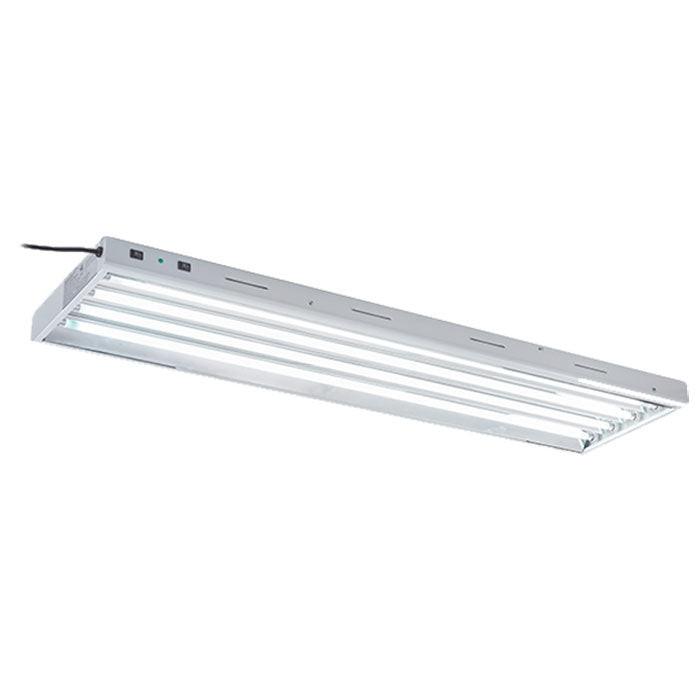
t5 grow light replacement bulbs Covert Fluorescent T5 Grow LightsCovert Fluorescent T5 Grow Lights Is A Perfect Choice For Starting Seeds Or Clones, Or Even The Vegetative Stage! Covert Fluorescent T5 grow lights are an affordable fixture, perfect for growers looking for a compact, low energy use low heat output grow light for use in grow rooms, grow tents, and nurseries. The Covert 2ft 4bulb fixture can cover up to a 3' x 2' growing space and the Covert 4ft 4bulb and 4ft 8bulb fixtures cover up to a 5' x 3' and a

Covert Fluorescent T5 Grow Lights Is A Perfect Choice For Starting Seeds Or Clones, Or Even The Vegetative Stage!

Covert Fluorescent T5 grow lights are an affordable fixture, perfect for growers looking for a compact, low energy use/low heat output grow light for use in grow rooms, grow tents, and nurseries. The Covert 2ft/4bulb fixture can cover up to a 3' x 2' growing space and the Covert 4ft/4bulb and 4ft/8bulb fixtures cover up to a 5' x 3' and a 5' x 4' at the recommended hanging height of 6" - 24".

The Covert T5 Grow Lights are passively cooled with absolutely no moving components. This means they are not only less noisy, but more reliable than lights with fans. The built-in lamp reflectors direct light back to the plant efficiently, ensuring no light is wasted. The included bulbs produce up to 8,000 lumens, as much as a 150 watt MH lamp with little to no heat generated, which helps cut down on any additional and expensive HVAC costs while keeping your plants happy & healthy.

Features of the Covert T5 Grow Lights

  • 4 Foot 8 Bulb Fixture - Perfect for 5' x 4' growing spaces
  • 4 Foot 4 Bulb Fixture - Perfect for 5' x 3' growing spaces
  • 2 Foot 4 Bulb Fixture - Perfect for 3' x 2' growing spaces
  • Ideal for cloning, propagation & vegetative growth
  • Recommended Hanging Height 6" to 24" Above Canopy
  • Can Be Hung Horizontally or Vertically Depending On Your Intended Application
  • Horizontal Slats Cool The Fixture & Lamps Effectively.
  • Durable White Powder Coated Steel Housing
  • Includes 8 Foot 120 Volt Power Cord

What's In The Box

  • Covert Fluorescent T5 Grow Light
  • 6,500K Fluorescent T5 Veg Bulbs
  • 120 Volt Power Cord
  • User Manual

Includes 6,500K Vegetative Spectrum T5 Lamps

The included full daylight spectrum 6,500 Kelvin Covert T5 grow bulbs are perfect for the vegetative period of plant growth. Each producing 2,000 Lumens while only using 24 Watts, these high output fluorescent lamps are also a great energy-saving alternative to metal halide lamps for growth in veg when the light intensity needs are lower.

Want to flower your plants with this T5? Although flowering with a fluorescent grow lights is usually not recommended, the Covert T5's make it possible when you swap the included 6,500k lamps for Replacement 3,000K T5 Flowering Lamps . This fixture is also compatible with replacement T5 LED lamp to increase effeicincy and lower wattage further!

Dual Switching Electronic Ballasts (*only on 4ft 4 bulb model)

The Covert 4 ft 4 bulb T5 Grow Lights are equipped with two electronic ballasts, each controlled separately by two power switches that allow you to turn off 2 of the 4 lamps at a time, reducing the power usage by 50%, if needed. The 2 ft 4 bulb version does not include this function.

How To Hang Your Fluorescent T5 Grow Light

Specifically for seed starting and plant cloning, you will want to keep your T5 light about 6" - 12" above your seedlings to help prevent excessive stretching. This also ensures you are giving your plants plenty of light energy. Once they grow past the seedling stage, the light can be raised to around 12" - 24" above the top of the plant canopy which increases the light coverage.

Always test the canopy level to gauge leaf surface temperature, since canopy temperature and room ambient temperature might vary. If your hand gets too hot at the plant canopy level, then the light is most likely too close to the plants and should be raised up. Read our complete guide on how to hang grow lights for more information.

Why use Fluorescent Grow Lights?

Fluorescent lights have been a staple in grow rooms around the world for as long as grow lights have been around, and for good reason. Fluorescent technology is great for growers that want a higher intensity light compared to CFLs, but can’t afford the height & investment requirement that other lights require. Fluorescent Grow Lights are great for the vegging and Cloning and Propagation , plus they can be placed much closer to the canopy of your plants.

Color temperature has a strong influence over plants and different temperatures will affect plants in different ways. A blue or bright white found in the temperature range of 5000K is recommended for plants in the vegetative stage as it keeps them short and bushy.

Shipping Notes
  • Free Standard Shipping on $100+ Orders to the USA.
  • Except Preorder products are shipped in 48 hours.
  • Delivery to the USA:
  1. Standard Shipping : 3-10 business days
  • If time is of the essence, please consider selecting expedited delivery for faster service.
Exchange/Return Notes
  • We offer a 30-day return/exchange service after receiving.
  • Final sale items are not eligible for returns or exchanges.
  • To process your return/exchange, please contact us at [email protected]
  • Please click here for more details>>> Return & Exchange Policy
SKU: 84714326270

Discover Niche Categories That Outsell t5 grow light replacement bulbs

Top-Converting Item to Boost Your Average Order

4.1 ★★★★★
Based on 9 reviews
Sort
Highest Rating
Newest First
Oldest First
Product Reviews
S
Verified Purchase
SeedyROM
Lowell, US
★★★★★ 5
Incredible Quality, Incredible Results!!
AMAZING!! I use my Samsung Z Fold with a Maono Podcast Soundboard for podcasting. Having the phone charge from the soundboard power passthrough was inadequate to keep the phone charged, and generated "noise" in the path. I got the Anker 565 USB-C hub, and routed the power and signal through the Anker hub. WOW!! My phone remains fully charged throughout the podcast, there is ZERO "noise" in the signal, and I can actually do more than ever expected! The quality of Anker products has been proven with me Over and Over with every single product I have purchased. From high-end 240w USB-C cords, to Power Banks, Power Blocks, Bluetooth Earbuds & Headphones, across the board; I have never been disappointed! I highly recommend Anker, and specifically the Anker 565 USB-C hub!!
WAS THIS REVIEW HELPFUL?YesReportShare
Reviewed in the United States on November 8, 2025
W
Verified Purchase
Wary one
Carnegie, US
★★★★★ 5
Versatile with all the ports you’re looking for.
Compact and really expands your options. I was using one of the ports on the MacBook Pro M1 for a second display and the other for an external drive and then switching back and forth with the charger. This device does all that and only uses one of the ports. Plus there are multiple USB OLD STYLE still available. No external power appears to be necessary, although since I use the Mac power supply in the dedicated power in port I’d think there’d be no issue.
WAS THIS REVIEW HELPFUL?YesReportShare
Reviewed in the United States on April 7, 2026
J
Verified Purchase
J. Almeida
Fort Morgan, US
★★★★★ 1
Good product, I suspect, if it works. (Also Marketing Needs Improvement)
UPDATE: Nope, it's just the hub. :( It's either defective or not a good product, which is unfortunate. The stutter issue has been resolved, but I can still not use the dock to push an image to my secondary monitor (1080p). I spent several hours this evening updating drivers for my Lenovo Thinkpad E15 Gen2 (AMD) without success. FYI: This laptop DOES support PD+DP through USB-C, something I confirmed before trying to go down the USB-C route in an attempt to replace my ancient Diamond USB-A dock. An image was never sent to my second monitor, whether connected via HDMI or DP through the hub. In all cases, the monitor IS recognized by Windows, so some information is being communicated, just not an image to the monitor. During every attempt, when the monitor was first plugged in, responsiveness in Windows would stutter, lag, and generally respond slowly to my KB+M inputs until, eventually, the laptop caught up and was OK. I am highly disappointed and am considering returning both products, but the USB-C dock is definitely returning. It would be nice, but I don't need a 100W charger. My hope of replacing my current USB-A dock is diminishing at the price point I was hoping for, so we shall see if it's up to the task of the new 2K monitor I have on the way and go from there. Original: Buyer be cautioned: The Anker 565 USB-C also needs power for itself, which is evident if you think about it, but it's not stated anywhere that I could find, and it may not dawn on you until things aren't working quite right. Lack of power could cause many issues I've read about in reviews. The issue: Mouse movement would stutter every 5-10 seconds. Though Windows recognized my HDMI monitor in Device Manager/Display settings, no image was sent to it through the Anker hub. Current theory: So, the manufacturer's 65W USB-C charger for my laptop cannot FULLY power the hub with one connected HDMI monitor, two USBs, and Ethernet through the USB-C hub. I did not test the two USB devices (Keyboard and headset) as there was little need once the stuttering began, which was immediate. I have an Anker Nano 100W arriving tomorrow, and I will update the review once I've re-tested. Suggestion: My ask to Anker would be to *estimate* the power draw of their dock and list it somewhere with many warnings, etc. If they wanted to go above and beyond and add averages for peripherals and the like, that would be amazing, but if not, I would understand, as I'm sure that information could become dated fast. A power warning would have prompted me to consider the power charging situation, and I may gone with one of their docks (About a $100 increase) instead. But now that I'm annoyed, I'll purchase a 100W charger that I can use for my work laptop and elsewhere as needed. :) They are still getting my money, but not as much. They make amazing products, but small details like this matter to me as a consumer.
WAS THIS REVIEW HELPFUL?YesReportShare
Reviewed in the United States on August 26, 2024
I
Verified Purchase
icsttt
Draper, US
★★★★★ 5
Anker 11 in 1 Docking station as a Starter.
This is an entry level addition to a PC. If more ports needed then the 14 in 1 or a powered Hub.
WAS THIS REVIEW HELPFUL?YesReportShare
Reviewed in the United States on June 3, 2026
T
Verified Purchase
Theodore Pankiewicz
Los Angeles, US
★★★★★ 5
It’s worth it
They sick with the insurance they cllaim
WAS THIS REVIEW HELPFUL?YesReportShare
Reviewed in the United States on June 1, 2026

recommand products