SKU: 89130226446
show pictures of aloe vera plant

show pictures of aloe vera plant Aloe Vera

Sale price$26.52 Regular price$29.47
Save 10%

Pay in installments of $7.37 with ShopPay, AfterPay and Klarna

Shipping Estimate
USA
  • USA
  • CAN

Ships within 48 hours · Estimated delivery Sep 14 - Sep 19

Promo Codes Available:

For Your Every Summer RSVP, with Code: SUMMER15

Description

show pictures of aloe vera plant Aloe VeraIntroducing the fabulous Aloe Vera plant also known as Aloe barbadensis 'miller,' it is also known as a medicinal aloe and burn plant. The Aloe vera plant is by far the most popular out of over 400 varieties of the Aloe genus. This incredible tropical succulent is not your average houseplant. It's a superstar known for its leaves, which hold a magical aloe vera gel for soothing sunburn and as a popular drink to help your stomach. This large Aloe vera

Introducing the fabulous Aloe Vera plant- also known as Aloe barbadensis 'miller,' it is also known as a medicinal aloe and burn plant. The Aloe vera plant is by far the most popular out of over 400 varieties of the Aloe genus.

This incredible tropical succulent is not your average houseplant. It's a superstar known for its leaves, which hold a magical aloe vera gel for soothing sunburn and as a popular drink to help your stomach.

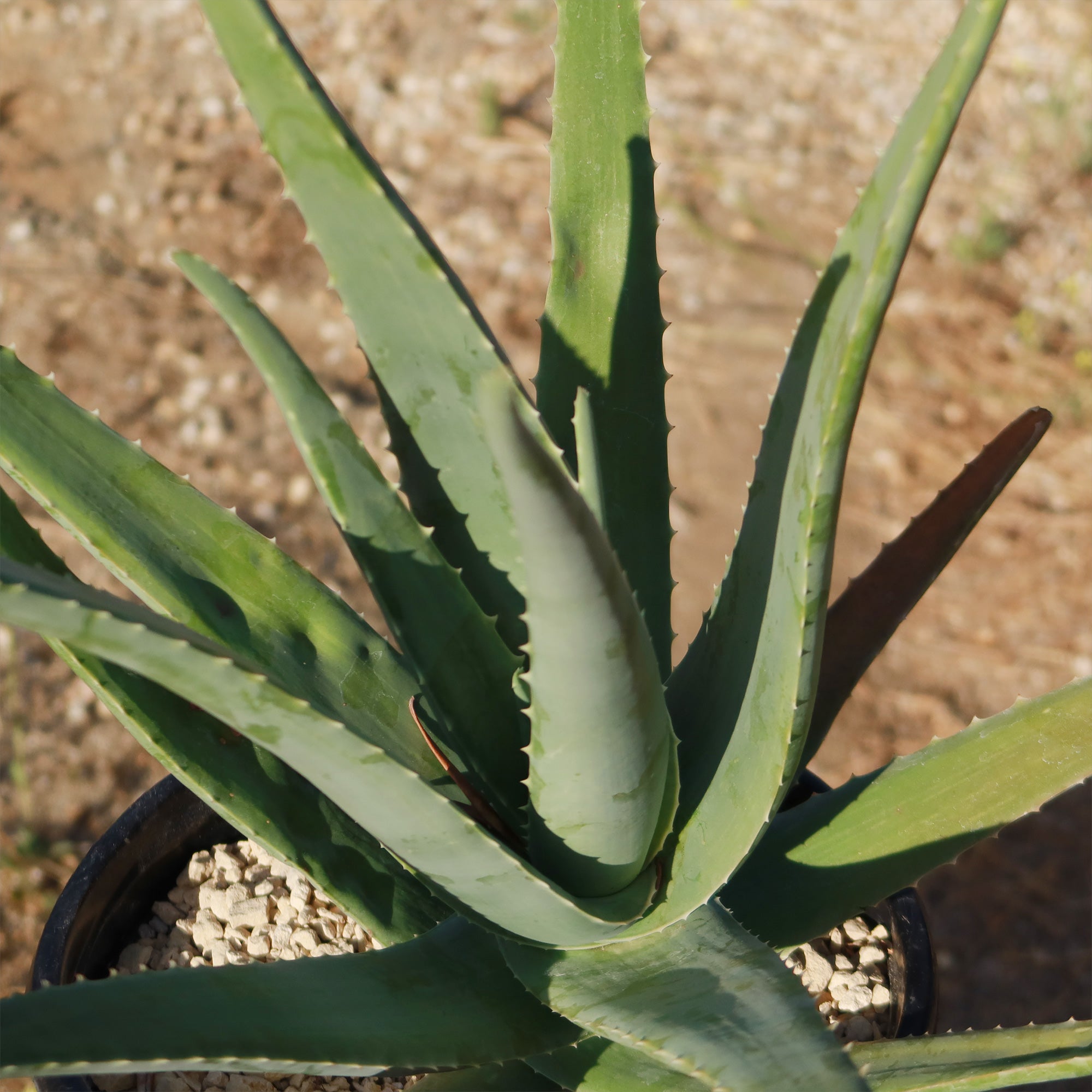
This large Aloe vera plant boasts fleshy lance-shaped grey-green leaves with small white teeth along the edges growing out from a starfish-like basal rosette. 

The edible aloe vera flowers burst into bloom in vibrant shades of yellow at the tips of their stalks when given favorable conditions. Only mature plants will yield flowers, so you'll have to wait at least four years to see an aloe vera bloom. However, in some growing conditions (especially hybrid plants), the flowers can sometimes appear with orange or reddish hues. 

This fast-growing succulent can grow into a large aloe vera plant up to 3 feet tall and 2 feet wide and even produce adorable pups that you can repot or share as delightful gifts with fellow plant enthusiasts.

How to Get Aloe Vera Gel from the plant to use on your skin

  1. Choose and Cut a Leaf: Select a large, healthy leaf from the bottom of the plant. Use a sharp knife to cut the entire leaf off at the base.
  2. Prepare the Leaf: Let the leaf sit upright in a container for 10–15 minutes to allow the yellow sap (aloin) to drain out. This sap can be irritating to the skin.
  3. Slice and Extract the Gel: For a small amount of gel, cut a section from the leaf rather than using the whole thing. Slice the leaf lengthwise to expose the gel. Use a spoon or knife to scoop out the clear gel.
  4. Apply or Store: Apply directly to your skin for soothing relief. Store extra gel in an airtight container in the fridge for a few days.

Aloe vera juice has many benefits for humans, this succulent rich in antibacterial, antioxidant, and anti-inflammatory properties, may enhance digestion, blood sugar levels, and oral health, although certain compounds, particularly aloin, may cause digestive discomfort and other side effects.

An aloe vera indoor plant is a great addition to any home, as it is easy to aloe vera care for and provides a variety of aloe vera benefits. 

According to the American Academy of Dermatology, Aloe vera has anti-inflammatory properties that can help in wound healing. It can also help to moisturize the skin and prevent peeling.

When and How to Water Your Aloe Vera 

As a desert dweller, watering the aloe vera succulent may be tricky, it may shrivel and die if given too little water, but it may also easily rot when given excessive water. So be careful not to overwater your aloe plantyou only want to give it enough to keep it from drying out completely, not drown it! 

A good rule of thumb is to water the Aloe plants deeply and then allow the soil to dry out completely before watering again. In the spring and summer, during the growing season, watering can be done once every 2-3 weeks.

During the winter months, when aloe vera is in a dormant period, it can be watered even less frequently. If you live in a rainy climate, consider planting aloe in gravel or stones. 

It is also important to note that aloe vera plants are sensitive to water quality. They prefer water that is low in minerals and salts, so it is best to use distilled or filtered water. Tap water can be used, but it should be left out for 24 hours before watering the plant to allow the chlorine to evaporate.

Light Requirements - Where to Place Your Aloe Vera Plant 

When growing indoors as a houseplant, place the aloe vera a few feet away from the south-facing window that receives plenty of sunlight, but it is important to avoid direct sunlight, as this can cause the leaves to burn. If the aloe plant is not receiving enough light, the leaves will start to droop and turn brown. In this case, it may be necessary to move the aloe vera plant to a brighter location. 

When planted outdoors, your Aloe plants need their daily dose of sunshine like a beach-loving teenager needs their favorite tunes!

They thrive on at least 6 to 8 hours of direct sunlight, soaking up those glorious rays with joy.

But wait, before you go dragging your aloe plant from its cozy shady spot into the blazing sun, be cautious. That sudden move can dry out your leafy buddy and leave it looking as yellow as a lemon.  

Now imagine you live in one of those cooler climates where clouds have permanent residency or if your home lacks these sunny windows altogether.

Fear not; you can use artificial lights – they're like little suns in bulb form! Hang them about one to two feet above your precious plant during daylight hours (that's roughly 16 hours per day) and watch it flourish happily amidst dim interiors.

Optimal Soil & Fertilizer Needs 

Aloe vera plants prefer well-draining soil that is a mixture of sand, perlite, and peat moss. It is critical to avoid soil that retains excessive moisture, as this can cause root rot. Instead, make or buy a well-draining potting mix, or ideally use our specialized succulent potting mix soil for aloe vera that contains 5 natural substrates and mycorrhizae to promote the development of a strong root system that helps your succulent to thrive.  

In terms of fertilizer, aloe succulents do not require a lot of nutrients. They can be fertilized once a year in the spring with a balanced fertilizer (NPK) of 5-10-5 in ratio. It is important not to over-fertilize the aloe plant, as this can lead to root burn. 

Hardiness Zones & More 

When grown indoors as a houseplant, aloe vera plants prefer a warm and dry environment. They thrive in temperatures between 60°F and 80°F. Aloe vera is a succulent, so it's adapted to arid conditions and doesn't do well in overly humid environments. Aim for a humidity level of around 30% to 40% for your indoor aloe vera plant.

In the United States, this is mostly an indoor plant, but if you live in southern Florida or Hawaii then you can cultivate it outdoors in USDA zones 9-11

Aloe vera can tolerate temperatures as low as 40°F for short periods, but prolonged exposure to freezing temperatures can damage or kill the plant. If you live in a colder climate, it's best to keep your aloe vera indoors or provide protection during winter months.

Aloe vera plants prefer dry air and do not require high levels of humidity. They can tolerate low humidity levels and do not need to be misted or placed in a humid environment. 

Wildlife - Aloe Vera Attracts the Following Friendly Pollinators

Aloe vera plants attract a variety of friendly pollinators, including bees, butterflies, and hummingbirds. These pollinators are essential for the reproduction of aloe vera plants, as they help transfer pollen between flowers, ultimately leading to the production of seeds. Additionally, these pollinators play a crucial role in maintaining biodiversity and ecosystem health.

Butterflies
Bees
Hummingbirds
Lady Bugs
Multi Pollinators
Other Birds

According to the ASPCA, the Aloe vera can be mildly toxic to pets and humans. It is rare but can occur if consumed in large quantities and can cause abdominal cramps, diarrhea, and electrolyte imbalances. It is important to consult a healthcare professional if you experience any adverse effects from consuming aloe vera.

How to Propagate Your Aloe Vera Plant

To propagate your aloe vera plant, you can separate the offsets or "pups" that grow at the base of the main plant. Gently remove these pups and plant them in their own pots with well-draining soil to encourage root growth. Water sparingly until they establish themselves, and place them in a sunny spot to promote healthy growth.

Aloe Vera: The Natural Sunburn Remedy


Aloe vera gel is known for its ability to moisturize the skin, it helps soothe burns and sunburns, as well as being known for its anti-inflammatory and antibacterial properties.

Aloe Vera is also rich in vitamins and minerals that are essential for healthy skin. It is best to use pure aloe gel extracted directly from an aloe vera plant.

To use aloe vera gel to soothe sunburns, cut off a piece of the large aloe vera leaf and open it to reveal the gel.

To maintain the aesthetic appeal of your aloe plant, it is advisable to cut off the entire leaf of the large aloe vera plant when cutting one. Just chop the leaf off as close to the main stem as you can. Cutting leaves from the base of the plant is always preferable. These leaves will be thicker since they are older. If you cut off the tip of a leaf, it will eventually turn brown at the tip because cut leaves keep their scars.

Key Takeaways

  1. Aloe vera is renowned for its medicinal properties, particularly its soothing gel, which is widely used for treating burns, wounds, and skin irritations. Its natural compounds, like aloin and acemannan, have anti-inflammatory and healing properties.
  2. When cut, aloe vera can seal its own wounds by producing protective latex, showcasing its remarkable survival mechanism in harsh environments.
  3. Aloe vera is not just a skincare savior; it also purifies indoor air by removing harmful pollutants like formaldehyde and benzene, making it a great addition to homes and offices.
  4. Native to arid regions, aloe vera thrives in minimal water conditions. It stores water in its thick, fleshy leaves, allowing it to endure prolonged droughts.
  5. The inner gel of aloe vera leaves is edible and used in drinks and food for its health benefits, such as aiding digestion, boosting immunity, and providing hydration. Always ensure proper preparation to remove any bitter or toxic compounds.
  6. The presence of yellow flower buds is a strong indicator of the edible variety.

The Bottom Line

Overall, Aloe vera is a popular plant known for its healing properties and versatility. It has gained popularity for its ability to help heal wounds, cuts, and burns, including sunburns. The gel inside the aloe vera leaves contains soothing and moisturizing properties that can provide relief and promote healing. In terms of care, aloe vera is relatively low-maintenance. It thrives in well-draining soil and requires moderate watering. It prefers bright, indirect sunlight but can tolerate some shade. 

A lot of people have a hard time finding large aloe vera plants, but here at Planet Desert, we regularly have large sizes in stock. Don't miss out on adding an Aloe vera plant for sale to your garden! Order now and enjoy its beauty for years to come. 

Shipping Notes
  • Free Standard Shipping on $100+ Orders to the USA.
  • Except Preorder products are shipped in 48 hours.
  • Delivery to the USA:
  1. Standard Shipping : 3-10 business days
  • If time is of the essence, please consider selecting expedited delivery for faster service.
Exchange/Return Notes
  • We offer a 30-day return/exchange service after receiving.
  • Final sale items are not eligible for returns or exchanges.
  • To process your return/exchange, please contact us at [email protected]
  • Please click here for more details>>> Return & Exchange Policy
SKU: 89130226446

Discover Niche Categories That Outsell show pictures of aloe vera plant

Top-Converting Item to Boost Your Average Order

4.3 ★★★★★
Based on 12 reviews
Sort
Highest Rating
Newest First
Oldest First
Product Reviews
Verified Purchase
314
San Leandro, US
★★★★★ 5
Works very well. Very easy to set up.
Configuration: 1-pack, Style: without eero Plus
Previously just had the standard wifi router provided by ATT with fiber connection. It was fine really but some parts of the house lacked good signal. Purchased the 6 Pro E and put the ATT router in bridge mode, the Eero instructions on doing that were perfect and it worked. The 6 Pro E was up and running in minutes and did it's own software updated immediately. Was super easy to rename the network, set the password and permissions and every single device that was previously on the old router connected seamlessly on it's own without any intervention. I think possibly one 2.5GHz device may not have auto-connected but it connected just fine once I put it in pairing mode. We have a lot of devices, mixed 5ghz and 2.5ghz, and so far both networks broadcast fine and everything works. Also 5th Gen Echo Dots seamlessly boost the wifi signal and I already had those in nearly every room before getting the Eero 6 Pro E. Few things to note: I don't pay for Eero Plus subscription so I don't use any of the extra reporting features. New devices connect with what looks like a random code or with a manufacturers name, which usually does not help identify what it is. That can be a challenge when you're trying to figure out if it is something you just added or someone else who managed to get in passed the firewall. Googling the name that shows up does not always help figure out what it is. For some reason my iphone reconnects every few weeks as a "new device" with a name of "unknown device". This does not happen with my husband's iphone. This means that at any given time there is one active "unknown device" and several others that are inactive with that name. Looks like eventually they drop off the recently connected inactive list. Even if I rename it to something specific, after a few weeks it will reconnect as if it's brand new and I'll get an Eero notification that a new device has connected. It is frustrating to have to continually check the app to make sure it's just my own phone and not something intruding. The Eero devices have a Zigbee hub built-in but my recent purchase of motorized Alexa compatible shades with Zigbee motors had issues. They connected sort of, but were not functioning in the Alexa app even though both Eero and the shade manufacturer said they should work. Eventually I had to also buy 2 older 4th gen Echo's that also have a Zigbee hub built-in, only then would they be found by Alexa and then they started working in Alexa app with voice and scheduling. However, adding the old 4th gen echos created two more issues: While every single other device in my house on other floors away from the Eero 6 Pro can connect just fine because I have 5th Gen Echos in most rooms boosting the mesh coverage, for some reason, the 4th Gen Echo placed on the second floor could not connect to the 6 Pro E router on the first floor. I had to end up buying a second Eero 6 for the second floor to act as a booster up there as well. Only then did the second floor 4th Gen Echo connect to wifi and stay connected. That's very odd because everything else on the second floor and in the basement and detached garage had no issues connecting to either the wide array of 5th Gen Echos or to the main 6 Pro E on the first floor. The second new issue... the Eero devices are set to roam automatically which is the point of mesh coverage. However, the Zigbee shades hated that feature and would constantly bounce from the nearest 4th Gen Echo to the 6 Pro E and back. Each bounce made them "unresponsive" in the Alexa App. Eventually I had to turn off that roaming feature in the Eero app settings so that every device now connects to whichever Echo or Eero it sees first and then stays there. Defeats the purpose of having mesh but it was the only way to make the $2000 worth of "smart" shades actually work with the network and Alexa.
WAS THIS REVIEW HELPFUL?YesReportShare
Reviewed in the United States on July 22, 2025
P
Verified Purchase
Patrick Calder
Draper, US
★★★★★ 4
Having trouble deciding if this is right for you? Read this.
Configuration: 3-pack, Style: without eero Plus
I'm only two days in to this, but I want to leave a review to help others who went through the same ordeal I have. This Eero Pro 6E has replaced an Orbi R750 system which I purchased in 2021 and used with two satellites. The Eero has some pros and cons over the Orbi. First, the reason for my replacement: while the Orbi still gives good coverage and speed, the stability of the wifi network has significantly decreased in the last year or so. I've done a lot of research on this and the only thing I can think of is that the Orbi 750 is rated for "40+" devices. I have "Smart Homed" my house and have 40-50 devices in total connected. Additionally, my wife owns a hair salon which operates out of our home so we have a guest wifi for that. So, I think that while theoretically the Orbi should still be fine, in practice it can't deal with more than 40 or so devices and starts "cycling through them" causing some devices to disconnect and reconnect repeatedly. I live in a rural area where cell signal is lousy, so you notice it very quickly when your device loses connectivity - especially if you are streaming. What good is my 65" OLED TV with wifi sound and my $300 a month cable and internet bill if I can't use the damn thing? So, on the Eero. I bought the three unit package since it was on sale (I'd actually initially bought the 2 unit package, and they went on sale the day afterwards so I returned it and ordered the 3 set. One complaint is that while I think you should get a "bulk deal" by ordering a 3 pack over a 2 pack over a single unit, but it's a huge difference. The 3 pack was $350 which equals $116 each. To buy just one if you misjudged how many you need, would be another $160.) Set up was quite simple, and was all done through the app. So it gets +1 for ease of use. As others have noted, there is no web log in and without the Eero plus subscription, there isn't much beyond set up and maintain the wifi. For the majority of users this is likely to not be a problem. Due to my recent wifi challenges, I wanted to use the analytics function of the app to see how the new coverage compared to the old. You can't do that without the plus subscription. So that's strike 1. However, you can set up the Guest network and basic things like that with the regular app access, so at least there's that. Likewise, adding each additional unit was pretty easy. What I recommend you do is download an app like WiFiman (which seems pretty legit) after you set up your first Eero and walk around with the shortcut function on in the WiFiman app which will tell you the signal strength as you move about. I would say right about the limit of where it stops being either "Excellent" or "Good" is where you need to place your next Eero unit. "Excellent" ensures the best quality, but if you have a lot of space to cover you'd need to stretch it to "Good". I will note here that unlike the Orbi, which has a router and two (or more) satellites, each Eero unit is functionally identical, so it doesn't matter which one you grab first, and which one are the satellites. It's easy to add the next Eero device from the app even if you didn't immediately select "Add another device" after the first one. Like I said, I recommend walking around and getting an idea of your coverage needs before adding the next ones anyway. So that's a +1, again for ease of use. However, I notice compared to the Orbi that its range and speed drops off much faster the further you get. So, you're not going to get the overall quality range. I noticed this while out doing yardwork this morning - my phone would stay on the Orbi wifi a hundred or so feet from the house. It loses the Eero wifi (or, the quality goes way down) at the same range. So this is another point that I guess I knew, but is important to remember: at range, the speed at which you transmit decreases despite what your internet connection actually is. So, for example, my service provider gives me 1000 mb/S service which is reasonably fast. Standing next to the Eero unit which is connected to my modem via the ethernet cable gives me close to that speed. But, get a dozen feet away with a wall in the way, and you are down to about 400 mb/s. As stated, the Orbi has better range and the speed keeps up better. But what good is range and speed if you are constantly getting booted off the Wifi? Supporting my max device theory, I'd often get booted off the Orbi wifi somewhat predictably at various times in the day. Last night, on the new Eero network, it didn't happen! I was able to stay connected the whole time. (As was my mother in law in the in-law apartment, so not having to deal with that is a major plus!). So stability is a +2 on the score scale. Finally, if you're like me and have several dozen Wifi devices you don't need to worry about the new Eero units and compatibility - as long as you name your new Wifi network the same and keep the same password, the devices don't know the difference. They connect to the new network the same way they'd go back to your old one as if it were nothing more than a power outage. So, ultimately the Eero 6E is a little slower and gives a little less coverage than the Orbi 750....but unlike the Orbi it says it will take "100+" devices...and it *works*. At least so far. That said, I'd definitely get it on sale. While functionality is always key, the fact is the features are much less than many competitors. It might not be worth the full price.
WAS THIS REVIEW HELPFUL?YesReportShare
Reviewed in the United States on June 20, 2025
V
Verified Purchase
Victoria N.
Phoenix, US
★★★★★ 5
Great Upgrade — Worth Every Penny
Configuration: 3-pack, Style: without eero Plus
We previously used the dual‑band eero 2 model, and it served us fairly well. After doing some research (and getting a little help from Copilot), we upgraded to the eero Pro 6E — and the difference has been incredible. We bought the 3‑pack, but quickly realized that 2 units easily covered our entire home (~2,000 sq ft). It’s not a loss, though; we’ll leave 2 behind for the family when we move and bring the extra 1 with us and we can buy another single unit later if needed. For context, we pay for 800 Mbps, but with our old modem/router combo we were only getting 70–150 Mbps in most rooms. Zoom calls were hit‑or‑miss, and the layout of our house doesn’t help — the modem is stuck in the far right corner of the house, and moving the line would require some construction/rewiring = $$$. After installing the eero Pro 6E, we’re now consistently getting 350–680 Mbps in every room, and even our garage pulls around 300 Mbps. That’s roughly an 80% improvement without touching any wiring. Setup was straightforward. Since we have a modem/router combo, the only tricky part was remembering to turn off the router portion. Once the main eero was connected, our devices automatically joined the new network since we kept the same Wi‑Fi name and password. From there, placing the second unit halfway through the house filled in the weak spots that we use to have. The speed and stability have been game‑changing for our hybrid/WFH household. We run Ring cameras, smart plugs, a MyQ garage opener, Google devices, and smart lights. For the smart lights, garage and smart locks, I had to manually reset the wifi though and 2 out of 7 of the ring cameras. Pros - Very easy to set up, especially if you’ve used eero before - The app makes managing devices, checking status, and updating Wi‑Fi info simple - Excellent coverage for homes with dead zones or awkward layouts - Truly plug‑and‑play — anyone can get this running Cons - It’s definitely pricey (we were lucky to have a gift card that covered most of it) - Much larger than the older eero 2 units — about 2.5× the size - Works best elevated on a table, so don’t leave it on the floor Overall, if you’re struggling with weak speeds, dead spots, or a modem stuck in a bad corner of the house, the eero Pro 6E is absolutely worth considering. It made a dramatic difference for us.
WAS THIS REVIEW HELPFUL?YesReportShare
Reviewed in the United States on January 25, 2026
A
Verified Purchase
A. Sudol
Massapequa, US
★★★★★ 1
Wanted to like this, but had to return... and return was not easy.
Configuration: 3-pack, Style: without eero Plus
This review is on the EEPRO 6E tri-band mesh. I'm not a network novice so after my bad experience I wanted to warn people away from this product. In my 25 years working in technology infrastructure I've acquired experience, network certifications, etc believe me when I claim I'm not stupid. I live in a three floor house on an acre lot so have little external signal penetration into my home. All rooms I wired with Cat6 for gigabit ethernet. My internet service is 1Gb; from the wire I speed test at 800 Mbps down and the same upload. No one in my family wants to plug in anymore so we all rely on three independent wireless routers connected by wire and bridged into the network: a netgear nighthawk (2,4Ghz and 5Ghz bands) on floor two, a Verizon gigabit router (2,4Ghz and 5Ghz bands) on floor three and an apple extreme (2.4Ghz band ) on floor one in the basement. From my apple phone (12 pro) I consistently get 550Mbps download and 300-400 upload except on the basement router where my office is. I wanted a mesh to improve signal handoff and for my office to get the same as the rest of the house. I picked this one because I read good things and the price was discounted compared to the orbi which at $2,000 I just could not bring myself to buy. The installation of the first node was easy (connect to the wire and run the app) on the second floor, the second node complained it was out of reach on floor 1 (directly under node one & connected to the ethernet wire). After two attempts to find it, it worked. The third one was a nightmare. Tried putting it on the other side of the house and connect to ethernet and just would not pickup. I had to bring it one room away from node one before it picked up. Job done? Well the first day I had 450 Mbps download and 400 upload everywhere. Thinking I was happy. Next day, "Dad we have no wifi!". My wife tells me she was dropping connections from her laptop all day within 20 feet of node 2. I thought ok I'll reset the system. Re-input all their devices with fresh connections. That worked for 24 hours. Next day, I'm sitting in the room with node2 and it affect me; 1Mbps download .01 Mbps upload. I renew my connection, no fix. Reset the system and back to 450 Mbps. I check any firmware updates, nope all current. I thought maybe the node below #2 was too close, so moved it an additional 15 feet away to lessen any signal cancellation. Next day,"Honey why did you buy this, it slower and worse than our old system?'. Yep it's time to return. So the old network went back in and all iphones and macbooks are happy again. Here is the worst part, the return. I initiate the return, pack it all nice and find out I can't drop it off at the UPS store. Why? Because Amazon will only process the return if they pickup from my home. Ugg, but fine. Here is where it goes downhill...you have to wait for a phone call from the carrier to arrange a pickup. After a week of waiting for a call and answering numerous telemarketer garbage calls, I decided to call back customer service and find another way because I have to travel for work and can't wait at my house for a phone call. The only other way - is to pay for shipping yourself. So um why can a return label or QR code be processed for anything else but not this product. Very Dodgey. Do yourself a favor and pick another system or maybe the mesh is just not worth it. PS. I did find out that the system ( even though it has a 2.5Mbps network port) is rated as one of the slower systems when it works. I could never get it as fast as my existing netgear with is over 2 years old.
WAS THIS REVIEW HELPFUL?YesReportShare
Reviewed in the United States on July 20, 2022
C
Verified Purchase
Customer in Oregon
Chelsea, US
★★★★★ 5
FULL POINTS!!!
Configuration: 2-pack, Style: without eero Plus
After repeated, torturous attempts with other routers to replace the wifi network provided by our beloved Apple Time Capsule, we are relieved and thrilled to have landed on the 2-unit eero Pro 6E router. Hallellujah! Among other things, the eero routers (and their mesh) were trivial to set up, the support was great (and barely needed), and a great surprise, the eero routers automatically connect to our wifi-aware HP LaserJet M401dw printer (via a feature in the eero routers called Universal Plug and Play, or uPnP), so that I don't have to choose the printer's wifi before printing. And oh yeah, the eero routers' mesh covers our 1,600-sq ft house nicely, with great signal speed and strength, and automatically chooses my Mac's fastest wifi speed. TIP (old news to most of you, I presume): To provide additional ethernet ports from the routers, I bought and installed the inexpensive, high quality "NETGEAR 5-Port Gigabit Ethernet Unmanaged Switch (GS105NA)", which required no setup at all, except that the switch must be connected to either of the eero routers after the eero router is connected to your cable modem, so that your ethernet service can recognize the additional ports provided by the switch. My only complaint is that setting up the eero routers requires a cell phone, and as I love macOS for its legacy self-evident user interface, I hate cell phones! But that said, set up with the cell phone was trivial. So... FULL POINTS!!! PS. Despite searching hard, I never found a router that supported Time Machine backups via wifi, which was possible with the Apple Time Capsule. Instead, I have adopted Apple's present guidance to make Time Machine backups to an SSD (removable flash drive). I use two, keeping one in the house and one in the car and swapping them with every backup. Works fine, but I miss Steve Jobs!
WAS THIS REVIEW HELPFUL?YesReportShare
Reviewed in the United States on January 9, 2026

recommand products