Pay in installments of $6.62 with
 ,
,
 and
and

Shipping Estimate
USA
- USA
- CAN
- USA
- CAN
Ships within 48 hours · Estimated delivery Sep 10 - Sep 15
 Promo Codes Available:
For Your Every Summer RSVP, with Code: SUMMER15
Description
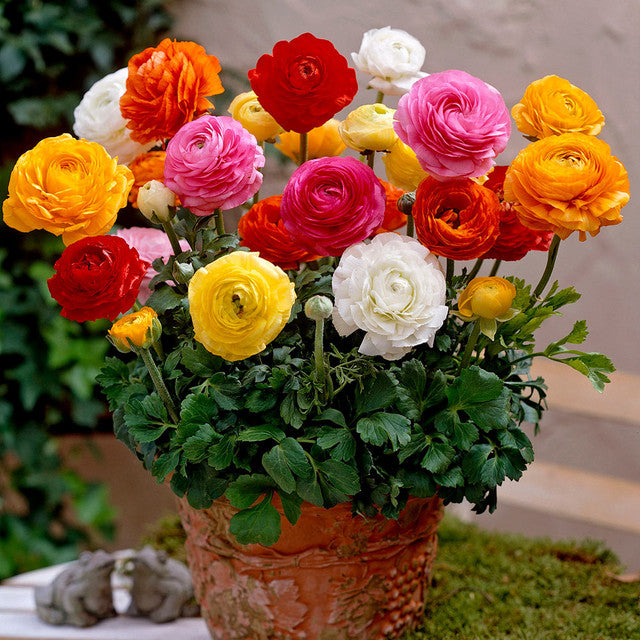
can ranunculus be planted in pots Ranunculus Dwarf Tomer Mixed Corms Bulbs Growing Bonsai Roots Rhizomes Tubers Potted Planting Reblooming Fragrant Garden Species Blooms Flower Seeds Plant GardeningAbout this item When to Plant Ranunculus Ranunculus bulbs perform best in regions with mild winters and long, cool springs. Fall is the ideal planting time in such areas. We recommend that gardeners in zones 8 through 10 plant ranunculus bulbs in autumn for blooms in late winter and early spring. Gardeners with colder winters in zones 2 through 7 should plant in late winter early spring, once the threat of hard frost is over. Your blooms will appear
-
When to Plant Ranunculus
Ranunculus bulbs perform best in regions with mild winters and long, cool springs. Fall is the ideal planting time in such areas. We recommend that gardeners in zones 8 through 10 plant ranunculus bulbs in autumn for blooms in late winter and early spring. Gardeners with colder winters in zones 2 through 7 should plant in late winter/early spring, once the threat of hard frost is over. Your blooms will appear in late spring/early summer. Ranunculus bulbs are one of the rare varieties that can be stored. If you aren’t ready to plant the bulbs when you receive them, simply keep your bulbs in the shipping bag at room temperature and out of direct sunlight for up to eight months.
-
Where to Plant Ranunculus
For container planting, select a container that's large enough to accommodate the full-grown plant. Ensure there are adequate drainage holes to prevent waterlogging. Choose a spot for your container that receives full sun for at least 6 hours a day. When the danger of hard frost has passed, place the container in full sun all day. Of course, you may always plant in prepared beds. Just follow the directions below.
-
How to Plant Ranunculus
Before planting, soak your bulbs for a two to three hours in lukewarm water. DO NOT OVERSOAK. Choose well-draining soil with full sun exposure. Dig holes that allow you to plant the ranunculus 2 to 3 inches deep, and 6 to 9 inches apart. Make sure that the "pointed" ends are facing downward. After planting, gently soak the soil.
Pre-sprouting ranunculus will allow your corms to bloom a few weeks earlier than normal. Soak corms in room-temperature water for three to four hours. Fill a flat-bottomed seed tray half-way with moist potting soil. Place corms in the tray and cover with more soil. Move the tray into an area that has consistent temperatures of 40 to 50°F for two weeks. Check the corms every three to four days to ensure the soil is moist, and remove any corms that show signs of rotting or molding. Once rootlets appear, it's time to plant!. -
How to Care for Ranunculus
Leave the foliage in place once blooming has ended for the season. The leaves will continue to gather sunlight and strengthen the bulbs for future seasons. Leaves will yellow and die back as the plant goes dormant. Foliage may be removed at this point.
-
How to Store
Ranunculus are shipped year-round in a dry, dormant state. If you are not ready to plant the dried corms, store them in this bag out of direct sunlight at room temperature for up to eight months. If you have lifted the corms from the ground, store tubers in dry moss, such as peat, in a mesh bag. Mesh onion bags are a great storing option for any bulb or tuber.
Why Seedsplant ?
- Experts in the field
- Family owned and operated - 100 years
- Rigorous quality control
- We strive for your success by offering the bulb size you need
- Affordable quality
Flower Bulb Facts of Life
Bulbs: Beauty In a Bottle:
Bulbs are a natural product. And, as such, follow a natural cycle of growth and rebirth. Enjoying their fabulous flowers means planting ahead in one season then results the next. Bulbs are among the easiest flowers to grow, not only are they affordable, but bulbs offer the most stunning colors available. Even the most novice gardener can create a breathtakingly beautiful spring garden with bulbs.
What's a Bulb?
A flower bulb is really a self-contained flower factory. Within this marvelous little package is nearly everything the flower needs to come to life! Split a bulb open, for instance, and you'll see its baby flower bud, leaves, roots, stem and food supply. All bulbs need from you is to be placed in the ground at the appropriate season of year, given a liberal drink of water then left to work their magic.
Variety:
Flower bulbs come in seemingly limitless varieties which makes them perfectly suitable for any garden design you can dream up.
Is It a bulb ?
The Difference Between Bulbs, Corms, Tubers, Roots,Today, people commonly us the term 'bulb' to refer to any plant that stores its own food underground. But, in truth, many popular 'bulbs' are not true bulbs at all. These include corms, tubers and roots and, while they all produce beautiful flowers, technically the plants are different
When To Plant
In fall, after soil temperatures are below 50ºF/10ºC. These bulbs bloom the following spring and require the cold winter temperatures for development. But let's say winter arrives and your bulbs are still in their bag. Not to worry! Bulbs are pre-programmed to grow so even if you have to plant through snow, plant your bulbs!
How To Plant
Most bulbs thrive in either full or partial sun and in almost any location with good drainage. Avoid planting at the base of hills or under drainage pipes where water collects and will rot the bulbs.
- Dig a hole
- Drop in the bulb
- Water thoroughly
Tips For success
- A larger grouping of flower bulbs are far more fab than just a few planted here and there. Think clumps of color.
- Buy the largest bulbs you can find.
- Note the flowering times. Not all bulbs will bloom at the same time. A little planning will greatly increase the number of months you will enjoy bulb flowers.
Passionate About bulbs
Generally speaking, the best predictor for gardening success is bulb size. Almost always, the larger the initial bulb size planted, the larger and stronger the plants will be, producing more flowers. The first year end result will be noticeable to anyone.The best predictor for gardening success is bulb size.
Shipping
All items are shipped usually within 2 working days (usually sooner) except plug plants. Plants only dispatch Monday-Thursday to avoid problems with live plants sitting in a postal depot over the weekend. During busy periods , due to the nature of product and extra care needed when packing and preparing for post, please allow up to 7 days for delivery (depending on day purchased). Plants are only dispatched when crops are ready to travel , therefore some multi orders may be delivered separately and occasionally it may be necessary to hold back dispatch until plants are ready. Shipping is either via Post or 24/48 Hour courier depending on order size/weight etc. at our discretion. Please be patient when ordering plants as you cannot rush nature. Please be aware delivery dates shown by Seedsplant are estimates only and do not apply to live plant orders. Any orders returned to us by Post or Courier will incur a further postage charge to resend.
Returs
You may return all unopened items within 14 days of delivery for a full refund less P&P charges. Any items received damaged in transit must be notified in writing/email within 24 hours of receipt. Live plants should arrive in perfect condition , If however for some reason they do not please contact us immediately upon receipt. A full refund including original P&P will be made for any items not as described or wrong part no etc. All returns must include your full details with a copy of original receipt. You may cancel any transaction as long as notice is received before item(s) are / have been dispatched.
Contact us
You can message us through Seedsplant messages , otherwise You can write to us by email :[email protected]
Shipping Notes
- Free Standard Shipping on $100+ Orders to the USA.
- Except Preorder products are shipped in 48 hours.
- Delivery to the USA:
- Standard Shipping : 3-10 business days
- If time is of the essence, please consider selecting expedited delivery for faster service.
Exchange/Return Notes
- We offer a 30-day return/exchange service after receiving.
- Final sale items are not eligible for returns or exchanges.
- To process your return/exchange, please contact us at [email protected]
- Please click here for more details>>> Return & Exchange Policy