Pay in installments of $7.31 with
 ,
,
 and
and

Shipping Estimate
USA
- USA
- CAN
- USA
- CAN
Ships within 48 hours · Estimated delivery Sep 11 - Sep 16
 Promo Codes Available:
For Your Every Summer RSVP, with Code: SUMMER15
Description
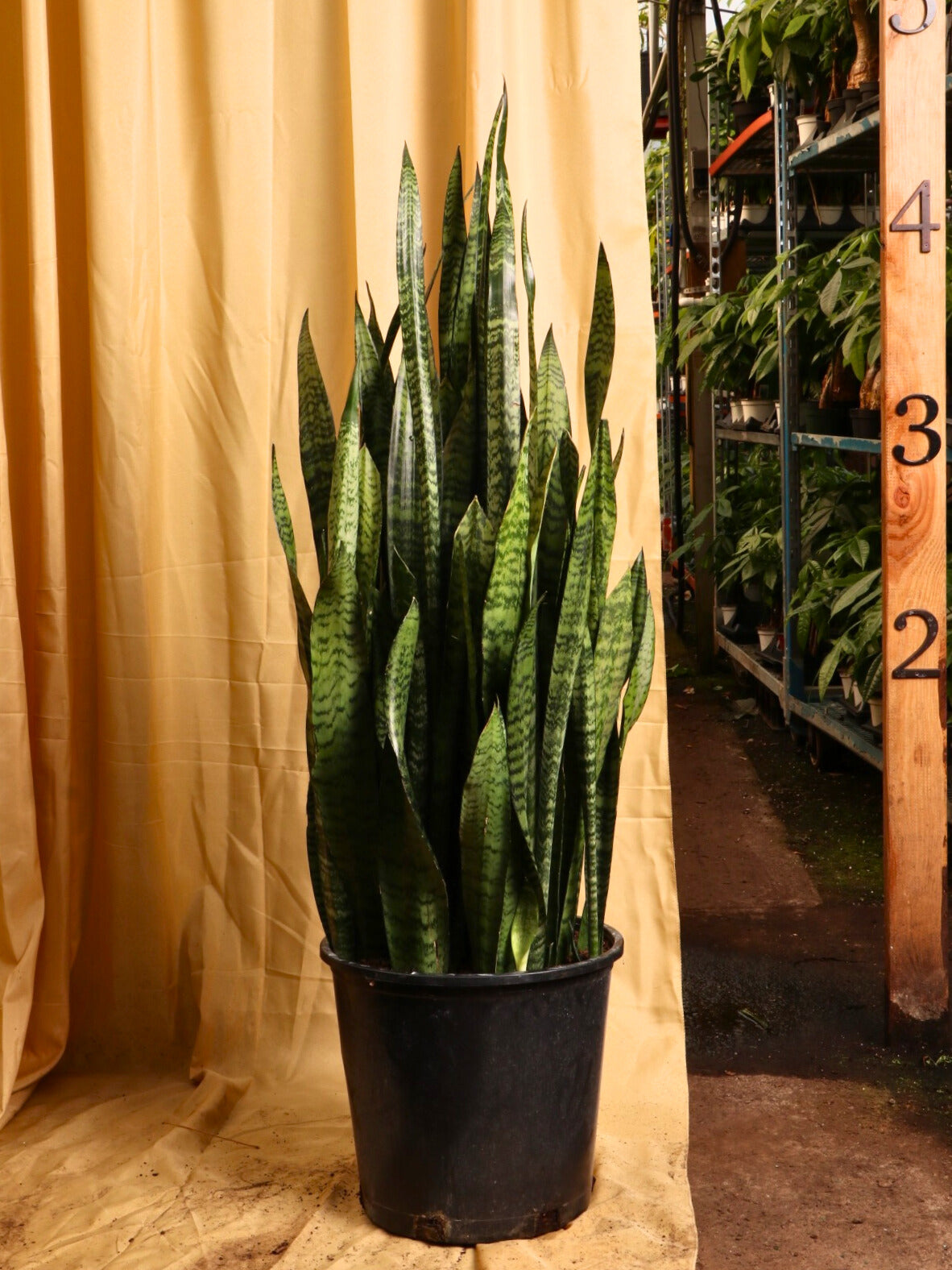
snake plant zeylanica care Full Size Green Snake Plant (Zeylanica)Description The snake plant is a type of succulent thats extremely resilient and easy to maintain. Seriously, its hard to kill. It doesnt need to be watered often, and it can tolerate any lightingfrom full shade to full sun. He barely demands anything from you, but he actively offers you something. The Snake plant, aka Sansevieria trifasciata, can purify the air in your house! (NASA said so!) The plant really catches the eye with its vibrant hues and
Description
The snake plant is a type of succulent that’s extremely resilient and easy to maintain. Seriously, it’s hard to kill. It doesn’t need to be watered often, and it can tolerate any lighting—from full shade to full sun. He barely demands anything from you, but he actively offers you something. The Snake plant, aka Sansevieria trifasciata, can purify the air in your house! (NASA said so!)
The plant really catches the eye with its vibrant hues and unique leaves that look like blades. Blades of grass? Medieval swords? That’s up to you. With hunter greens, emerald splashes, and lime highlights, the Trifasciata is an eye-catcher that will spice up any space.
Snake plant wins the “low maintenance” award, permanently
One time, a customer reached out to us after Covid. He was hoping to replace his plants that had died over the year when no one was in office. He said, "I want all snake plants!" I asked why.
He said, "Over the year and a half we weren't in office, no one was there to take care of the plants. Not surprisingly, ALL the plants in there died… EXCEPT for the few snake plants. They were chillin' like Bob Dylan. No light, no water, no care, no problem."
Snake plant benefits
Mr. Snake is resilient. It can tolerate drought, too much shade, too much light, or lack of fertilizer. This plant is great for beginners, no matter what color your thumb is! The Snake Plant also filters the air indoors.
By inhaling CO2 and converting it into oxygen, even overnight, the Snake plant helps encourage air flow. Snake plants remove allergens and toxins from the surrounding environment—like benzene, formaldehyde, and xylene, among others.
Order a snake plant today
Now that you're an expert in Snake Plantery (that’s the official terminology), order a big Snake plant by 7pm ET to get this plant out of our greenhouse in New Jersey tomorrow. Dahing delivers locally in the NJ/NYC area and ships as far as Chicago and Miami.
Hop on a video call to pick your EXACT big snake plant, and it will arrive just the way it looks in our greenhouse. (If you are wondering about the arrival time, check with the zip-code validator on top of the Add To Cart button.) Our plant shipping solution is truly protective and innovative to ensure your plants arrive safe and intact!
Hop on a video call to explore our greenhouse, and we WILL send out the EXACT plant that you pick out. Just like choosing a plant at a local nursery or garden center, except we have more and fresher plants to choose from—and you can't find our Pafe fine ceramic planter options anywhere else other than our website. :)
For any other questions or concerns, please don't hesitate to reach out to us at [email protected] or call/text (609)-968-7063!
Care
Are Snake plants hard to keep alive?
Snake plants are the easiest plant to keep alive. They’re totally ok in literally any lighting, from full sun to full shade. Put them anywhere you want. Water them occasionally, but it’s ok if you forget. They love to live.
What kind of lighting do snake plants need?
Snake plants are insanely flexible about lighting. Full shade? Bright indirect light? Full sun? It’s all good. It’s a master photosynthesiser who knows how to make do with very little sun and how to protect itself from lots of sun.
How often do you water a snake plant?
Snake plants are VERY drought tolerant. Do anything you want to it except water it. Ok, that was an exaggeration: You should not gift it to your cat and you should water the plant once every month or so.
If you are a regular reader, you're probably familiar with us being reluctant to give a schedule for watering. that's because we don't want to underquote it nor overquote it, and a bajillion factors go into the exact timing. (You don’t have to calculate those factors, just check the soil’s moisture level.)
But this is the only plant we can confidently give a schedule for, because we'll just under-quote it, because they're so drought tolerant. Water around once every month or so and you'll be fine.
If you want to go the scientific way, rather than the calendar method, then monitor the first 2-3 inches of the soil and only water when the first 2-3 inches are dry across a few spots of the soil.
Do Snake plants like bathrooms?
Snake plants love the bathroom! A Snake plant is happy in low lighting and comfortable in temperatures up to 90 degrees. It also purifies the air, and well, we’d bet you could use some air purification in that specific room.
Why are Snake plants so popular?
Snake plants are popular for two main reasons. First of all, they look epic. Zig-zaggy green swords, basically. Second, they’re unbelievably easy to keep alive, regardless of the color of your thumb. If you buy one, you’re kinda stuck forever.
How do I make my Snake plant happy?
Snake plants are inherently happy, like that girl in high school who got straight A’s, made the cheer team, and had supportive parents. Water when the soil’s dry. Put it wherever you want. Sing a lullaby at bedtime. That’s it.
Do Snake plants like their leaves misted?
Don’t mist your Snake plant! It comes from a dry climate, so it doesn’t need misting. In fact, misting can actively hurt your Snake plant. If the water drips down and collects near the roots, it can cause root rot.
Should a Snake plant be by a window?
A Snake plant is happy by a window—but it’s happy just about anywhere, including away from a window. It’s even happy in a dim room with little natural light. Basically, put your Snake plant wherever your heart desires.
Not pet-friendly
Are Snake plants toxic to dogs, cats, or kids?
Sadly, Snake plants are indeed toxic to dogs, cats, and babies—they contain saponins, which can cause nausea, vomiting, diarrhea. For cats, eating a Snake leaf could even hurt their red blood cells through a process called hemolysis.
Factoids
How tall is the snake plant?
Average Snake plants grow 2 feet tall and ½ foot wide—but our full-size snake plants are around 4 feet tall. If they were actual snakes, they’d be reticulated pythons (we looked it up, that’s the longest snake).
That height was measured when we wrote this—better to check with us over a live virtual shopping call. They might be even bigger!
What did NASA say about Snake plants?
The NASA Clean Air Study, led by NASA in association with the Associated Landscape Contractors of America, found that Snake plants are particularly good air purifiers. The study investigated which plants could keep a space habitat healthy. Snake plants could!
Is it good to sleep next to a Snake plant in the bedroom?
It’s beneficial to sleep next to a snake plant. First of all, it purifies the air and breathes out oxygen, helping you sleep peacefully. Second, it’ll make you smile when you wake up next to it in the morning.
Does the Snake plant make oxygen at night?
Most plants don’t release oxygen at night, but the Snake plant does. Most plants need light to photosynthesize—the process that takes in carbon dioxide and releases oxygen—but the Snake plant barely needs light, even during the day.
Can I touch my Snake plant, or is it poisonous to the touch?
The Snake plant’s sap can cause an itchy skin rash. We recommend wearing gloves when handling the Snake plant, unless of course you are in the market for an itchy rash. That would be strange, but you do you.
Do Snake plants smell good?
When a Snake plant flowers, it smells like vanilla. Some even say jasmine or banana. Unless you hate jasmine or banana (we refuse to believe anyone hates vanilla), it’s delightful. When it’s not flowering, it has a mild planty smell.
Does a Snake plant flower indoors?
A Snake plant can bloom inside, but it’s rare. It’s also not a good thing. Snake plants tend to flower when they’re afraid they’re dying, so they can send their progeny off into the world before they meet their fate.
If you’ve neglected your Snake plant so much that it freaks out and tries to make babies, you win a special medal for Plant Neglect. Snake plants hardly ever die, so they hardly ever flower. It does, however, smell really good. Win some, lose some.
Rumors
Why is the Snake plant called “mother-in-law’s tongue”?
The Snake plant is called “mother-in-law’s tongue” because the leaves look like sharp tongues, and . . . Well, there’s a certain stereotype. If you had a sharp-tongued MIL, you probably wouldn’t need to ask. Maybe ask your partner.
Do Snake plants ward off evil?
In African culture, Snake plants ward off evil spirits. In some Asian countries, they block negative Chi, and in China especially, they have positive feng shui. Plus, in all cultures, it demolishes carbon dioxide and other toxins in the air.
Does a Snake plant attract snakes? Or do snakes hate snake plants?
Snakes hate Snake plants! The sharp-edged leaves can slice up their scaly skin. So if you hate snakes as much as snakes hate Snake plants, get some Snake plants to keep the snakes away. (Say that five times fast.)
What’s the best room in the house for a Snake plant?
Put the Snake plant wherever you want! Snakey doesn’t care whether he sits by the north window or the south. In feng shui principles, you should put him near your front door, to protect your home from bad energy.
What are the magical uses of a Snake plant?
The Snake plant’s first magical power is air purification. In feng shui, it also symbolizes good fortune, good energy, and prosperity. It protects the home and offers mental clarity. If you don’t need any of that, buy a begonia.
Are Snake plants bad feng shui?
Thoughts are mixed on the Snake plant’s role in feng shui. Many believe that its sharp leaves represent protection and vitality. Others, however, believe you should avoid sharp plants, especially in your home’s relationship area. It could make you sharp-tongued.
Shipping Notes
- Free Standard Shipping on $100+ Orders to the USA.
- Except Preorder products are shipped in 48 hours.
- Delivery to the USA:
- Standard Shipping : 3-10 business days
- If time is of the essence, please consider selecting expedited delivery for faster service.
Exchange/Return Notes
- We offer a 30-day return/exchange service after receiving.
- Final sale items are not eligible for returns or exchanges.
- To process your return/exchange, please contact us at [email protected]
- Please click here for more details>>> Return & Exchange Policy