SKU: 97481574648
succulent plant rocks

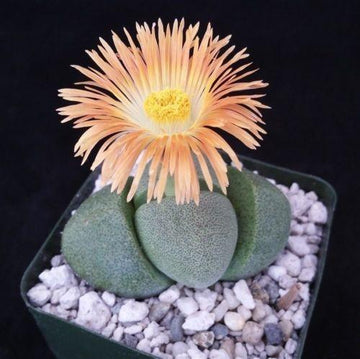
succulent plant rocks Split Rock Succulent 'Pleiospilos nelii' mesembs

Sale price$23.03 Regular price$25.59
Save 10%

Pay in installments of $6.40 with ShopPay, AfterPay and Klarna

Shipping Estimate
USA
  • USA
  • CAN

Ships within 48 hours · Estimated delivery Sep 9 - Sep 14

Promo Codes Available:

For Your Every Summer RSVP, with Code: SUMMER15

Description

succulent plant rocks Split Rock Succulent 'Pleiospilos nelii' mesembsThe split rock succulent, known as Pleiospilos nelii mesembs, is an absolutely stunning succulent plant that belongs to the Mesembryanthemaceae family! "Mesembs" is a common term used to refer to plants in this family, which includes various succulents known for their unique adaptations to arid environments. The split rock succulent has several other common names, such as mimicry plant, cleft stone, or living rock cactus. It gets its name because its

The split rock succulent, known as Pleiospilos nelii mesembs, is an absolutely stunning succulent plant that belongs to the Mesembryanthemaceae family! "Mesembs" is a common term used to refer to plants in this family, which includes various succulents known for their unique adaptations to arid environments. The split rock succulent has several other common names, such as mimicry plant, cleft stone, or living rock cactus. It gets its name because its leaves split open, revealing a cleft in the center. It looks like a rock that has been split in half! 

The split rock plant and Lithops are often confused because of their striking similarities. The biggest distinction between the two is in how they blossom. Both plants bloom in the early fall, but Split Rocks produce multiple flowers in a single reproductive cycle, whereas Lithops only produces one flower at a time. The split rock succulent produces daisy-like flowers in a variety of colors, including orange, white, yellow, and magenta.

Native to South Africa, this egg-shaped succulent has two gray-green, thick, fleshy leaves that cleft down the center. New leaves grow at right angles to the split.It can typically grow up to 4 inches tall and 8 inches wide. This split rock plant also comes in the lovely Pleiospilos nelii "Royal flush" variety, which has deep purple to reddish foliage. 

In terms of propagation, split rock plants can be propagated through seeds or by dividing the offsets that grow from the base of the parent plant. Additionally, this split rock is a friendly plant for both humans and pets, making it a popular choice among plant enthusiasts. 

Watering Needs

When it comes to watering split rock succulents, it's important to remember that they have lower water needs than other succulents. These rock plants are adapted to arid environments, so they prefer infrequent watering. It's best to allow the soil to dry out completely between waterings to prevent overwatering, which can lead to root rot or bursting your concrete leaf plant. 

One helpful tip is to use the "soak and dry" method. This means thoroughly watering your split rock plant until water drains out of the bottom of the pot through drainage holes, and then waiting for the soil to dry out completely before watering again. This helps mimic the natural rainfall patterns these succulents are accustomed to. Remember, it's always better to go underwater than to overwater when it comes to split rock succulents! 

In addition to monitoring the soil moisture, it's also important to consider the environmental conditions. During the active growing season, which is typically spring and summer, split rock succulents may require more frequent watering. However, during the dormant period in fall and winter, they require less water. 

Remember, a healthy Split Rock typically has two sets of leaves. If it develops more than two sets or shows cracking on its epidermis, it's time to stop watering. Avoid watering for at least a week if you notice these signs. 

Light Requirements

When it comes to light requirements, split rock succulents thrive in partial shade to full sun. They prefer a sunny spot where they can receive ample sunlight, but it's important to protect them from intense, direct sunlight, especially during the hottest parts of the day. 

A great location for split rock succulents is near a south or east-facing window, where they can receive bright, filtered light throughout the day. Consider purchasing grow lights if your Split Rock can't get enough light from a south-facing window or any other location. These can provide the necessary light intensity and duration for healthy growth. Just make sure to position the lights at an appropriate distance from the plants to avoid burning or overheating. 

Remember, each plant is unique, so it's important to observe your split rock succulents and adjust the lighting conditions accordingly.

Optimal Soil & Fertilizer Needs 

When it comes to soil and fertilizer needs, split rock plants prefer a well-drained soil mix specifically formulated for succulents. This type of soil allows excess water to flow out easily, preventing root rot. You can find pre-made succulent soil mixes at your local garden center, or you can create your own by combining equal parts of potting soil, perlite, and coarse sand.

Here at Planet Desert, we have a specialty-formulated succulent potting mix that contains 5 natural substrates and organic mycorrhizae to promote the development of a strong root system that helps your succulent to thrive. 

As for fertilizing, Pleiospilos nelii split rock succulents have low nutrient requirements. It's best to use a balanced natural NPK fertilizer specifically formulated for succulents, and only apply once a year during the active growing season, which is typically early spring. Remember, it's better to under-fertilize than to over-fertilize, as excessive nutrients can harm these plants. 

In general, it's important to avoid overfeeding split rock succulents, as they are adapted to nutrient-poor environments. Too much fertilizer can lead to weak growth and other problems. Always monitor the health and growth of your plants and adjust the fertilization routine as needed. If the leaves start turning yellow or the rock plant appears stressed, it may be a sign of nutrient imbalance or over-fertilization. 

Hardiness Zone & More

Split rock succulents are typically indoor plants and generally hardy in USDA hardiness zones 9 to 11. They thrive in warm climates and can tolerate temperatures ranging from 50°F to 85°F. If you live in a region with extreme temperatures or higher humidity levels, you can still grow split rock succulents indoors or in a controlled environment, such as a greenhouse or terrarium, where you can maintain the ideal conditions for their growth. Just remember to monitor the temperature and humidity levels to ensure they stay within the recommended range. 

In terms of humidity, the rock plants are adapted to arid conditions and prefer low to moderate humidity levels. They can tolerate dry air and do not require high levels of humidity. In fact, excessive humidity can increase the risk of fungal diseases and rot. It's best to provide good air circulation around the split rock to prevent moisture buildup. 

Don't miss out on adding the Pleiospilos nelii - Split rock succulent to your garden! Order now and enjoy its beauty for years to come. 

Shipping Notes
  • Free Standard Shipping on $100+ Orders to the USA.
  • Except Preorder products are shipped in 48 hours.
  • Delivery to the USA:
  1. Standard Shipping : 3-10 business days
  • If time is of the essence, please consider selecting expedited delivery for faster service.
Exchange/Return Notes
  • We offer a 30-day return/exchange service after receiving.
  • Final sale items are not eligible for returns or exchanges.
  • To process your return/exchange, please contact us at [email protected]
  • Please click here for more details>>> Return & Exchange Policy
SKU: 97481574648

Discover Niche Categories That Outsell succulent plant rocks

Top-Converting Item to Boost Your Average Order

4.6 ★★★★★
Based on 14 reviews
Sort
Highest Rating
Newest First
Oldest First
Product Reviews
O
Verified Purchase
OG Suga Blood
Carnegie, US
★★★★★ 4
Great mouse, but not a huge leap from previous MX Masters
Color: Pale Gray, Pattern Name: Mouse
I’ve used pretty much every mouse in the MX Master series over the years, so I had a good idea of what to expect going into this—and overall, it’s still a really solid mouse. The ergonomics are excellent, just like the previous versions. It fits the hand really naturally and is comfortable for long work sessions. That’s honestly one of the biggest reasons I keep coming back to this lineup. The scroll wheel is still a standout feature. The ultra-fast scrolling is incredibly smooth and makes a big difference when you’re going through long documents or web pages. Switching between free spin and precision scrolling works flawlessly. Build quality is top-notch as expected. Everything feels premium, from the materials to the button clicks. No complaints there at all. That said, if you’ve already used previous MX Master models, this doesn’t feel like a major upgrade. It’s more of a refinement than anything new or groundbreaking. It does everything well—but it doesn’t necessarily wow you if you’re coming from something like the MX Master 3 or 3S. Overall, still a great mouse and easy to recommend—especially if you’re new to the MX Master series. But if you already have a recent model, just know this is more of an incremental improvement than a big jump.
WAS THIS REVIEW HELPFUL?YesReportShare
Reviewed in the United States on April 7, 2026
R
Verified Purchase
Ronin
Belleville, US
★★★★★ 5
Quality materials, great mouse
Color: Graphite, Pattern Name: Mouse
I have gone through many mice looking for one that feels 'just right'. This is it. The shape is perfect for my hand, the haptic feedback is nice, if not very useful to me, and the smoothness with which it moves across my pad is well worth the price alone. Nicely configurable in the Logi app. One note - It's fine for me, but this is a very large mouse.
WAS THIS REVIEW HELPFUL?YesReportShare
Reviewed in the United States on June 4, 2026
D
Verified Purchase
Donald.50
Massapequa, US
★★★★★ 5
One Mouse to Bind Them, in the Long Hours of the Desk
Color: Graphite, Pattern Name: Mouse
It was the winter of the endless scroll, when the days in River Grove stretched thin and pale as old parchment and the light from the monitor became the only sun we knew, that my old mouse—poor, faithful thing—began its slow betrayal. Clicks faltered like the last breath of a dying Rohirrim steed; the wheel spun loose and reckless, sending spreadsheets cascading into chaos as though the very order of Middle-earth had unraveled; the cursor wandered with the aimless grief of a man who has lost his king. I sat there in the dim room above the garage, wrist aching like the shoulder that once bore the weight of Andúril, staring at the screen while deadlines crept closer, silent and inexorable as the shadow over Mordor. Then the Logitech MX Master 4 arrived, graphite-dark as the armor of Isildur’s line, shaped not for haste but for endurance, its curves rising like the hills of the Shire remade for the hand of a weary scribe. I took it up and felt the weight settle—not heavy, but certain, as though the mouse itself understood the gravity of long labor. The MagSpeed wheel turned under my thumb with the smooth inevitability of the Anduin in flood, ultra-fast when the document must race to its end, precise when a single pixel demanded mercy. The haptic feedback thrummed beneath my fingers like the deep pulse of the earth when the Ents march—subtle, insistent, alive. Every scroll, every gesture carried the quiet authority of a thing forged to outlast lesser tools. It paired without ceremony—Bluetooth to the laptop, Logi Bolt to the desktop—crossing between machines as swiftly as the Eagles bore Gandalf from the tower, no fumbling, no oaths sworn in frustration. The side buttons waited like loyal vassals: one to summon the hidden application switcher, another to gesture across screens as though drawing maps of realms unseen. The gesture button itself became my quiet command—thumb pressed, fingers sweeping, and windows arranged themselves in obedient array, the way the hosts of the West might have arrayed themselves upon the Pelennor Fields. And when the battery whispered low, the USB-C cord drank from the wall like a pilgrim at the fountains of Imladris, three hours of life from a single minute’s charge. I have worked with it now through the gray mornings when the snow muffled every sound outside, through the late nights when the house slept and only the cursor moved, through the sudden urgent revisions that once would have left me cursing the heavens. It does not slip. It does not tire. It endures, as the light of Eärendil endures above the storm, a small fierce companion against the gathering hours. If your days are measured in documents and deadlines, in the slow turning of wheels both literal and metaphorical, take this MX Master 4. It is not mere plastic and circuit; it is covenant between hand and machine, a shield against the tedium of the long watch, the fellowship your desk has hungered for in its quiet exile. Ten stars out of five, though the heavens ration light to fewer. I would carry it into the Cracks of Doom itself and fear no misclick. 🖱️🧙‍♂️📜🌑
WAS THIS REVIEW HELPFUL?YesReportShare
Reviewed in the United States on February 15, 2026
W
Verified Purchase
Walt
Alexandria, US
★★★★★ 4
Almost Perfect
Color: Graphite, Pattern Name: Mouse
If you are looking for a quiet mouse, this is it. I was skeptical about the "ergonomics" but find that it is much more comfortable for me than the more traditional design for left and right clicking. Simple moving seems fine but its weight is a bit excessive for lifting for repositioning in tight spaces. It is difficult to lift without activating the button on the haptic pad, even set to require firm pressure. A bit more contour on the right would solve this nicely to allow lifting the mouse without repositioning your hand. The forward and back buttons may be a bit awkward for some people. I'm slowly adjusting. Actually, each mouse I've owned needed a bit of getting used to. Side scrolling doesn't always work as it seems it would. Frequently, it scrolls vertically like the "normal" scroll wheel depending on the program. Haptic feedback is not a commonly used feature yet, however, Windows will be slowly adding haptic features to later updates from what I've read. I keep the setting on the lowest haptic feedback level and for what it functions on so far seems natural and not intrusive. There are many adjustments and customizations, too many to go into since I haven't played around with most. So far, even with what may seem like a lot of negative thoughts, I love this mouse. It would be five stars if lifting to repositioning in tight spaces was easier.
WAS THIS REVIEW HELPFUL?YesReportShare
Reviewed in the United States on April 14, 2026
M
Verified Purchase
Metal Sphere
Whiting, US
★★★★★ 5
Dependable, Reliable
Size: 1 Pack, Style: USB Receiver, Color: Swift Grey, Size: 1 Pack, Style: USB Receiver, Color: Swift Grey
As advertised. Logitech, best mouse for your hard-earned cheddar! It’s not that the (years) old Logitech mouse failed in any operational way, it just got that gummy, sticky surface texture that’s impossible to remove. While shopping for a replacement I noticed an off-brand mouse/keyboard combo and thought, “hey, 2 for 1”…mistake. All was well for about three weeks, long enough that when the gremlins arrived I didn’t immediately associate the new hardware. For the purposes of this discussion, gentle reader, know that I run legacy (what I affectionately refer to as, “Lazarus”) builds. Rigs that started life running Windows Vista/7, died, and that now, resurrected, run 10 and 11, and all that that implies. So, when a mouse started stuttering, of course I thought it was a gremlin in the machine, right? I spent more days than I am comfortable sharing with you pouring over processes and background apps, and registry trims…before Accam’s Razor suggested I eliminate the mouse as a variable. Changing the battery was ineffective, but when I swapped in the ooold Logitech…Yahtzee/Bingo/Booyah…smooth and precise…butter! All I needed was a new Logitech mouse. So, if you’re here you likely are having mouse issues of your own, or you just need one that works…this is it! 😉
WAS THIS REVIEW HELPFUL?YesReportShare
Reviewed in the United States on May 13, 2026

recommand products