SKU: 48512031190
vr01 fpv goggles

vr01 fpv goggles VR01 FPV Goggles – BETAFPV

Sale price$23.12 Regular price$25.69
Save 10%

Pay in installments of $6.42 with ShopPay, AfterPay and Klarna

Shipping Estimate
USA
  • USA
  • CAN

Ships within 48 hours · Estimated delivery Jul 24 - Jul 29

Promo Codes Available:

For Your Every Summer RSVP, with Code: SUMMER15

Description

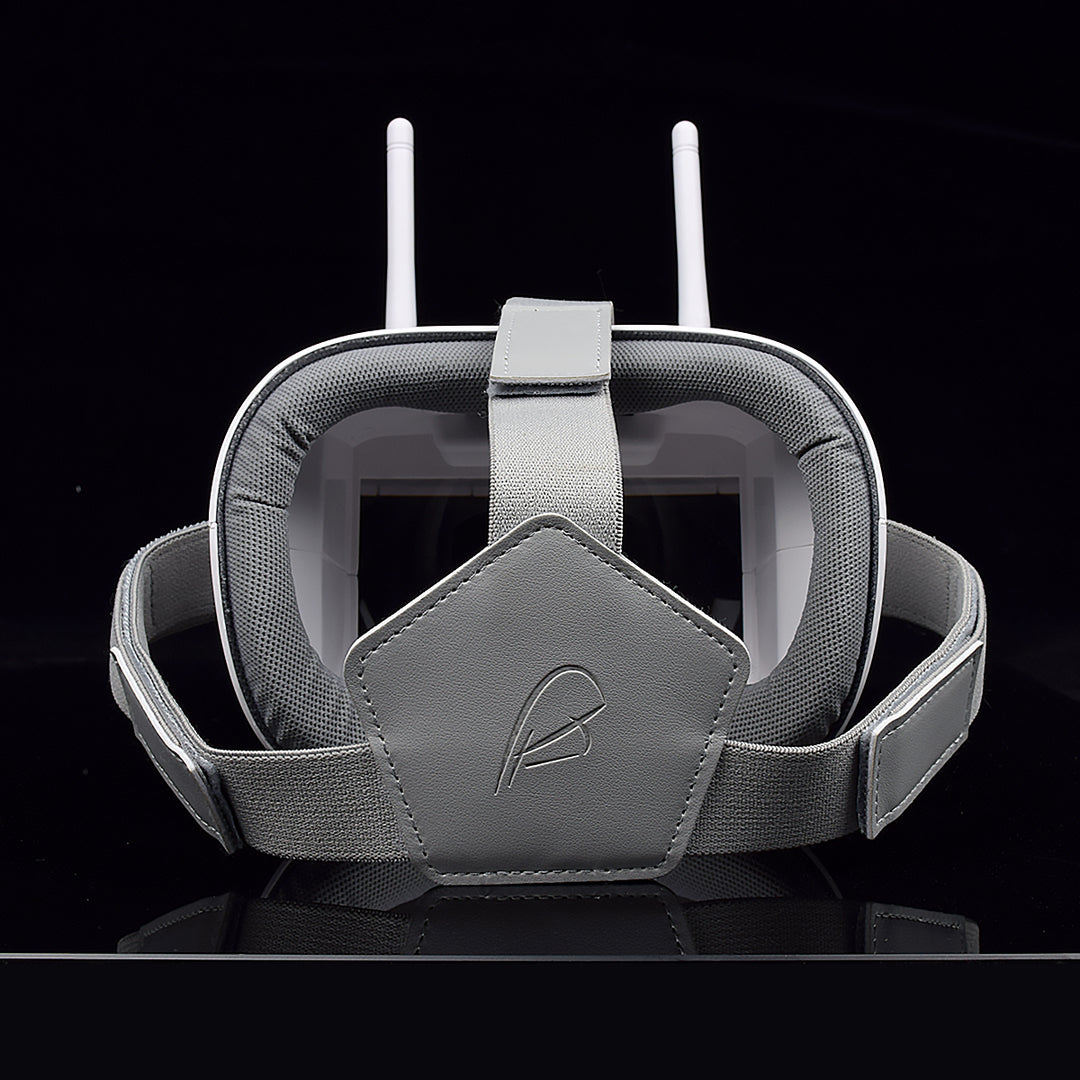
vr01 fpv goggles VR01 FPV Goggles – BETAFPVBETAFPV VR01 FPV Goggles a First Person View Goggle with 4. 3 inches 800*480px high brightness LCD which will allow you to experience a bright world without warped and blurred images. Adopt an ergonomic design with a foam sponge faceplate and a three sided adjustable headband, comfortable like cotton and suitable for all age ranges. Bullet Point BETAFPV VR01 FPV Goggles is with 4. 3 inches 800*480px high brightness LCD, which is specially tuned for

BETAFPV VR01 FPV Goggles - a First-Person-View Goggle with 4.3 inches 800*480px high brightness LCD which will allow you to experience a bright world without warped and blurred images. Adopt an ergonomic design with a foam sponge faceplate and a three-sided adjustable headband, comfortable like cotton and suitable for all age ranges.

Bullet Point

  • BETAFPV VR01 FPV Goggles is with 4.3 inches 800*480px high brightness LCD, which is specially tuned for FPV racing or Model airplanes. 
  • Adopt an ergonomic design with a foam sponge faceplate and a three-sided adjustable headband, this FPV Goggles fits your face and head perfectly.
  • Built-in super sensitiveness 5.8GHz 40ch receiver, especially with RaceBand.
  • Come with an advanced auto-searching function and show you the working frequency on screen.
  • 92% transparent lens adopted, no distort, no blur on the adage of the screen.
  • Lightweight only 375g, it also comes with a 2hr 2000mAh battery, bringing great endurance. RTF for any scale, racing, Model airplane game.

Specification

BODY
  • Dimension: 155x144x113mm
  • Weight: 375g with 2hr 2000mAh battery
  • Belt: three-Ways adjustable belt
SCREEN
  • screen size: 4.3 inch
  • Screen resolution: 800*480 (No blur after enlarge by the lens)
  • Screen brightness: 300cd/m2 with special high brightness backlight LED for outdoor FPV
  • View Angle: 12 O’CLOCK
LENS
  • 2.8x boost of the video to acquire intense feel-in-there video
  • 92% transparent rate no distort of light
JACK
  • Input CVBS
  • Headphone sound output
  • TF Card(C10) Max32G
  • USB DC5V IN, the device operating current of 550mA@5V,built-in battery maximum charge current of 750mA@5V; if the device is working when charging, please pay attention to selecting the rated current greater than 2A/5V charging equipment
BATTERY
  • Built-in 3.7V/2000mAh high-capacity polymer battery, LED stays red while charging. When charging is completed, the LED will turn to bright green.
  • Each full charge revive is around 2 hours working time

Band and Channel Selection

  CH
CH 1
(MHZ)
CH 2
(MHZ)
CH 3
(MHZ)
CH 4
(MHZ)
CH 5
(MHZ)
CH 6
(MHZ)
CH 7
(MHZ)
CH 8
(MHZ)
GROUP
A
5865
5845
5825
5805
5785
5765
5745
5725
B
5733
5752
5771
5790
5809
5828
5847
5866
D
5705
5685
5665
5645
5885
5905
5925
5945
E
5740
5760
5780
5800
5820
5840
5860
5880 
R
5658
5695
5732
5769
5806
5843
5880
5917

Operation Instructions

KEY
  • K1>SearCH/AV
Default mode, Short press for automatically search signals to certain signal strength and stops on that channel; Long press switch RF MOD and Long press for AV MOD; In Play mode, pressed jump volume to adjust OSD.
  • K2>MENU/Power
Default mode, Short press for MENU OSD; Long press 3S for Power OFF/ON; MENU pressed, this button is used as the Return.
  • K3>REC/Play/OK
Default mode, Short press for recording /STOP; Long press for Play mode; MENU pressed, this button is used as the confirmed.<
  • K4>Band+/VOL+
Default mode, Short press for Band+ option A, B, D, E, F, R cycle selection; Long press for Volume control -; MENU pressed, this button is used as the UP.
  • K5>CH+/VOL-
Default mode, Short press for CH 1~8 cycles; Long press for Volume control +, MENU pressed, this button is used as the DOWN.

    PLAYBACK

    • Call MENU and select Playback (Short Press K1 button to call menu, and use K3 button to select Playback mode; Or long pressed K3 )
    • Review/Replay in Playback mode (Playing Short K1 jump volume adjust OSD)
    • Buttons have a different function in playback mode
    • Record file: AVI, 800*480px progressive
    • Support up to 32G TF card (C10 recommend)
    • K2: Playback menu (volume control/file delete/protect)
    • K4: UP/ fast backward<<
    • K5: DOWM/ fast backward>>
    • K3: Select/Play/ Pause
    • K1: Quit Playback mode
    NOTE: If the device is not used for a long time, please charge once every four months, in order to protect the battery.

    Package

    • 1 * BETAFPV VR01 FPV Goggles
    • 1 * USB Charging Cable
    • 2 * Dipole 5.8G Antennas  
    • 1 * Adjustable Headband

    Shipping Notes
    • Free Standard Shipping on $100+ Orders to the USA.
    • Except Preorder products are shipped in 48 hours.
    • Delivery to the USA:
    1. Standard Shipping : 3-10 business days
    • If time is of the essence, please consider selecting expedited delivery for faster service.
    Exchange/Return Notes
    • We offer a 30-day return/exchange service after receiving.
    • Final sale items are not eligible for returns or exchanges.
    • To process your return/exchange, please contact us at [email protected]
    • Please click here for more details>>> Return & Exchange Policy
    SKU: 48512031190

    Discover Niche Categories That Outsell vr01 fpv goggles

    Top-Converting Item to Boost Your Average Order

    4.5 ★★★★★
    Based on 13 reviews
    Sort
    Highest Rating
    Newest First
    Oldest First
    Product Reviews
    E
    Verified Purchase
    Everyday Reviews
    Port Orchard, US
    ★★★★★ 4
    WALI Dual Monitor Stand: A Solid, Space-Saving Base Camp
    Size: Dual, Style: Free-Standing
    WALI Dual Monitor Stand: A Solid, Space-Saving Base Camp I needed to reclaim some real estate on my crowded desk, and this WALI freestanding mount did the trick. It's a straightforward, no-frills solution that holds my two 24-inch monitors securely and opens up a ton of space underneath. Assembly is intuitive, though having a second pair of hands is helpful when you're attaching the monitors to avoid any tipping. The all-metal construction feels sturdy and reliable. The adjustments are basic but effective—you can raise or lower both monitors together on the central pole and tilt or swivel them individually to get the angles just right. The included cable management clips are a nice touch for keeping things tidy. The key thing to understand with any freestanding mount is balance. If you extend the arms all the way out toward you, the whole unit can get top-heavy and want to tip forward. I keep my monitors positioned more centered over the heavy base, and it's perfectly stable. It's not meant for dramatic, extended poses. For the price, it's fantastic value. It doesn't have the infinite, fluid adjustability of high-end gas-spring arms, but it doesn't need to. It lifts your monitors, frees up your desk, and does its job without any fuss. Bottom Line: An excellent, budget-friendly way to lift two monitors and dramatically increase your usable desk space. Just be mindful of the center of gravity and don't expect ultra-flexible, independent positioning.
    WAS THIS REVIEW HELPFUL?YesReportShare
    Reviewed in the United States on August 26, 2025
    E
    Verified Purchase
    Erik Okerholm
    Dallas, US
    ★★★★★ 5
    Nice, sturdy, and supportive and easy to set up for my dual 27" monitors!
    Size: Dual, Style: Free-Standing
    Nice, sturdy, and supportive and easy to set up for my dual 27" monitors!
    WAS THIS REVIEW HELPFUL?YesReportShare
    Reviewed in the United States on May 18, 2026
    N
    Verified Purchase
    Needsmorenails
    Bozeman, US
    ★★★★★ 5
    Easily supports a pair of 26" displays
    Size: Dual, Style: Free-Standing
    I have no complaints with this stand. It is not as nice as the Inland brand sold at MicroCenter, but it does its job. It beats the price of the MicroCenter one, thats for sure. It comes with all the hardware you might need, even long screws and bushings if you have a display that needs them. Assembly was quick. It comes mostly assembled anyway. You have to put the bottom on the post then attach the assembled arms to the post. Setting up can be a challenge but with help, its easy. After mounting the bracket on the back of the displays, you just slide them into the receiver on the arms. Once mounted, adjusting the position is simple, but can take a while as there are several joints which can be positioned to angle the displays as you like. The cord clips do an OK job of cord management, but the clips are not as good as the Inland ones. They do the job, but not as durable. I broke the one that goes on the post, but I tried getting it to hold a wad of wire. My fault. I recommend this stand.
    WAS THIS REVIEW HELPFUL?YesReportShare
    Reviewed in the United States on December 3, 2025
    J
    Verified Purchase
    Joshua Jordan
    Massapequa, US
    ★★★★★ 5
    It's simple, it works, & its price makes for a good deal
    Size: Single, Style: Free-Standing
    I needed a stand for a 27" VIZIO TV that had been wall-mounted for a few years, & (?) the original stand must've got the toss long ago... It's hard to say... I found this stand on Amazon priced right, plus it had a coupon attached to the listing. I scrolled down & I saw a "newer model" of the same product was available, so I was initially hesitant. But, looking at the product pictures, reading the description, & scanning through some of the reviews, then the same with the "newer model" — the only difference I could see was mostly aesthetic (it also appears to have a desk mount included, which wouldn't have worked for me regardless of its purpose—either for conversion to a desk stand-off mount, or to further secure the stand....?) Eventually, I just thought "....it's a stand with a VESA mount; how do you **** that up...?" And I really couldn't think of anything...even if the VESA bracket was milled not to spec (it is milled to spec), I could have still made it work....(?) So, I made the purchase, received it, & 9-10 screws later, the TV had a stand. & I'm guessing a much more versatile stand than the original. The bracket that attaches the stand to the VESA mount can lower or raise the TV quite a bit. Even in it's highest position, it's still retains its sturdiness & remains stable. The baseplate has a decent amount of weight, and its overall design is well balanced to favor stability (to a tolerance; e.g., an old CRT monitor just isn't going to work). The stand is literally 4 basic pieces—the VESA bracket, an articulating bracket, a metal tube, & a metal baseplate. If you have a standard phillips screwdriver, then the stand is easy to assemble. If you have any experience with TV mounts, or TV stands, then it assembles in less than 15 minutes. Given what you get for the price, the ease of assembly, the added versatility, if you need a stand for a screen within the manufacturer's specific tolerances, then I would absolutely recommend this stand.
    WAS THIS REVIEW HELPFUL?YesReportShare
    Reviewed in the United States on July 19, 2021
    V
    Verified Purchase
    viplarry
    Lowell, US
    ★★★★★ 5
    Decent Monitor Stand with Some Assembly Required
    Size: Single, Style: Free-Standing
    This monitor stand works pretty well and is a good value for the price. It’s sturdy and adjustable, which makes it perfect for a variety of monitors, including my 32-inch curved Samsung. The assembly is straightforward if you have a Phillips screwdriver and something to tighten bolts, like a wrench. It’s solid once it’s put together and holds my monitor securely. The phone holder could use some improvement. It doesn't adjust to face me directly, which is a bit annoying. The stand itself is great for saving desk space and providing better ergonomics, but it can be a bit of a hassle to assemble if you’re not handy with tools. Overall, a good buy if you need a reliable monitor stand.
    WAS THIS REVIEW HELPFUL?YesReportShare
    Reviewed in the United States on October 25, 2024

    recommand products