Pay in installments of $6.10 with
 ,
,
 and
and

Shipping Estimate
USA
- USA
- CAN
- USA
- CAN
Ships within 48 hours · Estimated delivery Oct 14 - Oct 19
 Promo Codes Available:
For Your Every Summer RSVP, with Code: SUMMER15
Description
pedal midi Minimal Series MIDI Dual Stereo Loop (OC-M-MDSL)One Control Minimal Series MIDI Dual Stereo Loop (MDSL) One Control brings players easy MIDI Loop functionality with the new Minimal Series MIDI Dual Stereo Loop pedal (MDSL). This is a stereo effects loop that is powerful for small pedalboard or large effects systems. Switch your loop easily with MIDI with either stereo or mono loops, and you can covert mono signals to stereo (dual mono operation) and send them to stereo effects. And instead of
One Control Minimal Series MIDI Dual Stereo Loop (MDSL)
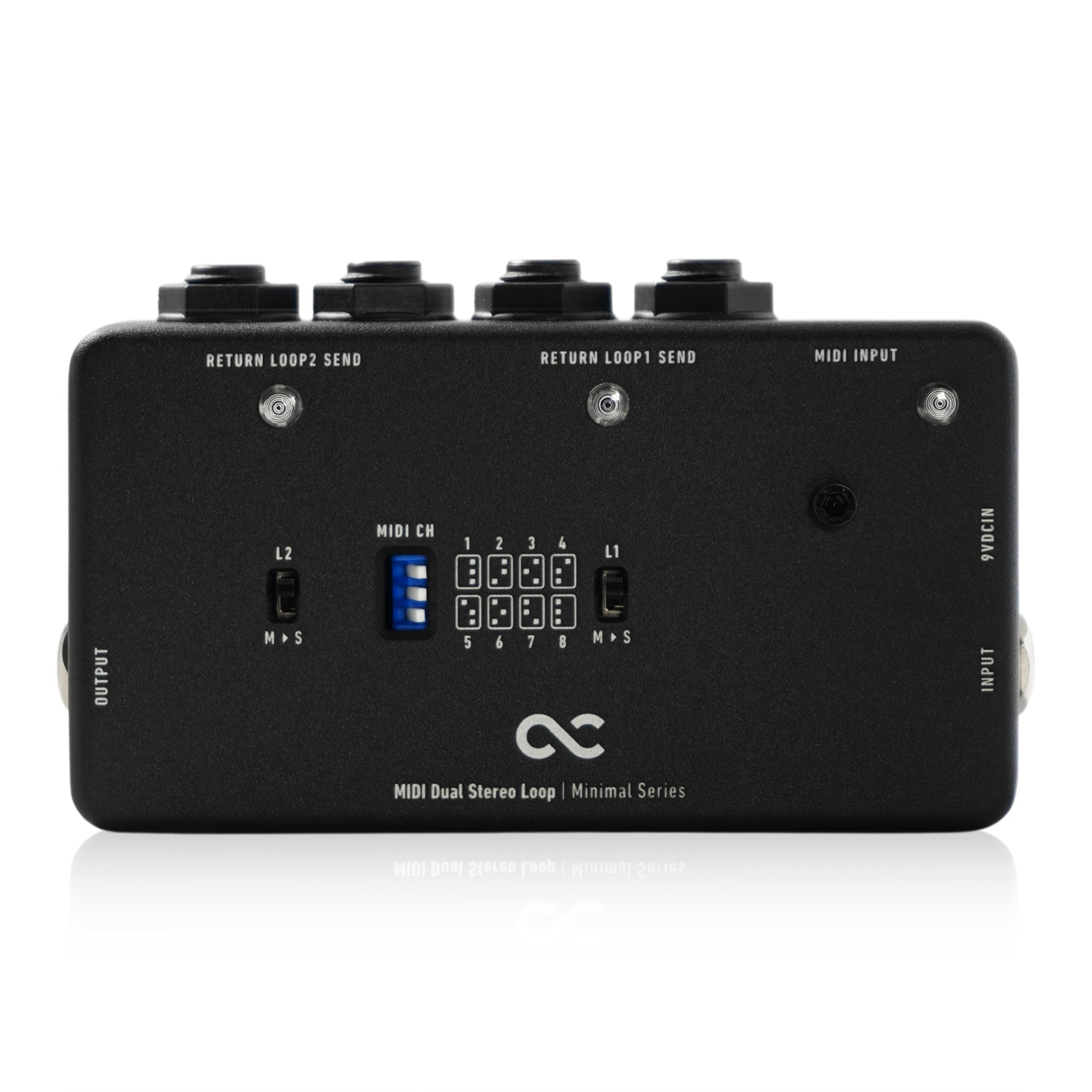
One Control brings players easy MIDI Loop functionality with the new Minimal Series MIDI Dual Stereo Loop pedal (MDSL). This is a stereo effects loop that is powerful for small pedalboard or large effects systems. Switch your loop easily with MIDI with either stereo or mono loops, and you can covert mono signals to stereo (dual mono operation) and send them to stereo effects. And instead of relying on a footswitch you can control the MDSL easily with MIDI from a wide variety of devices.
The OC MDSL can use between 1-8 MIDI channels to receive control signals, and the On/Off of the two effects loops via MIDI PC# or CC#. Use either PC or CC mode to control your loops easily. The input, output, and effects loop send and return jacks are all TRS stereo plugs and can be used as a full stereo loop. If the mono output signal becomes stereo via an effect connected to the effects loop, it can be output as a stereo signal to the output. Of course, you can simply use TS mono cables to have a mono loop switcher controlled via MIDI.
With the Minimal Series small size, you can use multiple MDSL units installed in remote locations, such as pedalboards and rack systems, with easy control of your loops. And beyond simple ON/OFF operation with MIDI switching, you can use the MDSL as an additional effects loop with larger switching systems like the One Control Caiman Tail Loop or the OC10+ Croc Eye. The OC MDSL is a simple and small switcher that can be used in a variety of ways to make your tone dreams come true.
MIDI Signal Characteristics:
PC# 80: Set it to PC mode. (Factory)
PC# 81: Set it to CC mode.
PC# 90: When you connect the power to the main unit, the ON/OFF setting of each loop is reset. (Factory)
PC# 91: When the power is connected to the main unit, the ON/OFF setting of each loop is set at the end.
PC# 10: Bypass Loop 1. This signal is ignored in CC mode.
PC# 11: Turn on Loop 1. This signal is ignored in CC mode.
PC# 20: Bypass Loop 2. This signal is ignored in CC mode.
PC# 21: Turn on Loop 2. This signal is ignored in CC mode.
PC# 30: Bypass both loops. This signal is ignored in CC mode.
PC# 31: Turn on both loops. This signal is ignored in CC mode.
CC# 102 / Value 10: Bypass loop 1. In PC mode, this signal is ignored.
CC# 102 / Value 11: Turn on loop 1. In PC mode, this signal is ignored.
CC# 102 / Value 20: Bypass loop 2. In PC mode, this signal is ignored.
CC# 102 / Value 21: Turn on Loop 2. In PC mode, this signal is ignored.
CC# 102 / Value 30: Bypass both loops. In PC mode, this signal is ignored.
CC# 102 / Value 31: Turn on both loops. In PC mode, this signal is ignored.
L1/L2 switch
L1 and L2 switches choose whether to change mono to stereo signals in loop 1 and loop 2 respectively.
When stereo signals are input and when mono signals are left mono, these switches are set on the top side.
If you want to convert a mono signal to stereo, set this switch to the bottom.
For example, if you enter a mono signal in the input, loop 1 is a mono effect, and loop 2 is a stereo effect, set only the L2 switch to the M>S side.
Enter a mono signal in the input, and if Loop 1 and Loop 2 are stereo effects, set only the L1 switch to the M>S side.
However, if the effect connected to loop 1 is mono input or stereo output, both switches remain on the upper side.
Also, if one of these switches is on the M>S side, the output will also be a stereo signal.
We do not make both switches M>S side. The M>S switch is used when loop 1, the signal from the input is mono, and the loop 1SEND is stereo.
For loop 2, it is used when loop 1 RETURN is a mono signal and loop 2SEND is stereo.
Otherwise, set it on the upper side.
Control:
MIDI CH: Set the MIDI channel to respond. It is used in combination with the position of the three DIP switches. Firmly fold the switch to the left or right and stop it in the middle and do not use it.
L1/L2 switches: Switch whether mono/stereo conversion is performed on loop 1 or loop 2.
Bottom position: Mono input → Stereo send, return, output
Top position: Stereo input → Stereo send, return, output
Mono input → mono send, return, output
Stereo input → mono send, return, output
Specifications:
120W x 60D x 30H mm (excluding protrusions)
125W x 68D x 32H mm (including protrusions)
Weight: 366g
Current consumption: 120mA
Power supply: Center minus DC9V adapter
*Batteries are not available.
Minimal Series – “Sophisticated Functionality”
The One Control Minimal Series eliminates all waste in the manufacturing process of pedals, achieves the most compact size, and consolidates simple but sophisticated functionality. These are pedals that have earned the name Minimal.
For this series One Control has devised and realized an innovative PCB layout that can ensure both speed and precision in the manufacturing process, as well as strength in construction with high quality parts. Production efficiency has improved, reducing unnecessary hand labor and waste and helping to lower the price without lowering the quality.
OC Minimal Series also achieves minimal size housings for the pedals so they can be used without taking up much space on your pedalboard or under your feet. Built to last, built to be stepped on, and built to fit anywhere you need them. Purpose-built solutions with exactly what you need, and nothing more. Switching is Easy with One Control!
Minimal Series MIDI Dual Stereo Loop Manual.pdf
Promotional Pictures (for dealers)
2000pix×2000pix 350dpi
Shipping Notes
- Free Standard Shipping on $100+ Orders to the USA.
- Except Preorder products are shipped in 48 hours.
- Delivery to the USA:
- Standard Shipping : 3-10 business days
- If time is of the essence, please consider selecting expedited delivery for faster service.
Exchange/Return Notes
- We offer a 30-day return/exchange service after receiving.
- Final sale items are not eligible for returns or exchanges.
- To process your return/exchange, please contact us at [email protected]
- Please click here for more details>>> Return & Exchange Policy