Pay in installments of $5.36 with
 ,
,
 and
and

Shipping Estimate
USA
- USA
- CAN
- USA
- CAN
Ships within 48 hours · Estimated delivery Oct 7 - Oct 12
 Promo Codes Available:
For Your Every Summer RSVP, with Code: SUMMER15
Description
dragon bones succulent Dragon Bones 'Euphorbia lactea' - For saleWelcome to the fascinating world of evergreen indoor perennial plants! If you are looking for a truly unique euphorbia plant for your succulent collection. Look no further than 'Euphorbia lactea,' also known as Dragon Bones, candelabra spurge, candelabra cactus, mottled spurge, false cactus, and milkstripe Euphorbia! This euphorbia is referred to as "dragon bones" because of its rhombic cross section, fleshy, thick stems that have ridged, bumpy
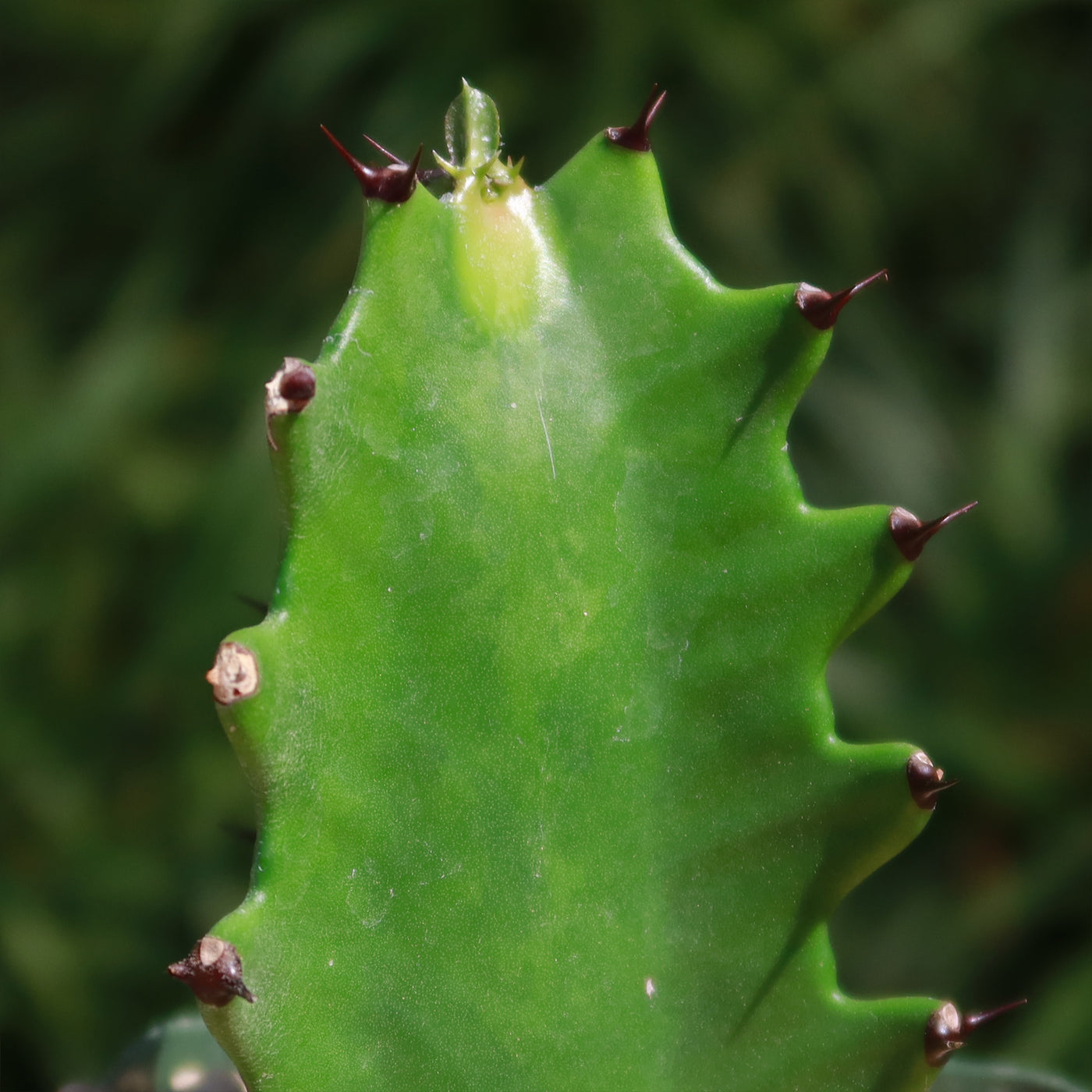
Welcome to the fascinating world of evergreen indoor perennial plants! If you are looking for a truly unique euphorbia plant for your succulent collection. Look no further than 'Euphorbia lactea,' also known as Dragon Bones, candelabra spurge, candelabra cactus, mottled spurge, false cactus, and milkstripe Euphorbia! This euphorbia is referred to as "dragon bones" because of its rhombic cross-section, fleshy, thick stems that have ridged, bumpy textures that resemble the bones of a dragon.
Although it is frequently referred to as a "Dragon bones cactus," it is not actually a cactus. This is likely due to its spiny cactus-like appearance, which includes spiky, ribbed stems, that can grow up to an incredible 15 feet tall. But don't worry; this stunning houseplant is typically kept at a more manageable height of 1 to 2 feet.
Hailing from Africa and India, this euphorbia spurge plant has striking mottled branches (as its name indicates mottled spurge) with green and white lines that sometimes grow in a crested form known as Euphorbia lactea 'Cristata' (Coral cactus). Both varieties are sure to become the centerpiece of any gardener's collection.
This stunning euphorbia plant sprouts a few tiny leaves in the summer, but as the weather cools in the autumn and winter, they quickly disappear to conserve water in a thick-fleshy stem, leaving it almost entirely leafless.
The Euphorbia lactea flowers are uncommon in cultivation; when they appear on this tenacious little fighter, they are hidden in paired cyathium near the stem tips, adding mystery to its already impressive persona.
Get this - when injured, the euphorbia candelabra oozes toxic milky latex! Don't miss out on this opportunity to add something truly exceptional to your home or garden.
Watering Needs
First, it's important to note that Euphorbia lactea is a succulent plant, which means it has adapted to survive in arid conditions and can store water in its stems. As a result, it is more tolerant of underwatering than overwatering.
When it comes to watering your Dragon Bones Euphorbia lactea, it's best to follow the "soak and dry" method. This means thoroughly watering the plant until water flows out of the drainage holes and then allowing the soil to dry out completely before watering again. During the growing season (spring and summer), you can water it every 2-3 weeks. However, during the dormant season (fall and winter), you should reduce watering to once a month or even less, as the plant requires less water during this time.
It's important to avoid overwatering, as this can lead to root rot and other issues. Always check the moisture level of the soil before watering and adjust accordingly. Additionally, make sure the pot has drainage holes to allow excess water to escape.
Remember, every spurge plant is unique, so it's essential to observe your Euphorbia lactea and adjust your watering routine based on its specific needs. If the stems start to shrivel or become soft, it may be a sign of underwatering, while yellowing or mushy stems can indicate overwatering.
Light Requirements
Like many other Euphorbias, the dragon bone's euphorbia also requires bright, direct sunlight to thrive. These Euphorbia lactea require at least six hours of strong light each day to survive, although partial shade in the afternoon is often preferable - especially in hotter climates where the succulent plant might become stressed by the intense heat of the afternoon sun.
It's crucial to place your succulents away from any areas with constant direct sunlight, as doing so could result in burned foliage. If you notice that the spurge plant's leaves are turning yellow or brown, it may be getting too much sunlight.
In the dormant winter period, you may also want to consider moving the dragon bone cactus to a brighter location or providing them with supplemental light.
Optimal Soil & Fertilizer Needs
When it comes to the soil and fertilizer needs of the Euphorbia lactea, this spurge plant prefers a well-draining soil mix. A cactus or succulent potting mix is a great option, as it provides the right balance of moisture retention and drainage. You can also create your own mix by combining regular potting soil with perlite or coarse sand to improve drainage. Instead, make or buy a well-draining potting mix, or ideally, use our specialized succulent potting mix that contains 5 natural substrates and mycorrhizae to promote the development of a strong root system that helps your succulent to thrive.
As for fertilizing, the dragon bones cactus doesn't require frequent feeding. During the growing season (spring and summer), you can fertilize it once a year using a balanced, natural fertilizer specifically formulated for succulents. However, it's important to avoid overfertilizing, as this can cause the Euphorbia candelabra to become leggy or develop burnt tips. During the dormant season (fall and winter), you can skip fertilizing altogether, as the plant is not actively growing and doesn't require additional nutrients.
Remember, it's always a good idea to monitor your plant's growth and adjust your fertilizing routine based on its specific needs. If your euphorbia candelabra starts showing signs of nutrient deficiencies or excessive growth, you may need to adjust the frequency or strength of your fertilizing.
Hardiness Zones & More
The Dragon Bones cactus is native to tropical and subtropical regions, so it prefers warm temperatures and high humidity. It is typically hardy in USDA hardiness zones 10-11, which means it can tolerate minimum temperatures of 30- 40°F. If you live in a colder climate, it's best to keep this spurge plant indoors or provide it with protection during the winter months.
In terms of temperature, this Euphorbia lactea thrives in temperatures between 60-85°F. Avoid exposing it to temperatures below 50°F for extended periods, as this can cause damage to the euphorbia plant. If you're keeping it indoors, make sure to place it in a location where it can enjoy a consistent temperature within this range.
As for humidity, this euphorbia plant appreciates higher humidity levels, similar to its natural habitat. You can increase humidity around it by placing a tray filled with water near it or using a humidifier. Another way to add moisture to the leaves is to mist them occasionally. However, be cautious not to mist it too frequently, as excessive moisture can lead to fungal diseases.
Don't miss out on this opportunity to add something truly exceptional to your garden. Order your very own Euphorbia lactea Dragon bones cactus today!
Shipping Notes
- Free Standard Shipping on $100+ Orders to the USA.
- Except Preorder products are shipped in 48 hours.
- Delivery to the USA:
- Standard Shipping : 3-10 business days
- If time is of the essence, please consider selecting expedited delivery for faster service.
Exchange/Return Notes
- We offer a 30-day return/exchange service after receiving.
- Final sale items are not eligible for returns or exchanges.
- To process your return/exchange, please contact us at [email protected]
- Please click here for more details>>> Return & Exchange Policy