Pay in installments of $6.84 with
 ,
,
 and
and

Shipping Estimate
USA
- USA
- CAN
- USA
- CAN
Ships within 48 hours · Estimated delivery Sep 11 - Sep 16
 Promo Codes Available:
For Your Every Summer RSVP, with Code: SUMMER15
Description
hypoxic tent cost BOX Altitude Sleep CloudBox Altitude Sleep Cloud Sleep at altitude. Train at sea level. Adapt either way. A four post tent that goes over your bed and drops the oxygen content of the air you sleep in to a chosen altitude quietly, all night, under app control. The Sleep Cloud is the Live High Train Low approach in physical form. You sleep inside a hypoxic environment that the F10 or F20 generator builds and the Altitude Sensor keeps honest. Your body adapts during the hours
Box Altitude · Sleep Cloud
Sleep at altitude. Train at sea level. Adapt either way.
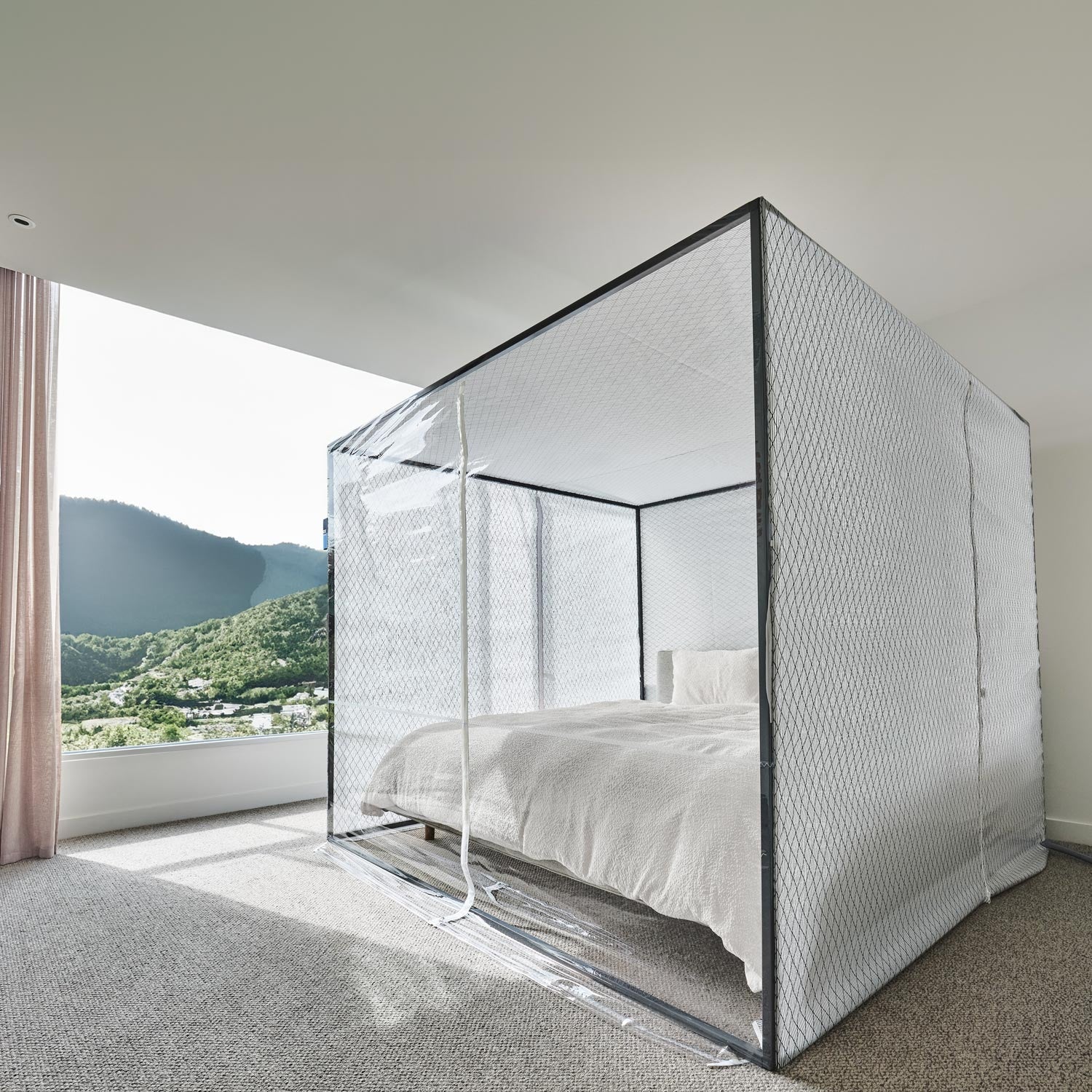
A four-post tent that goes over your bed and drops the oxygen content of the air you sleep in to a chosen altitude — quietly, all night, under app control.
The Sleep Cloud is the Live High / Train Low approach in physical form. You sleep inside a hypoxic environment that the F10 or F20 generator builds and the Altitude Sensor keeps honest. Your body adapts during the hours you'd already spend in bed; your training stays at sea level where you can hold real intensity. Set the altitude on your phone, the system holds it, and you wake up in normal air to train.
A controlled altitude environment, built around your bed
Four parts — tent, generator, sensor, and app — that work together to hold a chosen altitude through the night.
Sleep Cloud Tent
A four-post sleeping tent in King (2.35 m × 2.35 m × 1.95 m H) or Queen (2.15 m × 1.95 m × 1.95 m H). The footprint and ceiling height are sized so the inside doesn't feel claustrophobic and so the conditioned air stays steady through the night without spiking the temperature inside.
F10 or F20 Altitude Generator
Lowers the oxygen content of the tent air to the altitude you choose. The F10 is the quieter, multi-purpose generator most sleepers select. The F20 is the more powerful unit and reaches the same altitudes faster, which matters if you want the tent fully at altitude before you go to bed.
Box Altitude Sensor
Sits inside the tent and reads the actual oxygen content. The sensor pairs to the app via QR code and feeds the generator the data it needs to hold your set point all night rather than drift.
Box Altitude App (iOS & Android)
Set the target altitude, control the rate of ascent so your body adjusts gradually, monitor heat and humidity inside the tent, and track your time at altitude and sleep over time.
Why athletes sleep inside a Cloud
The altitude exposure happens in the hours you were already going to be in bed. No travel, no training camp logistics — just a tent over the bed and a set point on your phone.
Training at altitude tends to cap how hard you can push because lower oxygen limits intensity. Sleeping high and training low gives you the adaptive stimulus at night and full-intensity sessions during the day.
The tent is sized so you don't feel boxed in, and the gradual ascent control in the app minimizes the kind of sleep disruption that often comes with sudden altitude exposure.
Control everything from the Box Altitude App on iOS or Android. Available in 110-120 V or 220-240 V. Free standard shipping, with deliveries typically inside 30 days.
How a night in the Sleep Cloud works
Set your altitude, then go to bed
Open the Box Altitude App and dial in the altitude you want to sleep at — most athletes work in the 2,000–2,500 m range to start. The generator brings the tent to the set point and the sensor holds it there. You get into bed in normal air, the system slowly raises the altitude so the transition doesn't wake you, and you sleep at altitude for the rest of the night.
Pick the generator that fits your routine
Both generators reach the same 4,000 m ceiling. The F10 is the quieter, multi-purpose unit and the default pick for sleeping. The F20 is the more powerful generator and reaches the set point faster — useful if you turn the system on shortly before bed instead of running it ahead of time.
An app that also tracks the adaptation
Beyond setting altitude, the app shows you the actual oxygen content the sensor is reading, tracks how many nights you've slept at altitude, monitors temperature and humidity inside the tent, and lets you adjust the rate of ascent so your body has time to settle in. The Live High / Train Low protocol works best when you can see what you're actually getting, not just what you set.
Two tent sizes
Match the tent to the mattress underneath it. The internal altitude environment behaves the same way in both — only the footprint changes.
Sleep Cloud Queen
- 2.15 m long
- 1.95 m wide
- 1.95 m tall
Sleep Cloud King
- 2.35 m long
- 2.35 m wide
- 1.95 m tall
Choose your generator
Same tent, sensor, and app. Pick the generator that matches how much lead time you want.
F10 Altitude Generator
The quieter, multi-purpose generator. Most sleepers run the F10 ahead of bed so the tent is already at altitude when they lie down.
- Reaches set points up to 4,000 m
- Efficient, quiet operation
- Available in 110-120 V or 220-240 V
F20 Altitude Generator
The more powerful generator. Reaches the same altitudes as the F10, faster — useful if you'd rather hit the switch closer to bedtime than pre-condition the tent for an hour.
- Reaches set points up to 4,000 m
- Faster time-to-altitude than the F10
- Available in 110-120 V or 220-240 V
What ships in a Sleep Cloud system
Specifications
Tent — Queen
Tent — King
Altitude performance
Electrical & control
Shipping
Frequently asked questions
It's the approach the Sleep Cloud is built around: sleep at altitude, train at sea level. Sleeping at altitude prompts the body to produce a higher red blood cell count and carry more oxygen, while training low lets you keep the intensity that's hard to maintain when oxygen is limited. Box Altitude positions this as the more effective method for most athletes versus living and training at altitude full-time.
Both reach the same maximum altitude of 4,000 m. The F20 is the more powerful unit and reaches the set point faster — useful if you'd rather not pre-condition the tent for an extended period before bed. The F10 is the quieter, multi-purpose default and the more common pick for sleeping.
The Queen tent measures 2.15 m × 1.95 m × 1.95 m H and the King measures 2.35 m × 2.35 m × 1.95 m H. Match the tent to the mattress underneath it.
Box Altitude lists 2,500 m (8,202 ft) as the most beneficial set point for performance adaptation while still allowing subsequent training load. The system can reach 4,000 m if you want to push higher, but you control the rate of ascent in the app so your body has time to settle in.
The tent footprint and 1.95 m ceiling are sized to feel spacious — Box Altitude calls out the spacious sleeping environment specifically — and that same volume of air means body temperature inside the tent does not increase significantly through the night. The app also lets you monitor heat and humidity in real time.
From the Box Altitude App on iOS or Android. The app sets the target altitude and the rate of ascent, the sensor inside the tent reads the actual oxygen content, and the F10 or F20 generator holds the environment at the set point all night.
Yes — choose 110-120 V or 220-240 V at order to match your country's grid.
Standard shipping is free and deliveries usually arrive within 30 days of order.
Shipping Notes
- Free Standard Shipping on $100+ Orders to the USA.
- Except Preorder products are shipped in 48 hours.
- Delivery to the USA:
- Standard Shipping : 3-10 business days
- If time is of the essence, please consider selecting expedited delivery for faster service.
Exchange/Return Notes
- We offer a 30-day return/exchange service after receiving.
- Final sale items are not eligible for returns or exchanges.
- To process your return/exchange, please contact us at [email protected]
- Please click here for more details>>> Return & Exchange Policy