SKU: 62433045956
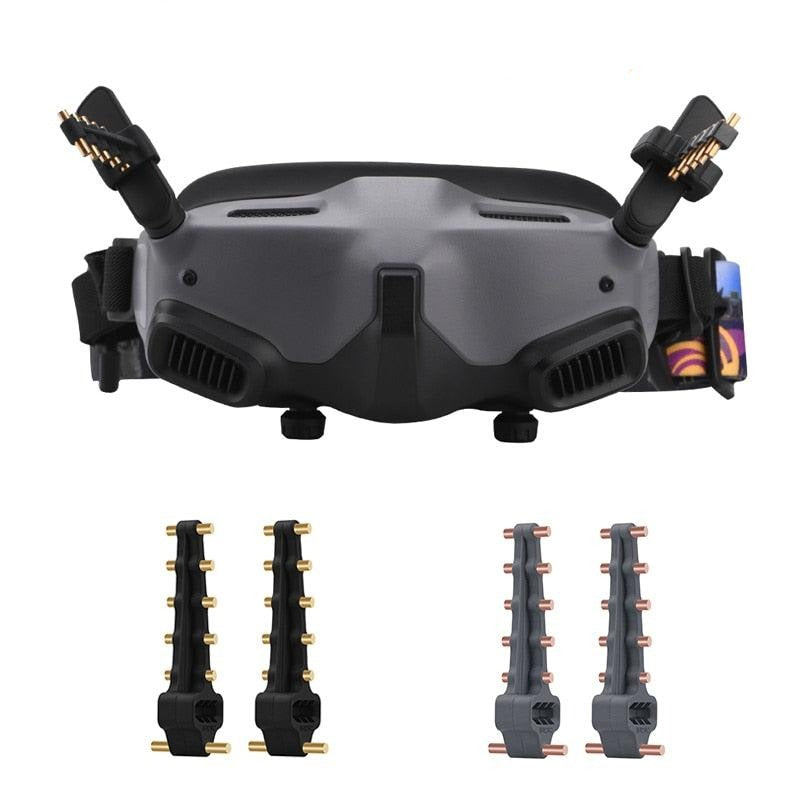
dji goggle v2 antenna

dji goggle v2 antenna Yagi Antenna for DJI AVATA Goggles 2

Sale price$26.25 Regular price$29.17
Save 10%

Pay in installments of $7.29 with ShopPay, AfterPay and Klarna

Shipping Estimate
USA
  • USA
  • CAN

Ships within 48 hours · Estimated delivery Sep 20 - Sep 25

Promo Codes Available:

For Your Every Summer RSVP, with Code: SUMMER15

Description

dji goggle v2 antenna Yagi Antenna for DJI AVATA Goggles 2Yagi Antenna for DJI AVATA Goggles 2 SPECIFICATIONS Package: Yes Origin: Mainland China Compatible Drone Model: for DJI AVATA Goggles 2 Compatible Drone Brand: DJI Brand Name: BRDRC A Yagi Antenna Feature: 1. obvious gain effect, with good directionality and some anti interference ability, 2. delicate and compact Yagi antenna, easy to carry, copper column and silicone material, does not affect the use after bending, 3. enhance the remote control

Yagi Antenna for DJI AVATA Goggles 2 SPECIFICATIONS

Package: Yes

Origin: Mainland China

Compatible Drone Model: for DJI AVATA Goggles 2

Compatible Drone Brand: DJI

Brand Name: BRDRC

A Yagi Antenna Feature:

1. obvious gain effect, with good directionality and some anti-interference ability,
2. delicate and compact Yagi antenna, easy to carry, copper column and silicone material, does not affect the use after bending,
3. enhance the remote control signal, effectively extend the flight distance,
4. easy installation and disassembly, no need to change the control, plug and play, non-destructive installation design, do not worry about damage to the remote control.

Description:
Material: ABS+copper
Applicable models: for Mavic 2 Smart Controller, Goggles 2,FIMI X8 MINI ,Sjrc F11S
Color: Black, gray
Net weight: 20.9g
Product size: 6.8*2.5*1.8cm

Packing list:
Yagi antenna *2

Note:
1.Does not include Drones, remote controls, cell phone, Goggles 2,
2.Transition: 1cm=10mm=0.39inch,
3.Please allow 1-3mm error due to manual measurement. please make sure you do not mind before ordering,
4.Due to the difference between different monitors, the picture may not reflect the actual color of the item,please make sure you do not mind before ordering, Thank you!

B Yagi Antenna Feature:

1. The gain effect is obvious, has good directionality, and has a certain anti-interference ability,
2. Using ABS + copper, after anodizing treatment, enhance the texture, wear resistance and corrosion resistance,
3. The weight is about 21g, and the lightweight design makes it easy for customers to carry and store,
4. Installation and disassembly are simple and quick, no need to change the control, plug and play, non-destructive installation design, do not worry about damaging the remote control.

Description:
Material: ABS+copper
Applicable models: for Mavic 2, Mavic 2 Smart Controller, Goggles 2,FIMI X8 MINI ,FINI X8 SE 2020, Sjrc F11S, Mavic Air, Mavic Mini, Spark
Color: Black, gray
Net weight: 21g
Product size: 7.4*2.5*2.1cm
Packing list:
Yagi antenna x 2

Note:
1.Does not include Drones, remote controls, cell phone, Goggles 2,
2.Transition: 1cm=10mm=0.39inch,
3.Please allow 1-3mm error due to manual measurement. please make sure you do not mind before ordering,
4.Due to the difference between different monitors, the picture may not reflect the actual color of the item,please make sure you do not mind before ordering, Thank you!


Shipping Notes
  • Free Standard Shipping on $100+ Orders to the USA.
  • Except Preorder products are shipped in 48 hours.
  • Delivery to the USA:
  1. Standard Shipping : 3-10 business days
  • If time is of the essence, please consider selecting expedited delivery for faster service.
Exchange/Return Notes
  • We offer a 30-day return/exchange service after receiving.
  • Final sale items are not eligible for returns or exchanges.
  • To process your return/exchange, please contact us at [email protected]
  • Please click here for more details>>> Return & Exchange Policy
SKU: 62433045956

Discover Niche Categories That Outsell dji goggle v2 antenna

Top-Converting Item to Boost Your Average Order

4.5 ★★★★★
Based on 18 reviews
Sort
Highest Rating
Newest First
Oldest First
Product Reviews
L
Verified Purchase
LJ & AJ
Birmingham, US
★★★★★ 1
Love & Hate at the same time
Style: WF-4830, Set: DUAL TRAY (500 sheets)/FAX/ADF/PRINT/COPY/SCAN
I installed, connected to the internet, everything was smooth and the 1st day I printed doc, scanned, sent air etc etc etc, and it was working absolutely great. Next day started asking to perform updates, then it was disconnected to the air computer, I couldn't scan, I connected a cable directly and it didn't work either, becae a nightmare and as last resource, I had to scan through a usb device and then connect to the computer back and forth. Then next days, it was always for updates, downloading more date on my computer as well update the printer, it is like they are spying everything you do with a printer, I just want to use it to print/scan/copy documents or any other info, if it is working just find the 1st day, why these companies begin with harassing the buyer with all these daily updates or connecting hundreds of things to make it work. It was much easier in the past, you just install the program of the printer with a CD and that was it! I had one of those printers before this one and it worked for 12 consecutive years with NO PROBLEMS whatsoever. And the last problem is that IS NOT WORKING AT ALL, I had to stored the printer computer and all my office equipment for 6 months and I plugged in everything and the printer asked for new cartridges, I took them out and they are still full of ink, my fingers completely colored & stained are witnesses & now it says use Epson Support code error 031006 ?!?!?!?!?! There is not a web/ph/any kind of information where do I need to go, I barely use the printer at all, it still has some of the protection plastic and it is already damaged. What a pain. Seriously they should at least add who or where we can ask for help. Now AGAIN buying a new printer because for sure EPSON IS NOT GOING TO HELP ME :((((
WAS THIS REVIEW HELPFUL?YesReportShare
Reviewed in the United States on March 19, 2024
R
Verified Purchase
randy pope
Fort Morgan, US
★★★★★ 5
Beats my HP in every phase for less money
Style: WF-4820, Set: 1. SINGLE TRAY (250 sheets)/FAX/ADF/PRINT/COPY/SCAN
Excellent printer. Scans quickly and quietly. Prints nice quality. Set up was a little problematic but i think mostly from operator error.
WAS THIS REVIEW HELPFUL?YesReportShare
Reviewed in the United States on May 21, 2026
Verified Purchase
6532
Lake Worth, US
★★★★★ 5
Great printer...I thought
Style: WF-4820, Set: 1. SINGLE TRAY (250 sheets)/FAX/ADF/PRINT/COPY/SCAN
This unit has really great reviews and many from small biz owners who say it works great and lasts. I've had it for a month and I'm really happy with it. It's much better than my last one. If it lasts as so many other reviews say, it's a great purchase. **UPDATE** Loved this printer. Only used it a few times. On the 3rd month, I pushed the button to turn on the printer and there was no response at all. I tried everything. Checked all connections and the outlets. It would not turn on at all. I was out of the return window with Amazon, so I called Epson. They told me they are sending a unit to me and to return mine with the box and label in the shipment. But they said they are NOT SENDING A NEW UNIT, BUT A REFURBISHED UNIT! I am not at all happy about this! I purchased a new printer, not a refurbished printer, and I want a new one! So, I'm really unhappy with Epson right now.
WAS THIS REVIEW HELPFUL?YesReportShare
Reviewed in the United States on November 6, 2025
H
Verified Purchase
Hamid Ahmad
Chelsea, US
★★★★★ 1
Not a good choice.
Style: WF-4820, Set: 1. SINGLE TRAY (250 sheets)/FAX/ADF/PRINT/COPY/SCAN
I recently purchased this printer with high hopes of a reliable and efficient printing solution. Unfortunately, my experience with this printer has been nothing short of a nightmare. Connectivity Woes: The most glaring issue is its abysmal Wi-Fi connectivity. Despite being placed right next to the router, the printer consistently displays a "Poor Wi-Fi Connection" message. This is in stark contrast to all other devices in my home, which work seamlessly with the Wi-Fi network. Even my old laser printer, which is placed close to the same location, functions without any connectivity hiccups. It's baffling how a modern printer can struggle so much to maintain a stable Wi-Fi connection. Scanning Nightmares: The scanning functionality of this printer is equally disappointing. The user interface is far from user-friendly, making it a daunting task to set up scanning to email or computer directly from the printer. This is a basic feature that should be intuitive and hassle-free, but instead, it's a convoluted process that requires unnecessary effort and time. Ineffective Customer Service: I reached out to customer service in hopes of resolving these issues. While they guided me through a reset process, the solutions they provided were only temporary fixes. The problems resurfaced shortly after, leaving me back at square one. It's frustrating to invest in a product only to find that the customer service solutions are inadequate and short-lived. Comparative Performance: What's more perplexing is that my older laser printer, which is from a different brand, continues to perform flawlessly in terms of connectivity and scanning capabilities. This stark contrast highlights the subpar quality of the Epson. Final Verdict: I'm deeply disappointed with this printer and regret this purchase immensely. Its inability to maintain a stable Wi-Fi connection, along with the cumbersome scanning setup and unsatisfactory customer service experience, make this printer a headache rather than a helpful device. I strongly advise against considering this printer if you value reliable performance and user-friendly features. Save yourself the frustration and explore more dependable options on the market.
WAS THIS REVIEW HELPFUL?YesReportShare
Reviewed in the United States on August 10, 2023
S
Verified Purchase
Scott V
Natrona Heights, US
★★★★★ 5
Easy set up on USB cable. Works as expected on my Windows 11 computer
Style: WF-4820, Set: 1. SINGLE TRAY (250 sheets)/FAX/ADF/PRINT/COPY/SCAN
I got this Epson All-In-One printer for my work. I had been using HP printers for years. I started having problems with paper handling on them. Things like getting a paper jam error when there was not paper jammed in it. I decided to try an Epson for a change. I have had the printer now for three weeks. So far it has worked great. Easy to set up on my Windws 11 computer. Works great for printing and for scanning. I have it set up by USB cable because I don't have reliable wireless internet in that part of the building. No issues with the USB configuration. Ink usage seems good so far. Ink on any printer is expensive, but that was expected. I would recommend this printer.
WAS THIS REVIEW HELPFUL?YesReportShare
Reviewed in the United States on March 28, 2026

recommand products